
VENTION FKGH0
VENTION 27000 mAh Laptop Power Bank User Manual
Model: FKGH0
1. Introduction
Thank you for choosing the VENTION 27000 mAh Laptop Power Bank. This high-performance power bank is designed to provide reliable and fast charging for a wide range of devices, including laptops, smartphones, and other portable electronics. With its large capacity, multiple output ports, and smart TFT display, it is an ideal companion for business travel, commuting, and outdoor activities.
2. Safety Information
Please read all safety instructions carefully before using this product. Failure to follow these instructions may result in electric shock, fire, or serious injury.
- Do not expose the power bank to extreme temperatures (above 60°C/140°F or below 0°C/32°F).
- Do not disassemble, modify, or repair the device yourself.
- Keep away from water, moisture, and flammable materials.
- Do not drop, impact, or subject the power bank to strong vibrations.
- Dispose of the power bank according to local regulations. Do not dispose of it with household waste.
- Keep out of reach of children.
- Ensure proper ventilation during charging and discharging.
3. Package Contents
Verify that all items are present in your package:
- VENTION 27000 mAh Laptop Power Bank (Model: FKGH0)
- USB-C to USB-C Charging Cable (external)
- User Manual
- Velvet Pouch
4. Product Overview
Familiarize yourself with the components of your VENTION Power Bank:

Figure 4.1: VENTION 27000 mAh Laptop Power Bank. Shows the main unit with its digital display, integrated USB-C cable, and an additional USB-C to USB-C cable.
- Integrated USB-C Cable: Supports up to 140W output/input. Designed for durability with over 10,000 bend tests, also functions as a lanyard.
- USB-C2 Port: Supports up to 100W output/input.
- USB-A Port: Supports up to 60W output.
- Smart TFT Display: Real-time monitoring of battery level, voltage, current, temperature, and charging cycles. Features interactive emoji animations.
- Power Button: Activates the display and initiates charging.
5. Setup
5.1 Initial Charging of the Power Bank
Before first use, fully charge your VENTION Power Bank. For optimal charging speed, use a power adapter that supports 100W or higher power delivery.
- Connect the integrated USB-C cable or the provided USB-C to USB-C cable to the power bank's USB-C port.
- Connect the other end of the cable to a compatible wall charger.
- The TFT display will show the charging status, including estimated time to full charge. A full charge with a 100W adapter takes approximately 2 hours.

Figure 5.1: Power Bank charging a MacBook Pro. Illustrates the power bank connected to a laptop, demonstrating its high-speed charging capability of up to 140W via the USB-C1 port.
6. Operating Instructions
6.1 Charging Your Devices
The VENTION Power Bank supports charging up to three devices simultaneously.
- Single Device Charging:
- For maximum speed (up to 140W), use the integrated USB-C cable (USB-C1 port) to charge compatible laptops like MacBook Pro 16".
- The USB-C2 port provides up to 100W, suitable for laptops, tablets, and smartphones.
- The USB-A port provides up to 60W, ideal for smartphones and other USB-A compatible devices.
- Multiple Device Charging:
- Two Devices:
- USB-C1 + USB-C2: Up to 100W + 100W (200W total). Ideal for charging two laptops simultaneously.
- USB-C1 + USB-A: Up to 100W + 60W.
- USB-C2 + USB-A: Up to 24W total.
- Three Devices:
- USB-C1 + (USB-C2 + USB-A): Up to 100W + 24W total.
- Two Devices:
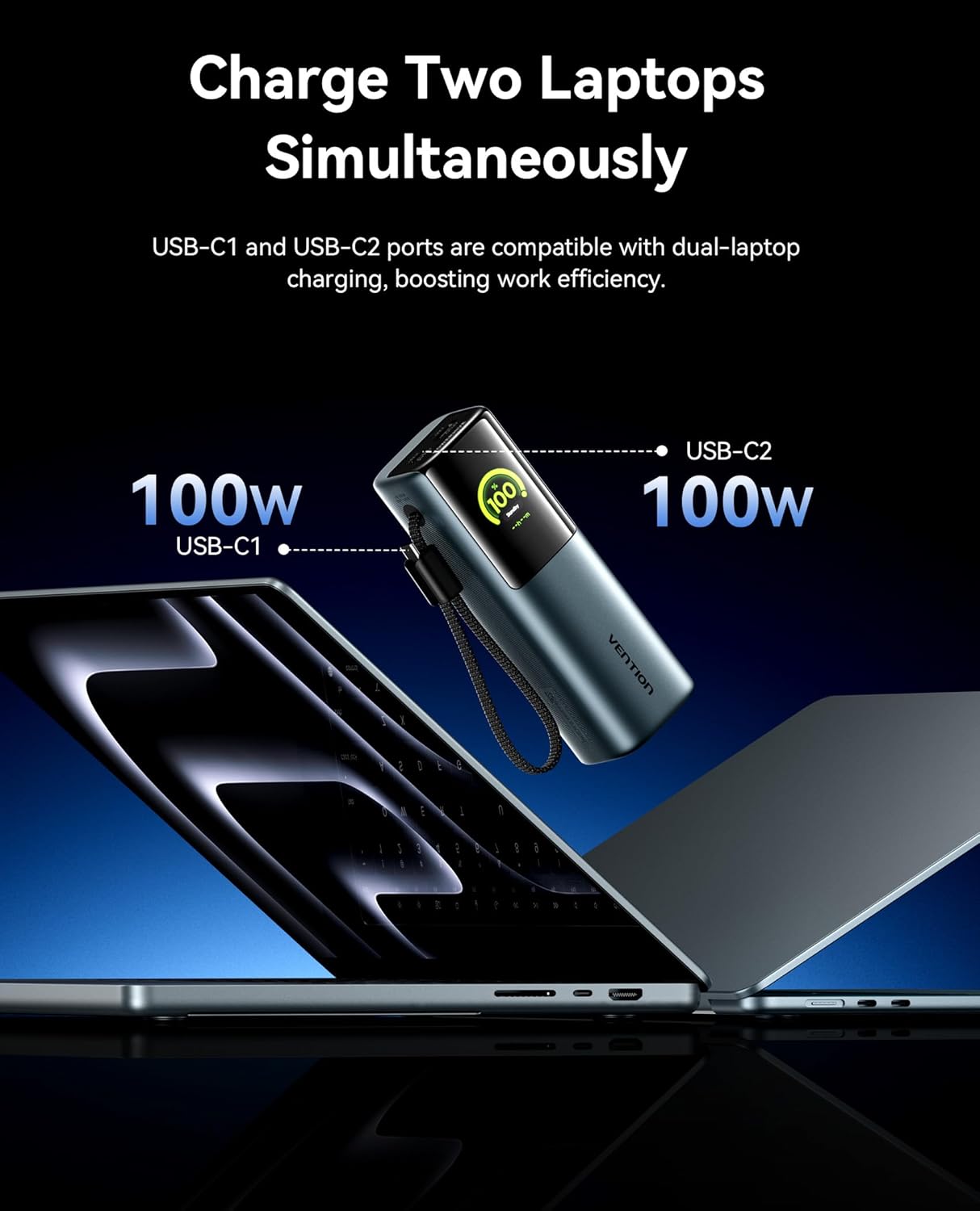
Figure 6.1: Charging two laptops simultaneously. This image demonstrates the power bank's capability to charge two laptops at 100W each using both USB-C ports, maximizing efficiency.

Figure 6.2: Charging three devices at once. The image shows the power bank connected to a laptop, a smartphone, and earbuds, illustrating its multi-device charging capability.
6.2 Smart TFT Display
The integrated TFT display provides comprehensive real-time information about the power bank's status.

Figure 6.3: Smart TFT Display. This image details the various data points shown on the display, including battery percentage, output power, estimated time to full charge, real-time power output, temperature monitoring, and battery cycle count.
- Battery Level: Displays the remaining battery percentage.
- Voltage & Amperage: Shows the real-time output voltage and current.
- Temperature: Monitors the internal temperature of the power bank.
- Charging Cycles: Tracks the number of charge/discharge cycles, indicating battery health.
- Estimated Time: Provides an estimate of the time remaining for charging or discharging.
6.3 Interactive Emoji Animations
The power bank features unique emoji animations that provide visual cues for different operational states.

Figure 6.4: Interactive Emoji Animations. This image illustrates various emoji expressions displayed on the power bank, corresponding to different battery levels (low, medium, high), standby mode, and high-power charging/discharging.
- Battery Level Display: Emojis change based on battery percentage (e.g., sad for low, happy for high).
- Sleep/Standby Mode: Indicates the device is in a low-power state.
- Battery Protection Mode: Alerts to potential issues like overheating or over-discharge.
- High-Power Charging/Discharging: Indicates when the power bank is operating at over 90W.
6.4 Integrated Cable and Lanyard Functionality
The built-in USB-C cable serves a dual purpose as a convenient charging cable and a durable lanyard for easy portability.

Figure 6.5: Integrated Cable as Lanyard. This image shows a person holding the power bank by its integrated USB-C cable, demonstrating its use as a convenient carry strap.
- Pull out the integrated cable for instant fast charging.
- Use the cable as a lanyard to comfortably carry the power bank.
- The high-density braided jacket ensures durability, tested for over 10,000 bends.
7. Maintenance
To ensure the longevity and optimal performance of your VENTION Power Bank, follow these maintenance guidelines:
- Clean the exterior with a soft, dry cloth. Do not use harsh chemicals or abrasive materials.
- Store the power bank in a cool, dry place away from direct sunlight and extreme temperatures.
- If storing for extended periods, charge the power bank to approximately 50-70% capacity every 3 months to preserve battery health.
- Avoid fully discharging the battery frequently, as this can reduce its lifespan.
- Keep ports free of dust and debris.
8. Troubleshooting
If you encounter issues with your VENTION Power Bank, refer to the following common problems and solutions:
| Problem | Possible Cause | Solution |
|---|---|---|
| Power bank not charging | Charging cable faulty; Wall adapter insufficient; Power bank fully charged. | Try a different USB-C cable and wall adapter. Ensure the adapter meets power requirements. Check the display for charge status. |
| Device not charging from power bank | Power bank low on battery; Cable faulty; Device incompatible; Power bank in protection mode. | Recharge the power bank. Try a different charging cable. Ensure your device is compatible with the power bank's output. Check the display for error emojis. |
| Slow charging speed | Cable not supporting fast charging; Device not supporting fast charging; Multiple devices connected. | Use the integrated USB-C cable or a high-quality PD-compatible cable. Ensure your device supports fast charging. Disconnect other devices for maximum speed to a single device. |
| Display not turning on | Power bank fully discharged; Power button not pressed correctly. | Connect the power bank to a charger. Press the power button briefly to activate the display. |
| Power bank feels warm during use | Normal operation during high-power charging/discharging; Overheating. | Slight warmth is normal. If it becomes excessively hot or displays an overheating emoji, disconnect devices and allow it to cool down in a well-ventilated area. |
9. Specifications
| Feature | Detail |
|---|---|
| Model Number | FKGH0 |
| Battery Capacity | 27000 mAh |
| Battery Type | Lithium-ion |
| Max Output Power | 200W (Total) |
| USB-C1 Output (Integrated Cable) | Up to 140W |
| USB-C2 Output | Up to 100W |
| USB-A Output | Up to 60W |
| Display Type | Smart TFT Display with Emoji Animation |
| Dimensions (L x W x H) | 21.8 x 6.2 x 11.2 cm (approx. 8.58 x 2.44 x 4.41 inches) |
| Weight | 900 grams (approx. 1.98 lbs) |
| Special Features | Fast Charging, Integrated USB-C Cable/Lanyard, Real-time Display, Emoji Animations |
10. Warranty and Support
VENTION products are designed and manufactured to the highest quality standards. For information regarding warranty coverage, technical support, or service inquiries, please contact VENTION customer support through the retailer where you purchased the product or visit the official VENTION website.
Please retain your proof of purchase for warranty claims.
Ask a question about this manual
Ask about setup, troubleshooting, compatibility, parts, safety, or missing instructions. Manuals+ will review the question and use this page’s manual context to help answer it.