
1. Introduction
Thank you for choosing the Docreate 2500W Handheld Steam Cleaner. This device is designed for effective and chemical-free cleaning across various surfaces using high-temperature, high-pressure steam. Please read this manual thoroughly before operation to ensure safe and optimal use of your steam cleaner.

Image 1.1: The Docreate 2500W Handheld Steam Cleaner with its various attachments, including the main unit, steam hose, power cord, and different brush heads.
2. Important Safety Instructions
To reduce the risk of fire, electric shock, or injury, always follow basic safety precautions when using an electrical appliance. Read all instructions before using this steam cleaner.
- Electrical Safety: Ensure the power outlet voltage matches the cleaner's requirements (110V). Do not immerse the unit, power cord, or plug in water or other liquids. Always unplug the appliance when not in use and before servicing.
- Steam Hazard: The steam produced is extremely hot (up to 221°F / 105°C). Never direct steam at people, pets, or electrical appliances. Keep hands and face away from the steam nozzle during operation.
- Water Tank: Only fill the water tank with clean tap water. Do not add detergents, perfumes, or other chemicals to the water tank, as this can damage the unit or create hazardous fumes.
- Children and Pets: Keep the appliance out of reach of children and pets. Do not allow children to operate the steam cleaner.
- Handling: Always use the provided handle to carry the unit. Do not pull or carry by the cord.
- Maintenance: Allow the unit to cool completely and depressurize before performing any maintenance or cleaning.
3. Package Contents
Verify that all items are present in the package:
- 1 x Docreate Steam Cleaner Unit
- 1 x 2-meter Steam Outlet Hose
- 1 x 1.5-meter Power Cord
- 1 x Extended Spray Rod
- 1 x Steel Brush
- 1 x Nylon Brush
- 1 x Large Nylon Brush
- 2 x Silicone Seal Rings
- 1 x User Manual
- 1 x Round Brush
- 1 x Extension Nozzle
- 1 x Floor Cleaning Brush
- 1 x Cleaning Cloth Cover

Image 3.1: An exploded view of the Docreate Steam Cleaner showing the main unit and all included accessories such as various brushes, nozzles, and hoses.
4. Product Overview
The Docreate 2500W Handheld Steam Cleaner features a robust design for efficient cleaning. Key components include:
- Main Unit: Houses the heating element, water tank, and control panel.
- Touch Screen Control Panel: Allows for easy adjustment of steam intensity with 6 levels and displays current settings.
- Semi-Transparent Water Tank: For easy monitoring of water levels.
- Steam Outlet Hose: Connects to various attachments for directed steam application.
- Variety of Nozzles and Brushes: Designed for different cleaning tasks and surfaces.

Image 4.1: A detailed view of the intelligent touch screen control panel, showing the power button and steam level adjustment controls.
5. Setup Instructions
Follow these steps to prepare your steam cleaner for first use:
- Fill the Water Tank: Open the top cover of the main unit and carefully add clean tap water to the semi-transparent tank. Do not overfill. The tank capacity is 800ml.
- Attach Accessories: Select the appropriate brush head or nozzle for your cleaning task. Connect it securely to the steam outlet hose. Ensure the silicone seal ring is properly seated to prevent leaks.
- Connect Power: Plug the power cord into a grounded 110V electrical outlet.

Image 5.1: Visual guide for initial setup, including filling the water tank, attaching a brush head, and plugging in the power cord.

Image 5.2: Instructions for installing various brush heads and ensuring the sealing ring is correctly connected to prevent water leakage.
6. Operating Instructions
Once set up, operate your steam cleaner as follows:
- Power On: Press the power button on the touch screen control panel. The unit will begin heating up. This typically takes 9-15 seconds to reach operating temperature (up to 221°F / 105°C).
- Adjust Steam Intensity: Use the '+' and '-' buttons on the touch screen to select one of the 6 available steam intensity levels. The current level will be displayed.
- Begin Cleaning: Direct the steam nozzle towards the surface to be cleaned. Hold the nozzle a few inches away from the surface and move it slowly to allow the steam to penetrate and loosen dirt. For stubborn stains, use the appropriate brush attachment.
- Continuous Operation: The 1100ml water tank allows for approximately 40-50 minutes of continuous operation, depending on the steam intensity level selected.
- Power Off: When finished cleaning, press the power button to turn off the unit. Unplug the power cord from the outlet.
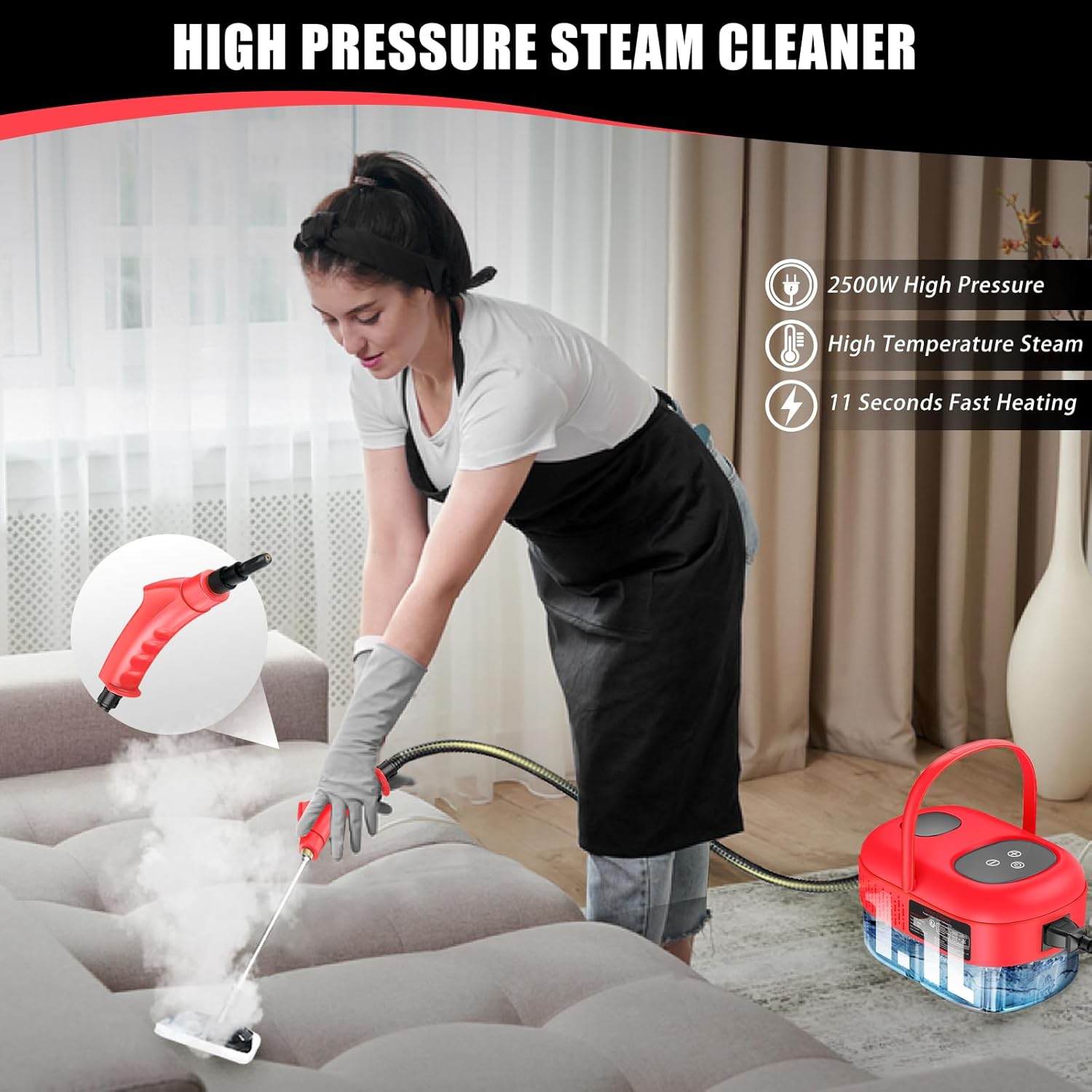
Image 6.1: An individual demonstrating the use of the steam cleaner on a couch, highlighting its application for upholstery cleaning.

Image 6.2: Examples of the steam cleaner's versatility, showing its use in kitchens, for car detailing, and on various household surfaces.
7. Maintenance and Care
Proper maintenance ensures the longevity and performance of your steam cleaner:
- Drain Remaining Water: After each use, ensure the unit has cooled down. Carefully drain any remaining water from the tank. This prevents mineral buildup.
- Clean Attachments: Rinse brush heads and nozzles with clean water after use. Allow them to air dry completely before storing.
- Wipe Down Unit: Wipe the exterior of the main unit with a damp cloth. Do not use abrasive cleaners or solvents.
- Descaling (Periodically): If you notice reduced steam output or mineral buildup, descaling may be necessary. Consult the manufacturer's website or customer support for recommended descaling procedures.
- Storage: Store the steam cleaner and its accessories in a cool, dry place, away from direct sunlight and extreme temperatures.
8. Troubleshooting
Refer to this section for common issues and their solutions:
| Problem | Possible Cause | Solution |
|---|---|---|
| No steam or low steam output | Water tank empty; Unit not heated; Mineral buildup | Refill water tank; Allow adequate heating time (9-15 seconds); Perform descaling procedure. |
| Water leakage from nozzle/hose connection | Seal ring improperly seated or damaged; Attachment not securely fastened | Ensure seal ring is correctly placed; Tighten attachment securely; Replace seal ring if damaged. |
| Unit does not power on | No power to outlet; Power cord not fully plugged in; Unit malfunction | Check power outlet; Ensure power cord is securely plugged in; Contact customer support. |
If the problem persists after attempting these solutions, please contact Docreate customer support.
9. Specifications
Key technical specifications for the Docreate 2500W Handheld Steam Cleaner:
| Feature | Specification |
|---|---|
| Brand | Docreate |
| Model Name | red steamer for cleaning |
| Wattage | 2500 watts |
| Voltage | 110 Volts |
| Tank Volume | 800 Milliliters (1100ml mentioned in A+ content, using 800ml from specifications) |
| Heat Time | 10 Seconds (9-15 seconds in A+ content) |
| Maximum Temperature | 221 Degrees Fahrenheit (105°C) |
| Item Weight | 1.93 Kilograms (4.24 pounds) |
| Form Factor | Handheld |
| Color | Red |

Image 9.1: A feature comparison table highlighting the Docreate steam cleaner's specifications against other models, including tank capacity, steam pressure, and usage time.
10. Warranty and Support
For warranty information, product support, or to purchase replacement parts, please refer to the contact information provided with your product packaging or visit the official Docreate website. Keep your purchase receipt as proof of purchase for warranty claims.