
1. Introduction
This manual provides essential instructions for the proper setup, operation, and maintenance of your kavey 6.5 Cubic Feet Home Safe. Please read all instructions carefully before using the safe to ensure optimal security and functionality. Keep this manual for future reference.
Safety Information
- Always keep emergency keys in a secure location away from the safe.
- Do not store the emergency keys inside the safe.
- Ensure the safe is securely mounted to prevent unauthorized removal.
- Replace batteries promptly when the low battery indicator appears to avoid lockout.
2. Product Features
The kavey 6.5 Cubic Feet Home Safe is designed for enhanced security and convenience, featuring:
- Drop Slot: An anti-fishing design with a front drop slot for easy deposit of cash, receipts, and other small items without opening the main compartment.
- Robust Construction: Made from low-carbon alloy steel with 6x20mm solid locking bolts and a 60mm thick reinforced steel door panel for superior anti-prying protection.
- Dual Compartments: Two independent sections with a large storage capacity. The top section includes the drop slot, while the spacious interior is suitable for documents, electronics, and other valuables.
- Soft Velvet Lining: Interior lining protects stored items from scratches and damage.
- Dual Alarm System: Activates an alarm exceeding 70 decibels if an incorrect password is entered three times consecutively or if the safe is shaken.
- Mute Function: Allows for silent operation of the keypad.
- Quick Access: Touch-screen digital keypad with a backlit display for accurate input in low light conditions.
- External Power Supply: USB Type-C port for emergency power when batteries are low.

Image: Detailed view of the kavey safe's features, including the drop slot, anti-fishing mechanism, dual LED lighting, robust locking bolts, and protective velvet lining.

Image: The safe's interior, demonstrating the two-in-one quick access drop slot and ample storage space for various items.

Image: Visual representation of the safe's anti-drilling capabilities, solid 20mm and 60mm locking bolts, and seamless door design for enhanced security.
3. Components Included
Your kavey safe package includes the following items:
- 4 x Emergency Keys
- 6 x Expansion Screws (for mounting)
- 4 x Non-slip Foot Mats
- 1 x USB Type-C Cable (for external power)
- 1 x User Manual (this document)

Image: Overview of the safe's dimensions and a visual display of the included emergency keys, foot mats, USB Type-C cable, expansion screws, and quick start guide.
4. Setup
4.1 Battery Installation
The safe requires 8 AAA alkaline batteries for the electronic keypad. The battery compartment is typically located on the inside of the safe door. Ensure correct polarity when inserting batteries.
4.2 Initial Code Setting
- Open the safe using the emergency key.
- Locate the reset button (often on the hinge side edge of the door). Press it.
- Enter your desired new password (3-8 digits) on the keypad.
- Press the '#' button to confirm.
- Test the new code with the door open before closing it.
4.3 Mounting the Safe
For maximum security, it is recommended to mount the safe to a wall or floor using the provided expansion screws.
- Choose a suitable location for mounting.
- Mark the drilling points through the pre-drilled holes in the back or bottom of the safe.
- Drill pilot holes into the wall or floor.
- Align the safe with the drilled holes and insert the expansion screws.
- Tighten the screws securely.

Image: Step-by-step guide for securely mounting the safe to a wall or floor using the provided hardware.
5. Operating Instructions
5.1 Opening Methods
Your kavey safe offers three primary ways to open the door:
- Emergency Key: Insert the emergency key into the hidden key lock, turn it, and then turn the knob to open.
- Password: Enter your programmed password on the digital keypad, then turn the knob to open.
- USB Type-C + Password: If batteries are depleted, connect the USB Type-C cable for external power, enter your password, then turn the knob to open.
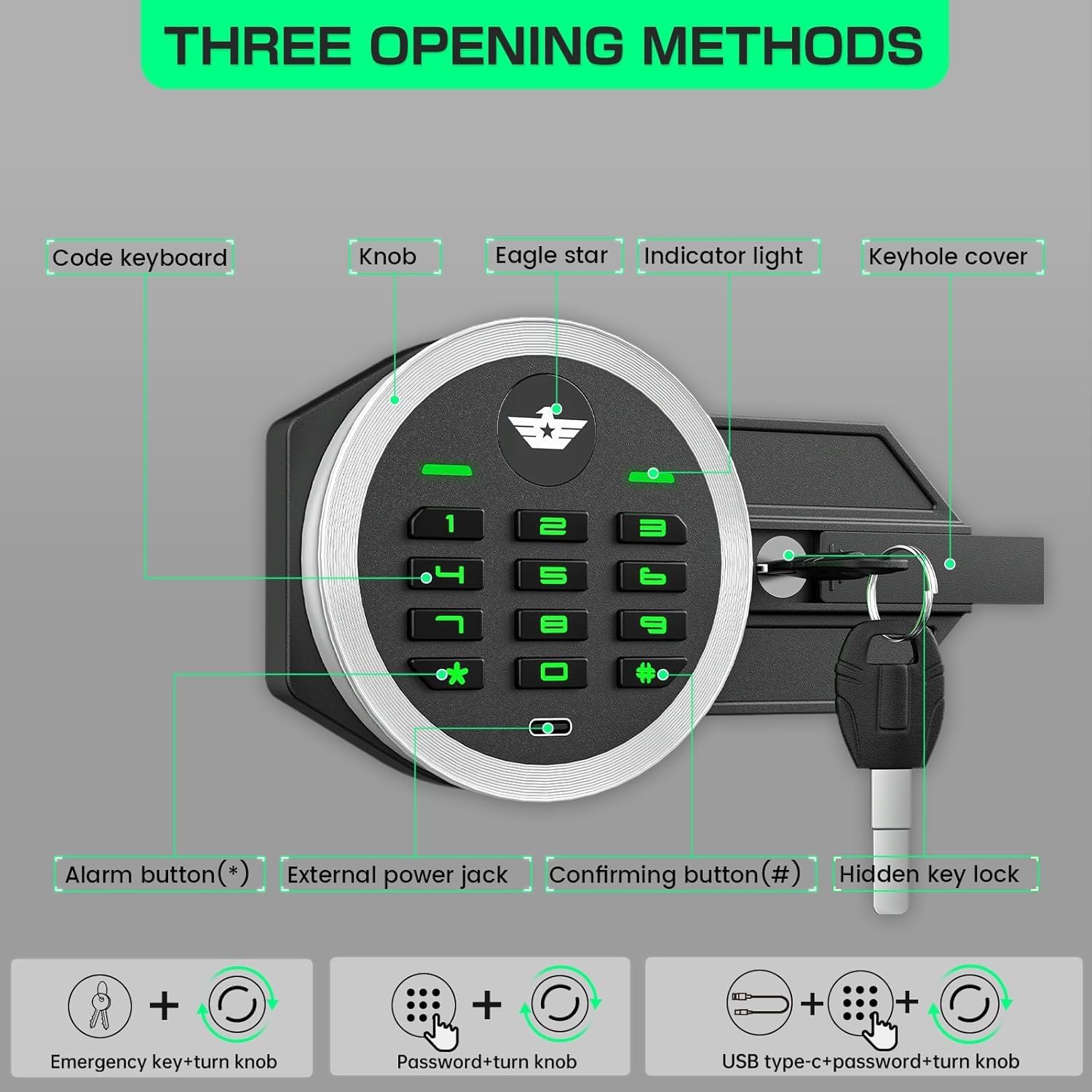
Image: Visual guide to the three ways to open the safe: using the emergency key, entering a password on the keypad, or using a USB Type-C cable for external power combined with a password.

Image: The backlit digital keypad, showing the numbers and symbols for code entry and external power port.
5.2 Using the Drop Slot
The top section of the safe features a convenient drop slot. Simply insert cash, envelopes, or small documents into the slot. The anti-fishing design prevents items from being retrieved from the outside.
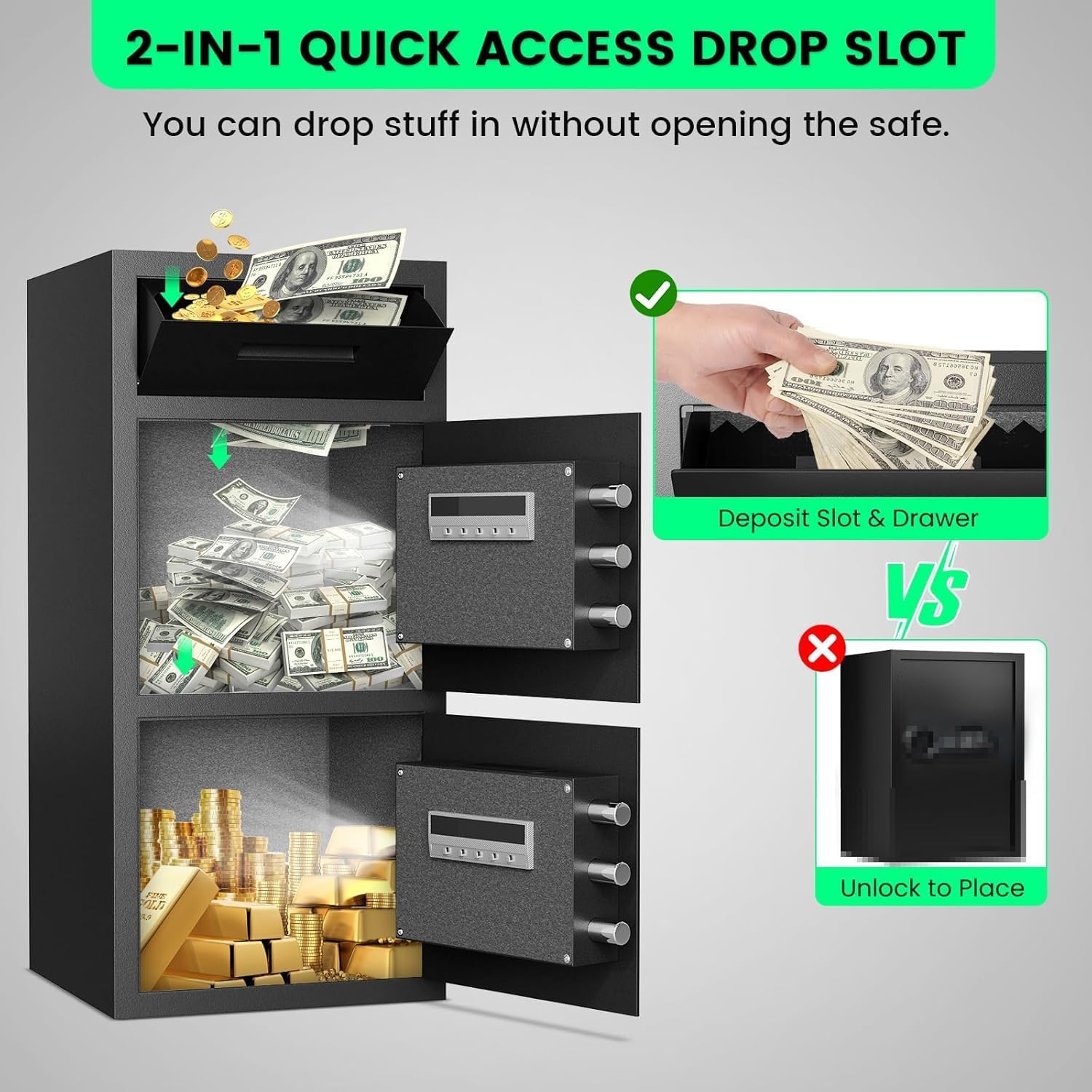
Image: Illustration of how to use the drop slot for quick deposits without needing to unlock and open the main safe door.
5.3 Dual Alarm System
The safe is equipped with a dual alarm system for enhanced security:
- Incorrect Code Alarm: If an incorrect password is entered three times consecutively, the alarm will activate for 60 seconds, emitting a sound exceeding 70 decibels.
- Vibration Alarm: If the safe is subjected to significant shaking or impact, the vibration sensor will trigger the alarm.
5.4 Mute Function
To activate or deactivate the mute mode for silent keypad operation, press the "1" button twice, then press the "#" button.
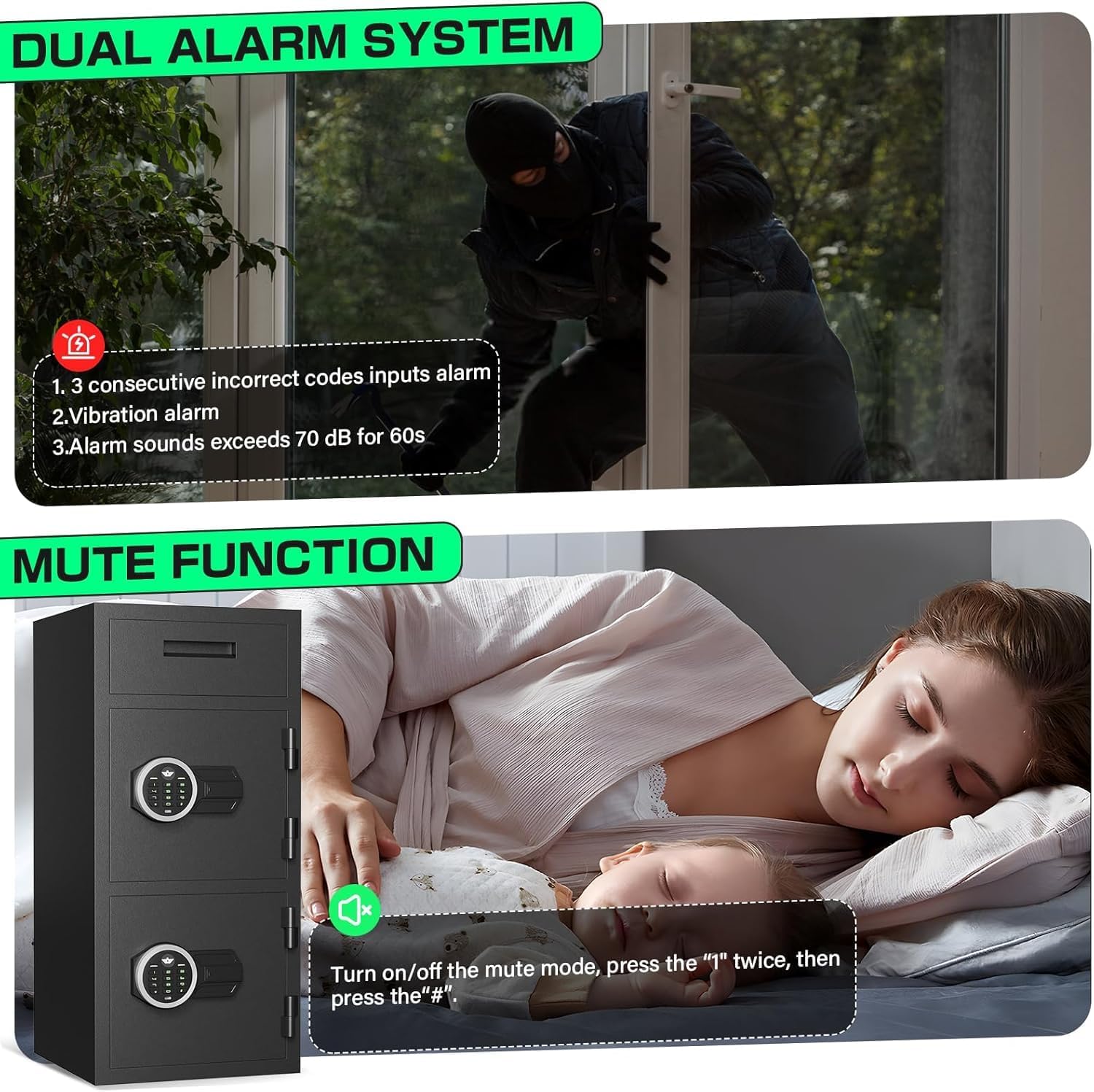
Image: Visual explanation of the dual alarm system (triggered by incorrect codes or vibration) and instructions for activating the mute function.
6. Maintenance
- Regularly check the battery level and replace all 8 AAA alkaline batteries when the low battery indicator appears.
- Clean the exterior of the safe with a soft, damp cloth. Avoid abrasive cleaners or solvents.
- Ensure the locking bolts and hinges are free from obstructions.
- Do not attempt to lubricate the locking mechanism unless specifically instructed by customer support.
7. Troubleshooting
7.1 Safe Does Not Open with Password
- Check Batteries: Ensure batteries are not depleted. Use the external USB Type-C power cable if necessary.
- Incorrect Password: Verify you are entering the correct password. Remember that three consecutive incorrect entries will trigger the alarm.
- Keypad Malfunction: If the keypad is unresponsive, try using the emergency key.
7.2 Alarm Sounds Unexpectedly
- Incorrect Entries: The alarm may have been triggered by three consecutive incorrect password attempts.
- Vibration: The safe may have been shaken or impacted.
- To Silence Alarm: Enter the correct password or use the emergency key to open the safe.
7.3 Lost Emergency Keys
If you have lost your emergency keys, please contact kavey customer support for assistance. Provide your product model number and any proof of purchase.
8. Specifications
| Feature | Detail |
|---|---|
| Brand | kavey |
| Model Number | GAO-KMT-75 |
| Product Dimensions (D x W x H) | 13.78"D x 13.78"W x 29.53"H |
| Capacity | 6.5 Cubic Feet |
| Material | Low Carbon Steel |
| Lock Type | Electronic Combination Lock, Key |
| Special Features | Anti-Theft, Drop Slot |
| Mounting Type | Floor Mount, Wall Mount |
| Item Weight | 46.1 Pounds |
| Alarm Type | Vibration |
| Control Type | Push Button Control |
9. Warranty and Support
kavey is committed to providing secure and reliable products. We offer lifetime product quality support for our customers.
Customer Service
If you encounter any problems with your product, please contact our experienced customer service team. We aim to respond and resolve issues within 24 hours.
To find seller support on Amazon:
- Log in to your Amazon buyer's account.
- Find your order.
- Click "Get help" to contact the seller directly for product-related inquiries.

Image: kavey's professional after-sales service team ready to assist customers with product issues.
10. Product Videos
3D Tour Video of Double-Door Safe
Video: A 3D tour showcasing the exterior and interior features of the kavey double-door safe, including its compartments and locking mechanisms.
Drop Test of Double-Door Safe
Video: A demonstration of the kavey double-door safe undergoing a drop test, highlighting its durability and structural integrity under impact.