
1. Introduction
This manual provides instructions for the setup, operation, and maintenance of your Retroid Pocket Classic handheld gaming console. The Retroid Pocket Classic is a portable Android-based gaming device featuring a 3.92-inch OLED touchscreen, designed for a versatile gaming experience.

Image 1.1: Retroid Pocket Classic consoles in white and yellow.
2. What's in the Box
Verify that all items are present in the package:
- Retroid Pocket Classic Gaming Console
- Charging Cable (USB-C)
- User Manual (this document)
3. Device Overview
Familiarize yourself with the physical components and controls of your Retroid Pocket Classic.
3.1 Front View

Image 3.1: Front view of the Retroid Pocket Classic.
- 3.92-inch OLED Touchscreen: The primary display for all operations and gaming.
- D-Pad: Directional input for navigation and gameplay.
- Action Buttons: (A, B, X, Y or similar layout) for in-game actions.
- Start/Select Buttons: For game and system functions.
- Speaker Grilles: Audio output.
3.2 Top and Back View

Image 3.2: Top view showing shoulder buttons and ports.
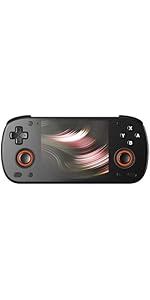
Image 3.3: Curved back design and trigger buttons.
- Shoulder Buttons (L1, R1): Located on the top edge.
- Trigger Buttons (L2, R2): Located on the back, below the shoulder buttons.
- USB-C Port: For charging and data transfer.
- 3.5mm Audio Jack: For connecting headphones.
- Micro SD Card Slot: For expanding storage.
- Power Button: To turn the device on/off or put it to sleep.
- Volume Buttons: To adjust audio output.
3.3 Internal Components (Cooling)

Image 3.4: Integrated active cooling system.
The Retroid Pocket Classic features an integrated active cooling system designed to maintain optimal performance and manage heat during extended use.
4. Setup
4.1 Initial Charging
Before first use, fully charge the device. Connect the provided USB-C charging cable to the console's USB-C port and the other end to a compatible USB power adapter (not included). The device has a 5000mAh battery.
4.2 Powering On/Off
- To Power On: Press and hold the Power button until the screen illuminates.
- To Power Off: Press and hold the Power button, then select "Power Off" from the on-screen options.
- To Sleep/Wake: Briefly press the Power button.
4.3 Wi-Fi Connection
To access online features and download applications, connect to a Wi-Fi network:
- Go to Settings.
- Select Network & internet.
- Tap Wi-Fi and turn it on.
- Select your desired network from the list and enter the password if prompted.
4.4 Google Account Setup
The Retroid Pocket Classic runs Android 14 and supports the Google Play Store. To download apps and games, you will need to sign in with a Google account during the initial setup process or later via the Settings menu.
4.5 Micro SD Card Installation
To expand the device's storage (128GB internal), insert a Micro SD card into the designated slot. Ensure the card is inserted correctly until it clicks into place. The device supports various Micro SD card capacities.
5. Operating Instructions
5.1 Navigating the Android Interface
The device operates on Android 14. Use the touchscreen for navigation, tapping icons to open applications, swiping to scroll, and using gestures for system controls. The D-pad and action buttons can also be used for navigation within compatible applications and games.
5.2 Downloading and Installing Applications
Applications and games can be downloaded from the Google Play Store. Open the Play Store app, search for your desired content, and follow the on-screen prompts to download and install.
Note: The Retroid Pocket Classic does not come with preloaded games. Users are responsible for acquiring and installing their own game content.
5.3 Managing Storage
To view and manage internal and external storage, go to Settings > Storage. Here you can see storage usage and manage files. For optimal performance, ensure sufficient free space is available.
5.4 Bluetooth Connectivity
The device supports Bluetooth 5.1 for connecting wireless accessories such as headphones or external controllers.
- Go to Settings.
- Select Connected devices.
- Tap Pair new device and select your accessory from the list.
6. Maintenance
6.1 Cleaning the Device
Use a soft, dry, lint-free cloth to clean the device's exterior. For the screen, a screen cleaner specifically designed for electronics can be used. Avoid using harsh chemicals or abrasive materials.
6.2 Battery Care
To prolong battery life:
- Avoid extreme temperatures.
- Do not fully discharge the battery frequently.
- Store the device with a partial charge if not used for extended periods.
6.3 Software Updates
Regularly check for and install system updates to ensure optimal performance and security. Go to Settings > System > System update to check for available updates.
7. Troubleshooting
7.1 Device Not Powering On
- Ensure the device is sufficiently charged. Connect it to a power source for at least 30 minutes.
- Try holding the Power button for 10-15 seconds to force a restart.
7.2 Wi-Fi Connectivity Issues
- Verify that Wi-Fi is enabled in Settings.
- Restart your Wi-Fi router.
- Forget the network and reconnect, ensuring the password is correct.
7.3 Applications Crashing or Freezing
- Close and reopen the application.
- Clear the app's cache and data via Settings > Apps > [App Name] > Storage & cache.
- Ensure the application is updated to its latest version.
- Restart the device.
7.4 Screen Unresponsive
- Restart the device by holding the Power button.
- Ensure the screen is clean and free of debris.
8. Specifications

Image 8.1: Retroid Pocket Classic detailed specifications.
| Feature | Detail |
|---|---|
| Model Name | RP CLASSIC |
| Processor | G1 Gen2 (8-Core Kryo CPU, 2 Performance Cores, 6 Efficiency Cores) |
| GPU | Adreno A12 |
| RAM | 6GB LPDDR4x @2133M |
| Storage | 128GB EMMC 5.1 (expandable via Micro SD card) |
| Screen | 3.92-inch AMOLED, 1240x1080 @60fps |
| Operating System | Android 14 |
| Wi-Fi | Wi-Fi 5 |
| Bluetooth | Bluetooth 5.1 |
| Interface | USB-C / 3.5mm Audio Jack / TF Card Slot |
| Video Output | N/A |
| Battery | 5000mAh |
| Charging Speed | 27 Watt |
| Dimensions | 138 x 89.8 x 26 mm (5.43 x 3.53 x 1 inches) |
| Weight | 223g (7.9 ounces) |
9. Warranty and Support
For warranty information and technical support, please refer to the official Retroid Pocket website or contact their customer service. Keep your proof of purchase for warranty claims.
Online resources and community forums may also provide helpful information and troubleshooting tips.

