
Introduction
This manual provides instructions for the proper installation, use, and maintenance of your Spigen Liquid Air Case, model ACS09923, designed specifically for the iPhone Air. The Spigen Liquid Air case offers durable protection with a slim profile, featuring Air Cushion Technology and a flexible Thermoplastic Polyurethane (TPU) material.
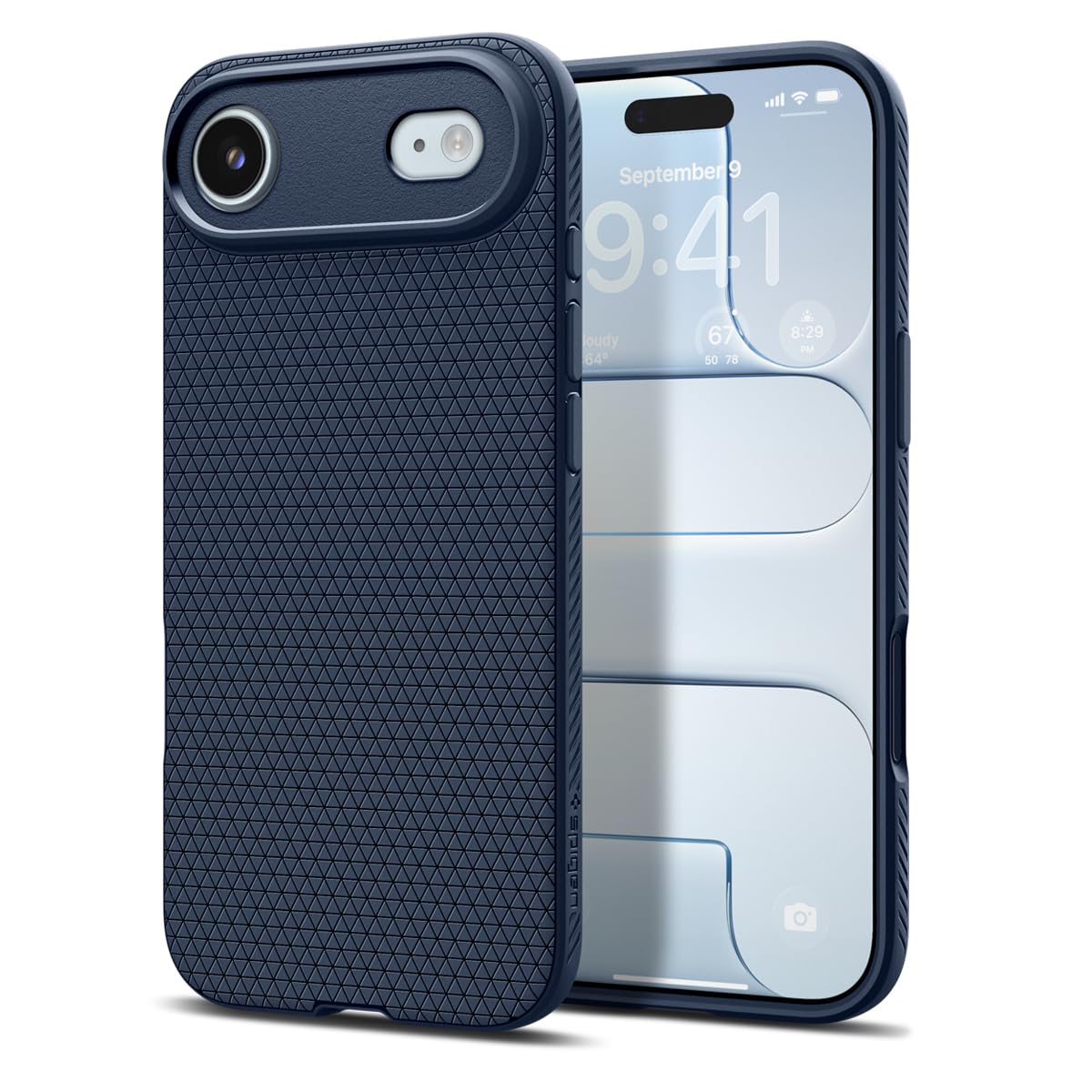
Image: Spigen Liquid Air Case for iPhone Air in Navy Blue. This image shows the overall design and textured pattern of the case.
Setup and Installation
Follow these steps to correctly install the Spigen Liquid Air case on your iPhone Air:
- Prepare your device: Ensure your iPhone Air is clean and free of dust or debris.
- Align the case: Hold the case with the camera cutout aligned with your phone's camera.
- Insert one side: Gently push one side of your iPhone Air into the case, starting with the volume button side or the power button side.
- Snap into place: Apply gentle pressure around the edges of the phone until the case fully snaps into place, ensuring all corners are securely covered. The flexible TPU material allows for easy installation.

Image: A visual representation of the easy snap-on installation process for the Spigen Liquid Air case, showing the flexible material conforming to the phone.
Operating and Features
The Spigen Liquid Air case is designed to enhance your iPhone Air experience with several key features:
- Precise Fit: The case is form-fitted for the iPhone Air, ensuring all ports, buttons, and camera functions are easily accessible and fully operational.
- Enhanced Grip: The flexible TPU material features an anti-slip pattern, providing a secure and comfortable grip to prevent accidental drops.
- Air Cushion Technology: Integrated Air Cushion Technology in the corners absorbs shock from impacts, offering robust protection against drops and bumps.
- Raised Bezels: A raised lip around the screen and camera provides additional protection against scratches when the phone is placed on flat surfaces.
- Camera Control Button Protection: The case includes a smooth TPU layer over the camera control button for full protection and tactile feedback.
- Sound Tunnel Technology: Features a 1mm micro-hole design for clearer sound output and reduced noise interference.
- Lanyard Compatibility: Convenient bottom cutouts allow for attachment of a lanyard (not included) for secure carrying.

Image: Detailed view of the case's precision engineering, highlighting raised lips for camera protection, anti-scratch surface design, and seamless button fit.

Image: Illustration demonstrating the Air Cushion Technology in the corners of the case, designed to absorb impact from drops, ensuring reliable protection.

Image: Visualizing the innovative Sound Tunnel Technology for enhanced audio and the perfectly fitted design for easy access to phone features.

Image: Depiction of the lanyard-ready design with bottom cutouts, allowing users to attach a lanyard for secure and convenient carrying.
Maintenance
To keep your Spigen Liquid Air case in optimal condition:
- Cleaning: Wipe the case regularly with a soft, damp cloth. For stubborn dirt, a mild soap solution can be used. Avoid harsh chemicals or abrasive cleaners, as these may damage the TPU material.
- Avoid Extreme Temperatures: Do not expose the case to extreme heat or cold, as this can affect the material's integrity and flexibility.
- Inspect Periodically: Check the case periodically for any signs of wear or damage. If the case is significantly damaged, it may compromise its protective capabilities.
Troubleshooting
If you encounter any issues with your Spigen Liquid Air case, consider the following:
- Loose Fit: Ensure the case is correctly aligned and fully snapped onto your iPhone Air. A loose fit might indicate improper installation or that the case is not designed for your specific phone model. This case is designed for iPhone Air.
- Buttons Not Responsive: Verify that the case is properly seated around the phone's buttons. The case is designed for seamless button fit and responsiveness.
- Discoloration: Over time, TPU materials can show slight discoloration due to UV exposure or contact with certain chemicals. Regular cleaning and avoiding direct sunlight exposure can help minimize this.
Specifications
| Brand | Spigen |
| Model Name | Liquid Air |
| Model Number | ACS09923 |
| Compatible Phone Models | iPhone Air |
| Material | Thermoplastic Polyurethane (TPU) |
| Color | Navy Blue |
| Product Features | Air-cushion technology, Anti-Slip, Flexible, Shock-Absorbent, Slim Fit, Raised Bezels, Camera Control Button Protection, Sound Tunnel Technology |
| Item Dimensions | 16 x 7.8 x 1.3 Centimeters |
| Item Weight | 31.4 Grams |
| Country of Origin | Korea, Republic of |
Warranty Information
The Spigen Liquid Air Case comes with a 1-year warranty against manufacturing defects. This warranty covers defects in materials and workmanship under normal use. It does not cover damage caused by misuse, accidents, unauthorized modifications, or normal wear and tear.
Please retain your proof of purchase for warranty claims.
Support and Contact
For further assistance, technical support, or warranty claims, please contact Spigen India Private Limited:
- Address: NO.295 - 296, Ecotech-1, Extension, Greater Noida, Uttar Pradesh 201310, India
- Online Support: Visit the official Spigen website for FAQs and support resources.
- Brand Store: Spigen Store on Amazon.in
When contacting support, please have your product model number (ACS09923) and proof of purchase ready.
