
Motorola Moto g86 5G (XT2527-1)
Contents
Motorola Moto g86 5G User Manual
Model: Moto g86 5G (XT2527-1)
1. Introduction
This user manual provides essential information for the safe and efficient operation of your Motorola Moto g86 5G smartphone. Please read this manual thoroughly before using your device to ensure optimal performance and to prevent damage.
The Motorola Moto g86 5G features a 1.5K pOLED display, a 50MP Sony LYTIA camera with OIS and Moto AI, and robust IP68/IP69 and MIL-STD 810H certifications for enhanced durability.
2. Device Overview

Figure 2.1: Front and back view of the Motorola Moto g86 5G smartphone, showcasing its sleek design and camera module.
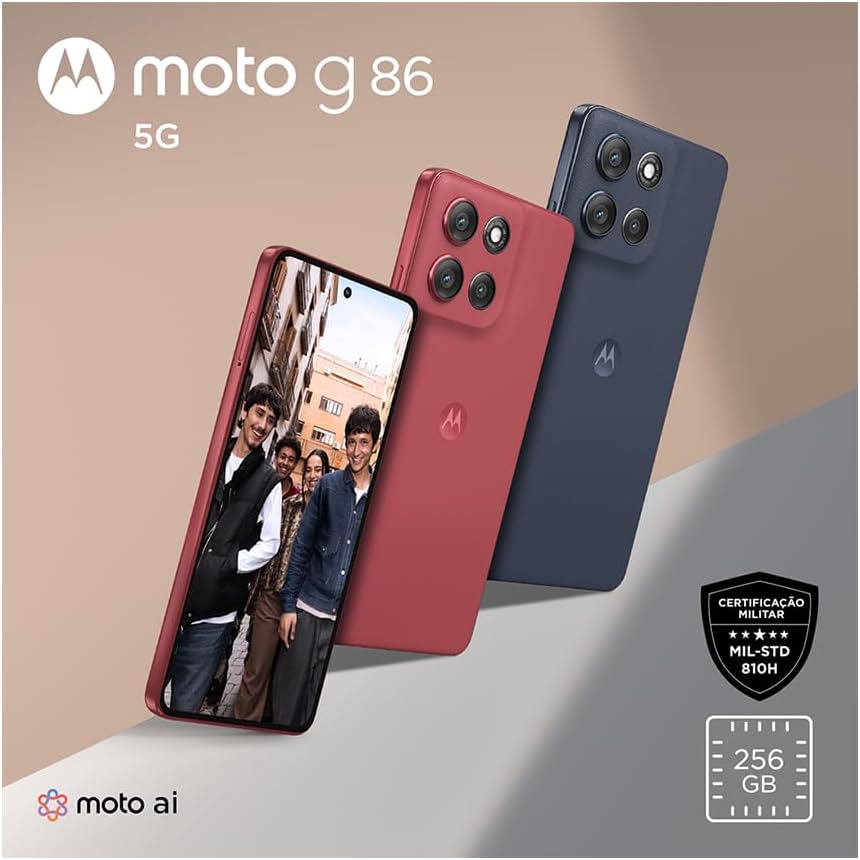
Figure 2.2: Front view of the device, highlighting the 1.5K pOLED display and punch-hole camera.

Figure 2.3: Rear view of the Motorola Moto g86 5G, showing the camera array and Motorola logo.

Figure 2.4: Bottom view of the device, illustrating the USB-C charging port and speaker grille.
3. Setup
3.1. Unboxing and Initial Inspection
Upon receiving your Motorola Moto g86 5G, carefully open the packaging and verify that all components are present:
- Motorola Moto g86 5G Smartphone
- TURBOPOWER™ 33W Charger
- USB-A to USB-C Cable
- Quick Start Guide (this manual)

Figure 3.1: The Motorola Moto g86 5G smartphone alongside its 33W TURBOPOWER charger and USB-A to USB-C cable.
3.2. Inserting SIM Card and microSD Card (if applicable)
Locate the SIM tray on the side of your device. Use the SIM ejector tool (not explicitly listed as included, but standard) to open the tray. Insert your Nano-SIM card(s) and/or a microSD card into the designated slots. Ensure the tray is fully reinserted to maintain the device's IP68/IP69 water and dust resistance.
3.3. Initial Charge and Power On
Before first use, it is recommended to fully charge your device. Connect the USB-C cable to the phone and the TURBOPOWER™ 33W charger to a power outlet. The device supports fast charging. Once charged, press and hold the power button on the side of the phone until the Motorola logo appears to power it on.
4. Operating Your Device
4.1. Basic Navigation
The Moto g86 5G runs on Android 15. Navigate the interface using gestures: swipe up for the app drawer, swipe down for notifications and quick settings, and use the navigation bar or gestures for home, back, and recent apps.
4.2. Camera Features
The device features a 50MP Sony LYTIA camera with Optical Image Stabilization (OIS) and Moto AI enhancements. To access the camera, tap the camera icon on your home screen or lock screen. Explore various modes such as Photo, Portrait, Night Vision, and Pro mode for advanced settings. The camera supports 4K video recording.
4.3. Connectivity
Your Moto g86 5G supports 5G cellular connectivity, Wi-Fi, Bluetooth, and NFC. To manage these connections, go to Settings > Network & internet for Wi-Fi and mobile data, and Settings > Connected devices for Bluetooth and NFC.
4.4. Display and Audio
The 6.7-inch 1.5K pOLED display offers vibrant colors and deep blacks. Adjust brightness and display settings under Settings > Display. For audio, the device features stereo speakers. Adjust volume using the physical volume buttons on the side or through Settings > Sound & vibration.
5. Maintenance and Care
5.1. Cleaning Your Device
Use a soft, lint-free cloth to clean the screen and body of your phone. Avoid using harsh chemicals or abrasive materials. For stubborn smudges, slightly dampen the cloth with water. Ensure all ports are dry before charging.
5.2. Water and Dust Resistance (IP68/IP69)
The Moto g86 5G is rated IP68 and IP69 for water and dust resistance, meaning it can withstand immersion in up to 1.5 meters of fresh water for up to 30 minutes, and is protected against high-pressure, high-temperature water jets. While durable, this resistance is not permanent and may decrease over time with normal wear. Do not intentionally submerge the device or expose it to saltwater, chlorinated water, or liquids other than fresh water. Always ensure the SIM tray is properly closed.
5.3. Software Updates
Keep your device's software updated to ensure optimal performance, security, and access to new features. You can check for updates by going to Settings > System > System updates.
6. Troubleshooting
6.1. Common Issues and Solutions
- Device not turning on: Ensure the battery is charged. Connect the charger and wait a few minutes before attempting to power on again. If unresponsive, perform a force restart by holding the power button for 10-15 seconds.
- Poor battery life: Reduce screen brightness, disable unused connectivity features (Wi-Fi, Bluetooth, GPS), close background apps, and check for software updates.
- Network connectivity issues: Check if Airplane mode is off. Restart the device. Verify your SIM card is properly inserted. Contact your service provider if issues persist.
- Apps crashing or freezing: Clear the app's cache and data in Settings > Apps. If the issue continues, uninstall and reinstall the app. Ensure your device software is up to date.
6.2. Factory Reset
If you experience persistent issues, a factory reset may resolve them. Warning: A factory reset will erase all data from your phone. Back up important data before proceeding. To perform a factory reset, go to Settings > System > Reset options > Erase all data (factory reset).
7. Specifications
| Feature | Specification |
|---|---|
| Model | Moto g86 5G (XT2527-1) |
| Operating System | Android 15 |
| Internal Storage | 256 GB |
| RAM | 8 GB (expandable with 16GB Ram Boost) |
| Display | 6.7-inch 1.5K pOLED (1220x2712 resolution) |
| Rear Camera | 50MP Sony LYTIA with OIS, 4K video recording |
| Battery Capacity | 5200 mAh |
| Charging | TURBOPOWER™ 33W fast charging |
| Connectivity | 5G, Bluetooth, NFC, Wi-Fi |
| Durability | IP68/IP69 Water and Dust Resistance, MIL-STD 810H |
| Dimensions (approx.) | 161.21 mm (H) x 74.74 mm (W) x 7.87 mm (D) |
| Weight | Approx. 425 grams (package weight, actual device weight not specified but inferred to be less) |
| Certifications | ANATEL: 00489-25-00330 |

Figure 7.1: Dimensional diagram of the Motorola Moto g86 5G, showing height, width, and thickness measurements.
8. Warranty and Support
For detailed warranty information, please refer to the warranty card included with your product or visit the official Motorola support website. Keep your proof of purchase for warranty claims.
For technical support, software updates, and frequently asked questions, please visit the Motorola support portal or contact their customer service. Contact information can typically be found on the Motorola website or in the device's pre-installed support application.
Online Support: www.motorola.com/support
Documents and downloads
Ask a question about this manual
Ask about setup, troubleshooting, compatibility, parts, safety, or missing instructions. Manuals+ will review the question and use this page’s manual context to help answer it.