
1. Introduction
This manual provides detailed instructions for the setup, operation, and maintenance of your PULUZ Wireless Lavalier Microphone, Model PU3155B. This device is designed to provide high-quality audio recording for various applications, including video recording, vlogging, live streaming, and online teaching, compatible with USB-C enabled iPhone and Android devices.
2. Package Contents
Before use, please verify that all items listed below are present in your package:
- Mic Receiver (USB-C) x1
- Mic Transmitters x2
- Charging Case x1
- Clip Magnets x2
- Charging Cable x1
- Storage Bag x1
- User Manual x1

Figure 2.1: Contents of the PULUZ Wireless Lavalier Microphone package.
3. Product Components
The PULUZ Wireless Lavalier Microphone system consists of a receiver, two transmitters, and a magnetic charging case. The transmitters feature a lightweight, flexible design with an adjustable and removable magnetic clip for secure and optimal positioning.

Figure 3.1: Lightweight clip-on and magnetic design of the microphone transmitter.
4. Setup and Connection
The PULUZ Wireless Lavalier Microphone offers plug-and-play convenience, requiring no additional apps or Bluetooth settings for connection.
4.1. Device Compatibility
- Compatible with iPhone models featuring a USB-C port (e.g., iPhone 15 series).
- Compatible with Android phones featuring a USB-C port.
- Note: This microphone is not compatible with iPhone models featuring a Lightning port.
4.2. Connection Procedure
- Ensure the microphone transmitters are charged (refer to Section 6).
- Insert the USB-C receiver directly into the USB-C port of your smartphone or tablet.
- The receiver and transmitters will automatically pair. No manual pairing or app installation is required.
- Once connected, the indicator lights on the devices will confirm a successful connection.
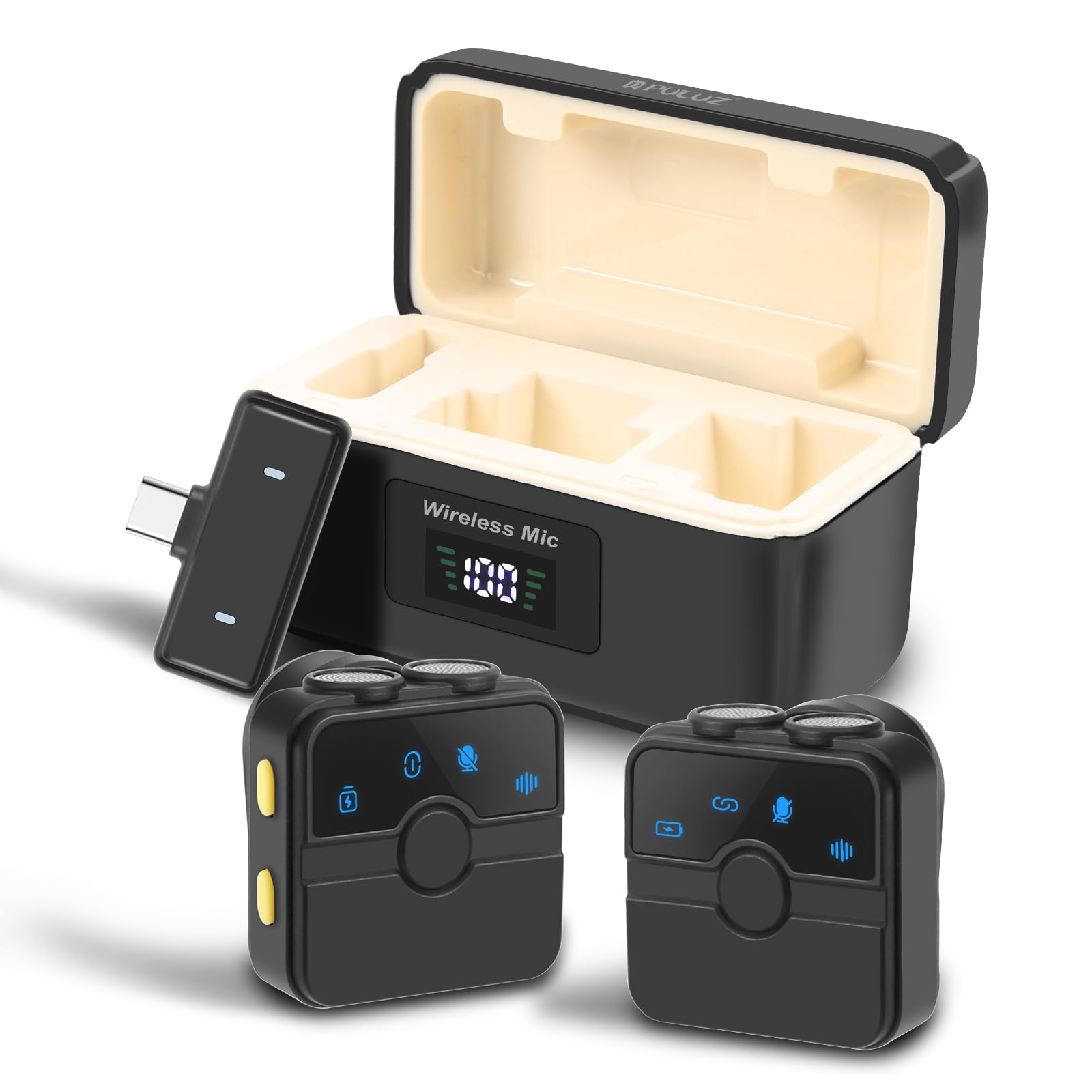
Figure 4.1: Plug-and-play connection of the USB-C receiver.
5. Operating Instructions
Once connected, the PULUZ Wireless Lavalier Microphone is ready for use. It features professional audio recording capabilities with noise cancellation.
5.1. Wearing the Transmitter
Attach the microphone transmitter to your clothing using the integrated clip or the magnetic clip. Position it approximately 6-8 inches (15-20 cm) from your mouth for optimal audio capture. The flexible design allows for various angles without clothing restrictions.
5.2. Noise Cancellation
The microphone is equipped with an intelligent noise reduction chip. This technology effectively minimizes background noise, allowing for clear audio recording even in noisy environments. The noise cancellation feature operates automatically.

Figure 5.1: Intelligent Noise Reduction capabilities.
5.3. Long-Range Transmission
The system supports long-distance wireless transmission up to 65 feet (20 meters), providing stable and consistent frequencies for various recording scenarios.

Figure 5.2: Long-range transmission in use.
5.4. Recording Scenarios
The PULUZ Wireless Lavalier Microphone is versatile and suitable for a wide range of recording applications:
- Live Streaming: For clear audio during live broadcasts.
- Online Teaching: Ensures students hear you clearly.
- Video Recording: Enhances audio quality for vlogs, interviews, and other video content.
- Podcasting: Captures professional-grade audio for podcasts.

Figure 5.3: Versatile usage scenarios.
6. Charging and Battery Life
The system includes a magnetic charging case that keeps your accessories organized and provides extended battery life for the transmitters.
6.1. Charging the Transmitters
Place the microphone transmitters into the magnetic charging case. The case will automatically begin charging them. A full charge for the transmitters takes approximately 2 hours.
6.2. Charging the Case
Connect the provided charging cable to the charging case and a suitable USB power source. The charging case itself provides an additional 23 hours of battery life, supporting two full charges for both transmitters.
6.3. Battery Performance
- Continuous Use: Up to 6 hours of continuous recording per transmitter on a single charge.
- Total Battery Life: Up to 60 hours of total battery life with the fully charged charging case.

Figure 6.1: Battery life and charging details.
7. Maintenance
To ensure the longevity and optimal performance of your PULUZ Wireless Lavalier Microphone, follow these maintenance guidelines:
- Cleaning: Use a soft, dry cloth to clean the microphone transmitters, receiver, and charging case. Avoid using liquid cleaners or abrasive materials.
- Storage: Store the device in its charging case or the provided storage bag when not in use to protect it from dust and physical damage.
- Environmental Conditions: Avoid exposing the device to extreme temperatures, humidity, or direct sunlight.
- Charging: Charge the device regularly, even if not in frequent use, to maintain battery health.
8. Troubleshooting
If you encounter issues with your PULUZ Wireless Lavalier Microphone, refer to the following common troubleshooting steps:
- No Sound/Poor Audio Quality:
- Ensure the receiver is fully inserted into your device's USB-C port.
- Check that the microphone transmitters are powered on and charged.
- Verify that the transmitters are paired with the receiver (indicator lights should confirm connection).
- Confirm your recording application is set to use the external microphone.
- Ensure the microphone is positioned correctly, not too far or too close to the sound source.
- Device Not Connecting:
- Ensure your smartphone or tablet has a USB-C port. (Not compatible with Lightning ports).
- Restart your smartphone or tablet.
- Try disconnecting and reconnecting the receiver.
- Ensure the transmitters are powered on.
- Short Battery Life:
- Ensure the transmitters are fully charged before use.
- Charge the charging case fully to maximize extended use.
9. Specifications
| Model Number | PU3155B |
| Brand | PULUZ |
| Number of Channels | 1 |
| Sampling Rate | 48kHz |
| Bit Depth | 16-bit |
| Signal to Noise Ratio | 72dB |
| SPL Maximum Sound Pressure Level | 126dB |
| Wireless Transmission | 2.4GHz |
| Transmission Range | Up to 65ft (20m) |
| Transmitter Battery Life (Single Charge) | Up to 6 hours |
| Charging Case Battery Life (Additional) | Up to 23 hours (supports 2 full charges) |
| Total Battery Life (with case) | Up to 60 hours |
| Full Charge Time (Transmitters) | Approx. 2 hours |
| Item Weight | 207 g |
| Package Dimensions | 11.94 x 8.89 x 5.08 cm |
10. Warranty and Support
Information regarding product warranty and customer support was not available in the provided product data. Please refer to the product packaging or the official PULUZ website for details on warranty coverage and how to contact customer support for assistance.

