
1. Introduction
Thank you for choosing the SEAJIC 66" Automatic Phone Tripod Stand with Remote. This versatile device is designed to enhance your mobile photography and videography experience, offering stability, adjustable height, and convenient remote control. Please read this manual carefully to ensure proper setup and operation.
2. What's in the Box
- SEAJIC 66" Automatic Phone Tripod Stand
- Bluetooth Remote (built-in, rechargeable via USB-C)
3. Key Features
- One-Tap Auto-Open Design: Instantly deploy the tripod stand with a single-hand operation, saving setup time.
- 66" Adjustable Height: Extends from a compact 13" to a full 66" for various shooting scenarios.
- 360° Full-Rotation Phone Mount: Features dual 180° rotating shafts for 360° phone rotation, allowing seamless switching between horizontal/vertical screens and diverse video recording angles.
- Pro-Grade Expansion with Cold Shoe: Equipped with a top-mounted cold shoe for attaching accessories like microphones, lights, action cameras, or ring lights.
- Ultra-Stable & Durable: Constructed with premium aluminum alloy legs and slip-resistant rubber feet, featuring a 16.2" wide base for enhanced stability.
- Anti-Pinch & Wide Compatibility: The phone mount adjusts from 2.36"-3.66" (60-93mm) to fit 4-7" smartphones (excluding foldables/tablets), with an anti-pinch design for one-handed, drop-proof installation.
- Ultra-Portable: Weighs only 14.8oz, making it easy to carry in backpacks for travel and adventures.
4. Setup Guide
4.1 Automatic Tripod Deployment
The SEAJIC tripod stand features an innovative one-tap auto-open design. Simply hold the stand vertically and gently tap the bottom on a flat surface. The legs will automatically deploy and lock into position, ready for use.
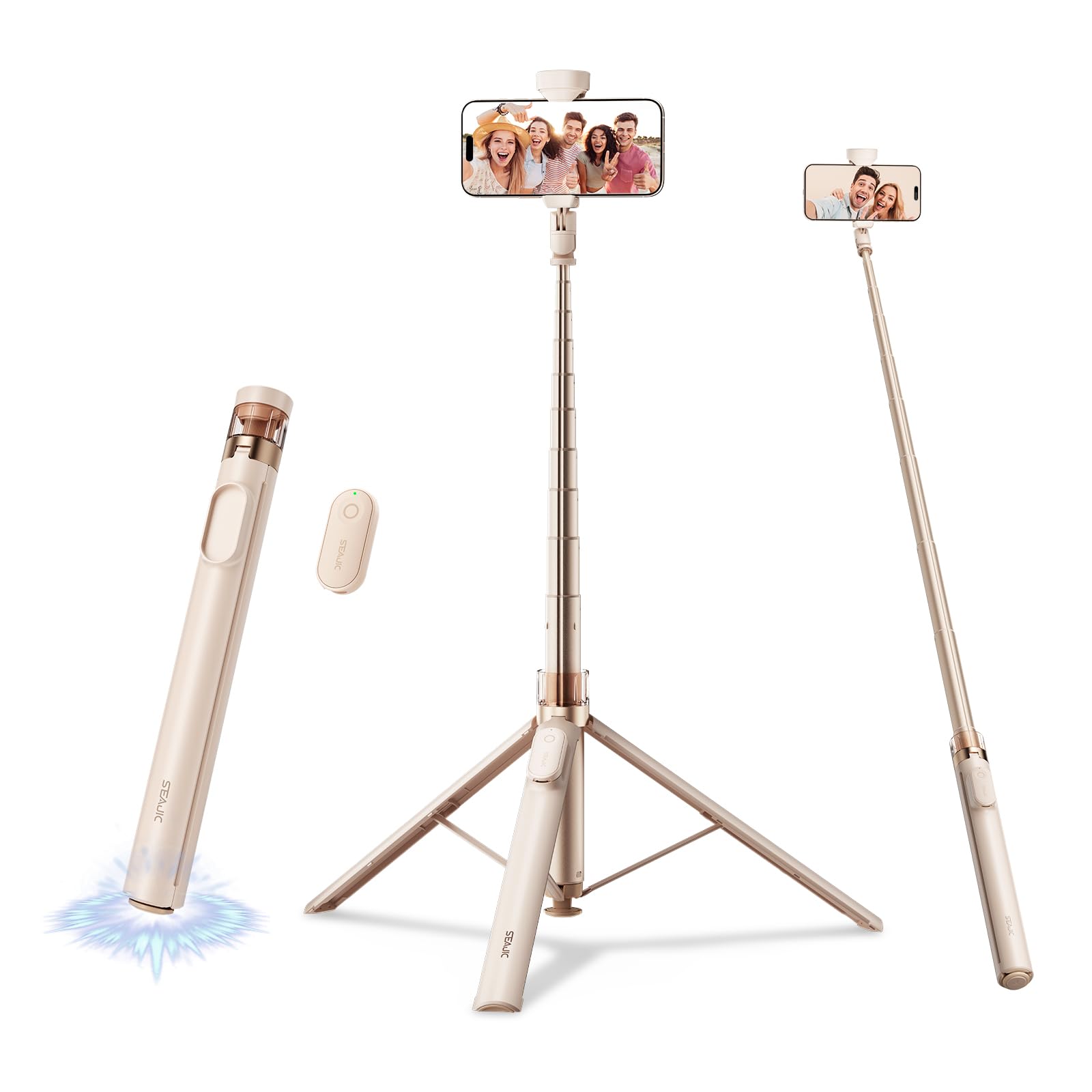
Figure 1: The tripod stand automatically deploys its legs in 0.1 seconds when tapped on a surface.
Video 1: Demonstration of the SEAJIC 66" Automatic Phone Tripod Stand's quick auto-deployment feature.
4.2 Bluetooth Remote Pairing
- Locate the detachable Bluetooth remote control on the side of the tripod stand. It is magnetically attached.
- Press and hold the power button on the remote until the indicator light flashes, indicating it's in pairing mode.
- On your smartphone, go to Bluetooth settings and search for available devices.
- Select "SEAJIC" (or similar name) from the list to pair. The indicator light on the remote will turn solid when successfully paired.
- The remote is rechargeable via USB-C. Ensure it is charged for optimal performance.

Figure 2: The Bluetooth remote is magnetically attached to the tripod stand for easy access and storage.
5. Operating Instructions
5.1 Attaching Your Phone
Gently pull apart the phone clamp at the top of the stand. The anti-pinch design allows for one-handed installation. Insert your smartphone (4-7 inches) into the clamp, ensuring it is securely held. The clamp is designed to prevent accidental drops.
5.2 Adjusting Height
To adjust the height, simply pull the telescoping pole upwards to extend it to your desired length, up to 66 inches. Push it down to retract. The pole will lock at various intervals for stable positioning.

Figure 3: The tripod stand can be adjusted from a minimum of 13 inches to a maximum of 66 inches.
5.3 Phone Mount Rotation
The phone mount features dual 180° rotating shafts. This allows for 360° rotation of your phone, enabling you to switch effortlessly between horizontal and vertical orientations, as well as adjust for top or back shots and various video recording angles.

Figure 4: The dual-axis design allows for flexible 360° rotation of your smartphone.
5.4 Using the Cold Shoe Mount
The top of the tripod stand includes a recessed cold shoe mount. To use it, remove the top cap and attach compatible accessories such as external microphones, LED lights, or other photographic equipment. Ensure accessories are securely fastened.

Figure 5: The recessed accessory port allows for easy attachment of external devices like microphones or lights.
5.5 Switching to Selfie Stick Mode
When the tripod legs are folded, the device functions as a selfie stick. Extend the pole to your desired length and use the Bluetooth remote to capture photos or start video recording.
Video 2: A comprehensive demonstration of the SEAJIC 66" Automatic Phone Tripod Stand, showcasing its features including selfie stick mode and remote functionality.
6. Maintenance
6.1 Cleaning
Wipe the tripod stand with a soft, dry cloth. Avoid using harsh chemicals or abrasive materials that could damage the finish. Ensure no dust or debris accumulates in the telescoping sections or the phone clamp.
6.2 Storage
When not in use, retract the pole completely and fold the tripod legs. Store the stand in a cool, dry place away from direct sunlight and extreme temperatures. Ensure the Bluetooth remote is securely reattached to its magnetic slot.
7. Troubleshooting
7.1 Remote Not Pairing
- Ensure the remote is charged. Connect it to a USB-C power source if the indicator light does not turn on.
- Make sure Bluetooth is enabled on your smartphone.
- Try unpairing and re-pairing the remote in your phone's Bluetooth settings.
- Restart both your phone and the remote.
7.2 Tripod Legs Not Deploying Automatically
- Ensure the bottom button is fully pressed when tapping the stand on a surface.
- Check for any obstructions or debris in the leg mechanism.
- If the issue persists, gently assist the legs to open manually, then try the auto-deploy feature again.
7.3 Instability
- Ensure the tripod legs are fully extended and locked into position on a flat, stable surface.
- Avoid extending the pole to its absolute maximum height in windy conditions or on uneven terrain.
- Verify that your phone is securely clamped and balanced in the mount.
8. Specifications
| Product Dimensions | 13.2 x 12.2 x 63 inches |
| Item Weight | 14.8 ounces (420 Grams) |
| Model Name | AB226 |
| Brand | SEAJIC |
| Material | Aluminum |
| Maximum Height | 66 Inches |
| Minimum Height | 13.2 Inches |
| Compatible Devices | Camera, Smartphone |
| Special Feature | Remote Control |
9. Warranty and Support
This product comes with a standard manufacturer's warranty. For detailed warranty information, product support, or to inquire about replacement parts, please refer to the contact information provided with your purchase or visit the official SEAJIC website.
