
1. Introduction
Thank you for choosing the APEXEL 2-in-1 HD 6X Telephoto and 150mm Macro Lens. This versatile lens kit is designed to enhance your mobile photography experience, allowing you to capture distant subjects with clarity and explore intricate details up close. This manual provides essential information for proper setup, operation, and maintenance of your lens kit.
The APEXEL TM6 lens features a robust aluminum alloy body, 10 imported optical glass elements in 7 groups, a Schmidt roof prism with FMC coating, edge ink coating, and achromatic APO lens technology. These features ensure light transmittance greater than 99.5% and reflectivity less than 0.3%, significantly improving image detail and quality.
2. Product Overview
The APEXEL 2-in-1 lens kit includes the following components:
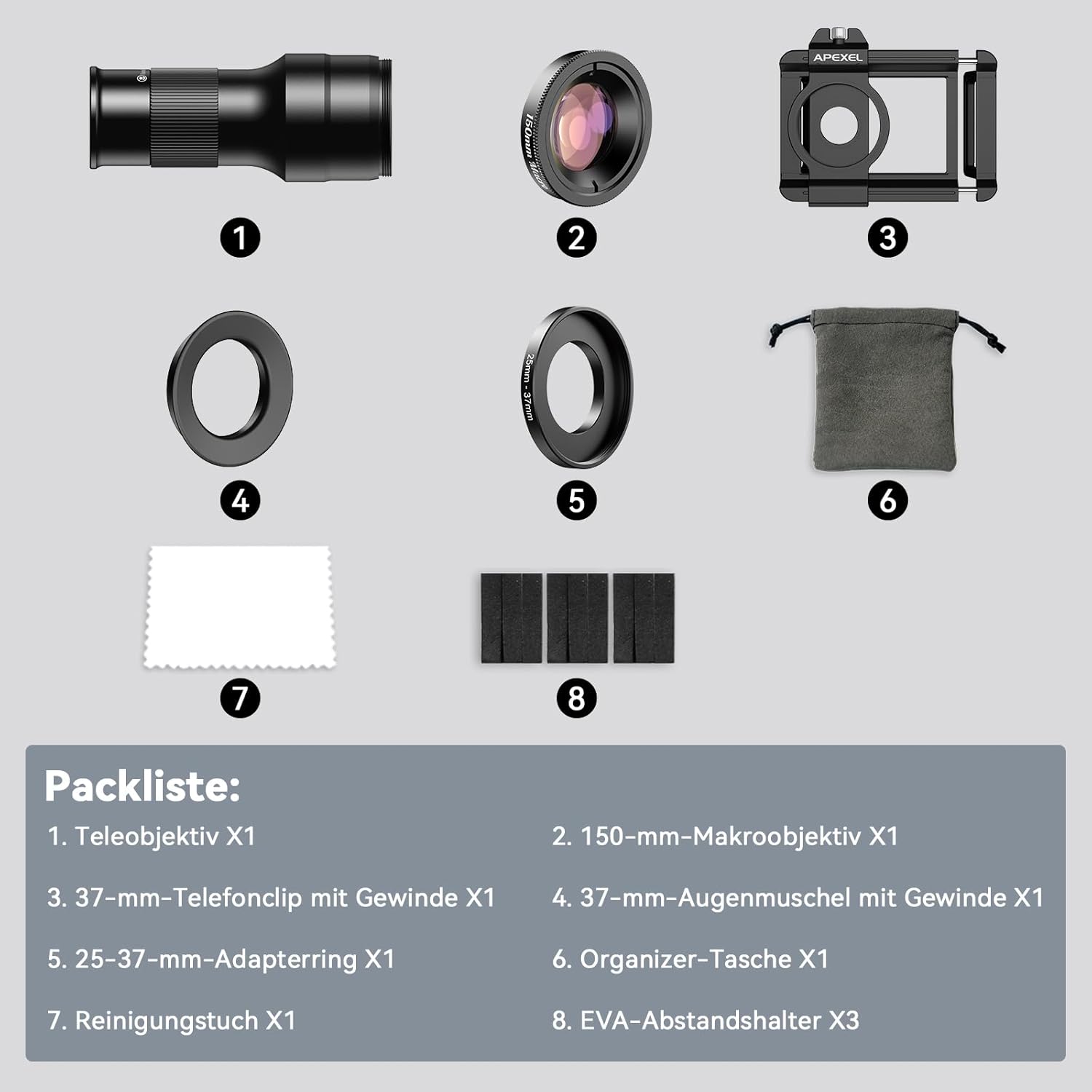
Image: Overview of the APEXEL 2-in-1 lens kit components. This image displays the telephoto lens, 150mm macro lens, 37mm threaded phone clip, 37mm eyecup with thread, 25-37mm adapter ring, organizer pouch, cleaning cloth, and three EVA spacers.
- Telephoto Lens (6X)
- 150mm Macro Lens
- 37mm Threaded Phone Clip
- 37mm Eyecup with Thread
- 25-37mm Adapter Ring
- Organizer Pouch
- Cleaning Cloth
- EVA Spacers (x3)

Image: The APEXEL 2-in-1 lens kit, showing the telephoto lens mounted on a smartphone via the universal clip, and the 150mm macro lens detached. A smartphone screen displaying a butterfly image is also shown, illustrating the photographic capabilities.
3. Compatibility
This tele-macro phone lens kit is designed for broad compatibility with most smartphones. It accommodates phones with a width between 70-100 mm (2.8-3.9 inches).
Important Note:
- This lens kit is not compatible with iPhone Mini, SE, 15/16 series, and Samsung Galaxy series phones.
- If your phone has a built-in macro function, please disable it before using this lens for optimal results.
- If the provided phone clip does not fit your specific phone model, please contact customer support for assistance with a replacement clip.
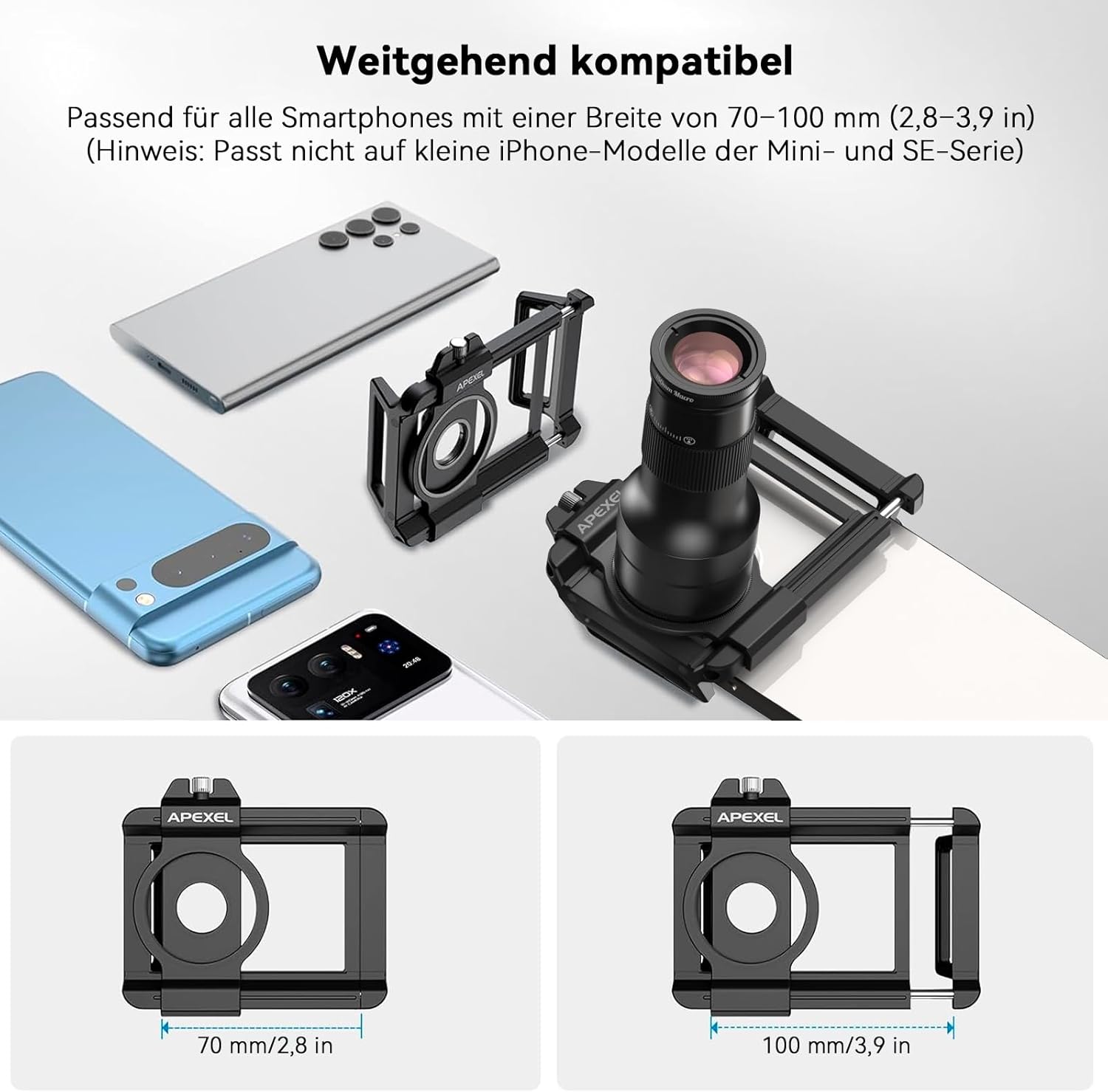
Image: A diagram illustrating the compatibility of the universal phone clip. It shows various smartphones and the clip's adjustable width from 70mm (2.8 inches) to 100mm (3.9 inches), indicating it fits most smartphones but explicitly excludes smaller iPhone models (Mini, SE series).
4. Setup Instructions
Follow these four simple steps to install your APEXEL lens kit:
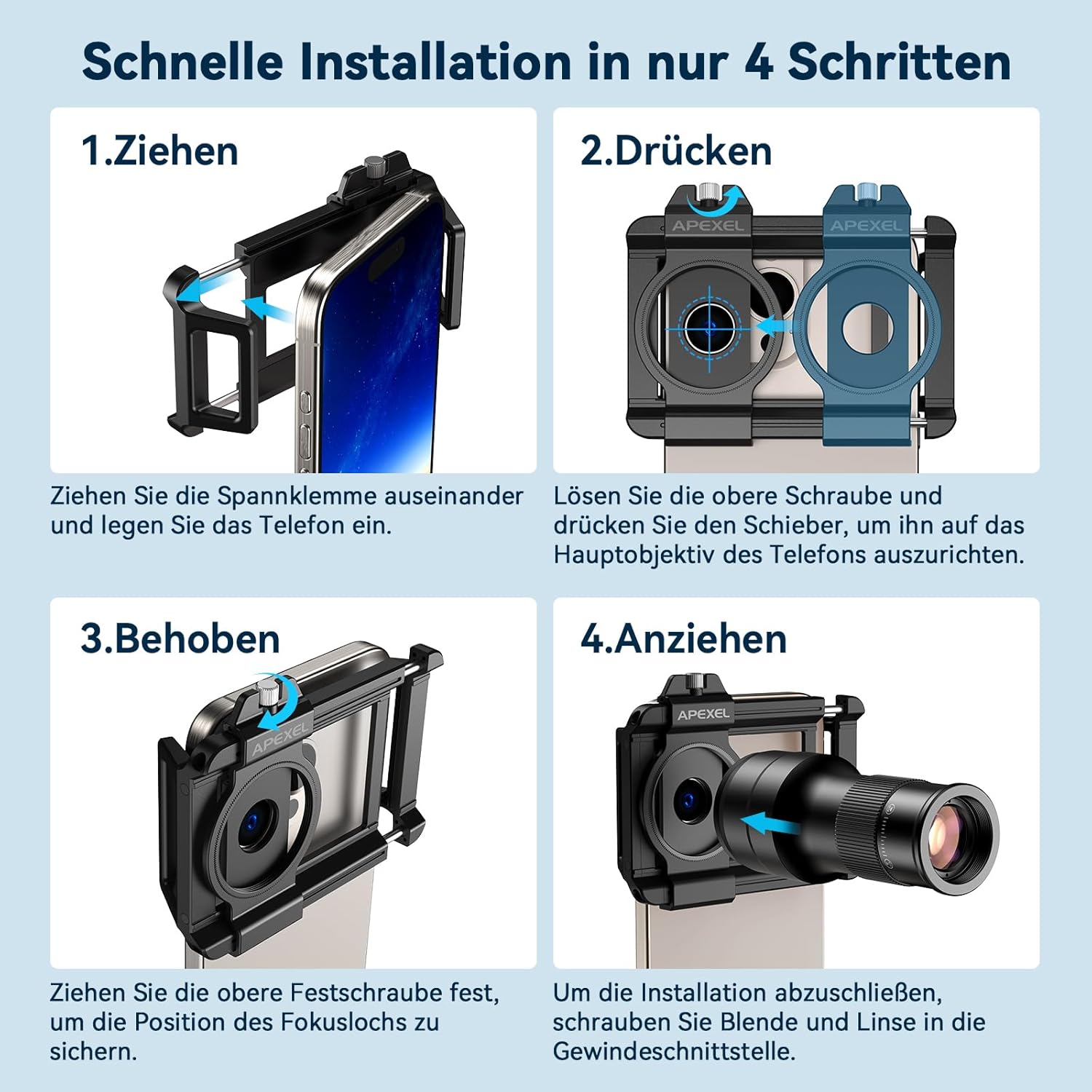
Image: A visual guide demonstrating the four steps for quick installation of the APEXEL lens. Step 1: Pull the clamp apart and insert the phone. Step 2: Loosen the top screw and push the slider to align with the phone's main lens. Step 3: Tighten the top screw to secure the focus hole position. Step 4: Screw the aperture and lens into the threaded connection to complete installation.
- Step 1: Insert Phone
Gently pull the clamping mechanism of the phone clip apart and carefully insert your smartphone. Ensure the phone is centered within the clip. - Step 2: Align Lens
Loosen the top screw on the phone clip. Slide the lens mount until the central opening is perfectly aligned with your smartphone's main camera lens. Precise alignment is crucial for optimal image quality. - Step 3: Secure Position
Once aligned, tighten the top screw firmly to secure the lens mount's position. This prevents movement during use. - Step 4: Attach Lens
Screw either the telephoto lens or the macro lens (depending on your desired use) into the threaded connection on the phone clip. Ensure it is securely fastened.
5. Operating Instructions
The APEXEL 2-in-1 lens offers two primary modes of operation: smartphone photography and handheld observation.
5.1. Smartphone Photography
Attach the lens to your smartphone using the universal clip as described in the Setup section. Open your phone's camera application. The lens will enhance your phone's photographic capabilities for both distant and close-up subjects.

Image: This image illustrates two primary uses of the lens. The top panel shows a person using the lens as a handheld monocular for observing distant mountains. The bottom panel shows the lens attached to a smartphone, ready for mobile photography, highlighting its dual functionality.
5.1.1. Telephoto Mode (6X Optical Zoom)
For capturing distant subjects, attach the 6X telephoto lens to the phone clip. The optimal telephoto focusing distance is 300mm to infinity. This mode allows you to bring far-off details closer without significant loss of image quality.

Image: This image demonstrates the 6X telephoto lens in action. The top panel shows a smartphone with the telephoto lens attached, focusing on a bird in a distant tree. The bottom left panel shows the bird as seen with the naked eye, while the bottom right panel displays a magnified, detailed view of the bird captured with an iPhone 15 Pro and the 6X telephoto lens.
5.1.2. Macro Mode (150mm)
For extreme close-up photography, attach the 150mm macro lens. This lens is designed to capture intricate details of small objects. The optimal macro focusing distance is between 150mm and 400mm (5.9-15.74 inches).
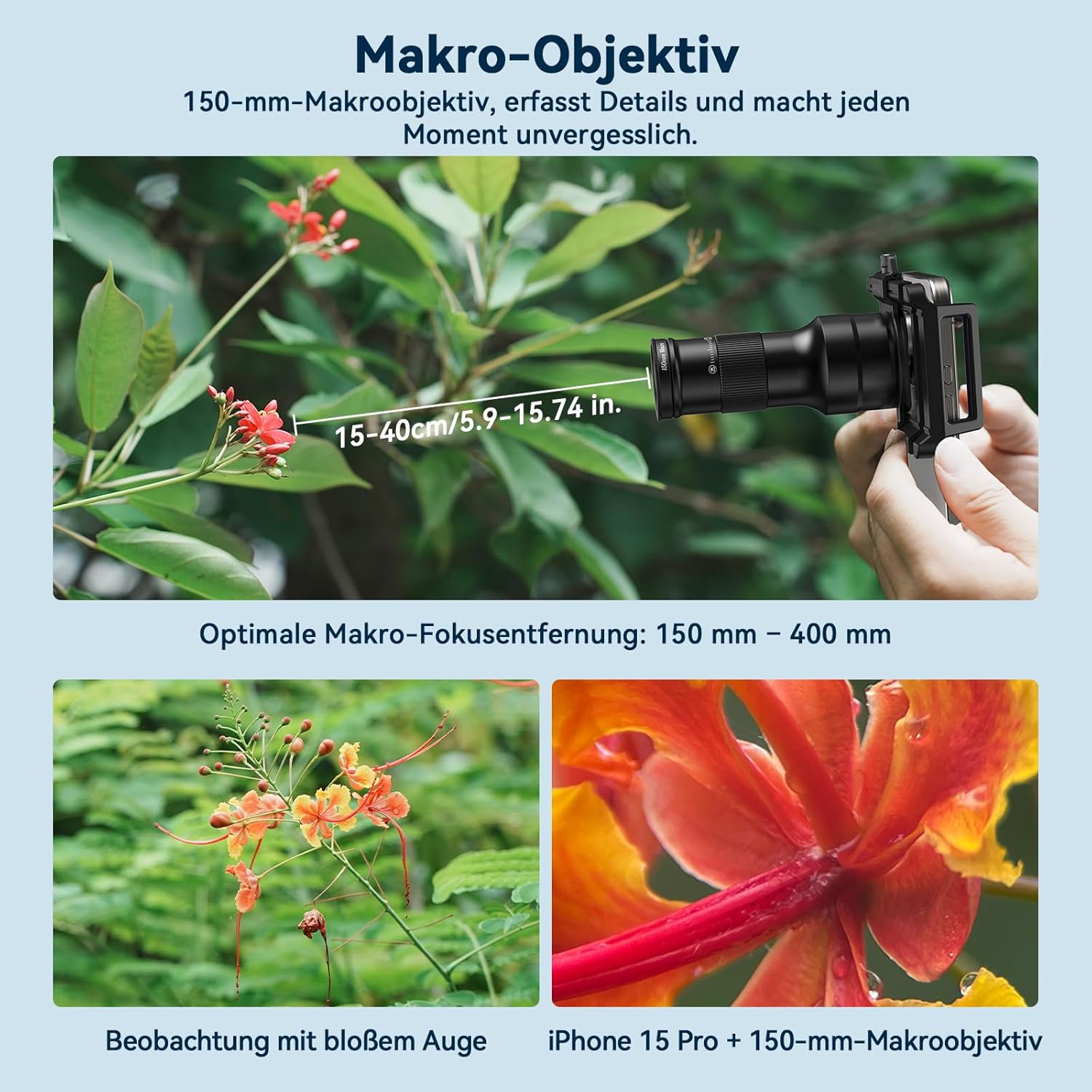
Image: This image showcases the 150mm macro lens. The top panel shows a smartphone with the macro lens attached, focusing on a plant with small red flowers, indicating an optimal macro focus range of 15-40cm (5.9-15.74 inches). The bottom left panel shows the flowers as seen with the naked eye, and the bottom right panel displays a highly magnified, detailed shot of a flower captured with an iPhone 15 Pro and the 150mm macro lens.

Image: A collage demonstrating the wide applicability of the APEXEL lens. It features examples of photography including a tiger, a butterfly, a sports event, and a detailed shot of an emerald ring, highlighting its versatility for various subjects both indoors and outdoors.
5.2. Handheld Observation (Monocular Mode)
The telephoto lens can also be used as a mini-monocular for direct observation without a smartphone. Simply attach the provided eyecup to the telephoto lens. This allows for comfortable viewing of distant objects with the naked eye.
6. Maintenance
- Cleaning Lenses: Use the provided cleaning cloth or a soft, lint-free microfiber cloth to gently wipe the lens surfaces. For stubborn smudges, use a specialized lens cleaning solution applied to the cloth, not directly to the lens.
- Storage: When not in use, store the lenses and accessories in the organizer pouch to protect them from dust, scratches, and impacts.
- Avoid Extreme Conditions: Do not expose the lenses to extreme temperatures, humidity, or direct sunlight for prolonged periods.
- Handle with Care: Avoid dropping the lenses or subjecting them to harsh impacts, as this can damage the optical elements.
7. Troubleshooting
- Dark Corners or Black Circles on Screen: This is a normal occurrence due to the design of external lenses. To minimize this, zoom in on your phone's screen accordingly. If your phone has a separate telephoto lens, ensure the screen magnification does not exceed a certain value, as this might automatically switch to the phone's internal telephoto lens, resulting in a black screen.
- Clip Does Not Fit: If the universal phone clip does not properly fit your smartphone (e.g., too wide, too narrow, or misaligned with the camera), please contact APEXEL customer support for assistance.
- Blurry Images:
- Ensure the lens is perfectly aligned with your phone's main camera.
- Verify that the lens surfaces are clean and free of smudges or dust.
- Check the focusing distance: For telephoto, subjects should be 300mm or further. For macro, subjects should be between 150mm and 400mm.
- Ensure your phone's auto-focus is working correctly or manually adjust focus if available.
8. Specifications
| Brand | APEXEL |
| Model | TM6 |
| Lens Type | 2-in-1 Telephoto & Macro |
| Telephoto Magnification | 6X Optical Zoom (Fixed Focus) |
| Macro Lens Focal Length | 150mm |
| Optimal Telephoto Distance | 300mm to Infinity |
| Optimal Macro Distance | 150mm - 400mm (5.9 - 15.74 inches) |
| Lens Design | 10 optical glass elements in 7 groups |
| Coating | FMC Coating, Edge Ink Coating |
| Body Material | Aluminum Alloy |
| Product Dimensions | 5 x 5 x 5 cm |
| Product Weight | 300 g |
| Image Stabilization | None |
9. Warranty and Support
APEXEL is committed to providing high-quality products. While specific warranty details are not provided in this manual, if you encounter any issues during use, such as the clip not fitting your device or any other operational problems, please contact APEXEL customer support.
You can typically find contact information for APEXEL customer service on the product packaging, the retailer's website where you purchased the item, or the official APEXEL website. Please have your product model (TM6) and purchase details ready when contacting support.


