
1. Introduction
Thank you for choosing the AMEGAT 140W Portable Charger, Model PBQ2610. This high-capacity power bank is designed to provide efficient and fast charging for a wide range of devices, including laptops, smartphones, and tablets. This manual provides essential information for the safe and effective use of your device, covering setup, operation, maintenance, and troubleshooting.

Image: The AMEGAT 140W Portable Charger, a sleek gray device with a digital display showing charging status and ports.
2. Product Overview
2.1 Components
- Power Bank Unit: The main portable charger device.
- USB-C Ports (x2): For both input (recharging the power bank) and output (charging devices).
- USB-A Port (x1): For output (charging devices).
- Digital Display: Shows battery percentage, input/output power, and estimated recharge time.
- Power Button: Activates the display and initiates charging.
2.2 Key Features
- 140W PD 3.1 Fast Charging: Delivers up to 140W output for rapid charging of compatible laptops and devices.
- 27600mAh High Capacity: Provides multiple charges for smartphones and significant power for laptops.
- 3-Port Simultaneous Charging: Two USB-C ports and one USB-A port allow charging of up to three devices concurrently.
- Intuitive Digital Display: Real-time monitoring of charging status, power levels, and estimated recharge time.
- Comprehensive Protection: Built-in safety features guard against overcharging, overheating, overcurrent, overvoltage, and short-circuits.

Image: The AMEGAT power bank demonstrating its 27600mAh capacity by showing charging capabilities for a MacBook Pro, iPhone, Galaxy S23 Ultra, and Nintendo Switch.
3. Setup
Before using your AMEGAT portable charger for the first time, it is recommended to fully charge it.
- Unpack: Remove the power bank and any included cables from the packaging.
- Initial Charge: Connect the power bank to a compatible USB-C power adapter (not included) using a USB-C to USB-C cable. For optimal charging speed, use a 140W PD 3.1 compatible charger.
- Monitor Display: The digital display will show the input power and battery percentage as the device charges. A full charge typically takes approximately 2 hours with a 140W input.
- Ready for Use: Once fully charged, the power bank is ready to power your devices.

Image: The AMEGAT power bank connected via USB-C to a MacBook Pro, illustrating 140W fast charging capability, achieving 50% charge in 40 minutes.
4. Operating Instructions
4.1 Charging Devices
- Connect Device: Use a compatible charging cable to connect your device (laptop, phone, tablet) to one of the power bank's output ports (USB-C1, USB-C2, or USB-A).
- Initiate Charging: The power bank will automatically detect the connected device and begin charging. If not, press the power button once to activate.
- Monitor Charging: The digital display will show the output power for each active port and the remaining battery percentage.
- Simultaneous Charging: You can charge up to three devices simultaneously using the available ports. The power bank intelligently distributes power based on device requirements.
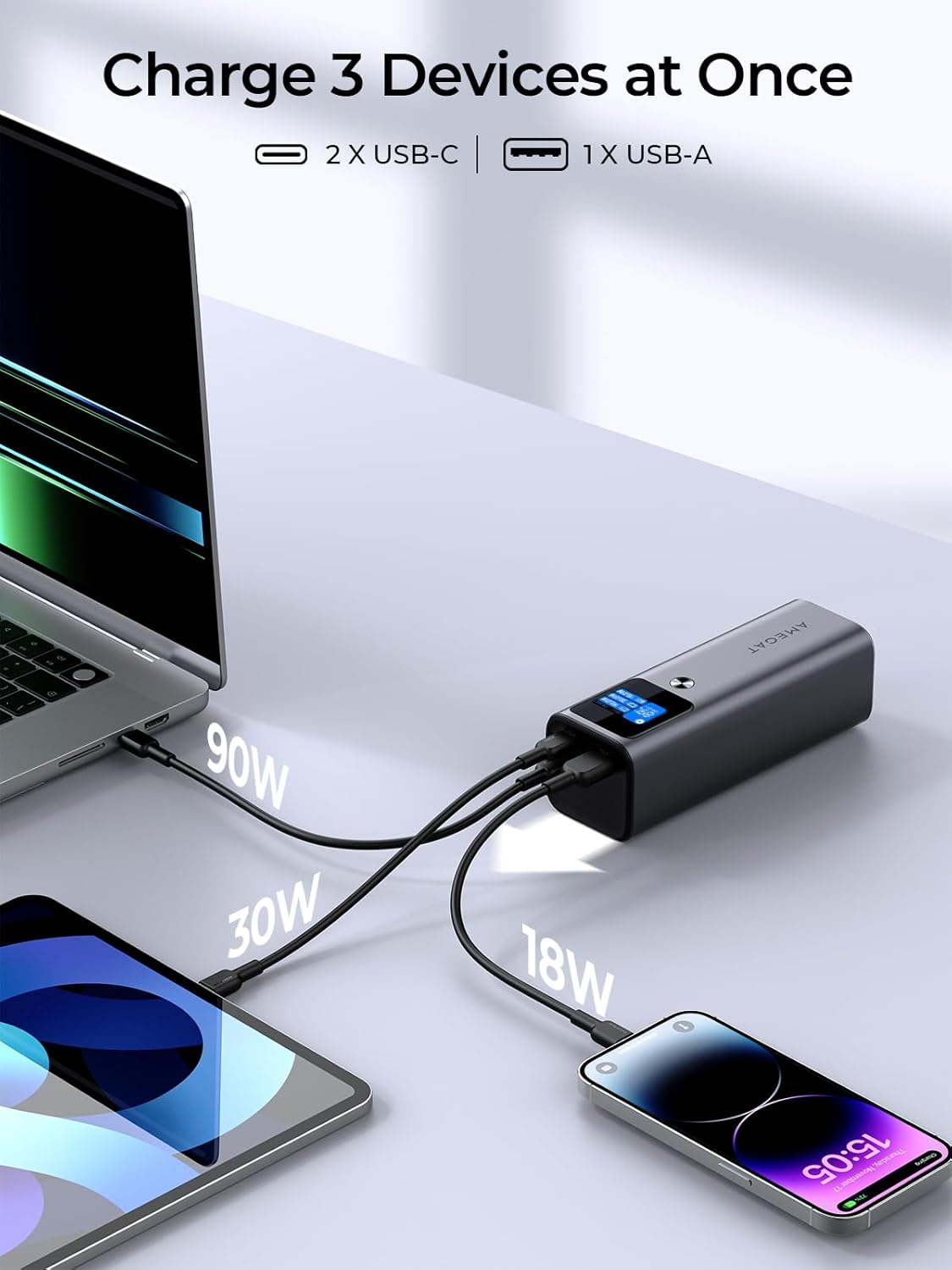
Image: The AMEGAT power bank simultaneously charging a laptop, tablet, and smartphone via its USB-C and USB-A ports, showing individual power outputs.
4.2 Digital Display Functions
The integrated digital display provides real-time information about the power bank's status.
- Battery Percentage: Shows the current charge level of the power bank.
- Input Power (W): Indicates the wattage being drawn when recharging the power bank.
- Output Power (W): Displays the wattage being delivered to each connected device (C1, C2, A1).
- Estimated Recharge Time: When charging the power bank, it shows the approximate time remaining until full.
- Screen Display Time: Pressing the power button cycles through different display modes, including estimated time for full recharge, battery cycles, and screen display duration settings (e.g., 30 seconds, Always).

Image: Close-up of the AMEGAT power bank's intuitive digital display, showing battery percentage, input/output wattage for each port, and options for screen display time.
4.3 Low-Current Charging Mode
The USB-C ports support a low-current charging mode, suitable for small devices like wireless earbuds or smartwatches that require less power. This ensures safe and efficient charging for sensitive electronics.
5. Maintenance
- Cleaning: Wipe the power bank with a soft, dry cloth. Avoid using harsh chemicals or abrasive materials.
- Storage: Store the power bank in a cool, dry place away from direct sunlight and extreme temperatures.
- Battery Health: For optimal battery longevity, avoid fully discharging the power bank frequently. Recharge it when the battery level is low.
- Avoid Drops: Protect the device from physical shocks and drops.
6. Troubleshooting
| Problem | Possible Cause | Solution |
|---|---|---|
| Power bank not charging |
|
|
| Device not charging from power bank |
|
|
| Slow charging speed |
|
|
| Digital display not working |
|
|
7. Specifications
| Feature | Detail |
|---|---|
| Model Number | PBQ2610 |
| Battery Capacity | 27600mAh (102.12Wh) |
| Input (USB-C) | Up to 140W (PD 3.1) |
| Output (USB-C1/C2) | Up to 140W (PD 3.1) |
| Output (USB-A) | Up to 22.5W |
| Total Output | Max 140W (shared across ports) |
| Dimensions | 6.1 x 2 x 2 inches (153mm x 53mm x 50mm) |
| Weight | 1.51 pounds (approx. 685g) |
| Special Features | Digital Display, Low-Current Charging Mode, Air-Travel Friendly |

Image: A diagram showing the dimensions of the AMEGAT portable charger and an included USB-C cable.
8. Safety Information
The AMEGAT 140W Portable Charger incorporates a comprehensive protection system, "EntireProtect," to ensure safe operation for both the power bank and your connected devices. This system guards against:
- Over-Voltage Protection: Prevents damage from excessive voltage input.
- Over-Charge Protection: Stops charging once the battery is full to prevent overcharging.
- Short-Circuit Protection: Automatically cuts power in case of a short circuit.
- Over-Discharge Protection: Prevents the battery from being drained too low, preserving battery life.
- Over-Current Protection: Safeguards against excessive current flow.
- Over-Temperature Protection: Monitors and regulates internal temperature to prevent overheating.
Important Safety Precautions:
- Do not expose the power bank to water or extreme temperatures.
- Do not disassemble, puncture, or modify the device.
- Keep out of reach of children.
- Use only original or certified compatible charging cables and adapters.
- Dispose of the product responsibly according to local regulations.
9. Warranty and Support
AMEGAT products are designed for reliability and performance. For any questions, technical assistance, or warranty claims, please contact AMEGAT customer support through the retailer where the product was purchased or visit the official AMEGAT website for contact information.
Please retain your proof of purchase for warranty purposes.


