
1. Setup and Assembly
This section details the steps for assembling and preparing your COMAN M1V5 Camera Monopod for use.
1.1 Included Components
Verify that all components are present in the packaging:
- Monopod Body
- V5 Fluid Head
- Tripod Base
- Quick-Release Modules
- Storage Bag
- Allen Wrench
- Stainless Steel Spike
- Head Quick Release Plate
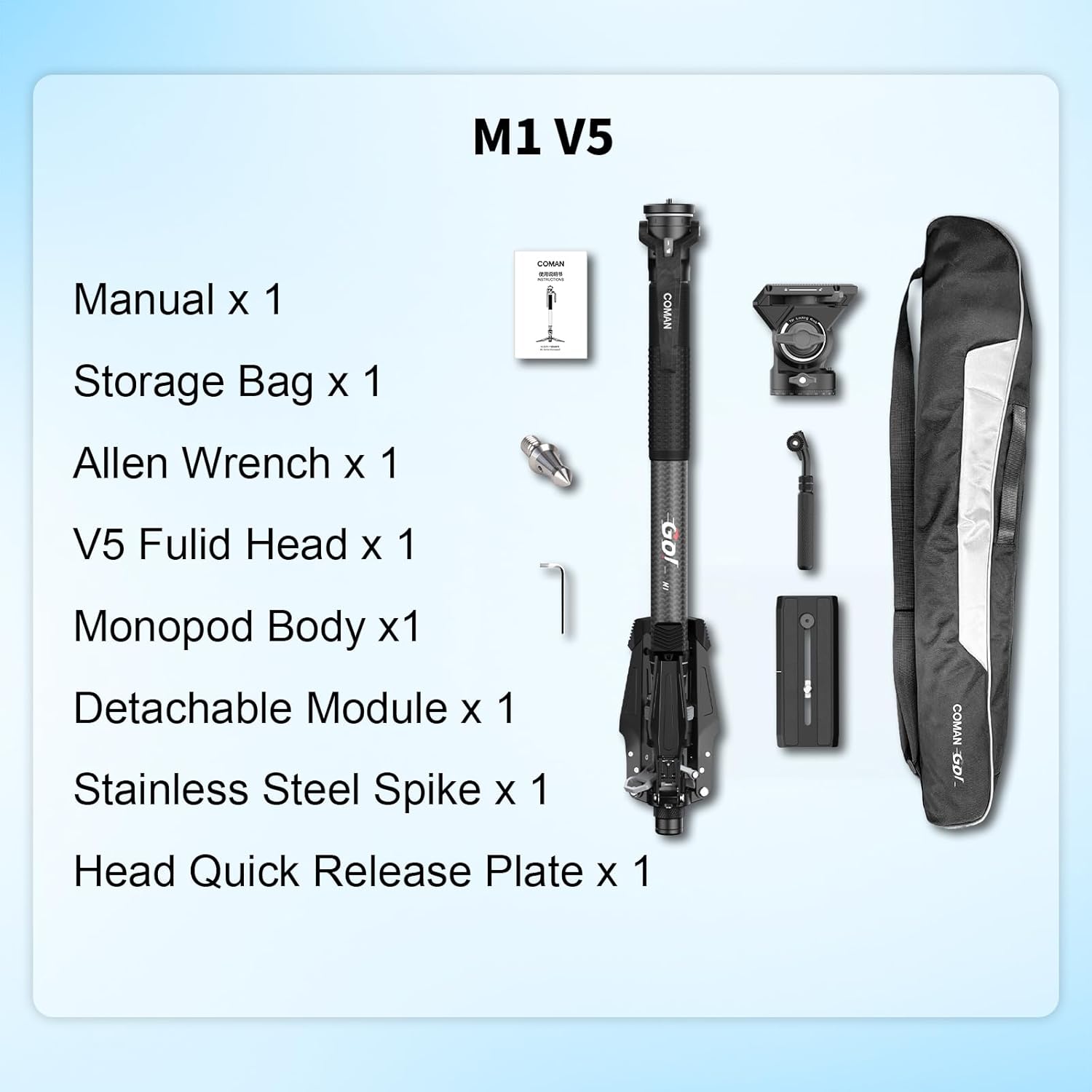
Image: All components included with the COMAN M1V5 Monopod, laid out for inspection.
1.2 Attaching the V5 Fluid Head
The V5 Fluid Head is designed for precise camera movements. Attach it securely to the monopod body.
Video: Demonstrates the process of attaching and using the V5 Fluid Head with the monopod.
1.3 Quick Release Plate Installation
The V5 Fluid Head features a quick-install system for the camera plate. Ensure the plate is correctly installed and locked before mounting your camera.

Image: Detailed view of the V5 Fluid Head's quick install system and release plate mechanism.
Video: Shows the one-click lifting mechanism of the monopod in action.
1.4 Detachable Head and Separable Leg Base
The M1V5 offers versatility with its detachable head and separable leg base. The head can be removed, and the leg section can be separated from the base. The removed head can be attached to the base using the included adapter for low-angle shooting or as a tabletop tripod.
Video: Illustrates how to replace the gimbal or detach the head for alternative configurations.
2. Operating Instructions
Learn how to effectively use your COMAN M1V5 Camera Monopod for stable and fluid camera support.
2.1 One-Click Lifting System
The monopod features a one-click lifting system for rapid height adjustment. Simply press the designated button to extend or retract the four-section carbon fiber leg. This allows for quick changes in height, improving setup speed.

Image: Shows the monopod extended to 170cm and folded to 71cm, highlighting the two-stage pedal design for height adjustment.
Video: Demonstrates the COMAN M1V5 monopod in use for video recording, showcasing its stability and ease of movement.
2.2 V5 Fluid Head Operation
The V5 Fluid Head allows for smooth ±90° tilt and 360° panning. Use the adjustment knobs to control movement tension and lock the head in position for stable shots.
2.3 Enhanced Stability
The M1V5 monopod is equipped with 190mm long support feet, providing stable footing on various terrains. Ensure the feet are fully extended and positioned for maximum stability, especially on uneven or slippery surfaces.
2.4 Portability
With a maximum extended height of 1700mm and a folded length of 605mm, the monopod is designed for portability. It can be easily carried in camera bags or backpacks for travel and fieldwork.
3. Maintenance
Proper maintenance ensures the longevity and optimal performance of your COMAN M1V5 Monopod.
3.1 Cleaning
- Wipe down the carbon fiber tubes and metal parts with a soft, dry cloth after each use to remove dust and dirt.
- For stubborn grime, use a slightly damp cloth with mild soap, then dry thoroughly.
- Avoid using harsh chemicals or abrasive cleaners, as these can damage the finish and materials.
3.2 Storage
- Store the monopod in its included storage bag to protect it from dust and scratches.
- Keep the monopod in a cool, dry place, away from direct sunlight and extreme temperatures.
3.3 Inspection
- Periodically check all screws and connections to ensure they are tight. Use the provided Allen wrench if adjustments are needed.
- Inspect the fluid head for smooth operation. If movement feels stiff, consult the support section.
4. Troubleshooting
This section addresses common issues you might encounter with your COMAN M1V5 Monopod.
4.1 Camera Not Securely Mounted
- Issue: Camera feels loose or detaches unexpectedly from the quick-release plate.
- Solution: Always ensure the quick-release plate is fully engaged and locked into the fluid head. Verify that the camera is securely fastened to the quick-release plate with the 1/4-inch screw. Double-check the locking mechanism on the fluid head after mounting the camera.
4.2 Monopod Legs Not Extending/Retracting Smoothly
- Issue: The one-click lifting system is stiff or unresponsive.
- Solution: Check for any obstructions or debris in the leg sections. Ensure the one-click lift button is fully depressed or released. If the issue persists, clean the leg sections and joints.
4.3 Fluid Head Movement is Not Smooth
- Issue: Panning or tilting feels jerky or too loose/tight.
- Solution: Adjust the tension knobs on the V5 Fluid Head. Ensure they are not overtightened or too loose. If debris is present, gently clean around the moving parts.
5. Specifications
Detailed technical specifications for the COMAN M1V5 Camera Monopod and V5 Fluid Head.

Image: Detailed product parameters for the COMAN M1V5 Monopod and V5 Fluid Head.
| Feature | Detail |
|---|---|
| Brand | COMAN |
| Model Name | M1V5 |
| Material | Carbon Fiber (B-2 Carbon Fiber Tube) |
| Item Weight | 5 pounds (2.3 kg) |
| Weight Limit | 10 kg |
| Maximum Height | 67 inches (1700mm) |
| Minimum Height | 23.8 inches |
| Folded Size | 605mm |
| Leg Sections | 4 |
| Leg Diameter | 36.00 millimeters (graduated: 36/32.5/29/25.5mm) |
| Tripod Head Type | V5 Fluid Head |
| Fluid Head Tilt Range | ±90° |
| Fluid Head Panning | 360° |
| Compatible Devices | Camcorder, Camera, Microscope, Projector, Telescope |
| Special Features | One-Click Lifting, Detachable Head, Separable Leg Base, Wide Support Feet |
6. Warranty Information
The COMAN M1V5 Camera Monopod comes with a 2-year warranty from the date of purchase. This warranty covers manufacturing defects and ensures the product meets its specified performance standards under normal use.
Please retain your proof of purchase for any warranty claims. For detailed terms and conditions, refer to the official COMAN website or contact customer support.
7. Customer Support
For further assistance, technical support, or inquiries regarding your COMAN M1V5 Camera Monopod, please contact COMAN customer service.
- Online Support: Visit the official COMAN website for FAQs and support resources.
- Email Support: Refer to your product packaging or the official website for the customer service email address.
- Phone Support: Refer to your product packaging or the official website for customer service phone numbers.
When contacting support, please have your product model (M1V5) and purchase information ready.