
AINAVI 3S-NBT-168
AINAVI 10.25 inch Car Multimedia Player
User Manual for BMW NBT 3 4 Series F30 F31 F34 (2013-2016) Model 3S-NBT-168
1. Introduction
This manual provides detailed instructions for the installation, operation, maintenance, and troubleshooting of your AINAVI 10.25 inch Car Multimedia Player, Model 3S-NBT-168. Please read this manual thoroughly before installation and use to ensure proper functionality and to maximize your user experience.

Image 1.1: AINAVI 10.25 inch Car Multimedia Player displaying the main menu interface.
2. Compatibility
The AINAVI 10.25 inch Car Multimedia Player (Model 3S-NBT-168) is designed for specific BMW models equipped with the NBT system and a 6-pin LVDS connector. Verify your vehicle's system before purchase and installation.
- BMW 3 Series F30/F31/F34 (2013-2016) with NBT System
- BMW 4 Series F32/F33/F36 (2013-2016) with NBT System
- BMW M3 F80 (2014-2019) with NBT System
- BMW M4 F82/F83 (2014-2019) with NBT System
Important: This unit is not compatible with CIC systems (4-pin LVDS) or CCC systems (10-pin LVDS).

Image 2.1: Visual representation of compatible BMW 3 and 4 Series dashboards with the multimedia player installed.
3. Package Contents
Verify that all items listed below are included in your package:
- 10.25" Head Unit (1 unit)
- ISO Wiring Harness Cable (1 unit)
- Audio Extension Cable (1 unit)
- USB Cable (1 unit)
- Installation Instruction (1 unit)
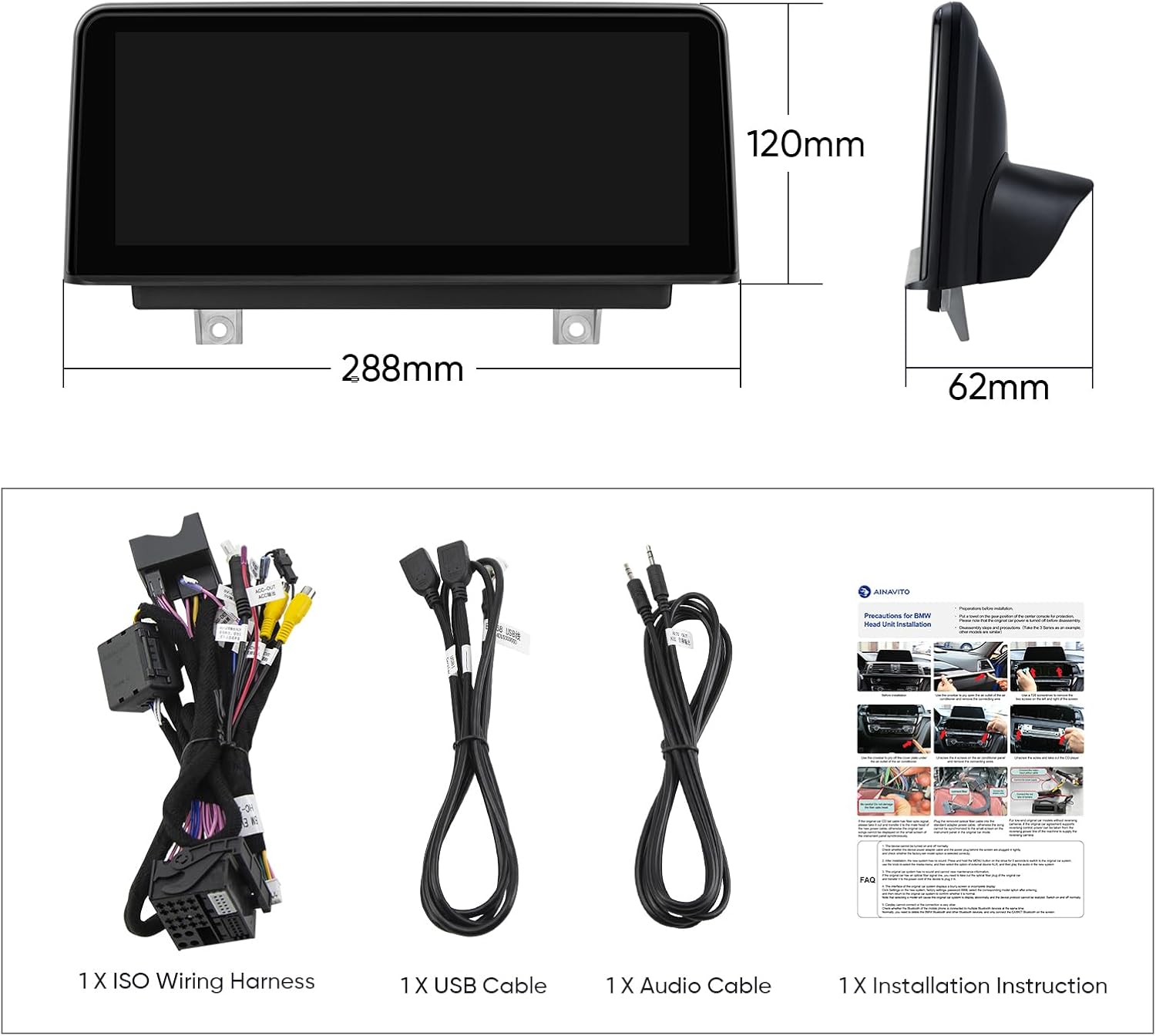
Image 3.1: Contents of the product package, including the head unit, wiring harness, USB cable, audio cable, and installation instructions.
4. Setup and Installation
Professional installation is recommended. Refer to the included installation instruction manual for detailed, step-by-step guidance. The following outlines key considerations:
4.1. Pre-Installation Check: Identify iDrive System
Before proceeding with installation, it is crucial to confirm your BMW vehicle has the original NBT system. This unit is not compatible with CIC or CCC systems. To identify your system:
- Remove the original screen on your BMW car.
- Check the LVDS port. An NBT system uses a 6-pin LVDS plug.

Image 4.1: Guide to identifying your BMW's iDrive system (NBT, CIC, CCC) by checking the LVDS connector type.
4.2. General Installation Steps
The included installation instruction manual provides specific diagrams and steps for your vehicle. Ensure the vehicle's power is disconnected before beginning installation. Connect the provided wiring harness and cables according to the instructions, paying close attention to the LVDS connection.
5. Operating Instructions
The AINAVI multimedia player offers a dual-system operation, retaining original BMW functions while adding advanced features.
5.1. System Switching
The unit allows seamless switching between the original BMW vehicle system and the new Linux-based system (which supports CarPlay/Android Auto). This ensures all original factory features remain accessible.

Image 5.1: The multimedia player displaying both the original BMW menu and the CarPlay interface, illustrating system switching.
5.2. Wireless Apple CarPlay and Wired Android Auto
The unit features built-in Wireless Apple CarPlay and Wired Android Auto. Connect your smartphone via Bluetooth for wireless CarPlay or use a USB cable for wired Android Auto to access navigation, calls, messages, and music directly on the display.

Image 5.2: Visual explanation of Wireless Apple CarPlay and Wired Android Auto connectivity.
5.3. Retained Original BMW System Features
The multimedia player is designed to retain and be compatible with various original BMW features:
- iDrive Knob control
- Original Bluetooth functionality
- Original Radio
- OEM rear camera
- Radar system
- Steering wheel controls
- Original CD Player
- Original Amplifier System
Vehicle information such as speed, fuel level, oil pressure, and safety warnings are displayed on the new screen.

Image 5.3: Examples of original BMW features that are retained and supported by the AINAVI multimedia player.
5.4. Bluetooth 5.1
The unit incorporates Bluetooth 5.1 (v2.1 + EDR, v5.1 Low Energy) for increased transmission rate and effective working distance. It supports audio streaming, automatic phone book transfer, and hands-free calling.
5.5. Dual WiFi Band Connecting
The system supports both 2.4GHz and 5GHz WiFi bands, providing a more reliable and faster internet connection for online features.
5.6. Touch Screen Operation
The 10.25 inch 1280x480 HD IPS Touch Screen offers intuitive control over the multimedia system. Its Grade-A IPS technology ensures excellent visual clarity and responsiveness.

Image 5.4: The 10.25 inch 1280x480 HD IPS Touch Screen, highlighting its visual quality and touch functionality.
6. Maintenance
To ensure the longevity and optimal performance of your AINAVI Car Multimedia Player, follow these maintenance guidelines:
- Cleaning the Screen: Use a soft, lint-free cloth to gently wipe the screen. For stubborn smudges, slightly dampen the cloth with water or a screen-specific cleaning solution. Avoid harsh chemicals or abrasive materials.
- General Care: Keep the unit free from dust and debris. Avoid exposing the unit to extreme temperatures or direct sunlight for extended periods.
- Software Updates: Periodically check for available software updates from AINAVI to ensure the system runs efficiently and has the latest features.
7. Troubleshooting
This section addresses common issues you might encounter. For problems not listed here, please contact customer support.
- Unit Does Not Power On:
- Check all power connections to ensure they are securely fastened.
- Verify the vehicle's fuse related to the stereo system.
- Ensure the unit is correctly installed according to the instruction manual.
- Screen Bugging/Display Issues:
- Ensure the LVDS cable is properly connected and not damaged.
- Restart the unit by turning off and on the vehicle's ignition.
- If the issue persists, a factory reset might be necessary (consult support for guidance).
- CarPlay/Android Auto Not Connecting:
- For Wireless CarPlay, ensure Bluetooth is enabled on your iPhone and paired with the unit.
- For Wired Android Auto, ensure you are using a high-quality USB cable and that Android Auto is enabled on your phone.
- Check your phone's compatibility with CarPlay/Android Auto.
- Cannot Switch Speed Units (MPH to KM/H) or Temperature (F to C):
- Access the system settings menu on the multimedia player.
- Look for 'Unit Settings' or 'Regional Settings' to change measurement units. Refer to the detailed installation instruction manual for specific menu navigation.
- No Sound:
- Check the audio extension cable connection.
- Ensure the volume is not muted or set too low on both the unit and the original car stereo system.
- Verify that the correct audio input source is selected.
8. Specifications
| Feature | Specification |
|---|---|
| Model Number | 3S-NBT-168 |
| Display Size | 10.25 Inches |
| Resolution | 1280x480 HD IPS |
| Operating System | Linux |
| Connectivity | Bluetooth 5.1, Dual-band Wi-Fi (2.4GHz & 5GHz), Wireless/Wired CarPlay & Android Auto |
| Special Features | Highest Level QLED, Works with Original Sound System, Retains iDrive, Steering Wheel Control, OEM Camera |
| Audio Output Mode | Stereo |
| Mounting Type | Dashboard Mount |
| Item Weight | 4 pounds |
| Package Dimensions | 12.72 x 11.22 x 5.27 inches |
9. Warranty
The AINAVI 10.25 inch Car Multimedia Player (Model 3S-NBT-168) comes with a 12-month warranty from the date of purchase. This warranty covers manufacturing defects and malfunctions under normal use. Please retain your proof of purchase for warranty claims.
10. Customer Support
For installation assistance, technical support, or any inquiries regarding your AINAVI product, please contact our customer support team:
- Via Amazon: Navigate to your order details on Amazon, click on the seller's name (HomeCar), and then select "Ask a question." Provide pictures or videos of your technical or installation questions for a prompt response.
- Hotline: +1 (833) 858-5016 (Working hours: 01:00 PM to 00:00 AM PST)
- Email: info@ainavi.com

Image 10.1: Visual guide for contacting customer support through the Amazon platform.

Image 10.2: Overview of customer support options, including phone and email.
Related documents3S-NBT-168


Ask a question about this manual
Ask about setup, troubleshooting, compatibility, parts, safety, or missing instructions. Manuals+ will review the question and use this page’s manual context to help answer it.