
Jesebang BD86
Jesebang BD86 Wireless Earbuds User Manual
Model: BD86 | Brand: Jesebang
Introduction
The Jesebang BD86 Wireless Earbuds offer an immersive audio experience with advanced Bluetooth 5.4 technology, ensuring stable and low-latency connections. Featuring 14.2mm dynamic drivers for rich sound, ENC noise-cancelling microphones for clear calls, and an IPX7 waterproof rating, these earbuds are designed for comfort and durability. The intelligent LED display provides real-time battery status, and the compact charging case extends playback time up to 30 hours.
What's in the Box
- Bluetooth Earbuds x 2 (Left and Right)
- Charging Case x 1
- Type-C Cable x 1
- User Manual x 1

Image: Contents of the Jesebang BD86 package, showing the earbuds, charging case, Type-C charging cable, and the user manual.
Product Overview

Image: The Jesebang BD86 Wireless Earbuds resting in their charging case, with the digital LED display showing battery levels.

Image: Detailed diagram illustrating the components of the Jesebang BD86 earbud and charging case, highlighting Microphone 1, LED Indicator, Microphone 2, Charging PINs on the earbud, and the LED Dual Digital Display and Type-C Input on the charging case.
Key Features:
- Bluetooth 5.4 Technology: Faster transfer speed and stable connection.
- Immersive Sound: 14.2mm dynamic drivers for rich audio.
- ENC Noise Cancelling Mic: Crystal clear call clarity by suppressing background noise.
- Long Battery Life: Up to 6 hours on a single charge, 30 hours total with charging case.
- Real-Time LED Display: Monitor battery levels of earbuds and case.
- Lightweight & Comfortable: Ergonomic design for prolonged wear.
- IPX7 Waterproof: Protection against sweat and rain.
- Smart Touch Control: Easy management of music, calls, and voice assistant.
Setup
1. Charging the Earbuds and Case
Before first use, fully charge the earbuds and the charging case. Place the earbuds into the charging case and connect the Type-C cable to the charging port on the case. Connect the other end of the cable to a USB power source (e.g., computer, wall adapter).
- Charging time for case: Approximately 1.5 hours.
- Charging time for earbuds (in case): Approximately 1 hour.
- The LED digital display on the case will show the charging status and battery percentage.

Image: Visual representation of the Jesebang BD86's battery life, indicating 6 hours of playback on a single charge, 1.5 hours for fast charging the case, and a total of 30 hours of music playback with the charging case.
2. Pairing with Your Device
- Ensure the earbuds are charged.
- Open the charging case. The earbuds will automatically enter pairing mode.
- On your device (smartphone, tablet, laptop), enable Bluetooth.
- Search for "BD86" in the list of available Bluetooth devices and select it to connect.
- Once connected, you will hear a confirmation tone, and the earbuds will be ready for use.
The earbuds feature Bluetooth 5.4 technology for a stable connection up to 15 meters (49 feet) and will automatically reconnect to the last paired device when taken out of the case.

Image: An illustration highlighting the upgrade to Bluetooth 5.4 technology in the Jesebang BD86 earbuds, emphasizing long transmission distance, strong signal stability, and clear, powerful sound.
Operating Instructions
Smart Touch Controls
The BD86 earbuds are equipped with high-sensitivity touch sensors for easy control of various functions:
| Action | Function |
|---|---|
| Tap L/R 2S | Switch Song (Next/Previous) |
| Tap L/R X2 | Play/Pause Music |
| Tap L/R 2S (Incoming Call) | Reject Call |
| Tap L/R X3 | Activate Voice Assistant (Siri, Google Assistant) |
| Tap L/R 4S | Power On/Off |
| Tap L/R X1 (Incoming Call) | Answer Call |

Image: A visual guide to the smart touch controls of the BD86 earbuds, detailing gestures for switching songs, play/pause, rejecting/answering calls, activating voice assistant, and power on/off.
Making and Receiving Calls
The built-in ENC noise-cancelling microphone ensures clear communication. Use the touch controls to manage calls:
- Answer Call: Tap either earbud once (X1).
- Reject Call: Tap and hold either earbud for 2 seconds (2S).
- End Call: Tap either earbud once (X1) during a call.

Image: A woman smiling while using the Jesebang BD86 earbuds, demonstrating the effectiveness of the double anti-wind noise structure for clear call quality, even when cycling fast or in breezy environments.
Music Playback
Enjoy high-fidelity stereo sound with the 14.2mm dynamic drivers.
- Play/Pause: Tap either earbud twice (X2).
- Next Song: Tap and hold the right earbud for 2 seconds (2S).
- Previous Song: Tap and hold the left earbud for 2 seconds (2S).
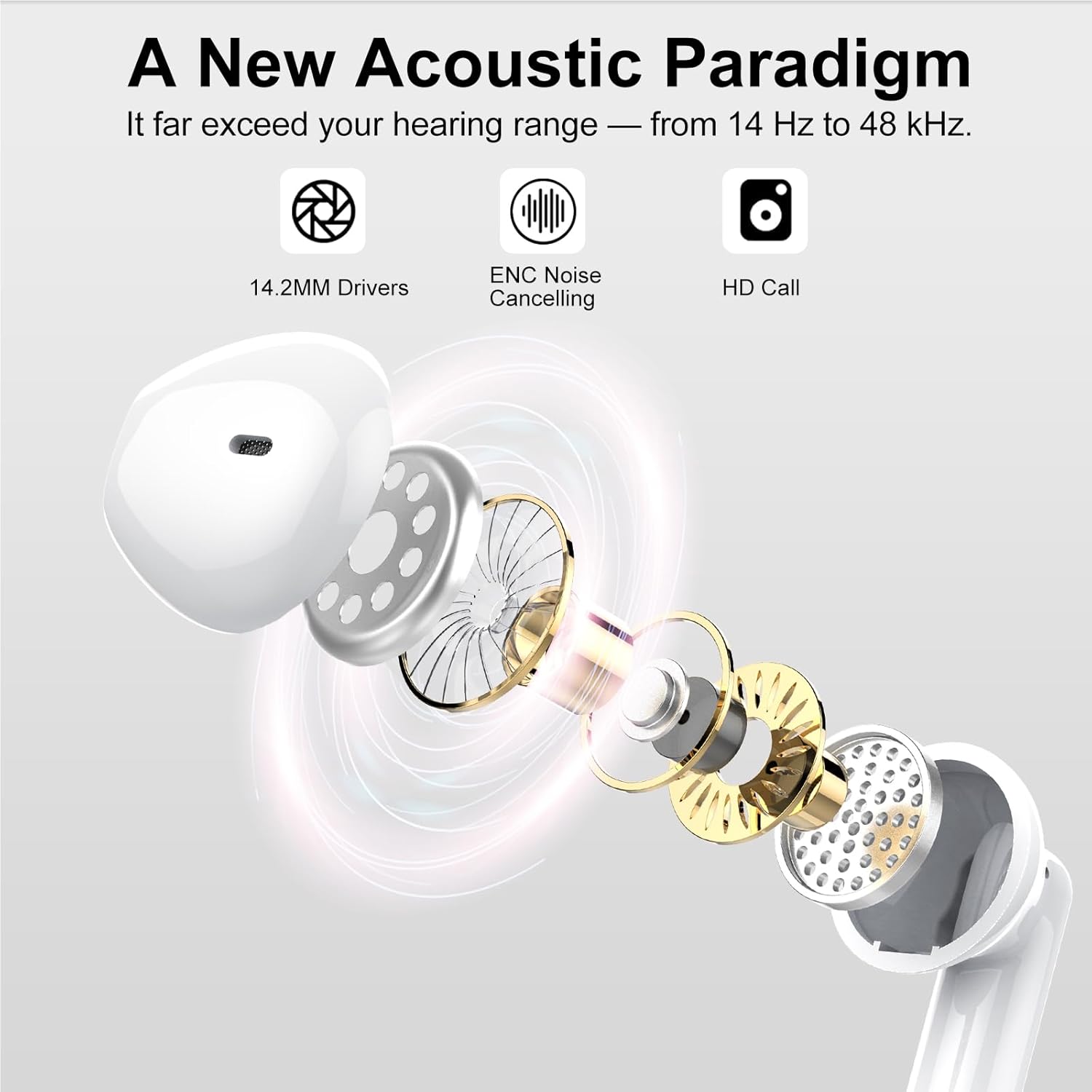
Image: An exploded view diagram illustrating the internal components of the Jesebang BD86 earbud, highlighting the 14.2mm drivers, ENC Noise Cancelling technology, and HD Call capabilities, which contribute to a broad hearing range from 14 Hz to 48 kHz.
Maintenance
Proper maintenance ensures the longevity and optimal performance of your earbuds.
- Cleaning: Regularly clean the earbuds and charging case with a soft, dry, lint-free cloth. Do not use abrasive cleaners or solvents.
- Water Resistance: The earbuds have an IPX7 waterproof rating, meaning they are protected against immersion in water up to 1 meter for 30 minutes. They are resistant to sweat and rain, making them suitable for workouts. However, they are not designed for swimming or showering. Ensure the charging port is dry before charging.
- Storage: When not in use, store the earbuds in their charging case to protect them from dust and damage. Store in a cool, dry place away from extreme temperatures.

Image: The Jesebang BD86 earbuds and charging case shown with water droplets, signifying their IPX7 dust and water resistance, suitable for daily use and protection against splashes.
Troubleshooting
If you encounter issues with your Jesebang BD86 earbuds, please refer to the following common solutions:
- Earbuds not pairing or connecting:
- Ensure both earbuds are charged.
- Turn off Bluetooth on your device and turn it back on.
- Forget "BD86" from your device's Bluetooth list and try pairing again.
- Place both earbuds back into the charging case, close the lid, wait a few seconds, then open the lid to reset.
- Ensure your device is within the 15-meter Bluetooth range.
- Only one earbud working:
- Ensure both earbuds are charged.
- Place both earbuds back into the charging case, close the lid, wait a few seconds, then open the lid. This often re-syncs them.
- Try resetting the earbuds by forgetting them from your device's Bluetooth list and re-pairing.
- Earbuds not charging:
- Ensure the charging cable is securely connected to both the case and the power source.
- Try a different Type-C cable and/or power adapter.
- Clean the charging contacts on both the earbuds and inside the charging case with a dry cotton swab.
- Ensure the charging case itself has power.
- Low volume or poor sound quality:
- Adjust the volume on both your device and the earbuds.
- Clean any earwax or debris from the earbud speaker mesh.
- Ensure the earbuds are properly seated in your ears.
- Try playing audio from a different source or application.
Specifications
| Feature | Detail |
|---|---|
| Model Name | BD86 |
| Connectivity Technology | Wireless (Bluetooth) |
| Bluetooth Version | 5.4 |
| Bluetooth Range | 15 Meters |
| Audio Driver Size | 14.2 mm |
| Noise Control | Passive Noise Cancellation (ENC for Mic) |
| Earbud Battery Life (Single Charge) | 6+ Hours |
| Total Playback Time (with Case) | 30 Hours |
| Charging Case Battery Capacity | 300 mAh |
| Charging Case Charging Time | 1.5 Hours |
| Waterproof Rating | IPX7 |
| Material | Plastic |
| Item Weight | 3.52 ounces |
| Compatible Devices | Cellphones, Laptops, Tablets |
Warranty and Support
For warranty information or technical support, please contact Jesebang customer service through the retailer where you purchased the product or visit the official Jesebang website. Please retain your proof of purchase for warranty claims.
Manufacturer: Jesebang
Date First Available: June 18, 2025
Ask a question about this manual
Ask about setup, troubleshooting, compatibility, parts, safety, or missing instructions. Manuals+ will review the question and use this page’s manual context to help answer it.