
Introduction
The lluvygoez SHEYIN X13 Bone Conduction Headphones offer an open-ear listening experience, allowing you to enjoy audio while remaining aware of your surroundings. Utilizing advanced bone conduction technology, sound is transmitted directly through your cheekbones, bypassing the eardrums. This design is ideal for outdoor activities, sports, and situations where situational awareness is crucial. These headphones feature Bluetooth 5.3 for stable connectivity, magnetic charging for convenience, and an IPX5 waterproof rating for durability in various conditions.

Image: lluvygoez SHEYIN X13 Bone Conduction Headphones, showcasing the open-ear design.
What's in the Box
Upon opening your package, you should find the following items:
- Bone Conduction Headphones (SHEYIN X13)
- Charging Cable
- User Manual
- Earplugs (for use in environments where external sound blocking is desired)
Product Features
- Open-Ear Design: Allows awareness of surroundings for enhanced safety during outdoor activities.
- Bluetooth 5.3 Connectivity: Provides seamless, fast pairing and stable connection up to 33 feet.
- Integrated Microphone: For hands-free calls and voice assistant activation.
- Magnetic Charging: Convenient and secure charging mechanism.
- Long Battery Life: Up to 10 hours of continuous playtime on a single charge.
- IPX5 Water Resistance: Protected against sweat and light rain, suitable for various sports and weather conditions.
- High Sound Quality: Delivers clear and rich audio with minimal distortion.
- Lightweight & Ergonomic: Designed for comfortable, secure fit during extended wear and intense activities.

Image: Open-ear design for safety and communication.

Image: Seamless Bluetooth 5.3 pairing with multiple devices.

Image: 10-hour battery life and magnetic charging feature.

Image: IPX5 waterproof rating for sports and outdoor use.
Setup
1. Charging the Headphones
Before first use, fully charge your headphones. Connect the magnetic charging cable to the charging port on the headphones and plug the USB end into a compatible USB power source (e.g., computer, wall adapter). The LED indicator will show charging status. A full charge takes approximately 2 hours and provides up to 10 hours of playtime.
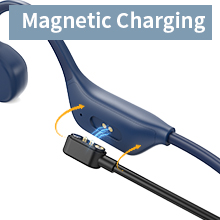
Image: Close-up of the magnetic charging connection.
2. Pairing with a Bluetooth Device
- Ensure the headphones are turned off.
- Press and hold the Power button for approximately 3-5 seconds until the LED indicator flashes red and blue, indicating pairing mode.
- On your device (smartphone, tablet, laptop), enable Bluetooth and search for available devices.
- Select "SHEYIN X13" (or similar name) from the list of devices.
- Once connected, the LED indicator will turn solid blue or flash blue slowly.
The headphones will automatically attempt to reconnect to the last paired device when powered on.
Operating Instructions
The SHEYIN X13 headphones feature intuitive button controls located on the right earpiece.
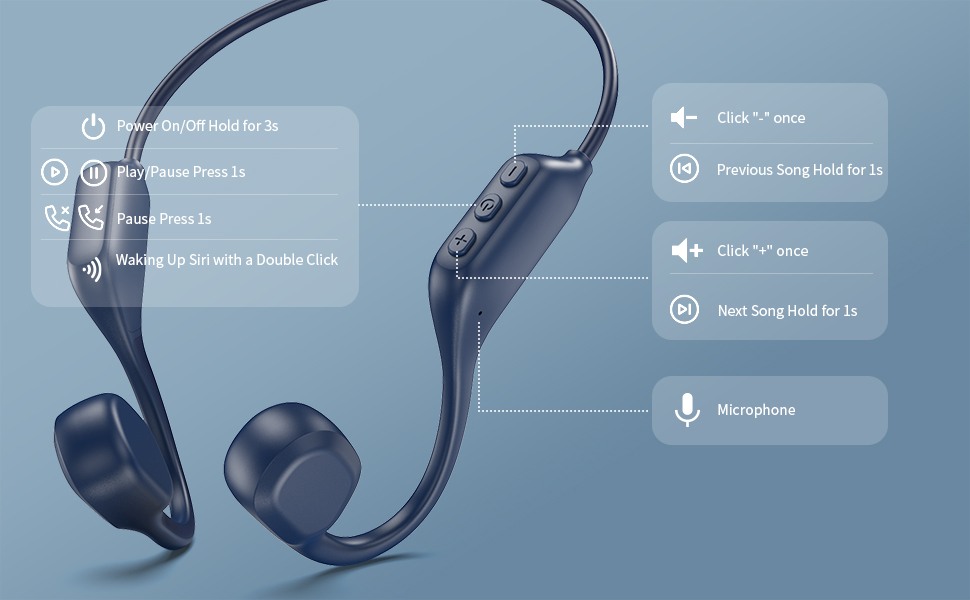
Image: Detailed diagram of the control buttons and their functions.
| Button/Action | Function |
|---|---|
| Power On/Off: Hold for 3 seconds | Powers the headphones on or off. |
| Play/Pause: Press once | Plays or pauses audio playback. |
| Answer/End Call: Press once | Answers an incoming call or ends an active call. |
| Reject Call: Hold for 1 second | Rejects an incoming call. |
| Volume Up (+): Press once | Increases the volume. |
| Volume Down (-): Press once | Decreases the volume. |
| Next Track: Hold (+) for 1 second | Skips to the next audio track. |
| Previous Track: Hold (-) for 1 second | Goes back to the previous audio track. |
| Activate Voice Assistant (Siri/Google Assistant): Double-click Power button | Activates your device's voice assistant. |
Maintenance
- Cleaning: Wipe the headphones with a soft, damp cloth. Avoid using harsh chemicals or abrasive materials.
- Water Resistance: The headphones are IPX5 water-resistant, meaning they can withstand sweat and light splashes. Do not submerge them in water or expose them to heavy rain for extended periods. Ensure the charging port is dry before charging.
- Storage: Store the headphones in a cool, dry place away from direct sunlight and extreme temperatures.
- Battery Care: To prolong battery life, avoid fully discharging the headphones frequently. Charge them regularly, even if not in use for a long time.
Troubleshooting
| Problem | Solution |
|---|---|
| Cannot power on | Ensure the headphones are charged. Connect to the charging cable and allow it to charge for at least 10 minutes before attempting to power on again. |
| Cannot pair with device |
|
| No sound or low volume |
|
| Call quality issues (muffled mic) |
|
Specifications
| Feature | Detail |
|---|---|
| Model Name | SHEYIN X13 |
| Brand | lluvygoez |
| Connectivity Technology | Bluetooth, Wireless |
| Bluetooth Version | 5.3 |
| Bluetooth Range | Up to 33 Feet (10 meters) |
| Audio Driver Type | Bone Conduction Driver |
| Battery Life | Up to 10 Hours (Playtime) |
| Charging Time | Approximately 2 Hours |
| Water Resistance Level | IPX5 (Sweat and splash resistant) |
| Control Method | Push Button |
| Material | Metal |
| Item Weight | 4.2 ounces |
| Product Dimensions | 3.93 x 3.74 x 1.57 inches |
| Ear Placement | Open Ear |
| Included Components | Bone Conduction Headphones, Charging Cable, Earplugs, User Manual |
Official Product Video
Video: An overview of the bone conduction headphones, demonstrating their features and use cases, including unboxing and wearability.
Warranty and Support
For warranty information or technical support, please refer to the contact details provided in the packaging or visit the official lluvygoez website. Keep your purchase receipt as proof of purchase for any warranty claims.