
Jesebang BD86
Jesebang Wireless Earbuds User Manual
Model: BD86
Introduction
Welcome to the user manual for your new Jesebang BD86 Wireless Earbuds. These earbuds feature advanced Bluetooth 5.4 technology, HiFi stereo sound, Environmental Noise Cancellation (ENC) for clear calls, and a long-lasting battery. This manual provides detailed instructions on how to set up, operate, maintain, and troubleshoot your earbuds to ensure optimal performance and enjoyment.
Please read this manual thoroughly before using the product and keep it for future reference.
What's in the Box
Upon opening your Jesebang BD86 Wireless Earbuds package, you should find the following items:
- Bluetooth Earbuds (2 units)
- Charging Case (1 unit)
- Type-C Cable (1 unit)
- User Manual (1 unit)
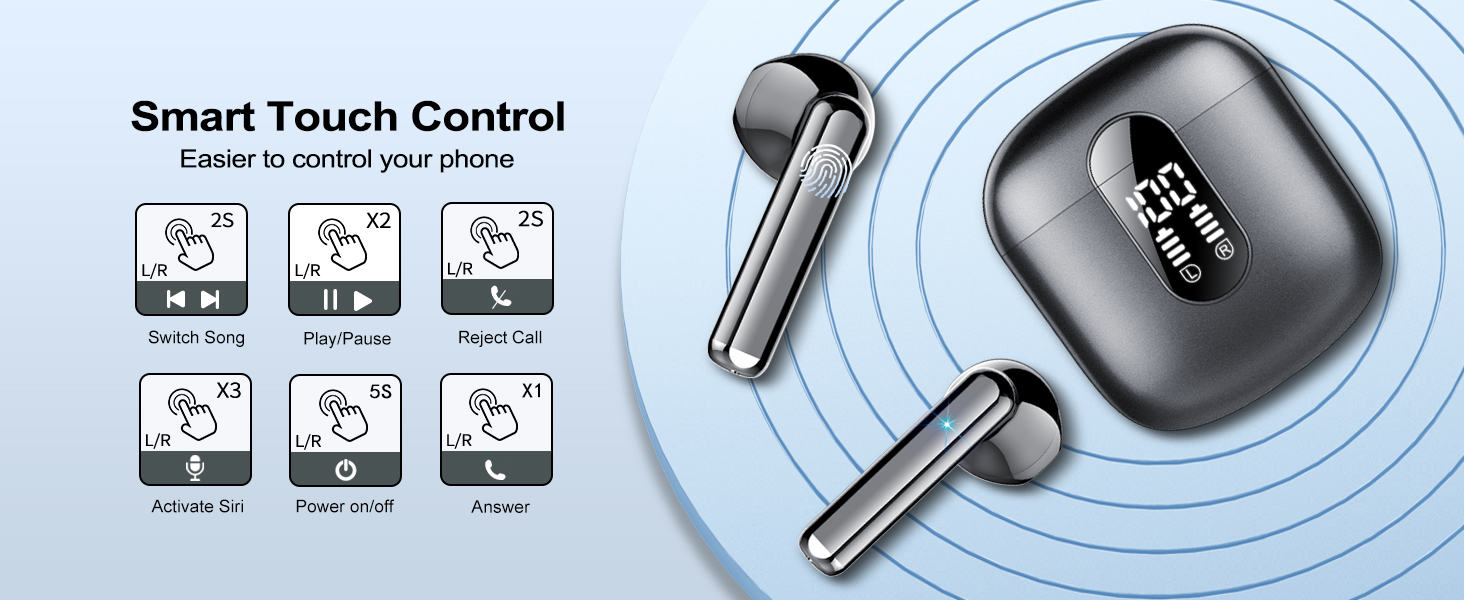
Image: All components included in the Jesebang BD86 Wireless Earbuds package.
Product Overview
Familiarize yourself with the different parts of your Jesebang BD86 Wireless Earbuds and charging case.
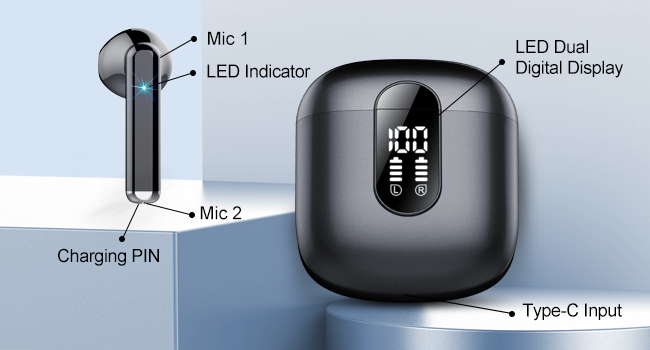
Image: Labeled diagram of the Jesebang BD86 Earbuds and Charging Case components.
- Earbuds: Each earbud features a microphone (Mic 1, Mic 2), an LED indicator, and charging pins.
- Charging Case: Equipped with an LED Dual Digital Display to show battery levels for both earbuds and the case, and a Type-C input port for charging.
Setup
1. Initial Charging
Before first use, it is recommended to fully charge the earbuds and the charging case.
- Connect the provided Type-C cable to the charging port on the case and the other end to a USB power adapter (not included).
- The LED digital display on the charging case will show the charging status. Allow approximately 1.5 hours for the case to fully charge.
- Place the earbuds into the charging case. They will begin charging automatically. The LED indicators on the earbuds will light up, and the case display will show their individual battery levels. Earbuds take approximately 1 hour to fully charge.

Image: Battery life overview for Jesebang BD86 Earbuds.
2. First-Time Pairing
Follow these steps to pair your earbuds with your device:
- Ensure the earbuds are charged and placed inside the charging case.
- Open the charging case. The earbuds will automatically enter pairing mode.
- On your device (smartphone, tablet, laptop), enable Bluetooth.
- Search for available Bluetooth devices. Select "BD86" from the list.
- Once connected, you will hear a confirmation tone, and the LED indicators on the earbuds will turn off or flash slowly.

Image: Bluetooth pairing process with a smartphone.
The earbuds will automatically reconnect to the last paired device when taken out of the case, provided Bluetooth is enabled on the device.
Operating Instructions
Smart Touch Controls
The Jesebang BD86 earbuds feature high-sensitivity touch controls on each earbud. Refer to the diagram and instructions below for various functions:

Image: Smart Touch Control functions for Jesebang BD86 Earbuds.
| Function | Action (L/R Earbud) |
|---|---|
| Play/Pause Music | Tap 2 times |
| Next Song | Tap 2 times (Right Earbud) |
| Previous Song | Tap 2 times (Left Earbud) |
| Answer/End Call | Tap 1 time |
| Reject Call | Tap and hold for 2 seconds |
| Activate Voice Assistant (Siri, Google Assistant) | Tap 3 times |
| Power On/Off | Tap and hold for 5 seconds |
Wearing the Earbuds
The earbuds are designed for an ultra-light and ergonomic fit, ensuring comfort during prolonged use.
- Gently insert each earbud into the corresponding ear canal (L for left, R for right).
- Adjust the earbud slightly to ensure a snug and comfortable fit that seals the ear canal for optimal sound quality and noise isolation.

Image: Jesebang BD86 earbuds highlighting their tiny size and lightweight build for comfortable wear.
Maintenance
Cleaning
- Regularly clean the earbuds, especially the ear tips and charging contacts, with a soft, dry, lint-free cloth.
- Do not use abrasive cleaners, alcohol, or chemical solvents.
- Ensure the charging case and earbuds are dry before placing them back into the case or charging.
Water Resistance (IPX7)
The Jesebang BD86 earbuds have an IPX7 waterproof rating, meaning they are protected against immersion in water up to 1 meter for up to 30 minutes. This makes them suitable for workouts and use in rainy conditions.
- Do not intentionally submerge the earbuds in water for extended periods or beyond the specified depth.
- The charging case is NOT waterproof. Keep the charging case dry.
- If the earbuds get wet, wipe them dry thoroughly before placing them back in the charging case to prevent damage to the charging contacts.

Image: Jesebang BD86 earbuds demonstrating IPX7 water resistance.
Storage
When not in use, store the earbuds in their charging case to protect them and keep them charged. Store in a cool, dry place away from extreme temperatures and direct sunlight.
Troubleshooting
If you encounter any issues with your Jesebang BD86 Wireless Earbuds, please refer to the common problems and solutions below:
| Problem | Possible Solution |
|---|---|
| Earbuds not pairing with device. |
|
| Only one earbud is working. |
|
| Earbuds not charging. |
|
| Poor sound quality or intermittent connection. |
|
Specifications
Detailed technical specifications for the Jesebang BD86 Wireless Earbuds:
| Feature | Detail |
|---|---|
| Model Name | BD86 |
| Connectivity Technology | Wireless (Bluetooth) |
| Bluetooth Version | 5.4 |
| Bluetooth Range | Up to 15 Meters |
| Audio Driver Type | Dynamic Driver |
| Audio Driver Size | 14.2 Millimeters |
| Noise Control | Passive Noise Cancellation (ENC for calls) |
| Earbud Weight (Each) | Approx. 3.4 grams |
| Single Charge Playback Time | Over 6 hours |
| Total Playback Time (with Charging Case) | Up to 30 hours |
| Earbud Charging Time | Approx. 1 hour |
| Charging Case Charging Time | Approx. 1.5 hours |
| Charging Case Battery Capacity | 300 Milliamp Hours |
| Waterproof Rating | IPX7 (Earbuds only) |
| Material | Plastic |
| Compatible Devices | Cellphones, Laptops, Tablets |
| Included Components | Bluetooth Earbuds * 2, Charging Case * 1, Type-C Cable * 1, User Manual |
Warranty and Support
Jesebang products are designed and manufactured to the highest quality standards. For information regarding warranty coverage, technical support, or service inquiries, please refer to the warranty card included in your product packaging or visit the official Jesebang website. Please retain your proof of purchase for warranty claims.
For further assistance, you may contact Jesebang customer support through their official channels.
Related documentsBD86

Ask a question about this manual
Ask about setup, troubleshooting, compatibility, parts, safety, or missing instructions. Manuals+ will review the question and use this page’s manual context to help answer it.