
Introduction
This manual provides essential information for setting up, operating, maintaining, and troubleshooting your Dell 15 Laptop DC15255. Please read this guide thoroughly to ensure optimal performance and longevity of your device.
1. Setup
1.1 Unboxing and Initial Inspection
Carefully remove your Dell 15 Laptop DC15255 and its accessories from the packaging. Verify that all components listed below are present and undamaged:
- Dell 15 Laptop DC15255
- 65 Watt AC Adapter
- Power Cord
- Documentation

The Dell 15 Laptop DC15255, showcasing its 15.6-inch FHD display with multiple applications open, highlighting its multitasking capabilities.
1.2 Connecting the Power Adapter
Connect the power cord to the AC adapter, then plug the AC adapter into the power jack on your laptop. Plug the other end of the power cord into a wall outlet. The battery will begin charging automatically.
1.3 Identifying Ports and Connectors
Familiarize yourself with the various ports on your laptop for connecting external devices.

A detailed side view of the Dell 15 Laptop DC15255, illustrating the placement of its various input/output ports for connecting peripherals.
- USB 3.2 Gen 1 Type-C: For high-speed data transfer and connecting compatible devices.
- USB 3.2 Gen 1 Type-A: Standard USB port for peripherals.
- HDMI 1.4: For connecting to external displays or projectors.
- Power Jack: For connecting the AC adapter.
- Universal Audio Jack: For headphones or headsets.
- USB 2.0: For connecting standard USB devices.
- SD Card Reader: For reading data from SD memory cards.
1.4 Initial Power On and Windows 11 Setup
Press the power button to turn on your laptop. Follow the on-screen instructions to complete the initial setup of Windows 11 Home. This process typically involves selecting your region, connecting to a network, and creating a user account.

The official logo for Windows 11 Home, the operating system pre-installed on the Dell 15 Laptop DC15255.
2. Operating Your Laptop
2.1 Keyboard and Touchpad Usage
Your Dell 15 Laptop features a full-size ergonomic keyboard with a separate numeric keypad for efficient typing and data entry. The integrated touchpad supports multi-touch gestures for navigation.

A detailed view of the Dell 15 Laptop DC15255's full-size ergonomic keyboard with a separate numeric keypad and a spacious touchpad for comfortable input.
2.2 Using the HD Webcam
The built-in HD webcam allows for clear video calls and online meetings. Ensure proper lighting for the best video quality.

The Dell 15 Laptop DC15255 featuring its built-in HD webcam, ideal for clear video conferencing and online communication.
2.3 Ergonomic Design and Thermal Management
The laptop's lifted hinge design provides an ergonomic typing angle, enhancing comfort during extended use. Adaptive thermals intelligently adjust power and cooling to maintain efficient operation, whether on a desk or your lap.

The Dell 15 Laptop DC15255 in use, illustrating how the lifted hinge provides an ergonomic typing angle for enhanced comfort.
2.4 Windows 11 Features
Leverage the modern design and multitasking tools of Windows 11 Home for improved productivity and ease of use.

The Dell 15 Laptop DC15255 running Windows 11, with the Copilot AI assistant visible on the screen, showcasing its integrated features.
3. Maintenance
3.1 General Care
To maintain your laptop's condition, avoid exposing it to extreme temperatures, direct sunlight, or excessive moisture. Clean the screen with a soft, lint-free cloth and a specialized screen cleaner. Use compressed air to clear dust from keyboard keys and vents.

A sleek side view of the Dell 15 Laptop DC15255, emphasizing its thin form factor and modern design.
3.2 Software Updates
Regularly update your Windows 11 operating system and drivers to ensure optimal performance, security, and compatibility. You can check for updates through the Windows Settings menu.
3.3 Battery Care
To prolong battery life, avoid fully discharging the battery frequently. Store the laptop in a cool, dry place when not in use for extended periods.
3.4 Environmental Considerations
The Dell 15 Laptop DC15255 is designed with post-consumer recycled plastic in the palmrest and bottom cover, contributing to environmental sustainability.
4. Troubleshooting
If you encounter issues with your Dell 15 Laptop DC15255, consider the following basic troubleshooting steps before contacting support:
- No Power: Ensure the AC adapter is securely connected to both the laptop and a working power outlet. Try a different outlet.
- Display Issues: If the screen is blank, try adjusting the brightness settings. Connect an external monitor to check if the issue is with the laptop's display or graphics output.
- Connectivity Problems: For Wi-Fi issues, restart your router and the laptop. For Bluetooth devices, ensure they are properly paired and charged.
- Slow Performance: Close unnecessary applications, check for malware, and ensure your operating system is up to date.
For more complex issues, refer to the Dell support website or contact Dell technical support.
5. Specifications
Detailed technical specifications for the Dell 15 Laptop DC15255:
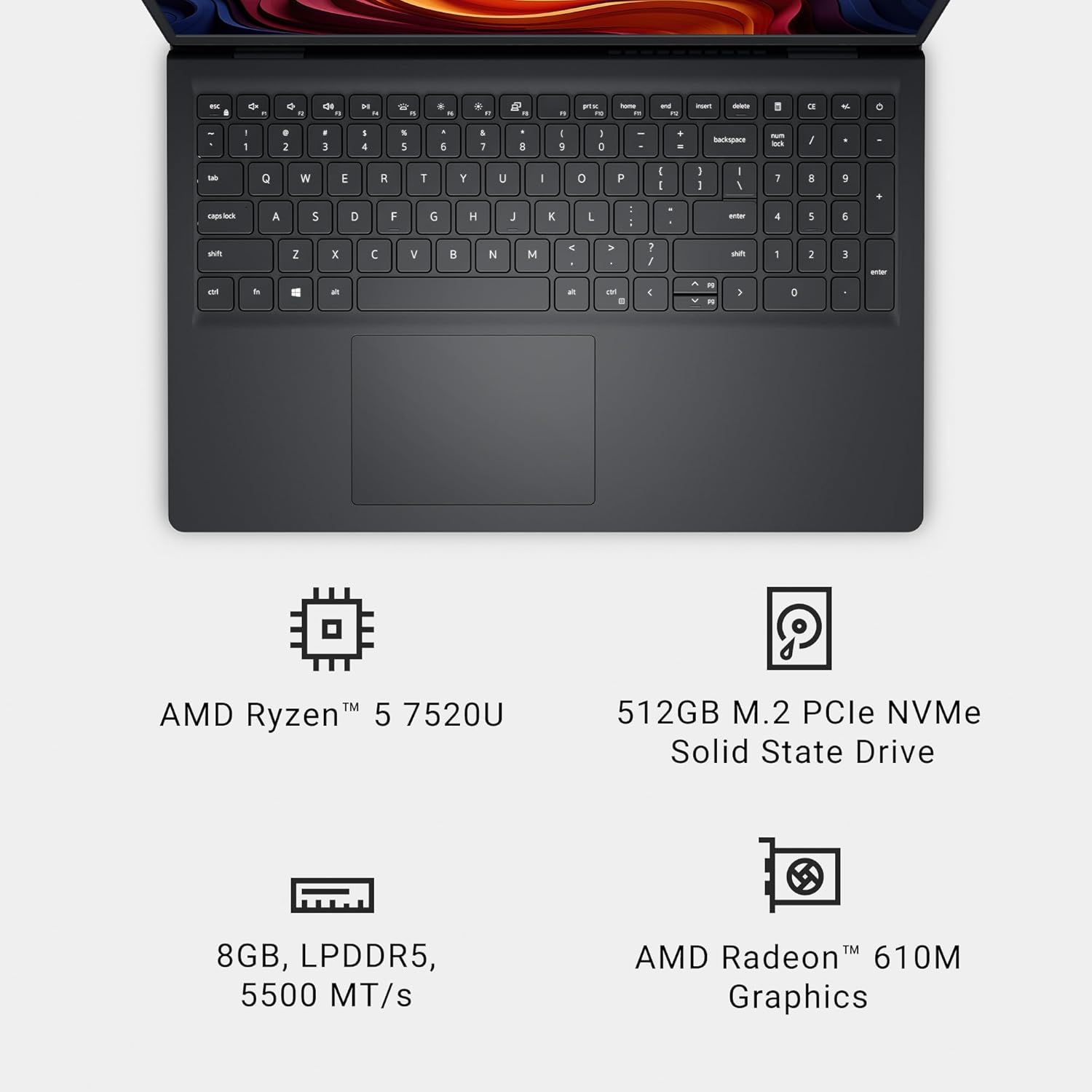
An overview of the Dell 15 Laptop DC15255's internal components, including its AMD Ryzen processor, storage, memory, and integrated graphics.
| Feature | Detail |
|---|---|
| Brand | Dell |
| Model Name | Dell 15 DC15255 Laptop |
| Screen Size | 15.6 Inches |
| Display Resolution | 1920x1080 (FHD) |
| Refresh Rate | 120Hz |
| CPU Model | AMD Ryzen 5-7520U |
| RAM Memory Installed Size | 8 GB LPDDR5 |
| Hard Disk Size | 512 GB SSD |
| Graphics Coprocessor | AMD Radeon 610M |
| Operating System | Windows 11 Home |
| Connectivity Technology | Bluetooth, Wi-Fi |
| Total USB Ports | 3 (USB 3.2 Gen 1 Type-C, USB 3.2 Gen 1 Type-A, USB 2.0) |
| HDMI Ports | 1 |
| Item Weight | 4.2 Pounds |
| Dimensions (L x W x Th) | 9.27"L x 14.11"W x 0.75"Th |
| Battery Energy Content | 41 Watt Hours |
6. Warranty
Your Dell 15 Laptop DC15255 includes a 1-Year Basic Onsite Service after remote diagnosis with Hardware-Only Support. This service provides support when and where you need it, with Dell dispatching a technician to your location if an issue covered by the Limited Hardware Warranty cannot be resolved remotely.

Information regarding Dell's 1-Year Onsite Service, explaining the support process for hardware issues.
Availability of onsite service may vary, and other conditions apply. For complete details, please refer to Dell's official service contracts.
7. Support
For further assistance, Dell offers comprehensive support resources:
- Dell Hardware Support: Access technical assistance for hardware-related issues.
- PC Repairs: Easy repair services available at your home, office, or school.
- SupportAssist: Utilize the pre-installed SupportAssist tool on your PC for automated diagnostics, updates, and proactive issue resolution.

Details on the comprehensive onsite support available for the Dell 15 Laptop DC15255, including hardware assistance and diagnostic tools.
You can find more information and contact options on the official Dell support website.
7.1 Official Product Videos
Watch these official videos for additional insights into your Dell 15 Laptop:
Official video from Dell Technologies showcasing their partnership with McLaren, demonstrating the advanced technology and performance associated with Dell products.
An official overview video of the Dell 15 Laptop, highlighting its design and key features.


