
PARUUNTYS M5
PARUUNTYS M5 Self-Cleaning Litter Box User Manual
Automatic Cat Litter Box for Multiple Cats with App Control and Safety Protection
Introduction
Thank you for choosing the PARUUNTYS M5 Self-Cleaning Litter Box. This automatic litter box is designed to simplify cat care by providing an open-top, self-cleaning solution with advanced safety features and smart app control. It is suitable for multiple cats and aims to maintain a clean and odor-free environment in your home.

Image: The PARUUNTYS M5 Self-Cleaning Litter Box, showcasing its design and the accompanying mobile application interface.
Product Features
- Open-Top Design: Features a spacious 16.5”×16.5” entrance for comfortable cat access and exit, promoting a welcoming environment.
- Dual Safety Technology: Equipped with 4 weight-activated sensors and 3 high-precision infrared detectors to pause operation instantly upon detecting a cat's presence, ensuring safety.
- Smart APP Control: Allows remote management of cleaning routines, scheduling waste disposal, and tracking litter usage trends via a mobile application (requires 2.4G WiFi).
- 10.5L Sealed Waste Bin: A large capacity, odor-locking waste compartment minimizes the frequency of emptying and helps maintain a fresh home environment.
- Leak-Proof & Reusable Design: Reinforced edges and a removable, washable liner prevent spills and facilitate easy cleaning and maintenance.
- Litter Compatibility: Optimized for bentonite, mineral, and mixed litters. Not suitable for tofu or crystal litter.
- Quiet Operation: Designed to operate quietly, ensuring minimal disturbance to your household.

Image: Visual representation of the litter box's key features, including open-top design, large capacity, self-cleaning, safety, weight measurement, and app control.
Setup Guide
- Unpack the Unit: Carefully remove all components from the packaging. Ensure all parts are present and undamaged.
- Placement: Place the litter box on a flat, stable surface in a location accessible to your cat. Ensure it is near a power outlet and within range of a 2.4G WiFi network for app connectivity.
- Install Waste Bag: Open the waste bin drawer located at the bottom front of the unit. Line the waste bin with a compatible litter bag.
- Add Litter: Pour clumping cat litter (bentonite, mineral, or mixed litters are recommended) into the main drum. Do not overfill; ensure the litter level is below the MAX line indicated inside the drum.

Image: Illustration of compatible litter types for the PARUUNTYS M5, including bentonite, mixed, and mineral litters.
- Power Connection: Connect the power adapter to the litter box and plug it into a wall outlet. The unit will power on.
- App Download and Connection:
- Download the companion app (e.g., Tuya Smart or Smart Life app) from your device's app store.
- Register or log in to your account.
- Follow the in-app instructions to add the PARUUNTYS M5 litter box. Ensure your phone is connected to a 2.4G WiFi network during the pairing process.
- Press and hold the Wi-Fi button on the litter box for 3 seconds until you hear a "beep" sound, indicating it's ready to connect.

Image: A user interacting with the mobile application to control the PARUUNTYS M5 litter box.
Operating Instructions
Automatic Cleaning
The PARUUNTYS M5 is designed to automatically clean after your cat uses it. The built-in sensors detect when your cat has exited the litter box and initiate a cleaning cycle after a set delay (configurable via the app). The internal mechanism sifts the litter, depositing waste into the sealed waste bin below.
Manual Control
You can manually control the litter box using the buttons on the unit or through the mobile app.
- On-Unit Buttons:
- Wi-Fi Button: Press and hold for 3 seconds to enter pairing mode.
- Empty Button: Press and hold for 3 seconds to initiate a full emptying cycle of the litter.
- Clean Button: Press for 1 second to start a cleaning cycle.
- App Control: The mobile app provides comprehensive control:
- Activate auto-cleaning or manual cleaning cycles.
- Schedule specific cleaning times.
- Monitor litter usage trends and cat weight.
- Receive alerts for a full waste bin or other operational statuses.
Safety Features
The PARUUNTYS M5 prioritizes your cat's safety with its dual sensor system. If a cat approaches or enters the unit during a cleaning cycle, the system will immediately pause operation to prevent any injury. Cleaning will resume once the cat has left the vicinity.

Image: The PARUUNTYS M5 litter box highlighting its multiple security protection sensors, including infrared and weight sensors, designed to detect a cat's activity.
Maintenance
Emptying the Waste Bin
The 10.5L sealed waste bin should be emptied regularly, depending on the number of cats and their usage. The app will notify you when the bin is full. To empty:
- Ensure the unit is not in a cleaning cycle.
- Pull out the waste bin drawer from the front of the unit.
- Tie off the used litter bag and dispose of it.
- Place a new litter bag in the waste bin and slide the drawer back into place.
Cleaning the Unit
Regular cleaning ensures optimal performance and hygiene.
- Drum Cleaning: The internal drum can be wiped down with a damp cloth and mild, pet-safe detergent. Ensure it is completely dry before reassembly.
- Washable Liner: The included liner is washable for easy cleaning and reuse. Remove it from the drum, wash with water and mild soap, rinse thoroughly, and air dry before placing it back.
- Exterior Cleaning: Wipe the exterior of the unit with a soft, damp cloth. Avoid using abrasive cleaners or excessive water.
Troubleshooting
| Problem | Possible Cause | Solution |
|---|---|---|
| Unit not powering on. | Power cable not connected; power outlet issue. | Check power cable connection; try a different outlet. |
| Cleaning cycle not starting. | Cat still detected; waste bin full; litter level too high. | Ensure cat is clear of sensors; empty waste bin; adjust litter level. |
| App not connecting to the unit. | Incorrect WiFi (not 2.4G); unit not in pairing mode; network interference. | Verify 2.4G WiFi; put unit in pairing mode (hold Wi-Fi button); restart router. |
| Odor persists. | Waste bin full; unit needs cleaning; poor quality litter. | Empty waste bin more frequently; clean the unit thoroughly; consider a different litter brand. |
| Litter not sifting properly. | Incorrect litter type; litter too wet/clumpy; mechanism obstruction. | Use recommended litter types; ensure litter is dry; check for obstructions in the sifting mechanism. |
Specifications
| Feature | Detail |
|---|---|
| Model Number | M5 |
| Brand | PARUUNTYS |
| Dimensions (L x W x H) | 21.65" x 20.47" x 21.1" |
| Entrance Dimensions | 16.5" x 16.5" (approx.) |
| Waste Bin Capacity | 10.5 Liters |
| Litter Box Type | Automated Self-Cleaning |
| Pet Type | Cat |
| Connectivity | 2.4G WiFi (for App Control) |
| Safety Features | 4 Weight Sensors, 3 Infrared Detectors |
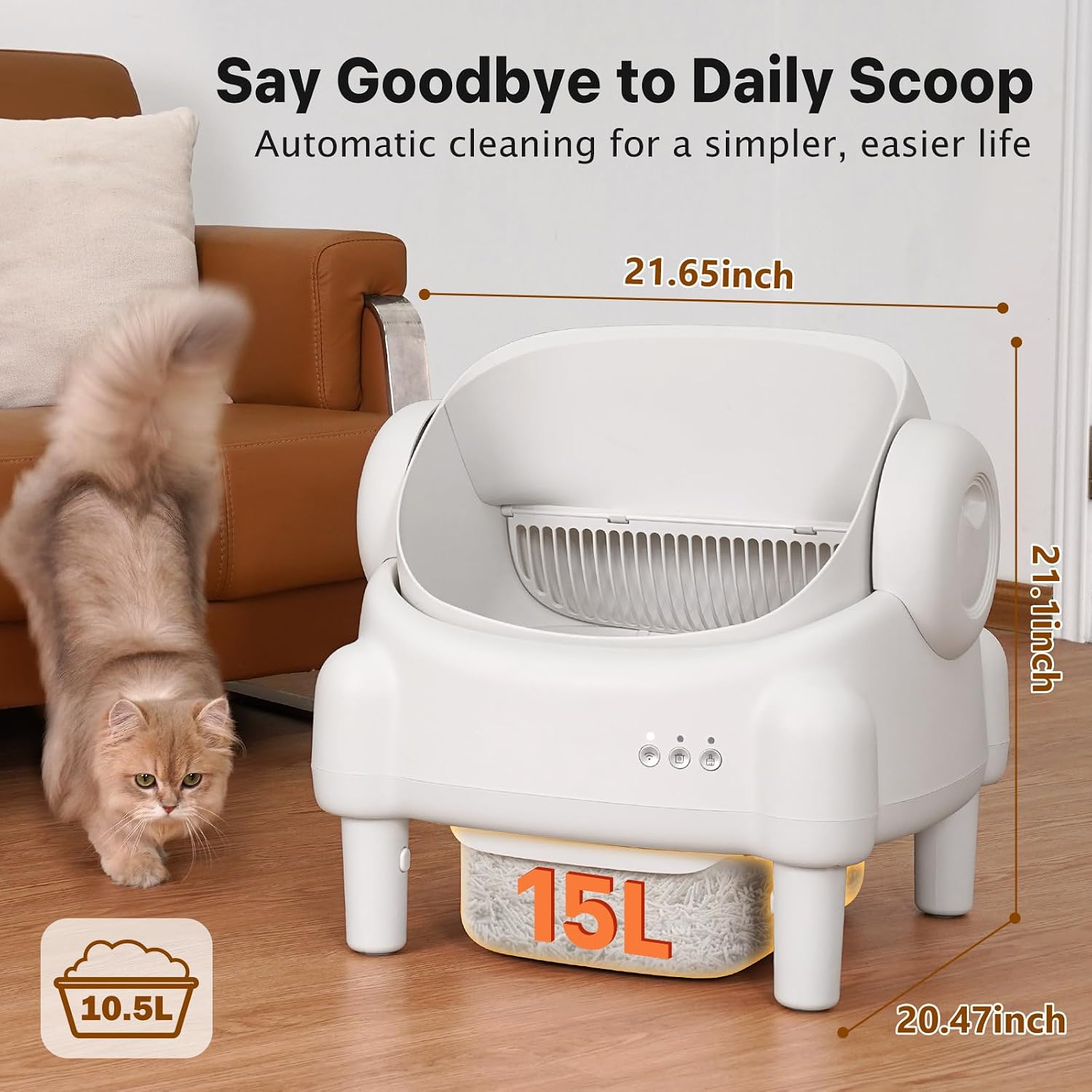
Image: The PARUUNTYS M5 litter box with its key dimensions (length, width, height) and waste bin capacity highlighted.
Warranty and Support
For warranty information, technical support, or any questions regarding your PARUUNTYS M5 Self-Cleaning Litter Box, please contact PARUUNTYS customer service. Refer to the product packaging or the official PARUUNTYS website for contact details.
Related documentsM5


Ask a question about this manual
Ask about setup, troubleshooting, compatibility, parts, safety, or missing instructions. Manuals+ will review the question and use this page’s manual context to help answer it.