
TesPower 14304
TesPower MJx 14304 Brushless RC Car Instruction Manual
Model: 14304
Introduction
This manual provides essential information for the safe and efficient operation, maintenance, and care of your TesPower MJx 14304 Brushless RC Car. Please read this manual thoroughly before operating the vehicle.

Image: The TesPower MJx 14304 Brushless RC Car, accompanied by its remote control, a battery, the brushless motor, electronic speed controller (ESC), and two distinct sets of tires for varied terrain.
Safety Information
- Recommended age for use: 15 years and up.
- Always operate the RC car in open areas, away from people, pets, and obstacles.
- Do not operate near water or in wet conditions to prevent electrical damage.
- Ensure all connections are secure before operation.
- Keep fingers and loose clothing away from moving parts.
- Always turn off the RC car and remote control when not in use.
Setup
Unboxing and Initial Inspection
Carefully remove all components from the packaging. Inspect the RC car and accessories for any signs of damage. Refer to the packing list to ensure all items are present.
Video: A seller-provided video demonstrating the unboxing process of a similar RC car, showing how components are packaged.
Battery Installation (Remote Control)
- Locate the battery compartment on the remote control.
- Insert 2 AA batteries, ensuring correct polarity.
- Close the battery compartment cover securely.
Battery Installation (RC Car)
- Remove the car body shell to access the battery compartment.
- Connect the 7.4V 2000mAh 15C Li-ion battery to the car's ESC connector. Ensure a firm connection.
- Secure the battery within its compartment using the provided strap.
- Reattach the car body shell.

Image: The internal chassis of the RC car, highlighting the placement of the 7.4V 2000mAh battery, secured by a strap, and protected by a dust cover.
Operating Instructions
Remote Control Overview
The remote control features a steering wheel for direction, a trigger for throttle/brake, and various buttons for trim adjustments, lights, and gyroscope control.
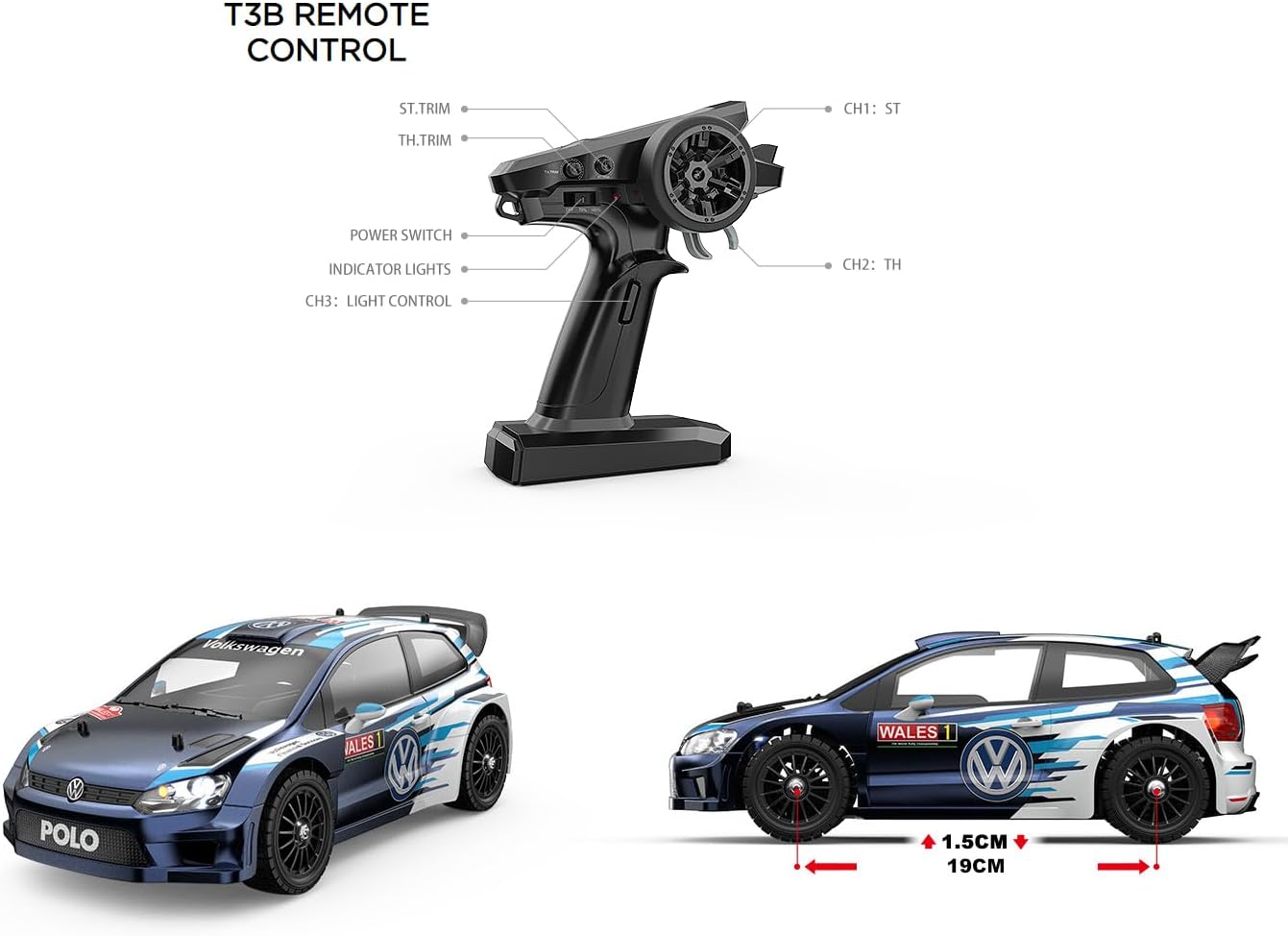
Image: A detailed diagram of the T3B remote control, illustrating the functions of its various buttons and controls, including steering trim, throttle trim, power switch, and channel assignments.
Video: A seller-provided video demonstrating how to use the remote control transmitter, including battery installation, pairing, and basic control functions.
Powering On and Pairing
- Turn on the remote control first using its power switch.
- Then, turn on the RC car using the power button on the chassis.
- The remote and car should automatically pair. If not, refer to the binding procedure in the full manual.
Driving Controls
- Steering: Use the steering wheel on the remote control to turn the car left or right.
- Throttle: Pull the trigger on the remote control to accelerate forward. Push the trigger forward to brake or reverse.
- Speed Settings: The remote control may offer multiple speed settings (e.g., high, medium, low) for different skill levels or environments. Adjust as needed.
Lights and Gyroscope Control
- Headlights/Taillights: Use the designated light control button (CH3) on the remote to toggle the lights.
- Gyroscope: The car is equipped with a gyroscope for enhanced stability. Activate or deactivate it via the remote control's gyroscope switch (if available).

Image: The RC car demonstrating its full vehicle linkage light set, with both headlights and taillights actively illuminated.
Maintenance
Cleaning
After each use, especially in dusty or dirty conditions, clean the RC car. Use a soft brush or compressed air to remove dirt and debris from the chassis, wheels, and moving parts. Avoid using water directly on electronic components.
Battery Care and Charging
- Always use the provided USB charging cable for the 7.4V 2000mAh Li-ion battery.
- Charging time is approximately 240 minutes.
- Do not overcharge or completely discharge the battery.
- Store batteries in a cool, dry place away from direct sunlight.
General Inspection
Regularly check for loose screws, damaged parts, or worn tires. Replace any damaged components promptly to maintain optimal performance and safety.

Image: The robust metal chassis of the RC car, showcasing its high-performance components including the brushless motor, ESC, gyroscope, and digital servo.

Image: An illustration detailing the internal components of the RC car's drivetrain, featuring metal gears, a sealed metal differential, metal oil-filled shocks, and various other metal parts for durability.
Troubleshooting
- Car not responding: Check battery levels in both the car and remote. Ensure proper pairing.
- Reduced speed/power: Battery may be low or damaged. Ensure the speed setting on the remote is not set to low.
- Steering issues: Check steering trim settings on the remote. Inspect steering servo for damage or obstruction.
- Overheating: Allow the motor and ESC to cool down after extended use. Avoid continuous high-speed operation without breaks.
Specifications
| Feature | Detail |
|---|---|
| Product Model | 14304 |
| Maximum Speed | 42km/h (2S battery), 55km/h (3S battery, not included) |
| Remote Control Distance | ≥ 120 meters |
| Full Speed Use Time | ≥ 13 minutes |
| Charging Method | USB charging cable |
| Product Size | 320*153*115 mm (12.6 x 6 x 4.5 inches) |
| Wheelbase | 192 mm |
| Track | 125 mm |
| Tire Diameter | 58 mm |
| Vehicle Weight | 1105g (excluding battery) / 2.3 pounds |
| Motor Specification | 2845 3700KV brushless motor |
| Motor Heat Dissipation | Aluminum heat sink fan |
| ESC | 45A independent ESC |
| Servo Specification | 17g Digital Servo (2.1KG) |
| Remote Control | 2.4G |
| Remote Control Battery | AA*2 |
| Battery Specification | 7.4V 2000mAh 15C |
| Charging Time | 240 minutes |
| Battery Weight | 98.5g |
Warranty and Support
For any issues or inquiries regarding your TesPower MJx 14304 Brushless RC Car, please refer to the contact information provided with your purchase or visit the official TesPower store on Amazon.
Ask a question about this manual
Ask about setup, troubleshooting, compatibility, parts, safety, or missing instructions. Manuals+ will review the question and use this page’s manual context to help answer it.