
1. Introduction
Thank you for choosing the KSIPZE Outdoor LED Strip Lights, Model ST5705. This product is designed to provide versatile and vibrant lighting for both indoor and outdoor environments. Featuring IP68 waterproofing, RGB color options, Bluetooth app control, a physical button controller, music synchronization, and a timer function, these LED strip lights are ideal for enhancing the ambiance of your balcony, roof, garden, or pool area. This manual provides essential information for safe installation, operation, and maintenance of your LED strip lights.
2. What's in the Box
Please verify that all components are present in the package:
- Waterproof LED Strip Lights (16.5ft)
- Button Controller
- Power Adapter
- User Manual
3. Safety Information
Read all safety instructions before installation and use. Failure to follow these instructions may result in electric shock, fire, or other hazards.
- Power Source: Use only the provided power adapter. Do not connect the LED strip directly to mains voltage without the adapter.
- Water Resistance: The LED strip lights are IP68 waterproof. However, the power adapter and controller are not waterproof and must be protected from water exposure.
- Installation: Ensure the installation surface is clean, dry, and smooth for proper adhesive adhesion. Avoid installing near heat sources or in areas with excessive vibration.
- Cutting: Do not cut the LED strip lights unless specifically indicated by designated cutting marks. Cutting at other points will damage the strip and void the warranty.
- Children: Keep the product and its components out of reach of children.
- Maintenance: Disconnect power before cleaning or performing any maintenance.
4. Setup
Follow these steps to set up your KSIPZE Outdoor LED Strip Lights:
- Prepare the Surface: Clean the desired installation surface thoroughly. Ensure it is dry and free of dust, oil, or debris.
- Plan Placement: Unroll the LED strip and plan its route. The strip is flexible and can be bent around corners. Ensure the power adapter and controller will be in a dry, protected location.
- Connect Components: Connect the LED strip to the button controller, and then connect the power adapter to the button controller. Ensure all connections are secure.
- Apply the Strip: Peel off the protective backing from the adhesive tape on the back of the LED strip. Carefully press the strip onto the prepared surface, applying firm pressure along its entire length to ensure good adhesion.
- Power On: Plug the power adapter into a suitable electrical outlet. The lights should turn on or be ready for control.

Image: Example installation of KSIPZE Outdoor LED Strip Lights on a house and around a pool.

Image: KSIPZE LED strip lights enhancing the exterior of a home.
5. Operating Instructions
Your KSIPZE LED Strip Lights can be controlled via a physical button controller or a smart Bluetooth application.
5.1. Button Controller
The included button controller provides direct access to basic functions:
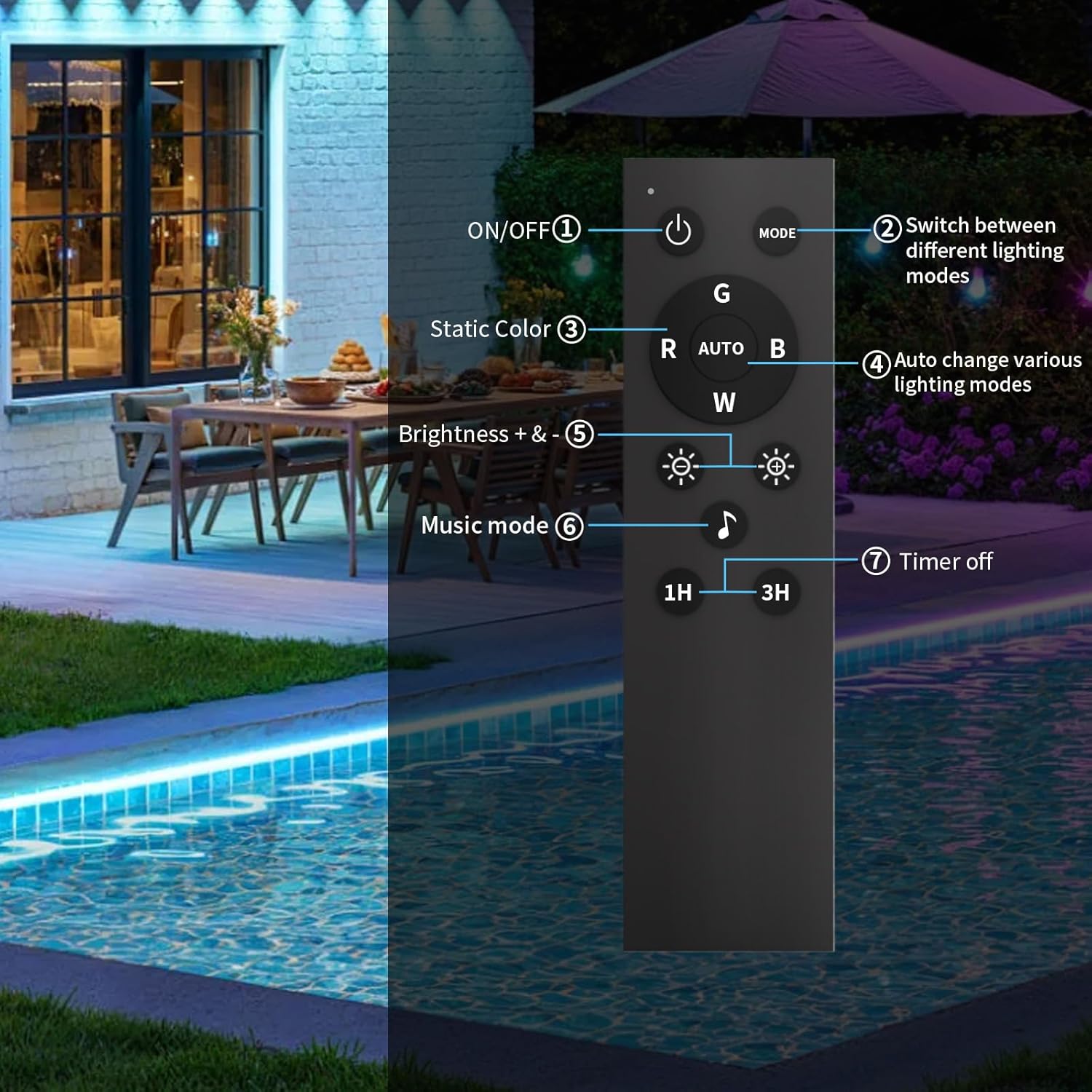
Image: Functions of the physical button controller.
- ON/OFF Button: Press to turn the lights on or off.
- MODE Button: Cycles through different lighting effects and modes.
- Static Color Buttons (R, G, B, W): Selects Red, Green, Blue, or White static colors.
- Brightness Buttons (+/-): Adjusts the brightness level of the lights.
- Music Mode Button: Activates the music synchronization feature.
- Timer Off Buttons (1H, 3H): Sets the lights to automatically turn off after 1 hour or 3 hours.
5.2. Smart App Control (Bluetooth)
For advanced control and customization, download the dedicated smart app (refer to the packaging or included QR code for app download instructions). Ensure Bluetooth is enabled on your smartphone.

Image: Dual control options: Smart App and Button Controller.
The app allows you to:
- Adjust Colors: Choose from 16 million colors using a color wheel or preset options.
- Brightness Control: Precisely adjust the light intensity.
- Style/Modes: Select from various dynamic lighting effects and scenes.
- DIY Mode: Create and save your own custom lighting effects.
- Group Management: Control multiple KSIPZE LED strip lights simultaneously.

Image: Overview of smart app features including Adjust, Style, DIY, Music, and Timing.
5.3. Music Sync Mode
The built-in microphone detects ambient sound and music, allowing the lights to change color and brightness in rhythm with the audio. Activate this feature via the button controller or the smart app.

Image: Music Sync Mode in action, with lights responding to audio rhythms.
5.4. Timer Function
Set schedules for the lights to automatically turn on or off at specific times using the smart app. This feature helps save energy and provides convenience.

Image: App interface for setting the timer function.
6. Maintenance
Proper maintenance ensures the longevity and optimal performance of your LED strip lights.
- Cleaning: Disconnect power before cleaning. Use a soft, dry cloth to wipe the LED strip. For stubborn dirt, a slightly damp cloth can be used, ensuring no water enters the controller or adapter.
- Connection Check: Periodically inspect all connections (strip to controller, controller to adapter) to ensure they are secure and free from corrosion or damage.
- Water Protection: While the LED strip is IP68 waterproof, always ensure the power adapter and controller remain in a dry, protected area, away from direct water exposure.
- Storage: If storing the lights for an extended period, ensure they are clean, dry, and stored in a cool, dry place.

Image: IP68 waterproof feature of the LED strip lights.
7. Troubleshooting
If you encounter issues with your LED strip lights, refer to the following common problems and solutions:
| Problem | Possible Cause | Solution |
|---|---|---|
| Lights do not turn on. | No power, loose connection, faulty adapter. | Check power outlet. Ensure all connections are secure. Test with another adapter if available. |
| App cannot connect to lights. | Bluetooth off, lights out of range, app issue. | Ensure Bluetooth is enabled on your device. Move closer to the lights. Restart the app or your phone. |
| Button controller not responding. | Controller malfunction, interference. | Ensure the controller is properly connected. Try controlling via the app to isolate the issue. |
| Lights are dim or flickering. | Low power, damaged strip, incorrect setting. | Check power supply. Adjust brightness settings in the app or with the controller. Inspect the strip for physical damage. |
8. Specifications
- Model Number: ST5705
- Brand: KSIPZE
- Length: 16.5 Feet
- Color: Multicolor (RGB)
- Indoor/Outdoor Usage: Indoor, Outdoor
- Special Features: Adjustable, Color Changing, Dimmable, Timer, Waterproof, Music Sync
- Light Source Type: LED
- Power Source: Corded Electric
- Controller Type: App Control, Button Controller
- Voltage: 24 Volts
- Material: Brass, Silicone
- Ingress Protection Code Rating: IP68
- Smart Home Compatibility: Smart Home Compatible
- Item Weight: 13.6 ounces
9. Product Video
Video: An official product video demonstrating the KSIPZE Outdoor LED Strip Lights, highlighting their waterproof features and various lighting effects in an outdoor setting.
10. Warranty
KSIPZE products are covered by a standard manufacturer's warranty. Please refer to the product packaging or contact customer support for specific warranty terms and conditions. The warranty typically covers defects in materials and workmanship under normal use.
11. Support
For further assistance, technical support, or warranty claims, please contact KSIPZE customer service through the following channels:
- Email: Refer to your product packaging or the official KSIPZE website for contact details.
- Website: Visit the official KSIPZE website for FAQs and support resources.
Please have your model number (ST5705) and purchase information ready when contacting support.