
SOFTSEA x02
SOFTSEA Twin Size Daybed with USB Ports, Hydraulic Lift Storage - Instruction Manual
Model: x02
Introduction
Thank you for choosing the SOFTSEA Twin Size Daybed. This manual provides essential information for the safe assembly, operation, and maintenance of your new daybed. Please read all instructions carefully before beginning assembly and retain this manual for future reference.
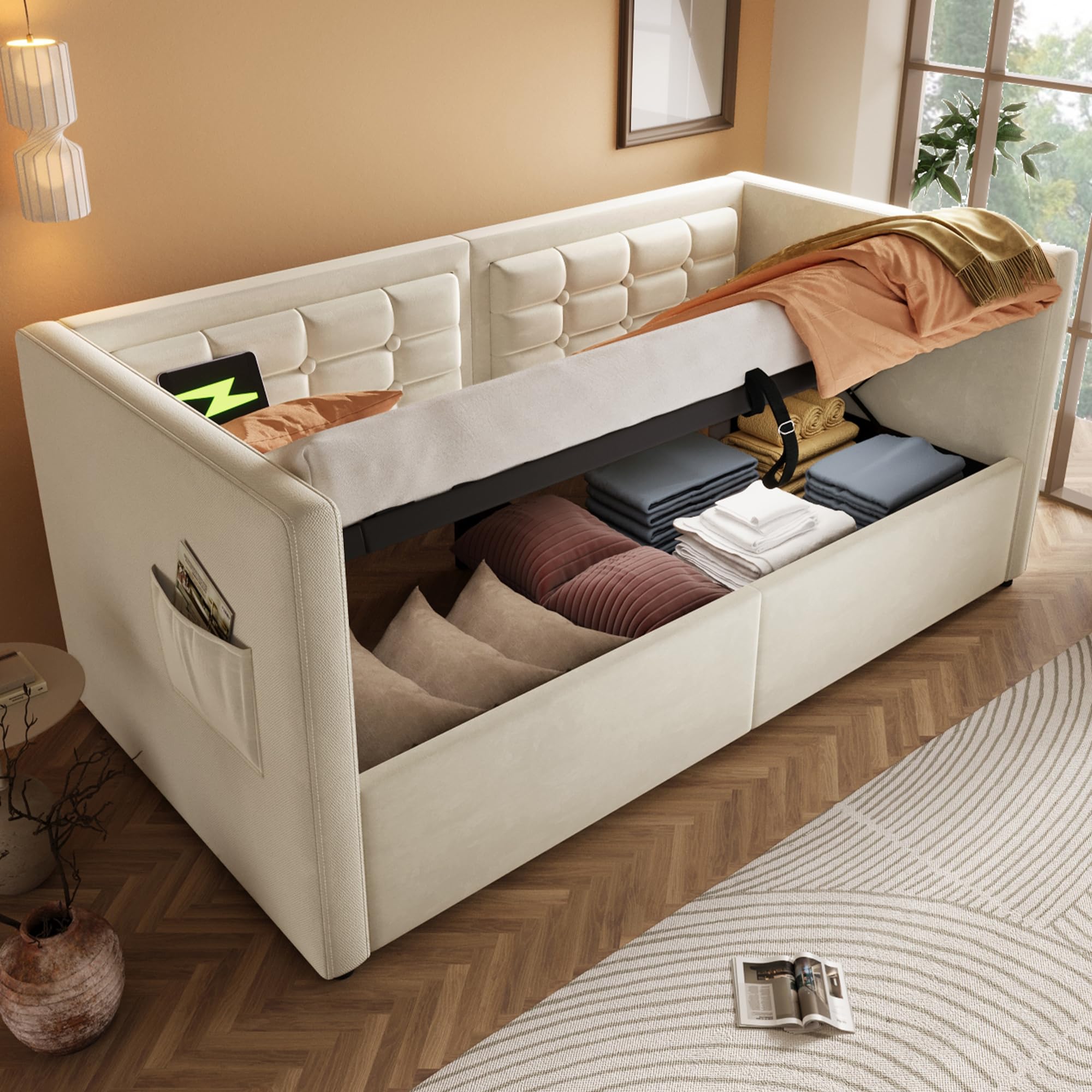
Image: The SOFTSEA Twin Size Daybed, showcasing its upholstered design and overall appearance in a bedroom environment.
Safety Information
- Always assemble the daybed on a soft, clean surface to prevent damage.
- Ensure all parts are securely fastened before use. Periodically check and tighten all connections.
- Do not exceed the maximum weight capacity of 350 LBS.
- Keep small parts away from children during assembly to avoid choking hazards.
- Use only the recommended mattress thickness of 8-10 inches.
- Exercise caution when operating the hydraulic lift mechanism to prevent injury. Keep hands clear of moving parts.
Package Contents
Before assembly, verify that all components listed below are present. If any parts are missing or damaged, please contact customer support.
- Upholstered Headboard and Footboard sections
- Side Rails
- Bed Slats and Support Legs
- Hydraulic Lift Mechanism components
- USB Charging Port assembly
- Hardware Pack (screws, bolts, washers, Allen wrench)
- Instruction Manual
Setup and Assembly
Assembly requires two people. Please follow these steps carefully.
Step 1: Prepare Components
Unpack all components and lay them out on a soft, clean surface. Identify each part using the provided parts list in your separate assembly guide.

Image: An overhead view of the daybed frame, showing the wooden slats and the hydraulic lift components before mattress installation.
Step 2: Assemble Frame
Attach the side rails to the headboard and footboard using the provided hardware. Ensure all bolts are finger-tightened initially. Once the main frame is stable, fully tighten all connections with the Allen wrench.

Image: A side view of the daybed frame, illustrating the internal structure, slat supports, and an integrated storage pocket.
Step 3: Install Slats and Hydraulic Mechanism
Place the bed slats onto the support beams. Secure them according to the separate assembly guide. Install the hydraulic lift mechanism as instructed, ensuring it is properly aligned and secured to the frame. The U-shaped rod and embedded structure are designed to prevent mattress sliding.
Step 4: Connect USB Charging Station
Locate the round USB & Type-C charging station on the left side of the daybed. Connect the power cable to a suitable power outlet. Ensure the connection is secure.
Operating Instructions
Using the Hydraulic Lift Storage
The daybed features a hydraulic lift mechanism for convenient under-bed storage access. To open, gently pull the fabric loop or handle located at the foot of the bed upwards. The hydraulic system will assist in lifting the mattress platform. To close, push the platform down firmly until it locks into place. Ensure no objects obstruct the mechanism when closing.

Image: The daybed with the mattress platform lifted, showcasing the spacious storage compartments beneath.
Using the USB Charging Ports and Storage Pockets
The integrated USB and Type-C ports allow you to charge electronic devices directly from the daybed. Simply plug your device's charging cable into the appropriate port. The side storage pockets are designed to hold small items like phones, tablets, or books, keeping them within easy reach and the area tidy.

Image: A close-up view of the integrated USB and Type-C charging ports, demonstrating their use with various electronic devices.
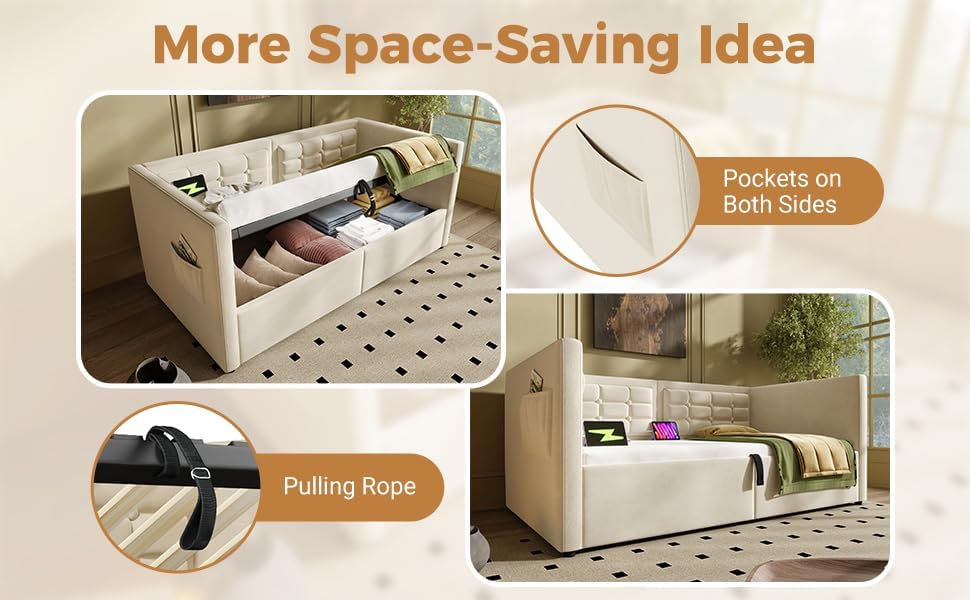
Image: The daybed highlighting the convenient side storage pockets and the pulling rope used to operate the hydraulic lift mechanism.
Maintenance
- Cleaning: For the upholstered surfaces, use a soft, damp cloth and a mild fabric cleaner. Test the cleaner on an inconspicuous area first. Avoid harsh chemicals.
- Hardware Check: Periodically (every 3-6 months) check all bolts and screws to ensure they are tight. Loose connections can affect the stability and safety of the daybed.
- Hydraulic Mechanism: The hydraulic system is designed for long-term use and generally requires no special maintenance. Keep the mechanism free from dust and debris. Do not apply lubricants unless specifically instructed by customer support.
- USB Ports: Keep the USB ports clean and free of dust. Avoid inserting foreign objects into the ports.
Troubleshooting
| Problem | Possible Cause | Solution |
|---|---|---|
| Daybed feels unstable or wobbly. | Loose hardware connections. | Check and tighten all bolts and screws. Ensure the daybed is on a level surface. |
| Hydraulic lift is difficult to open or close. | Mechanism obstruction or uneven weight distribution. | Ensure no items are blocking the mechanism. Distribute mattress weight evenly. If the issue persists, contact customer support. |
| USB ports are not charging devices. | Power cable disconnected or faulty device cable. | Verify the daybed's power cable is securely plugged into a working outlet. Try a different charging cable or device to rule out a device-specific issue. |
| Mattress slides on the frame. | Incorrect mattress size or embedded structure not properly engaged. | Ensure your mattress is a standard Twin size (75"L x 38"W). Verify the U-shaped rod and embedded structure are correctly installed as per assembly instructions. |
Specifications
- Model: x02
- Overall Dimensions (L x W x H): 80.51" x 44.88" x 29.72"
- Bed Inner Space: Twin
- Recommended Mattress Thickness: 8-10 inches
- Weight Capacity: 350 LBS
- Overall Product Weight: 98.33 LBS
- Color: Beige
- Material: Pine Wood + MDF + Plywood, Velvet Upholstery
- Assembly Level: Full Assembly Needed
- USB Ports: 1x USB-A (5V 2A), 1x USB-C (5V 2A)

Image: A detailed diagram illustrating the dimensions of the SOFTSEA Twin Size Daybed in inches.
Warranty and Support
SOFTSEA products are manufactured with quality and care. For specific warranty information, please refer to the warranty card included with your purchase or visit the official SOFTSEA website. For technical support, missing parts, or any questions regarding your daybed, please contact SOFTSEA customer service.
Contact Information: Please refer to your purchase documentation or the SOFTSEA brand store for the most current contact details.
Ask a question about this manual
Ask about setup, troubleshooting, compatibility, parts, safety, or missing instructions. Manuals+ will review the question and use this page’s manual context to help answer it.