
1. Introduction
The Ultenic U15 Cordless Vacuum Cleaner is designed for efficient and versatile home cleaning. Featuring powerful suction, a long-lasting battery, and specialized cleaning technologies, it is suitable for various floor types and cleaning tasks. This manual provides detailed instructions for assembly, operation, maintenance, and troubleshooting to ensure optimal performance and longevity of your device.
2. What's Included
Carefully unpack all components and ensure everything listed below is present. If any parts are missing or damaged, please contact Ultenic customer support.

Figure 2.1: All components included in the Ultenic U15 package.
- U15 Main Unit
- Power Adapter
- Wall Mount
- 2-in-1 Brush
- Crevice Tool
- User Manual
- HEPA Filters (x2)
- Cleaning Brush
3. Assembly
Follow these steps to assemble your Ultenic U15 Cordless Vacuum Cleaner:
- Attach the Extension Wand: Align the extension wand with the main unit's suction port and push until it clicks securely into place.
- Attach the Brush Head: Connect the main brush head to the bottom of the extension wand, ensuring it clicks firmly.
- Insert the Battery: Slide the battery pack into the designated slot on the main unit until it locks. Ensure it is fully charged before first use.
- Mounting (Optional): Use the provided wall mount and screws to install a convenient storage and charging station. The wall mount also holds the accessory tools.
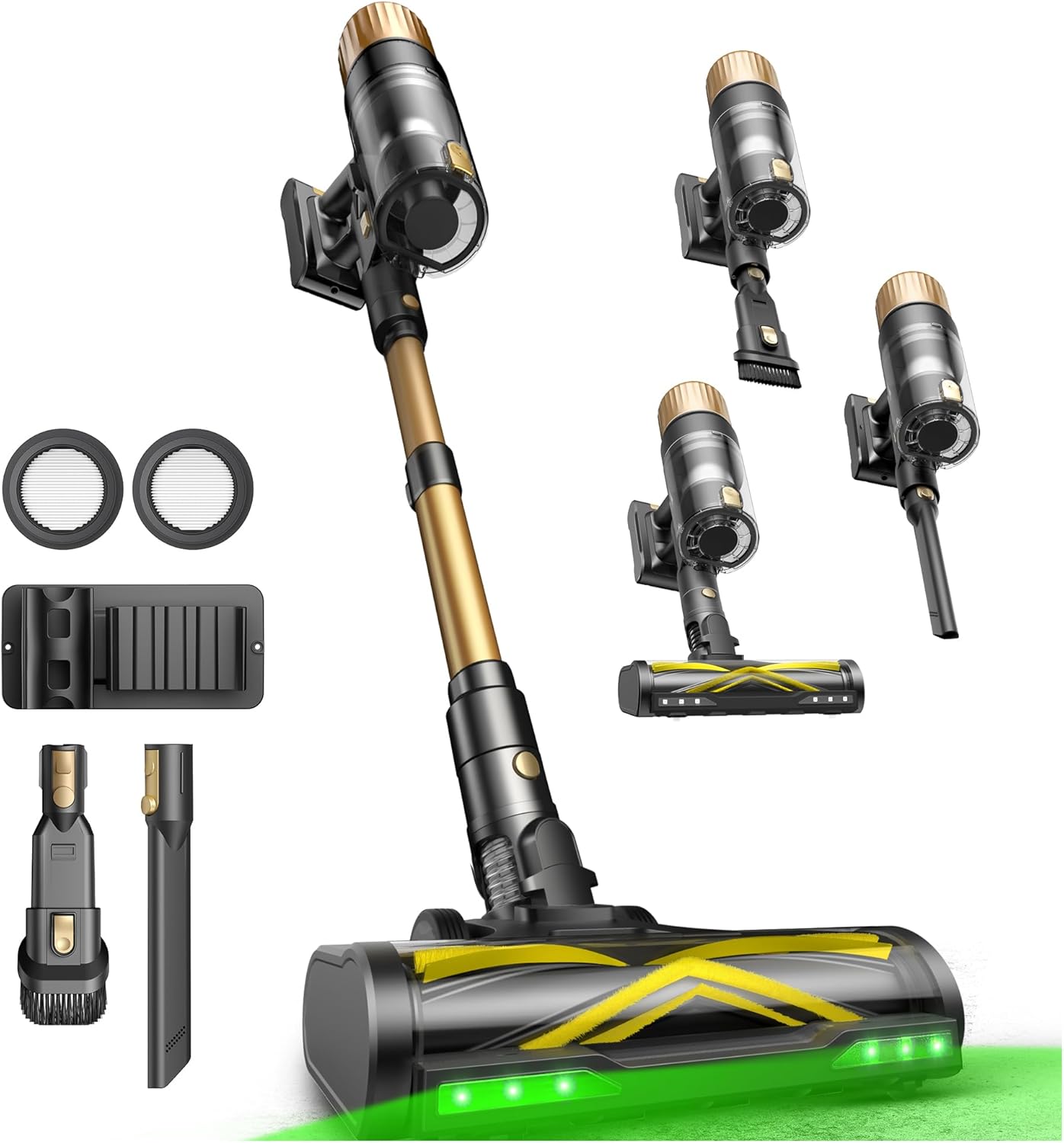
Figure 3.1: The Ultenic U15 Cordless Vacuum Cleaner fully assembled.
4. Charging the Battery
For optimal performance, fully charge the battery before the first use. The battery can be charged while attached to the main unit via the wall mount or separately.
- Connect the power adapter to the charging port on the main unit or the wall mount.
- Plug the adapter into a power outlet.
- The battery indicator on the display will show charging status. A full charge typically takes 4 hours.
5. Operating Instructions
5.1 Power On/Off and Suction Modes
To power on the vacuum, press the power button and then pull the trigger. The LED display will show the battery level and current suction mode. Cycle through the 3 suction modes (Eco, Standard, Turbo) by pressing the mode button on the display.
- Eco Mode: Up to 65 minutes runtime, ideal for light cleaning on hard floors.
- Standard Mode: Up to 45 minutes runtime, suitable for daily cleaning and carpets.
- Turbo Mode: Up to 25 minutes runtime, for maximum suction on stubborn dirt and pet hair.

Figure 5.1: Different cleaning modes and their approximate runtimes.
5.2 GreenEye Technology
The GreenEye Technology utilizes a high-performance green light on the brush head to illuminate hidden dust and debris on various surfaces, making it easier to spot and clean.

Figure 5.2: GreenEye Technology reveals hidden dust on the floor.
5.3 Maneuverability and Self-Standing Design
The 180° rotating brush head and adjustable telescopic handle allow for easy maneuvering under furniture and into tight spaces. The vacuum also features a self-standing design for convenient storage without needing a wall mount.

Figure 5.3: 180° Flat-Reach Design for cleaning under low furniture.

Figure 5.4: The vacuum stands upright on its own for easy storage.
5.4 Using Attachments
The U15 comes with various attachments for specialized cleaning. These can be attached directly to the main unit or the extension wand.
- 2-in-1 Brush: For cleaning delicate surfaces, upholstery, and curtains.
- Crevice Tool: Ideal for narrow gaps, corners, and hard-to-reach areas.
- Upholstery Tool: Designed for cleaning sofas, mattresses, and pet beds.

Figure 5.5: The Ultenic U15 with its versatile cleaning attachments.
6. Maintenance
6.1 Emptying the Dustbin
The large 1.5L dustbin can be emptied with a single touch, preventing direct contact with dirt.
- Hold the main unit over a trash can.
- Press the dustbin release button to open the bottom flap and empty the contents.
- Close the flap securely after emptying.

Figure 6.1: One-touch dustbin emptying for hygienic disposal.
6.2 Cleaning Filters
The 6-stage HEPA filtration system traps 99.9% of dust and pollen. Filters are washable for extended use.
- Twist and pull to remove the filter assembly from the dustbin.
- Separate the HEPA filter and metal mesh filter.
- Rinse all washable parts under cold running water until clean.
- Allow all parts to air dry completely for at least 24 hours before reassembling and reinserting into the vacuum.

Figure 6.2: Exploded view of the 6-stage HEPA filtration system.
6.3 Cleaning the Tangle-Free Brush Roll
The 4-in-1 tangle-free brush is designed to prevent hair wrap. Periodically check and clean the brush roll to maintain efficiency.
- Turn off the vacuum and detach the brush head.
- Locate the release mechanism on the side of the brush head and open it to remove the brush roll.
- Remove any tangled hair or debris from the brush roll and its housing. Use the provided cleaning brush if necessary.
- Reinsert the brush roll and close the release mechanism until it clicks.

Figure 6.3: Components of the 4-in-1 Tangle-Free Brush Roll.
7. Specifications
| Feature | Specification |
|---|---|
| Brand | Ultenic |
| Model Name | U15 |
| Special Feature | Spotless Cleaning, Lightweight, Cordless, Self-standing, Rechargeable |
| Filter Type | HEPA Filter (6-stage filtration) |
| Is Cordless? | Yes |
| Capacity | 1.5 Liters |
| Wattage | 550 watts |
| Charging Time | 4 Hours |
| Battery Description | Lithium-Ion |
| Noise Level | 68 Decibels |
| Item Weight | 6.71 pounds |
| Product Dimensions | 16.93"L x 12.2"W x 7.48"H |
8. Troubleshooting
If you encounter any issues with your Ultenic U15, please refer to the following common troubleshooting steps:
- No Power: Ensure the battery is fully charged and correctly inserted. Check the power adapter connection.
- Reduced Suction: Empty the dustbin. Clean or replace the HEPA filters. Check the brush roll for blockages or tangled hair. Ensure all connections are secure.
- Brush Roll Not Spinning: Check for tangled hair or debris obstructing the brush roll. Clean the brush roll as described in the Maintenance section.
- Unusual Noise: Turn off the vacuum immediately. Check for any foreign objects caught in the brush head, extension wand, or dustbin.
For further assistance, please contact Ultenic customer support.
9. Official Product Video
Video 9.1: An overview of the Ultenic U15 Cordless Vacuum Cleaner, showcasing its features and operation.
10. Warranty and Support
The Ultenic U15 Cordless Vacuum Cleaner comes with a standard manufacturer's warranty. Please refer to the warranty card included in your package for specific terms and conditions. For product support, technical assistance, or warranty claims, please visit the official Ultenic website or contact their customer service team directly.
Online Support: Ultenic Brand Store


