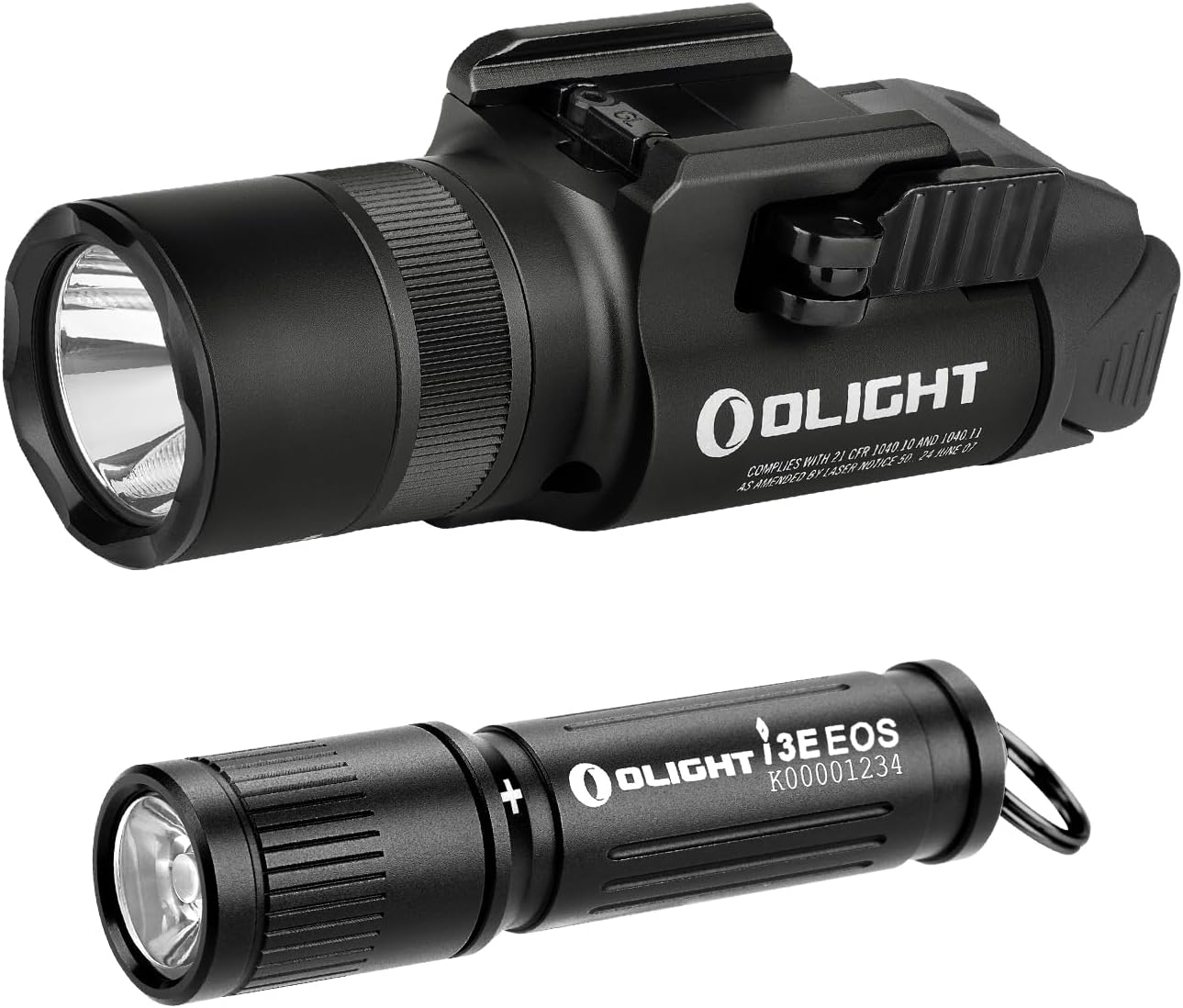
OLIGHT Baldr Pro R and i3E EOS Flashlight Instruction Manual
Model: Baldr Pro R, i3E EOS
Introduction
This manual provides detailed instructions for the safe and effective use of your OLIGHT Baldr Pro R Tactical Weaponlight and i3E EOS EDC Flashlight. Please read this manual thoroughly before operation and retain it for future reference.
Product Overview
OLIGHT Baldr Pro R
The Baldr Pro R is a high-performance tactical weaponlight featuring both a white LED and a green laser. It is designed for compatibility with GL and Picatinny rails, offering robust performance and versatile lighting options.
White LED Output: Up to 1350 lumens.
Green Laser: Integrated for precise targeting.
Mode Selector Ring: Easily switch between white light only, green beam only, or combined modes.
Ambidextrous Rear Switches: For momentary-on or constant-on activation.
Compatibility: Fits both GL rail and Picatinny rail systems.
Water Resistance: IPX4 rated (splash resistant from every direction).
OLIGHT i3E EOS
The i3E EOS is a compact and powerful AAA EDC (Everyday Carry) flashlight. It features a PMMA TIR lens for a soft and balanced beam, making it ideal for daily tasks.
Output: 180 lumens.
Battery: Powered by a single AAA alkaline battery.
Lens: PMMA TIR lens producing a soft and balanced beam.
Design: Double helix body knurling for enhanced grip.
Water Resistance: IPX8 waterproof (designed for use in heavy rain).
Image: The OLIGHT Baldr Pro R tactical weaponlight and the compact i3E EOS flashlight.
Setup
Baldr Pro R Initial Use & Installation
First Use (Lockout Mode): The Baldr Pro R ships in lockout mode. To exit lockout mode, press and hold both rear switches simultaneously for approximately 2 seconds until the high white light or green laser beam activates.
Rail Attachment:
Identify the appropriate rail adapter (GL or Picatinny) for your firearm. The package includes adapters and an Allen wrench for installation.
Loosen the screw on the light's mounting mechanism.
Slide the light onto your firearm's rail.
Tighten the screw securely using the provided Allen wrench to ensure a stable fit.
Laser Adjustment: Use the small Allen wrench to adjust the laser's windage and elevation for precise aiming.
Image: Visual guide for exiting lockout mode on the Baldr Pro R by pressing both switches for 2 seconds.
Image: Illustrates the GL and Picatinny rail adapters for the Baldr Pro R.
i3E EOS Battery Installation
Unscrew the head of the flashlight.
Insert one AAA alkaline battery with the positive (+) end facing towards the head of the flashlight.
Screw the head back on securely.
Operating Instructions
OLIGHT Baldr Pro R
Power On/Off: Press either of the ambidextrous rear switches for momentary-on. Press and release for constant-on.
Mode Selection: Rotate the mode selector ring located on the front of the light to choose between:
White light only
Green beam only
White light and green beam combined
Strobe Mode: Press both ambidextrous rear switches simultaneously to activate strobe mode.
Image: Close-up of the ambidextrous rear switches on the Baldr Pro R.
OLIGHT i3E EOS
Power On/Off: Fully tighten the head to turn the flashlight on. Slightly loosen the head to turn it off.
Image: Demonstrates twisting the head of the i3E EOS to activate the light.
Maintenance
Baldr Pro R Charging
The Baldr Pro R features a magnetic charging port. Use the provided magnetic charging cable to recharge the device. Ensure the magnetic end of the cable is securely attached to the charging port on the underside of the light.
i3E EOS Battery Replacement
When the light output diminishes, replace the AAA alkaline battery by unscrewing the head, removing the old battery, and inserting a new one with the correct polarity.
General Care
Keep the lens clean to maintain optimal light output.
Regularly check O-rings for wear and tear to ensure water resistance.
Store the flashlights in a cool, dry place when not in use.
Troubleshooting
Baldr Pro R Not Turning On: Ensure the device is out of lockout mode (press and hold both switches for 2 seconds). Check battery charge level.
i3E EOS Not Turning On/Dim Light: Ensure the head is fully tightened. Replace the AAA battery with a fresh one.
Laser Not Visible/Misaligned: Adjust the laser using the provided Allen wrench for windage and elevation.
Video: An official overview of the OLIGHT PL-3R Valkyrie, demonstrating its features and functionality. Note: This video is for a related product, the PL-3R Valkyrie, which shares similar features with the Baldr Pro R.
Warranty and Support
For warranty information, technical support, or service inquiries, please visit the official OLIGHT website or contact their customer service department. Keep your purchase receipt for warranty claims.
Visit the OLIGHT Store for more products and information.
Ask about setup, troubleshooting, compatibility, parts, safety, or missing instructions. Manuals+ will review the question and use this page’s manual context to help answer it.