
1. Introduction
Thank you for choosing the NIMO 15.6" IPS FHD-Gaming-Laptop. This manual provides essential information for setting up, operating, maintaining, and troubleshooting your new laptop. Designed for versatile performance, this laptop is equipped with an AMD Ryzen 5 6600H processor, 32GB DDR5 RAM, and a 1TB SSD, making it suitable for work, gaming, and everyday use. Please read this manual thoroughly before using your device to ensure optimal performance and longevity.

Figure 1.1: NIMO 15.6" IPS FHD-Gaming-Laptop
The NIMO 15.6" IPS FHD-Gaming-Laptop features a sleek design with a vibrant Full HD IPS display, ideal for both productivity and entertainment.
2. What's in the Box
Please verify that all items are present in the package:
- 1 x Nimo N153 Laptop
- 1 x Type-C 100W PD Fast Charger
- 1 x User Manual
- Windows 11 Home (Pre-installed)
- 2 Years Warranty, 90 Days Return Information
3. Setup Guide
3.1 Initial Power-On and Charging
Before first use, ensure your laptop is fully charged. Connect the provided Type-C 100W PD Fast Charger to the laptop's Type-C port and a power outlet. The charge LED indicator will illuminate.
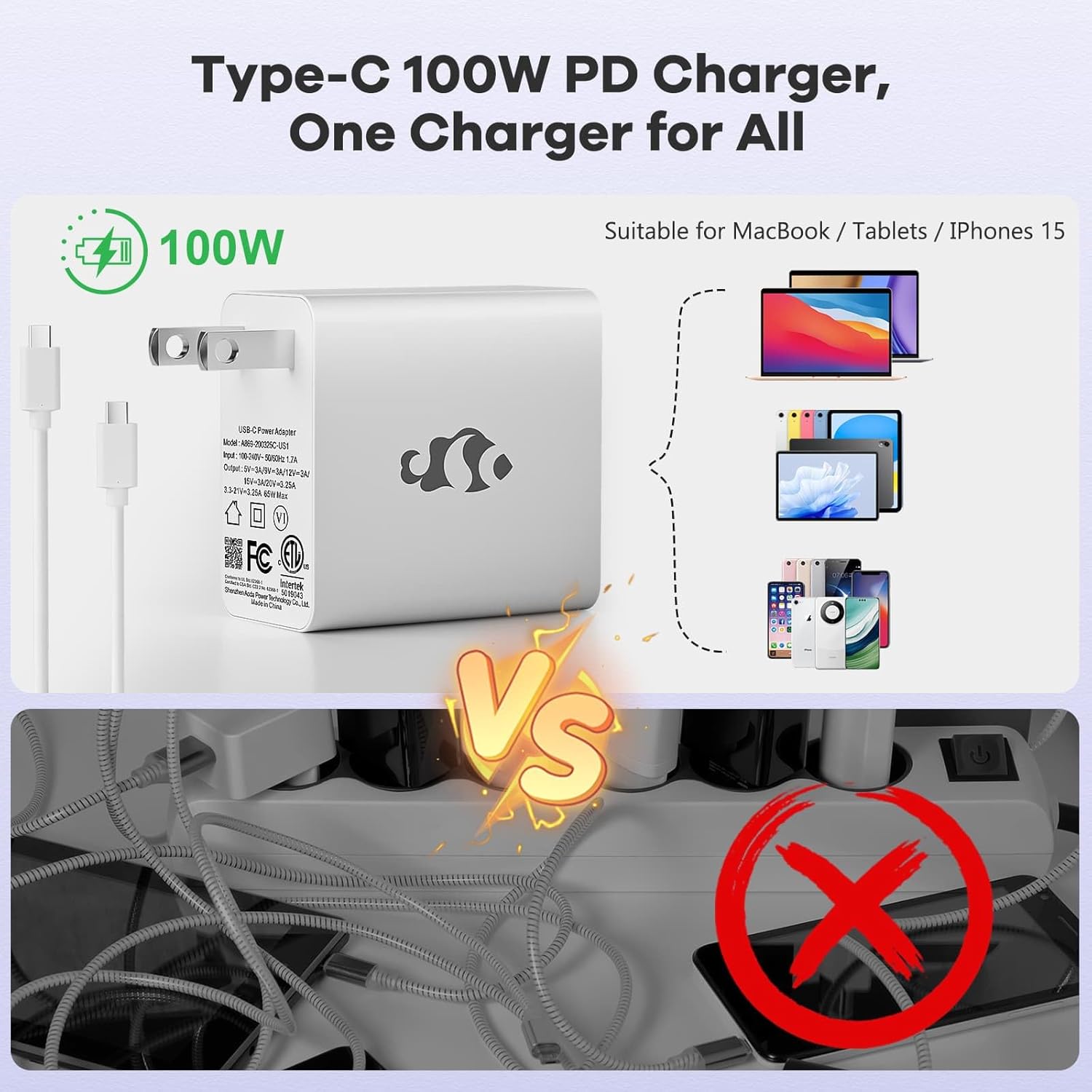
Figure 3.1: Type-C 100W PD Fast Charger
The compact 100W USB-C PD fast charger and 6.56ft cable provide efficient power delivery, compatible with various devices.
3.2 Connecting Peripherals
Your NIMO laptop offers multiple ports for enhanced versatility. Refer to the diagram below for port locations and types:
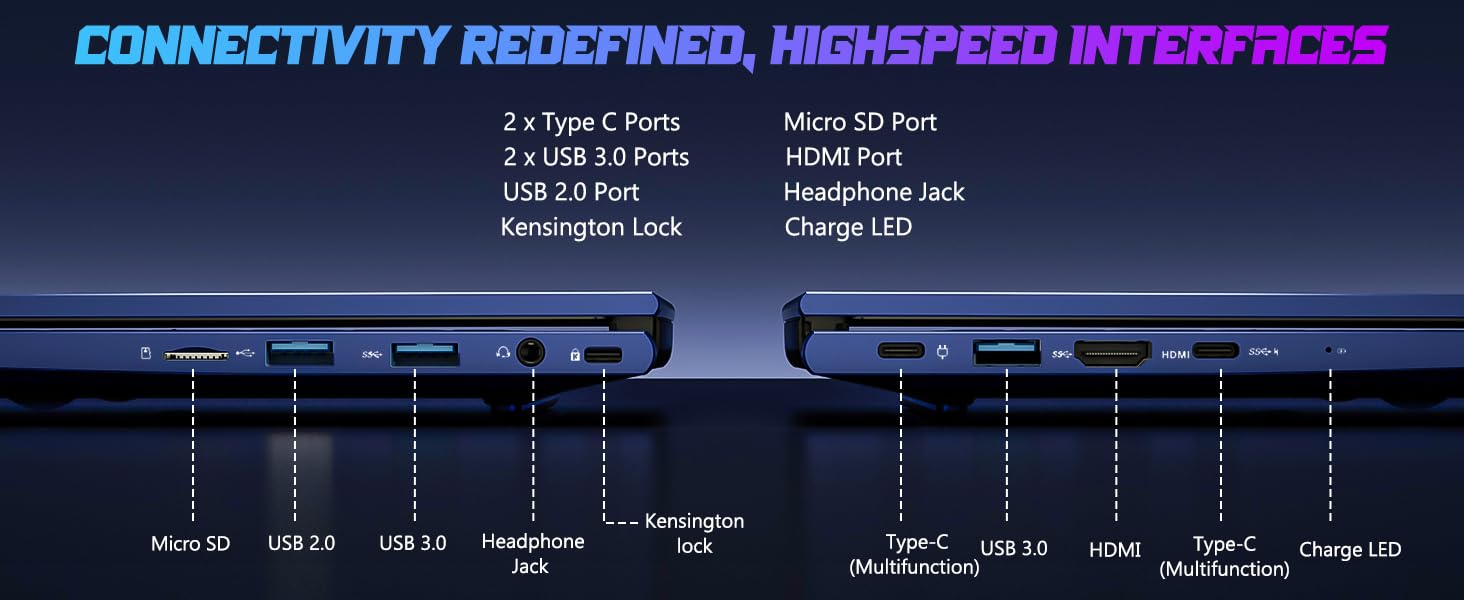
Figure 3.2: Connectivity Ports
The laptop includes 2x Type-C ports, 2x USB 3.0 ports, 1x USB 2.0 port, Micro SD port, HDMI port, Headphone Jack, and Kensington Lock for comprehensive connectivity.
- USB Ports: Connect external devices such as mice, keyboards, or external storage drives.
- HDMI Port: Connect to an external monitor or TV for a larger display.
- Headphone Jack: For audio output to headphones or external speakers.
- Micro SD Slot: Insert a Micro SD card for additional storage or data transfer.
4. Operating Your Laptop
4.1 Display Features
The NIMO laptop features a 15.6" FHD IPS (1920x1080) anti-glare display with an 85% screen-to-body ratio, providing clear and vibrant visuals for all your tasks.
4.2 Keyboard and Fingerprint Reader
The laptop is equipped with a backlit keyboard for comfortable typing in various lighting conditions and a multi-touch touchpad for precise navigation. The built-in fingerprint reader allows for secure, one-touch login.

Figure 4.1: Backlit Keyboard and Fingerprint Reader
The backlit keyboard enhances visibility, while the integrated fingerprint reader provides quick and secure access to your system.
4.3 Webcam Privacy
For enhanced privacy, the laptop includes a built-in privacy camera switch, allowing you to easily disable the 2.0M webcam when not in use.

Figure 4.2: Webcam Shield
The physical webcam shield provides an extra layer of privacy, ensuring your camera is off when you need it to be.
4.4 Performance Overview
The NIMO laptop is powered by an AMD Ryzen 5 6600H CPU (6 cores, 12 threads, up to 4.5 GHz) and an integrated AMD Radeon 660M GPU (6nm process, 6 GPU cores, 1900 MHz). This configuration provides balanced performance for productivity and light gaming.

Figure 4.3: Outstanding Performance
The AMD Ryzen 5 6600H processor and Radeon 660M iGPU deliver robust performance for various computing tasks.
With 32GB of DDR5 RAM and a 1TB PCIe 4.0 SSD, the laptop ensures seamless multitasking, faster load times, and ample storage for your files and applications. The memory is upgradable to 64GB and the SSD is detachable for future expansion.

Figure 4.4: Seamless Multitasking and Ample Storage
The combination of 32GB DDR5 RAM and a 1TB PCIe 4.0 SSD provides lightning-fast performance and significant storage capacity.
4.5 Battery Life
The laptop is equipped with a 54Wh smart battery, providing up to 5 hours of active use and up to 10 hours of standby time. A 15-minute charge can provide up to 2 hours of standby time with the 100W PD fast charger.

Figure 4.5: 54Wh Smart Battery
The efficient 54Wh smart battery offers extended usage and quick charging capabilities.
5. Maintenance
To ensure the longevity and optimal performance of your NIMO laptop, follow these maintenance guidelines:
- Keep it Clean: Regularly clean the screen with a microfiber cloth and the keyboard with compressed air to remove dust and debris.
- Software Updates: Keep your Windows 11 operating system and drivers updated to ensure security and performance improvements.
- Battery Care: Avoid completely draining the battery frequently. For long-term storage, charge the battery to about 50-60%.
- Proper Ventilation: Ensure the laptop's vents are not obstructed to prevent overheating. Use it on a hard, flat surface.
- Safe Handling: Avoid dropping or subjecting the laptop to strong impacts.
6. Troubleshooting
This section addresses common issues you might encounter with your NIMO laptop.
| Problem | Possible Cause | Solution |
|---|---|---|
| Laptop does not power on | Low battery; Power adapter issue | Connect the charger and wait a few minutes. Ensure the power adapter is securely connected to both the laptop and the outlet. |
| Slow performance | Too many applications running; Low disk space; Outdated drivers | Close unnecessary applications. Free up disk space. Update Windows and device drivers. |
| Wi-Fi connectivity issues | Wi-Fi adapter off; Router issue; Driver issue | Ensure Wi-Fi is enabled in Windows settings. Restart your router. Update Wi-Fi drivers. |
| Keyboard backlight not working | Backlight disabled; Driver issue | Press the dedicated backlight key (usually Fn + F key). Check keyboard drivers in Device Manager. |
If you encounter issues not listed here or require further assistance, please contact NIMO customer support.
7. Specifications
Detailed technical specifications for the NIMO 15.6" IPS FHD-Gaming-Laptop:
| Feature | Detail |
|---|---|
| Standing Screen Display Size | 15.6 Inches |
| Max Screen Resolution | 1920 x 1080 Pixels (FHD IPS) |
| Processor | AMD Ryzen 5 6600H (6 Cores, up to 4.5 GHz) |
| RAM | 32 GB DDR5 (4800 MHz) |
| Hard Drive | 1 TB SSD (PCIe 4.0) |
| Graphics Coprocessor | AMD Radeon 660M (Integrated) |
| Operating System | Windows 11 |
| Wireless Type | 802.11a/b/g/n/ac |
| USB Ports | 1x USB 2.0, 3x USB 3.0, 2x Type-C |
| Average Battery Life | 5 Hours (active use) |
| Item Weight | 3.8 pounds |
| Product Dimensions | 14.07 x 8.98 x 0.76 inches |
| Color | Blue |
| Special Features | Backlit Keyboard, Fingerprint Reader, HD Audio, Numeric Keypad |
8. Warranty and Support
NIMO is committed to providing high-quality products and excellent customer service.
8.1 Warranty Information
Your NIMO laptop comes with a comprehensive 2-Year Manufacturer's Warranty. This warranty covers defects in materials and workmanship under normal use. Additionally, we offer a 90-Day Hassle-Free Return Policy from the date of purchase.
8.2 Customer Support
Our dedicated support team is ready to assist you with any questions or issues. For technical support, warranty claims, or general inquiries, please contact us via:
- Email: service@nimopc.com
- Online: Visit the official NIMO website for FAQs and support resources.
We strive to resolve any issues swiftly and ensure your satisfaction.
8.3 Product Overview Video
Watch this official video for a quick overview of the NIMO laptop's features and benefits:
Video: NIMO Laptop Overview
This video provides a brief look at the NIMO 15.6" laptop, highlighting its key features and user experience, including its display, camera, and overall performance.