
FOHERE 1010
FOHERE Nugget Ice Maker Model 1010 User Manual
Model: 1010
1. Introduction
Thank you for choosing the FOHERE Nugget Ice Maker Model 1010. This manual provides essential information for the safe and efficient operation, maintenance, and troubleshooting of your new ice maker. Please read these instructions thoroughly before first use and retain them for future reference.
2. Safety Instructions
To reduce the risk of fire, electric shock, or injury, always follow basic safety precautions when using electrical appliances.
- Ensure the power outlet voltage matches the appliance's requirements.
- Do not immerse the appliance, power cord, or plug in water or other liquids.
- Unplug the ice maker from the outlet when not in use, before cleaning, or during maintenance.
- Keep the appliance away from heat sources and direct sunlight.
- Do not operate the appliance with a damaged cord or plug.
- This appliance is for household use only.
- Ensure proper ventilation around the unit. Maintain at least 5 inches of space on all sides.
- Use only potable water in the ice maker.
3. Product Overview
3.1 Components
The FOHERE Nugget Ice Maker comes with the following components:
- Nugget Ice Maker Unit
- Ice Scoop
- Removable Ice Basket
- Operation Guide (this manual)
- Maintenance Guide
3.2 Key Features
- High-Efficiency Ice Production: Produces the first batch of ice in approximately 6 minutes, with a daily output of up to 55 lbs of nugget ice.
- Chewable Nugget Ice: Creates soft, dense pellet ice ideal for various beverages.
- Self-Cleaning Function: Features a one-button auto-cleaning system to remove limescale and maintain hygiene.
- Quiet Operation: Operates at approximately 40 dB, ensuring a low-noise environment.
- Energy Efficient: Designed for reduced energy consumption, saving up to 40% compared to traditional ice makers.
- Intelligent Alerts: Provides real-time indicators for low water level and full ice basket.
- Durable Construction: Features a food-grade PP inner layer and thickened stainless steel shell for longevity and rust prevention.
- Compact Design: Dimensions of 11.1 x 8.7 x 11.8 inches make it suitable for various countertop spaces.

Image 3.1: The FOHERE Nugget Ice Maker with a full basket of ice and the included ice scoop.

Image 3.2: Overview of the ice maker's capacity, highlighting the 2 lbs ice basket, 55 lbs daily production, and 1.9 qt water tank.

Image 3.3: Demonstrating the chewable soft nugget ice, emphasizing its benefits for various drinks.

Image 3.4: Exploded view illustrating the internal and external components of the ice maker, such as the removable ice basket, food-grade plastic layer, polythane insulation, 304 stainless steel layer, control panel, advanced infrared sensor, ultra-quiet exhaust fan, and drain outlet.
4. Setup
4.1 Unpacking
Carefully remove the ice maker from its packaging. Remove all packing materials, tape, and any protective film. Ensure all accessories (ice basket, ice scoop) are present.
4.2 Placement
- Place the ice maker on a flat, stable surface away from direct sunlight and heat sources.
- Ensure there is at least 5 inches (12.7 cm) of clear space around the unit for proper ventilation.
- Do not place the unit near appliances that generate heat, such as ovens or radiators.
4.3 Initial Cleaning
Before first use, clean the interior of the ice maker. Refer to the 'Maintenance' section for detailed cleaning instructions.
4.4 First Use
- After cleaning, ensure the drain plug is securely closed.
- Fill the water reservoir with potable water up to the MAX fill line. Do not overfill.
- Plug the ice maker into a grounded electrical outlet.
- Press the Power button to start the ice-making cycle. The 'ICE' indicator will illuminate.
- Discard the first 2-3 batches of ice to ensure any manufacturing residues are flushed out.
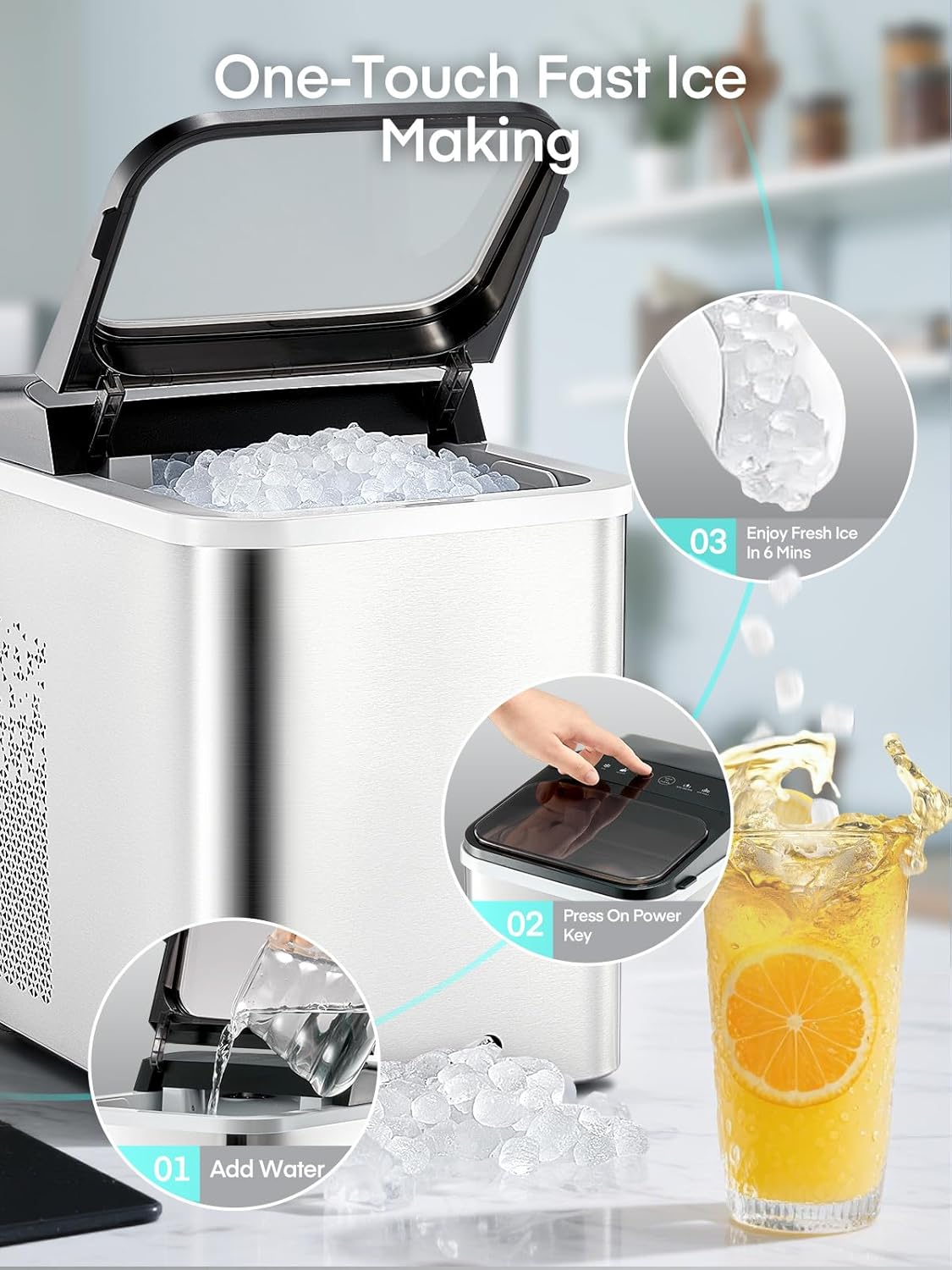
Image 4.1: Visual guide for initial setup and ice making, showing adding water to the reservoir.
5. Operating Instructions
5.1 Making Ice
- Ensure the water reservoir is filled with potable water.
- Press the Power button on the control panel. The ice maker will begin its cycle.
- The 'ICE' indicator light will be on during ice production.
- The first batch of nugget ice will be ready in approximately 6 minutes.
- The ice maker will automatically stop when the ice basket is full, and the 'ICE FULL' indicator will illuminate.
- When the water level is low, the 'ADD WATER' indicator will light up. Refill the reservoir to resume ice production.
5.2 Control Panel Indicators
- ICE: Illuminates when the ice maker is actively producing ice.
- CLEAN: Illuminates during the self-cleaning cycle.
- ADD WATER: Indicates that the water reservoir needs refilling.
- ICE FULL: Indicates that the ice basket is full and ice production has paused.

Image 5.1: The easy-to-operate control panel showing indicator lights and function buttons.

Image 5.2: The ice maker producing nugget ice, ready for use in beverages within 6 minutes.
6. Maintenance
Regular cleaning and maintenance will ensure the longevity and optimal performance of your FOHERE Nugget Ice Maker.
6.1 Self-Cleaning Function
The ice maker features an automatic self-cleaning cycle:
- Ensure the water reservoir is filled with clean water.
- Press and hold the 'CLEAN' button for 3 seconds to activate the self-cleaning cycle. The 'CLEAN' indicator will illuminate.
- The cycle typically takes about 5 minutes. During this time, water will circulate to clean the internal components.
- Once the cycle is complete, drain the water from the unit by opening the drain plug located at the bottom.
- Rinse the reservoir with fresh water and drain again to remove any cleaning solution residue.

Image 6.1: The self-cleaning function in action, illustrating water circulation for internal cleaning and limescale removal.
6.2 Descaling
Mineral deposits from hard water can affect ice maker performance. Descale your ice maker regularly, especially if you live in an area with hard water.
- Monthly: For moderately hard water areas (61-120mg/L calcium carbonate).
- Every 2-3 Weeks: For hard to very hard water areas (121-250mg/L calcium carbonate).
To descale, use a descaling solution suitable for ice makers or a mixture of water and white vinegar. Follow the instructions for the self-cleaning cycle, replacing water with the descaling solution, then rinse thoroughly.

Image 6.2: Information on how hard water can impact the ice maker and recommended descaling frequencies based on water hardness levels.
6.3 External Cleaning
Wipe the exterior of the ice maker with a soft, damp cloth. Do not use abrasive cleaners or solvents.
6.4 Storage
If the ice maker will not be used for an extended period, drain all water, clean the unit thoroughly, and store it in a dry, cool place.
7. Troubleshooting
Before contacting customer support, please refer to the following table for common issues and solutions.
| Problem | Possible Cause | Solution |
|---|---|---|
| Ice maker not producing ice. | No water in reservoir; Power not connected; Ambient temperature too high. | Fill water reservoir; Check power connection; Ensure unit is in a cool environment. |
| 'ADD WATER' indicator is on. | Water level is low. | Refill the water reservoir with potable water. |
| 'ICE FULL' indicator is on. | Ice basket is full. | Remove ice from the basket. Ice production will resume automatically. |
| Ice tastes strange or has an odor. | Unit needs cleaning; Stale water. | Perform a self-cleaning cycle; Use fresh potable water. |
| Ice melts quickly. | High ambient temperature; Ice not stored in a freezer. | Ensure unit is in a cool environment; Transfer ice to a freezer for long-term storage. |
8. Specifications
| Feature | Specification |
|---|---|
| Model Number | 1010 |
| Product Dimensions (D x W x H) | 12.2" x 11.02" x 8.66" |
| Weight | 22.29 Pounds |
| Daily Ice Production | Up to 55 lbs |
| Ice Basket Capacity | 2 lbs |
| Water Tank Capacity | 1.9 Quarts |
| Wattage | 1200 watts |
| Noise Level | Approximately 40 dB |
9. Warranty and Support
9.1 Warranty Information
Your FOHERE Nugget Ice Maker is covered by a manufacturer's warranty. Please refer to the warranty card included with your product for specific terms and conditions. Keep your proof of purchase for warranty claims.
9.2 Customer Support
For any questions, technical assistance, or warranty inquiries, please contact FOHERE customer support. Contact details can typically be found on the product packaging, the official FOHERE website, or your purchase platform.
When contacting support, please have your model number (1010) and purchase date ready.
Ask a question about this manual
Ask about setup, troubleshooting, compatibility, parts, safety, or missing instructions. Manuals+ will review the question and use this page’s manual context to help answer it.