
1. Safety Instructions
Read all instructions carefully before assembly and use. Keep this manual for future reference.
- Weight Capacity: Do not exceed the maximum weight capacity of 350 lbs for the bed.
- Guardrails: Ensure all guardrails are securely installed and maintained to prevent falls.
- Ladder Safety: Always use the ladder for access to and from the bed. Do not jump on or off the bed.
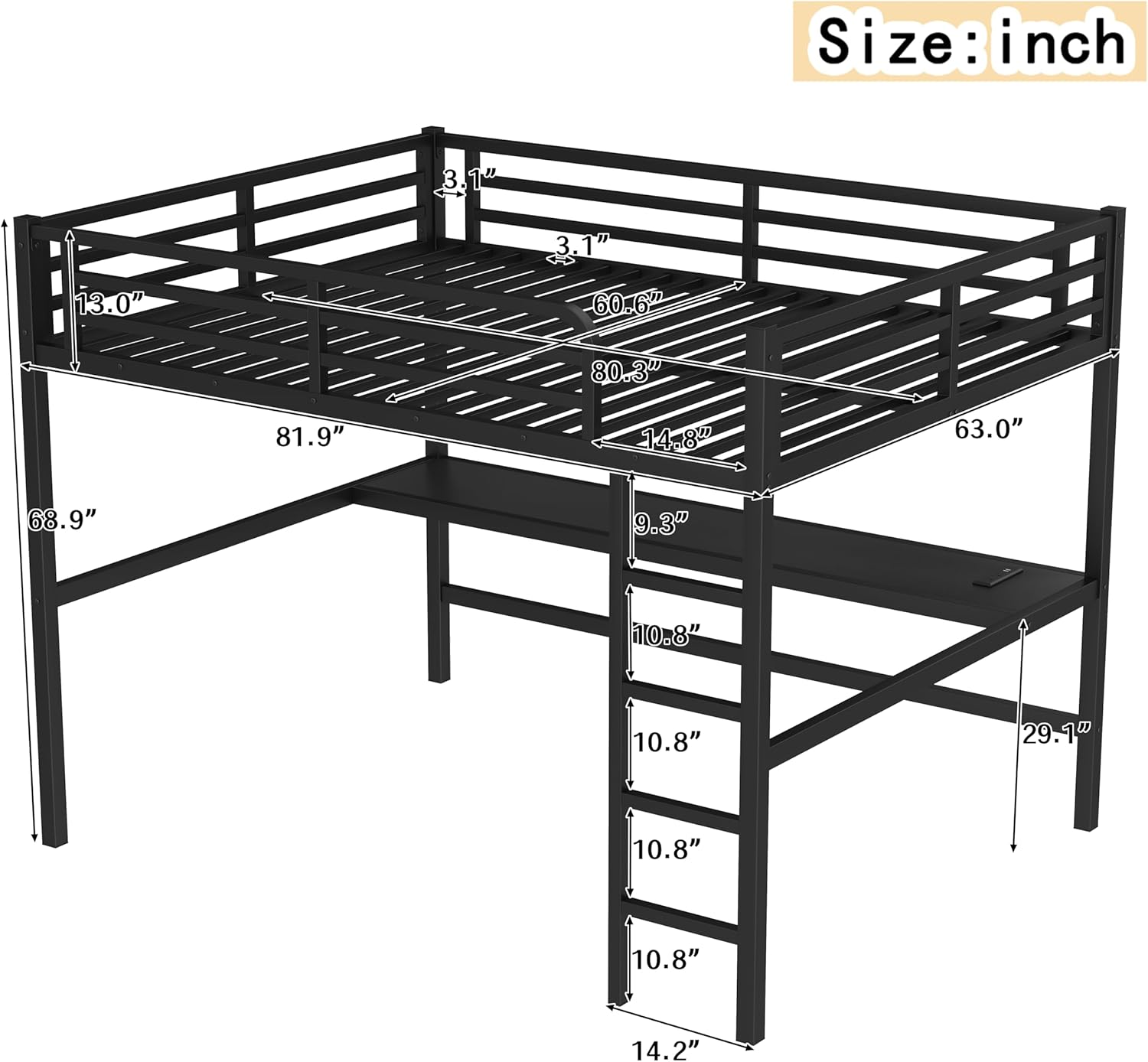
- Mattress Thickness: Use a mattress no thicker than 6 inches to ensure proper guardrail height.
- Assembly: Assemble the bed on a soft, clean surface to prevent damage. Two adults are recommended for assembly.
- Regular Checks: Periodically check all bolts and connections to ensure they remain tight.
- Ventilation: Ensure adequate ventilation around the bed, especially if using additional electronics.
- Electrical Safety: When using the integrated power outlets, ensure devices are compatible and do not overload the circuit. Keep liquids away from electrical components.
- LED Lights: Do not stare directly into the LED lights. Ensure wiring is not pinched or damaged during assembly.
2. Package Contents
Verify all parts are present before beginning assembly. If any parts are missing or damaged, contact customer support.

The package typically includes:
- Metal Bed Frame Components (various beams, posts, slats)
- Desk Surface
- Ladder Rungs and Supports
- Guardrails
- LED Light Strip
- Power Outlet Unit (USB + Standard)
- Hardware Pack (bolts, nuts, washers, Allen wrench)
- Instruction Manual
3. Setup & Assembly
Follow these steps carefully for proper assembly. It is recommended to have two people for assembly.
- Unpack and Identify Parts: Lay out all components on a clean, soft surface. Refer to the parts list in your manual to identify each piece.
- Assemble Base Frame: Connect the main support beams and posts to form the base structure of the loft bed. Do not fully tighten bolts until all major components are in place.
- Install Desk: Attach the desk surface to the designated frame supports. Ensure it is level and secure.
- Attach Ladder: Securely fasten the ladder to the bed frame. Verify that all rungs are stable.
- Install Guardrails: Attach the full-length guardrails to the upper bed frame. These are crucial for safety.
- Place Bed Slats: Distribute and secure the metal bed slats across the upper frame.
- Install LED Lights: Adhere the LED light strip to the underside of the bed frame, above the desk area, following the manufacturer's guidelines for placement and wiring.
- Connect Power Outlets: Integrate the power outlet unit into the designated slot on the desk. Connect it to a power source as instructed.
- Final Tightening: Once all components are in place and aligned, fully tighten all bolts and connections using the provided Allen wrench.
- Safety Check: Before use, perform a thorough safety check. Ensure the bed is stable, all connections are tight, and guardrails are secure.


4. Operation
4.1. LED Lights
The integrated LED lights provide ambient lighting for your workspace or sleeping area. They are typically controlled by a switch or remote (if included) to adjust brightness and color modes.
- Power On/Off: Locate the power switch for the LED lights, usually near the light strip or on the power cord.
- Mode Selection: If your LED lights include multiple color modes or brightness settings, use the provided controller to cycle through options.
- Placement: The LED strip is designed to illuminate the desk area underneath the bed.
4.2. Power Outlets
The built-in power outlets offer convenient charging for electronic devices.
- Connection: Plug the bed's main power cord into a standard wall outlet.
- USB Ports: Use the USB ports to charge smartphones, tablets, and other USB-powered devices.
- Standard Outlets: Use the standard AC outlets for laptops, lamps, or other small appliances.
- Overload Protection: Do not exceed the maximum wattage rating of the power strip to prevent electrical overload. Refer to the specifications section for details.
5. Maintenance
Regular maintenance ensures the longevity and safety of your loft bed.
- Cleaning: Wipe down the metal frame and desk surface with a soft, damp cloth. Avoid abrasive cleaners or harsh chemicals that could damage the finish.
- Hardware Check: Every 3-6 months, inspect all bolts, screws, and connections. Tighten any loose hardware to maintain structural integrity.
- LED Lights: If LED lights dim or flicker, check the power connection. If a strip fails, contact customer support for replacement options.
- Power Outlets: Ensure the power outlet unit is free from dust and debris. Do not attempt to repair electrical components yourself.
- Ladder: Periodically check the ladder rungs and connections for any signs of wear or looseness.
6. Troubleshooting
| Problem | Possible Cause | Solution |
|---|---|---|
| Bed feels wobbly or unstable. | Loose hardware connections. | Inspect and tighten all bolts and screws. Ensure the bed is on a level surface. |
| LED lights are not working. | Power connection issue, faulty strip, or switch. | Check if the LED power cord is securely plugged in. Verify the switch is in the "on" position. If issues persist, contact support. |
| Power outlets are not providing power. | Main power cord unplugged, circuit breaker tripped, or overloaded. | Ensure the bed's main power cord is plugged into a live wall outlet. Check your home's circuit breaker. Reduce the number of devices plugged in. |
| Difficulty assembling parts. | Incorrect orientation or missing hardware. | Refer to the assembly instructions and diagrams carefully. Ensure all parts are oriented correctly. Verify all hardware is present. |
7. Specifications
| Feature | Detail |
|---|---|
| Product Type | Metal Loft Bed |
| Size | Queen |
| Material | Metal |
| Color | Pure Metallic Black |
| Overall Product Dimensions (L x W x H) | 81.9" x 63" x 68.9" |
| Weight Capacity | 350 lbs |
| Recommended Mattress Thickness | 6 inches |
| Included Components | Desk, LED Lights, Ladders, Power Outlets |
| Assembly Required | Yes |
| Power Outlet Type | USB + Standard AC |
8. Warranty & Support
This Bellemave product comes with a limited warranty. For specific warranty details, please refer to the documentation included with your purchase or contact Bellemave customer support.
Customer Support:
- For assistance with assembly, missing parts, or product inquiries, please contact Bellemave customer service.
- Please have your model number (Queen Metal Loft Bed with Desk, B0FCS1GQLW) and purchase date ready when contacting support.
- Visit the official Bellemave store for more information: Bellemave Store