
1. Introduction
Thank you for choosing the Eonon UX6S Double Din Car Stereo. This advanced car audio receiver is designed to enhance your driving experience with its powerful Android 13 operating system, 7-inch QLED touchscreen, wireless CarPlay and Android Auto capabilities, and superior audio processing. This manual provides detailed instructions for installation, operation, and maintenance to ensure you get the most out of your new device.

Figure 1.1: Eonon UX6S Double Din Car Stereo with accessories.
2. What's in the Box
Please verify that all items listed below are included in your package:
- A0127 Reversing camera *1
- Power cord *1
- GPS antenna *1
- 4G Antenna *1
- USB adapter cable *2
- Audio/video adapter cable *2
- Reverse video input cable *1
- 15A Fuse *1
- SIM card holder *1
- External Microphone *1
- Manual *1
- Screws *8
- Small knob *1

Figure 2.1: Visual representation of included accessories.
3. Specifications
The Eonon UX6S is engineered with high-performance components to deliver a superior in-car experience:
| Feature | Description |
|---|---|
| Model Number | UX6S |
| Processor | Qualcomm QCM6225 Octa-core (6nm Low-Power process technology) |
| RAM | 6GB |
| ROM | 64GB |
| Display | 7-inch QLED Touch Screen, 1280*720 HD Resolution |
| Operating System | Android 13 |
| Connectivity | Bluetooth 5.1, HDMI, USB, Wi-Fi (Wi-Fi 6 ready, 2.4/5 GHz), 4G LTE |
| Audio Output | Built-in DSP, 4*48W Max Output, 48-band graphic equalizer, Optical & Coaxial HD audio output |
| Special Features | Wireless CarPlay, Android Auto, Screen Mirroring, Split-Screen, Online Software Update (OTA), Steering Wheel Controls, Fast Charging |
| Dimensions | 9.45 x 8.27 x 6.69 inches (Package) |
| Item Weight | 4.4 pounds (2 Kilograms) |

Figure 3.1: Internal architecture highlighting Qualcomm QCM6225 and other key components.
4. Installation
4.1 Applicable Models and Dimensions
The UX6S features a 7-inch adjustable panel that supports vertical movement and angle adjustments for optimal viewing and seamless dashboard integration. This unit is designed for double DIN car stereo installations. Ensure your car's original radio mounting size is compatible with a width from 170-178 mm (6.69-7.01 inches) and a height from 96-100 mm (3.78-3.94 inches). If your car's center console dimensions do not match this range, an extra installation kit (not included) will be required.

Figure 4.1: Compatible installation dimensions for the UX6S.
4.2 Wiring Diagram
Refer to the following diagram for proper wiring connections. Ensure all connections are secure before powering on the unit. If your factory car radio's power cable has an ISO standard interface, you can directly install it. Otherwise, you may need to purchase a compatible ISO wiring harness.

Figure 4.2: Comprehensive wiring diagram for the UX6S unit.
5. Operating Instructions
5.1 User-Focused Panel Design
The UX6S features an intuitive panel design for easy access to essential functions:
- Volume Knob: Easily and intuitively adjust the volume.
- USB Ports: Charge your phone or transfer music, movies, etc.
- AUX Input: Connect external audio devices.

Figure 5.1: Front panel features for user interaction.
5.2 Performance and Processing
Powered by a Qualcomm QCM6225 Octa-core processor with 6GB RAM and 64GB ROM, the UX6S delivers high performance and responsiveness. The 6nm low-power process technology ensures efficient operation. The built-in DSP (Digital Signal Processing) and 4*48W max output power provide a superior sound experience with a 48-band graphic equalizer and six preset EQ modes.

Figure 5.2: Qualcomm QCM6225 8-Core processor specifications.

Figure 5.3: Built-in DSP for enhanced sound quality.
5.3 CarPlay & Android Auto & Screen Mirroring
Connect your smartphone effortlessly for navigation, music, and more:
- Wireless CarPlay: Enjoy a seamless in-vehicle experience by connecting your iPhone via Bluetooth.
- Android Auto: Access the full-featured Android Auto system via both Bluetooth and USB connections.
- Screen Mirroring: Project content from your mobile phone onto the large screen for immersive entertainment.

Figure 5.4: Wireless Apple CarPlay and Android Auto in action.
5.4 7-Inch QLED Display & Split-Screen Multitasking
The 7-inch QLED touch screen with 1280*720 HD resolution provides true-to-life colors and high contrast from any angle. The split-screen function allows you to view and use two applications simultaneously, enhancing multitasking capabilities.
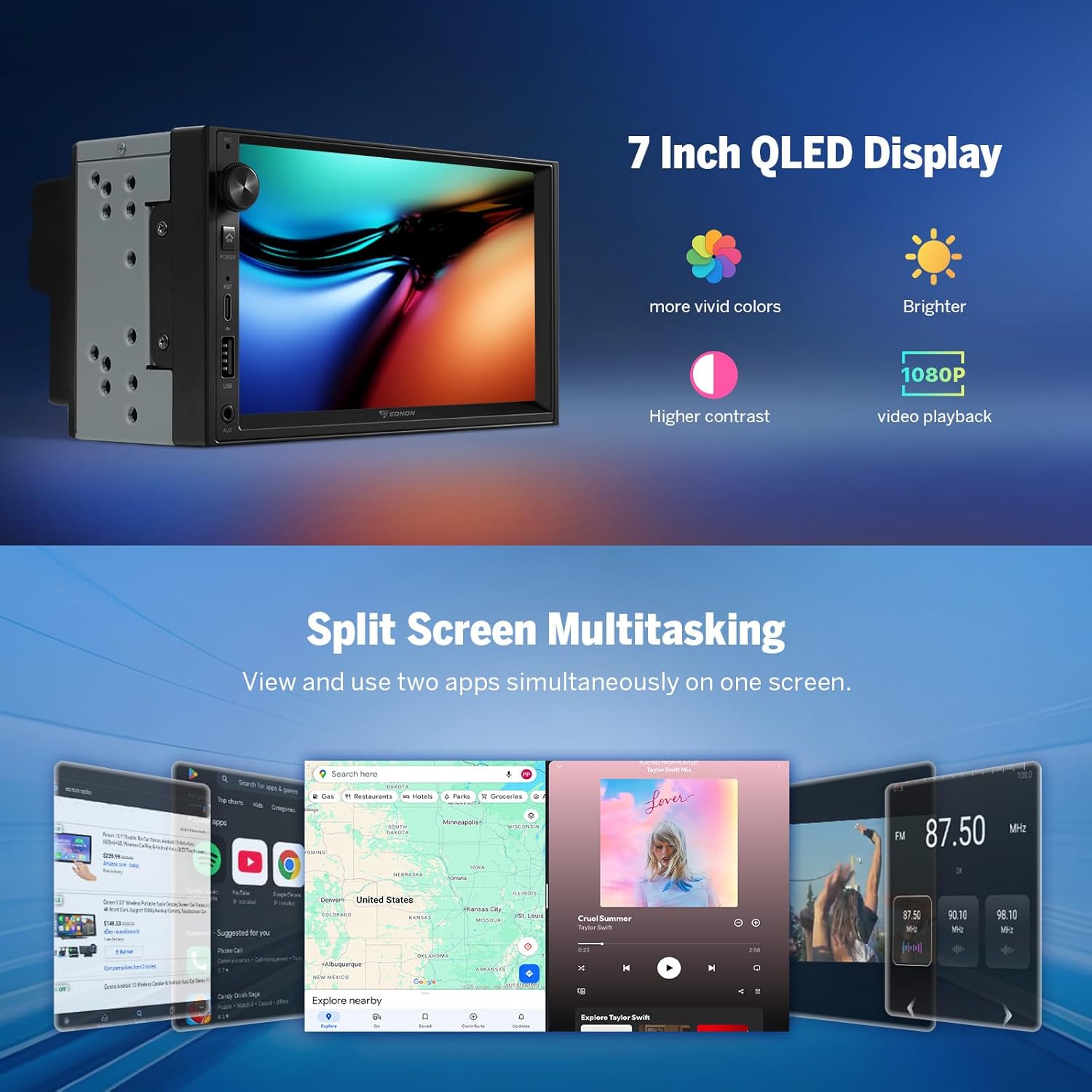
Figure 5.5: QLED display quality and split-screen functionality.
5.5 Android 13 Features
The UX6S runs on Android 13, offering a modern and flexible entertainment system with smartphone integration, app flexibility, and ease of use. It supports offline/online GPS navigation, Bluetooth 5.1, and RDS/FM radio.

Figure 5.6: Android 13 operating system interface.
5.6 Steering Wheel Controls
The unit supports analog Steering Wheel Control (SWC) signals, allowing you to retain factory features and control the stereo directly from your steering wheel for convenience and safety.

Figure 5.7: Steering wheel control integration.
5.7 Additional Features
- Fast Charging: Equipped with a high-speed Type-C port supporting PD 3.0 and PPS fast charging.
- Bluetooth 5.1: Upgraded built-in Bluetooth system for hands-free calls, contact synchronization, and music playback. Includes an external microphone for clear calls.
- Customizable UI: Choose from 3 built-in UI themes, customize button colors, boot logo, and wallpaper.
- Fast Boot: Experience quick startup times.
- Multiple USB Ports: Three USB ports for versatile connectivity.
- RCA Output: Provides maximum flexibility for connecting amplifiers, subwoofers, and DSPs.
6. Maintenance
6.1 Over-the-Air (OTA) Firmware Updates
Keep your Eonon UX6S up-to-date through convenient Over-the-Air (OTA) updates. These updates help fix software issues and enhance security with just a few taps. Please note that these updates are for the software and do not upgrade the core Android system version.

Figure 6.1: OTA Firmware Update process.
7. Troubleshooting
If you encounter any issues with your Eonon UX6S, please refer to the following general troubleshooting tips:
- No Power: Check all power connections and ensure the 15A fuse is intact. Verify proper grounding.
- No Sound: Check speaker connections, audio output settings (DSP, EQ), and ensure volume is not muted or too low. Verify external amplifier connections if used.
- Touchscreen Unresponsive: Try restarting the unit. If the issue persists, perform a factory reset (note: this will erase personal data).
- CarPlay/Android Auto Connection Issues: Ensure Bluetooth and Wi-Fi are enabled on both the stereo and your phone. Re-pair the devices. Check the Zlink5 app settings.
- GPS Signal Loss: Ensure the GPS antenna is properly installed and has a clear view of the sky.
- Slow Performance: Close unnecessary background applications. Clear cache and temporary files. Consider a factory reset if performance remains sluggish.
For more detailed troubleshooting or persistent issues, please contact Eonon customer support.
8. Warranty and Support
Eonon is committed to providing high-quality products and customer satisfaction. For information regarding product warranty, technical support, or service inquiries, please visit the official Eonon website or contact their customer service department directly. Keep your purchase receipt as proof of purchase for warranty claims.
You can find more information and support resources on the EONON Store on Amazon.