
1. Introduction
This manual provides detailed instructions for the proper setup, operation, and maintenance of your SMSL AD18 HiFi Amplifier. Please read this manual thoroughly before using the device to ensure optimal performance and safety. The SMSL AD18 is a versatile digital amplifier designed to deliver high-fidelity audio with multiple input options and powerful stereo output.

Figure 1.1: Front view of the SMSL AD18 HiFi Amplifier.
2. Product Overview
2.1 Key Features
- Versatile Connectivity: Supports USB, coaxial, analog, Bluetooth 4.2 (with apt-X), and dual optical fiber inputs.
- High-Resolution Audio: Utilizes advanced Cirrus Logic CS8422 chips for high-resolution audio up to 24bit/192kHz (decodes up to 96kHz on AD18 USB input).
- Powerful Stereo Output: Delivers 80Wx2 output with dedicated circuits for speakers and headphones, plus an active subwoofer output.
- Precision Sound Customization: Features a built-in digital equalizer with bass and treble controls, and SMSL's patented SDB sound enhancement technology.
- Advanced Power Efficiency: Incorporates Texas Instruments (TI) TAS5508C and TAS5342 chips for efficient, high-resolution amplification.
2.2 Components and Controls
The SMSL AD18 amplifier comes with essential accessories for immediate use. Familiarize yourself with the main unit and its included components.

Figure 2.1: The SMSL AD18 amplifier shown with its remote control, highlighting key features such as Bluetooth 4.2, remote control functionality, color TFT screen, DSP, CNC chassis, and NFC capability.
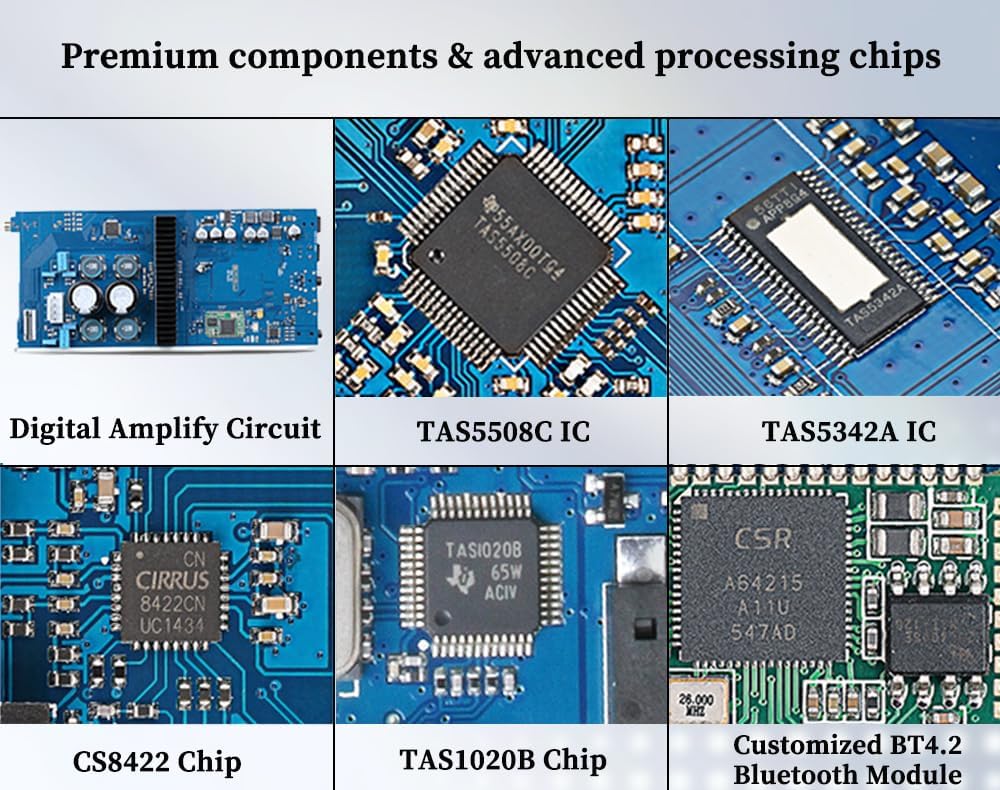
Figure 2.2: Internal view of the SMSL AD18, showcasing premium components and advanced processing chips like TAS5508C, TAS5342, CS8422, TAS1020B, and the customized BT4.2 Bluetooth Module.
3. Setup
3.1 Connecting Audio Sources and Speakers
The AD18 offers a variety of input and output options. Ensure all connections are secure before powering on the device.

Figure 3.1: Rear panel of the SMSL AD18, indicating connection points for AUX input, USB input, 3.5mm coaxial/optical input, optical input, power input jack, Bluetooth antenna, and left/right speaker terminals.
- USB Input: Connects to your computer's USB jack and supports 24bit/96kHz high-resolution music files.
- 3.5mm OPT1 Input: Designed for decoding and connecting with CD players, TV-BOX, PS4, and TV optical signals.
- Standard OPT2 Input: A convenient optical jack for various audio source devices. Two optical inputs are available, eliminating the need to unplug and plug cables to switch signals.
- 3.5mm Coaxial Input: Shares the same 3.5mm jack with OPT1 input. This jack can connect with CD players via coaxial output.
- 3.5mm AUX Analog Input: Sends analog signals to the amplifier for digital signal processing before outputting to speakers, providing enhanced performance. This jack is suitable for computers, phones, and TVs.
- Speaker Outputs: Connect your passive speakers to the left and right speaker terminals. Ensure correct polarity (+ to + and - to -).
- Subwoofer Output: Connect an active subwoofer to this output for enhanced bass.

Figure 3.2: Diagram illustrating the 3.5mm coaxial input and subwoofer output connections, along with detailed descriptions of all input jacks.
3.2 Bluetooth and NFC Pairing
The AD18 supports Bluetooth 4.2 with apt-X for wireless audio streaming and NFC for quick pairing.

Figure 3.3: Instructions for Bluetooth 4.2 wireless connection and NFC function. For Bluetooth, search for "SMSL BT4.2" on your device. For NFC, bring your phone's NFC area close to the AD18's NFC area to induce connection.
- Bluetooth Pairing: Switch on your device's Bluetooth function and search for "SMSL BT4.2". Select it to pair with your device.
- NFC Pairing: Use your phone's NFC function. Bring your phone close to the AD18's NFC area to initiate pairing automatically.
4. Operating Instructions
4.1 Power On/Off
Press the power button on the front panel or the remote control to turn the unit on or off.
4.2 Input Selection
Use the input selector button on the front panel or the remote control to cycle through the available input sources (USB, Coaxial, Optical 1, Optical 2, AUX, Bluetooth).
4.3 Volume Control
Rotate the large knob on the front panel or use the volume up/down buttons on the remote control to adjust the output volume.
4.4 Tone Control and EQ
The AD18 features a built-in digital equalizer. Access the menu via the remote or front panel controls to adjust bass and treble levels (±8dB) and select from 7 preset EQ modes. The patented SDB sound enhancement technology can also be activated for dynamic audio optimization.
5. Maintenance
To ensure the longevity and optimal performance of your SMSL AD18 amplifier, follow these maintenance guidelines:
- Cleaning: Use a soft, dry cloth to clean the exterior of the unit. Avoid using liquid cleaners or abrasive materials, as they may damage the finish.
- Ventilation: Ensure adequate ventilation around the amplifier. Do not block the ventilation openings. Avoid placing the unit in enclosed spaces or on soft surfaces that may impede airflow.
- Environment: Keep the amplifier away from direct sunlight, heat sources, excessive dust, moisture, and strong electromagnetic fields.
- Power: Disconnect the power supply from the wall outlet if the unit will not be used for an extended period.
6. Troubleshooting
If you encounter issues with your SMSL AD18, refer to the following common problems and solutions:
- No Power:
- Ensure the power adapter is securely connected to both the amplifier and a working power outlet.
- Verify the power outlet is active.
- No Sound Output:
- Check that the correct input source is selected on the amplifier.
- Verify that speakers are correctly connected and their cables are secure.
- Ensure the volume is not set to minimum or muted.
- Test with a different audio source or cable to rule out source or cable issues.
- Bluetooth Connection Issues:
- Ensure the Bluetooth antenna is securely attached to the amplifier.
- Make sure the amplifier is in Bluetooth pairing mode.
- Delete the AD18 from your device's Bluetooth list and try pairing again.
- Reduce the distance between the amplifier and the Bluetooth device.
- Distorted Sound:
- Check audio cables for damage or loose connections.
- Ensure the input signal level is not too high, causing clipping.
- Verify speaker impedance matches the amplifier's specifications.
If the problem persists after attempting these solutions, please contact customer support.
7. Specifications
Detailed technical specifications for the SMSL AD18 amplifier:

Figure 7.1: Table detailing the parameters and specifications of the SMSL AD18 amplifier.
| Parameter | Value |
|---|---|
| Type | Full digital decoding Amplifier |
| Color | Black |
| Treble Adjustment Range | ±8dB |
| EQ Quantity | 7 |
| Bass Adjustment Range | ±8dB |
| SNR | 90dB |
| Output Power | 80W*2 |
| Voltage | 24V |
| Power Consumption | 50W |
| Standby Power | 0.8W |
| Net Weight | 572g (1.26 lbs) |
| Gross Weight | 1585g (3.49 lbs) |
| USB Sampling Rate | 96kHz |
| Optical Sampling Rate | 44.1kHz-192kHz |
| Coaxial Sampling Rate | 44.1kHz-192kHz |
| Bluetooth Version | BT4.2 |
| Input Jack | Amplifier output port, Headphone port |
| Output Jack | USB, Coaxial, 3.5mm, Bluetooth, Optical*2 |
| Machine Size | 172*51*85 (mm) / 6.77"D x 2.01"W x 3.35"H |
| Package Size | 285*232*75 (mm) |
| Headphone Output (32ohm) | 53mW @THD=0.04% |
| Chips Used | TAS5508C, TAS1020B, CA8422, VT1600A, MAX97220A, CS5341, BT4.2, NE5532 |
8. What's in the Box
Upon opening the package, you should find the following items:

Figure 8.1: The SMSL AD18 amplifier, power supply, remote control, MICRO USB cable, and antenna as included in the package.
- SMSL AD18 Amplifier Unit
- Power Supply
- MICRO USB Cable
- Remote Control
- Antenna
9. Warranty and Support
For warranty information and technical support, please refer to the documentation provided with your purchase or visit the official SMSL website. Keep your proof of purchase for warranty claims.
10. Official Product Videos
No official product videos from the seller were found in the provided data. Please refer to the manufacturer's official website or authorized channels for any available video resources.