
1. Product Overview
The DCA 12V Mini Cordless Polisher and Sander (Model ADSP75(EK-EU01)) is a versatile tool designed for various applications including automotive polishing, waxing, and sanding. It features a high-efficiency brushless motor, two adjustable speed settings, and a compact, ergonomic design for comfortable and precise operation.
Key features include:
- Brushless Motor: Provides increased power, efficiency, and extended tool life.
- Two Speed Settings: Low speed (0-2800 RPM) for polishing and waxing, high speed (0-8300 RPM) for sanding.
- Dual Battery System: Includes two 2.0Ah 12V batteries for continuous operation and quick charging.
- Ergonomic Design: Lightweight (approx. 1.1 kg) with a comfortable rubberized grip to reduce user fatigue.
- Quick Accessory Change: Spindle lock for fast and secure plate changes.
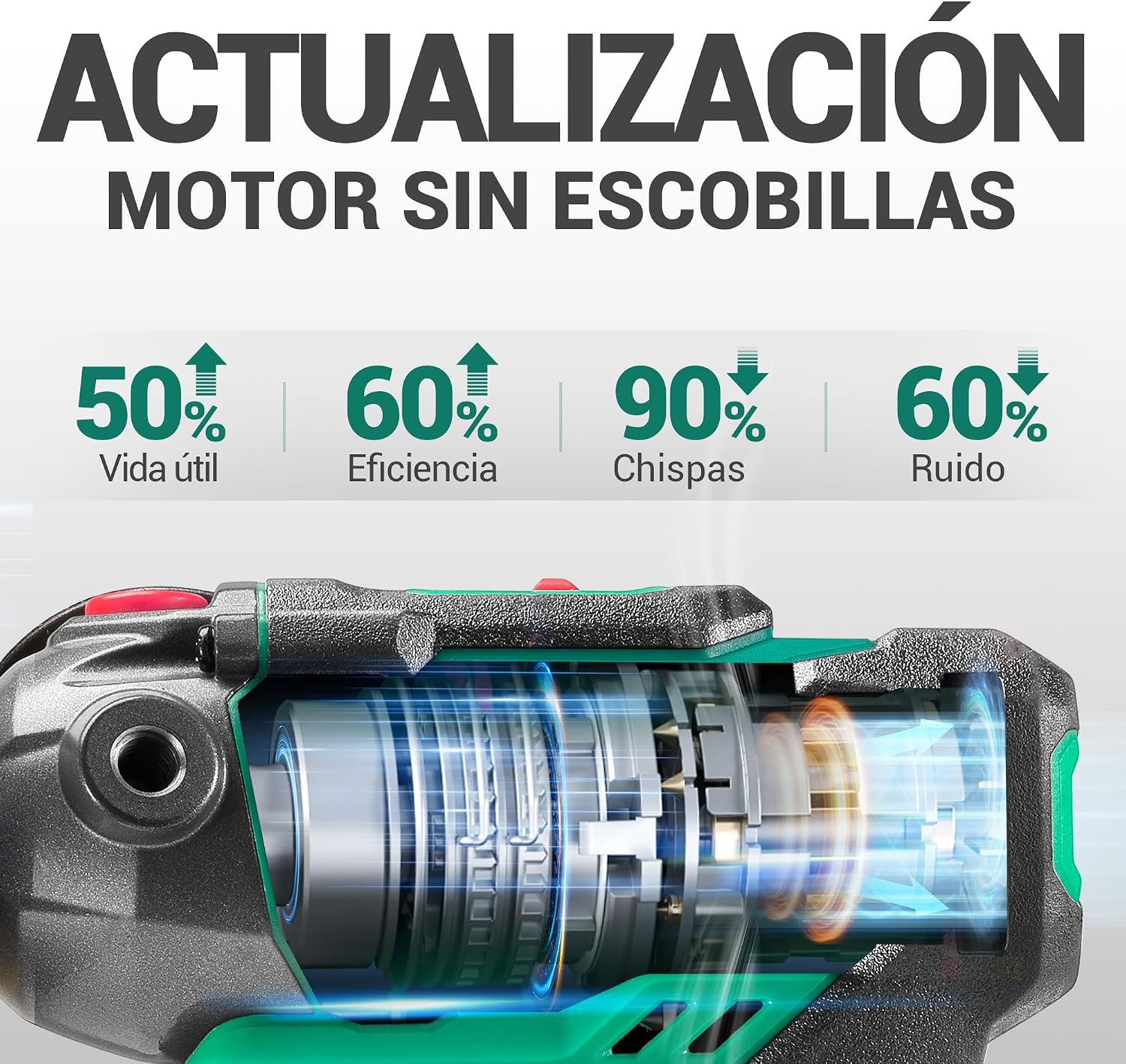
Image 1.1: DCA 12V Mini Cordless Polisher and Sander in use, polishing a car surface.
2. Safety Instructions
Always observe basic safety precautions when using this power tool to reduce the risk of fire, electric shock, and personal injury.
- Work Area Safety: Keep your work area clean and well-lit. Do not operate power tools in explosive atmospheres, such as in the presence of flammable liquids, gases, or dust.
- Electrical Safety: Avoid body contact with earthed or grounded surfaces. Do not expose power tools to rain or wet conditions.
- Personal Safety: Always wear eye protection, dust mask, non-skid safety shoes, hard hat, or hearing protection as appropriate. Dress properly; avoid loose clothing or jewelry.
- Tool Use and Care: Do not force the power tool. Use the correct power tool for your application. Disconnect the battery pack from the power tool before making any adjustments, changing accessories, or storing power tools.
- Battery Tool Use and Care: Recharge only with the charger specified by the manufacturer. Use power tools only with specifically designated battery packs.
3. Package Contents
Verify that all items listed below are included in your package. If any items are missing or damaged, please contact your retailer.
- DCA 12V Mini Cordless Polisher and Sander (ADSP75(EK-EU01)) x 1
- 2.0Ah 12V Lithium-ion Battery x 2
- 3A Fast Charger x 1
- 75mm Self-adhesive Backing Plate x 2
- 75mm Coarse Polishing Sponge Pad x 2
- 75mm Fine Polishing Sponge Pad x 2
- 75mm Wool Polishing Pad x 2
- 50mm Abrasive Disc x 1
- 50mm Sanding Plate x 1
- Auxiliary Handle x 1
- Tool Bag x 1
- User Manual x 1
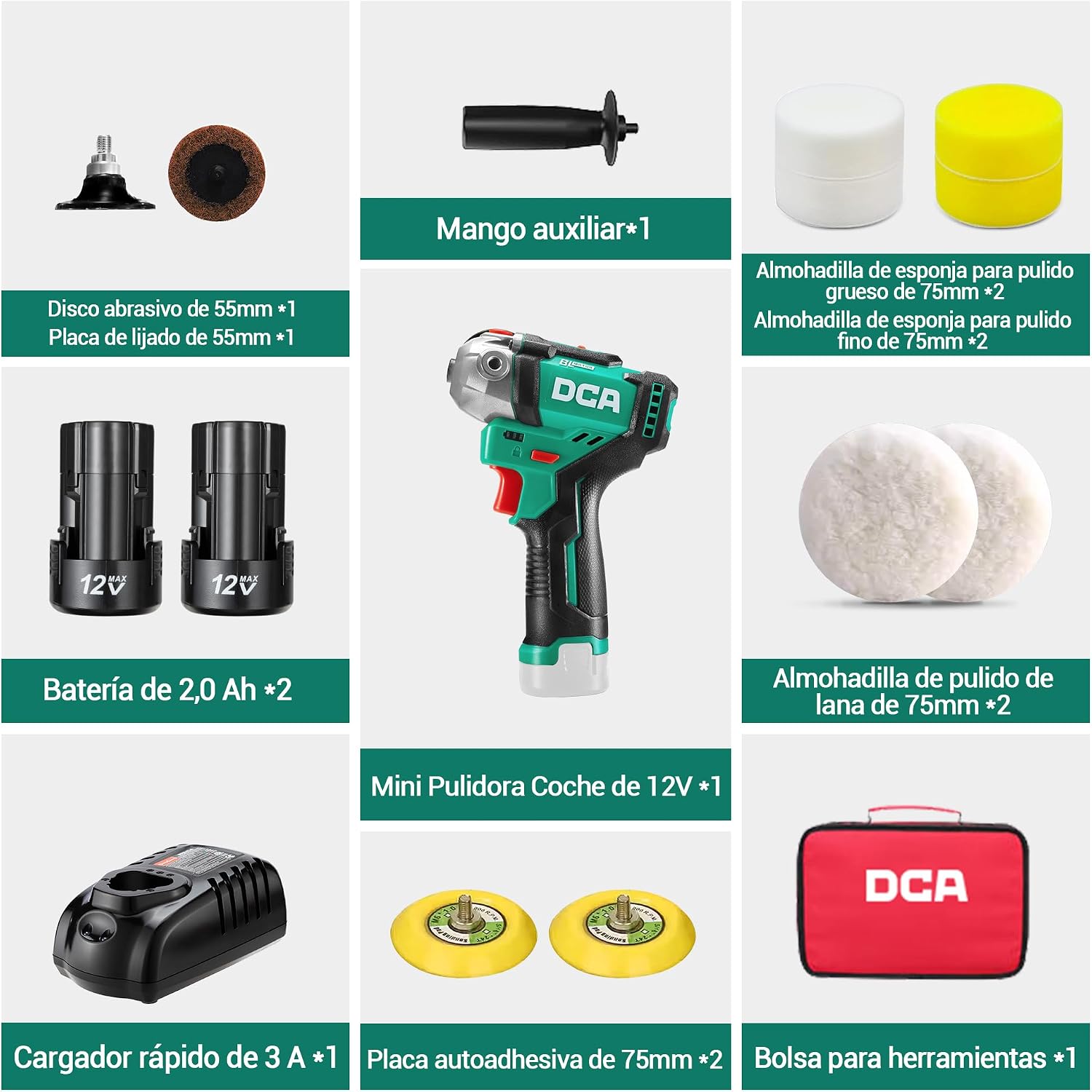
Image 3.1: All components included in the DCA 12V Mini Cordless Polisher and Sander kit.
4. Product Components
Familiarize yourself with the parts of your DCA 12V Mini Cordless Polisher and Sander for safe and effective operation.

Image 4.1: Diagram showing the main components of the polisher/sander, including auxiliary handle, 75mm self-adhesive plate, battery indicator, safety switch, trigger, battery, spindle lock cap, and speed control switch.
5. Setup
5.1. Battery Installation and Charging
- Insert the 12V battery into the charger. Ensure it clicks into place.
- Plug the charger into a power outlet. The indicator light on the charger will show the charging status. A full charge takes approximately 40 minutes.
- Once fully charged, remove the battery from the charger.
- Align the charged battery with the battery slot on the tool and slide it in until it locks securely.

Image 5.1: Illustration of the 12V battery charging process and its protective features.
5.2. Attaching Polishing Pads
- Ensure the tool is switched off and the battery is removed for safety.
- Press and hold the spindle lock button to prevent the shaft from rotating.
- Screw the 75mm self-adhesive backing plate onto the spindle until it is hand-tight.
- Attach the desired 75mm polishing sponge pad (coarse or fine) or wool polishing pad to the backing plate using its hook-and-loop fastener.

Image 5.2: Demonstrating the quick attachment of a 75mm hook and loop polishing pad.
5.3. Attaching Sanding Disc
- For safety, ensure the tool is off and the battery is removed.
- Press the safety switch to lock the tool.
- Screw the 50mm sanding plate onto the drive shaft and tighten it.
- Attach the 50mm abrasive disc to the sanding plate.
- Once installed, unlock the safety switch to begin work.

Image 5.3: Step-by-step guide for attaching the 50mm sanding plate and abrasive disc.
6. Operating Instructions
6.1. Powering On/Off and Speed Adjustment
- Ensure the battery is securely installed.
- To turn on the tool, press the trigger switch. The tool features a soft start function to prevent accidental splashing.
- Adjust the speed using the 2-speed switch located on the tool. Position 1 (0-2800 RPM) is for polishing and waxing. Position 2 (0-8300 RPM) is for sanding.
- To turn off the tool, release the trigger switch.

Image 6.1: Illustration of the two adjustable speed settings for polishing and sanding.
6.2. Application Techniques
The DCA polisher/sander is suitable for a variety of tasks:
- Automotive Polishing & Waxing: Use low speed (0-2800 RPM) with appropriate polishing pads and compounds to remove swirls, light scratches, and apply wax for a brilliant finish.
- Wood/Tile Polishing & Waxing: Apply low speed for delicate surfaces to restore shine without damage.
- Glass Polishing: Can be used for light polishing on glass surfaces with suitable pads and compounds.
- Metal Sanding: Use high speed (0-8300 RPM) with the 50mm abrasive disc for sanding metal surfaces.

Image 6.2: Examples of the polisher/sander being used for automotive polishing, wood/tile polishing, glass polishing, and metal sanding.
7. Maintenance
Regular maintenance ensures the longevity and optimal performance of your tool.
- Cleaning: After each use, wipe down the tool with a clean, damp cloth. Do not use harsh chemicals or abrasive cleaners. Ensure ventilation openings are clear of dust and debris.
- Accessory Care: Clean polishing pads and sanding discs according to their specific instructions. Replace worn or damaged accessories promptly.
- Battery Storage: Store batteries in a cool, dry place away from direct sunlight and extreme temperatures. For long-term storage, charge batteries to approximately 50% capacity.
- General Inspection: Periodically check for loose screws, damaged cords, or any other signs of wear. If any issues are found, have the tool serviced by qualified personnel.
8. Troubleshooting
If you encounter issues with your DCA 12V Mini Cordless Polisher and Sander, refer to the following common problems and solutions:
| Problem | Possible Cause | Solution |
|---|---|---|
| Tool does not start | Battery not charged or improperly installed. | Charge the battery fully and ensure it is securely inserted into the tool. |
| Reduced power or speed | Low battery charge; worn accessories. | Recharge the battery. Replace worn polishing pads or sanding discs. |
| Excessive vibration | Improperly attached accessory; damaged backing plate/pad. | Ensure accessories are securely attached. Inspect and replace damaged parts. |
| Tool overheats | Continuous heavy use; blocked ventilation. | Allow the tool to cool down. Clear any obstructions from ventilation slots. |
9. Specifications
| Specification | Detail |
|---|---|
| Brand | DCA |
| Model Number | ADSP75(EK-EU01) |
| Voltage | 12 Volts |
| Power Source | Battery Powered |
| Battery Type | 2.0Ah Lithium-ion |
| Speed Settings | 2 (0-2800 RPM / 0-8300 RPM) |
| Polishing Plate Diameter | 75 mm |
| Sanding Plate Diameter | 50 mm |
| Product Weight | 1.1 Kilograms |
| Material | Plastic |
| Color | Green |
| Specific Uses | Automotive, Floor, Metal, Wood, Tile |
10. Official Product Video
Watch the official product video for a visual guide on the features and applications of the DCA 12V Mini Cordless Polisher and Sander.
Video 10.1: Official demonstration of the DCA 12V Mini Cordless Polisher and Sander, showcasing its versatility in various polishing and sanding tasks.
11. Warranty and Support
DCA provides a 24-month technical assistance for this product. For warranty claims, technical support, or replacement parts, please contact your retailer or visit the official DCA website. Keep your purchase receipt as proof of purchase.