
1. Important Safety Instructions
Please read these instructions carefully before operating the device. Keep this manual for future reference.
- Electrical Safety: Always connect the device to a grounded power outlet. Disconnect power before cleaning, maintenance, or when not in use. Do not expose the device to rain or moisture to prevent electric shock.
- Ventilation: Ensure adequate ventilation around the unit. Do not block ventilation openings. Overheating can lead to malfunction or fire.
- Placement: This device is designed for indoor use only. Avoid placing it in direct sunlight, near heat sources, or in environments with extreme temperatures or humidity.
- Handling: Handle the device with care. Avoid dropping or subjecting it to strong impacts.
- Laser Safety: This product contains laser components. Avoid direct eye exposure to laser beams. Do not open the housing or attempt to modify the laser module.
- Professional Installation: For suspended installations, ensure the mounting hardware is securely fastened and capable of supporting the device's weight. Consult a qualified professional if unsure.
- Cleaning: Use a soft, dry cloth for cleaning. Do not use harsh chemicals or abrasive materials.
2. Product Overview
The WZYBUTA 150W RGBW LED Moving Head Disco Light (Model ZQ02620) is a versatile stage lighting fixture designed to create dynamic and vibrant light effects for various events. It combines multiple lighting technologies to deliver a comprehensive visual experience.

This image displays the WZYBUTA 150W RGBW LED Moving Head Disco Light, highlighting its compact design and key dimensions: approximately 40.66 cm (16 inches) in height, 16.84 cm (6.6 inches) in width, and 22.14 cm (8.7 inches) in depth. It also points out the Disco Ball Light, 4 RGBW LEDs, 3 Golden Strobe LEDs, and 3 Red/Green/Blue Laser Lights.
Key Features:
- Multi-Effect Lighting: Integrates a disco ball LED, bright beams (Red/Green/Blue/White), Red, Green, and Blue full-star laser effects, a golden strobe light, and 28 RGB LED light strips for walking effects.
- Extensive Coverage: Features X-axis 540° horizontal rotation, Y-axis 180° vertical rotation, and Z-axis infinite rotation to provide three-dimensional light coverage for stages, walls, and ceilings.
- Multiple Control Modes: Offers 4 operational modes: Sound Activated, Auto-Propelled, Master-Slave, and DMX (19CH/25CH).
- Wide Application: Suitable for parties, bars, gyms, weddings, clubs, and other event venues.
- Efficient Cooling: Equipped with a cooling fan for strong heat dissipation and low noise operation.

This image illustrates the WZYBUTA Moving Head Light's capability to produce diverse lighting effects using its 28 RGB LED light strips. It shows the main unit alongside a grid of 12 different circular light patterns, demonstrating the variety of built-in light effects.

A collage of images demonstrating the various light effects achievable with the WZYBUTA disco light. This includes laser patterns (red, green, blue, white), circular RGB LED strip effects, a golden strobe light, and dynamic multi-color beam effects.
3. Package Contents
Upon unpacking, please ensure all items listed below are present and in good condition:
- 1 x Moving Head Light
- 1 x Power Cable
- 1 x Hook Accessory
- 1 x User Manual

This image displays the WZYBUTA Moving Head Light along with its accessories: a power cord, a hook accessory, and the instruction manual. A 'Packing List' graphic confirms these items: 1 Power Cord, 1 Moving Head Light, 1 Hook Accessory, and 1 Instruction Manual.
4. Specifications
| Feature | Detail |
|---|---|
| Model Number | ZQ02620 |
| Brand | WZYBUTA |
| Product Dimensions (L x W x H) | 22 x 16 x 40 cm (8.7 x 6.3 x 15.7 inches) |
| Item Weight | 5.1 Kilograms (11.24 lbs) |
| Light Source Power | 150 Watts |
| Number of Light Sources | 1 (main LED unit) |
| Power Source | Corded Electric |
| Finish Type | Painted |
| Included Components | Moving Head Light + Kits (Power Cable, Hook Accessory, User Manual) |
| Batteries Included | No |
5. Setup
5.1 Placement
- Choose a stable, flat surface for placement, ensuring adequate space for rotation and ventilation.
- For optimal light projection, consider placing the unit where its beams can cover the desired area without obstruction.
5.2 Mounting (Optional)
The device can be suspended using the included hook accessory. Ensure the mounting surface or truss is capable of safely supporting the unit's weight (5.1 kg) and that all connections are secure.
- Attach the hook accessory to the designated mounting points on the base of the light.
- Securely fasten the unit to a truss or ceiling mount using appropriate clamps and safety cables (not included).
5.3 Power Connection
- Connect the provided power cable to the power input on the rear of the unit.
- Plug the other end of the power cable into a standard, grounded electrical outlet.
- Ensure the power supply matches the voltage requirements of the device.
6. Operating Modes
The WZYBUTA Moving Head Disco Light offers four primary operating modes, allowing for flexible control and diverse lighting effects.

This image shows the WZYBUTA 150W RGBW LED Moving Head Disco Light in an active setting, projecting colorful beams. The image also highlights the available control modes: DMX Controller (19/25CH), Master-Slave, Automatic, Sound Activated, and Strobe.
6.1 Sound Activated Mode
In this mode, the light reacts to ambient sound and music. The built-in microphone detects sound, and the light effects, colors, and movements synchronize with the beat.
- To activate, select 'Sound' mode from the control panel.
- Adjust the microphone sensitivity if available, to fine-tune responsiveness to music.
6.2 Auto-Propelled Mode (Automatic)
The light runs through a series of pre-programmed patterns and sequences automatically. This mode is ideal for quick setup and continuous operation without external control.
- Select 'Auto' mode from the control panel.
- Some units may allow selection of different auto programs or speed adjustments.
6.3 Master-Slave Mode
This mode allows multiple units to operate in synchronization. One unit acts as the 'Master' and controls all other 'Slave' units connected via DMX cables.
- Connect the DMX OUT of the Master unit to the DMX IN of the first Slave unit, then DMX OUT of the first Slave to DMX IN of the next, and so on.
- Set the Master unit to 'Master' mode and all other units to 'Slave' mode via their respective control panels.
6.4 DMX Control Mode
For professional control, the light can be operated via a DMX controller. It supports 19-channel (19CH) and 25-channel (25CH) DMX modes, allowing precise control over movement, color, patterns, and effects.
- Connect a DMX controller to the DMX IN port of the light.
- Set the DMX address for the unit using the control panel. Ensure each unit has a unique DMX address if multiple units are used.
- Refer to the DMX channel chart (usually provided in a separate DMX manual or appendix) for specific control functions for 19CH and 25CH modes.

Another collage showcasing a wide range of light effects from the WZYBUTA disco light. It features various laser patterns, dynamic multi-color beams, a golden strobe effect, and different circular RGB LED strip patterns.
7. Maintenance
7.1 Cleaning
- Always disconnect the power cable before cleaning.
- Use a soft, lint-free cloth to wipe the exterior of the unit.
- For lenses and optical components, use a specialized lens cleaning solution and cloth to avoid scratches.
- Regularly clean the ventilation openings to prevent dust buildup, which can impede cooling.
7.2 Storage
- Store the device in a cool, dry place away from direct sunlight and extreme temperatures.
- If storing for extended periods, consider using the original packaging or a protective case to prevent dust and damage.
8. Troubleshooting
If you encounter issues with your WZYBUTA Moving Head Disco Light, refer to the following common problems and solutions:
- No Power:
- Check if the power cable is securely connected to both the unit and the power outlet.
- Verify that the power outlet is functional. - Light Not Emitting:
- Ensure the unit is powered on and not in a standby mode.
- Check the selected operating mode. If in DMX mode, ensure the DMX controller is sending appropriate signals. - No Sound Reaction (Sound Activated Mode):
- Increase the volume of the music source.
- Check the microphone sensitivity setting on the unit (if adjustable).
- Ensure the microphone is not obstructed. (Note: One user review mentioned this issue, suggesting it might be a common point of confusion or a potential sensitivity limitation.) - Movement Issues:
- Ensure the unit is placed on a stable surface or securely mounted.
- In DMX mode, verify that the DMX controller is sending correct movement commands.
- Check for any physical obstructions preventing movement. - Overheating:
- Ensure the ventilation openings are clear and not blocked.
- Operate the unit in a well-ventilated area.
If the problem persists after attempting these solutions, please contact customer support for further assistance.
9. Warranty and Support
For warranty information, technical support, or service inquiries, please contact the retailer or manufacturer directly. Keep your purchase receipt as proof of purchase.
10. Environmental Information
This product is designed with environmental considerations. Please dispose of electronic waste responsibly according to local regulations.
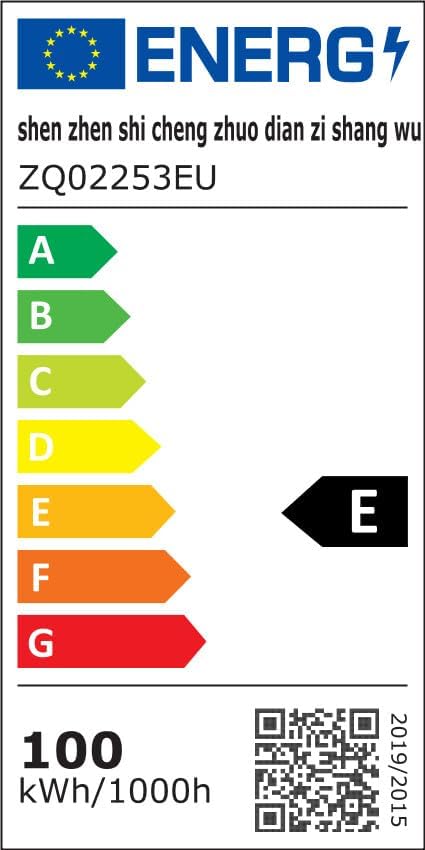
This image shows the EU Energy Label for a product identified as ZQ02253EU, indicating an energy efficiency class of E and an energy consumption of 100 kWh/1000h. A QR code is also present for further information.
For detailed energy information, please visit the EPREL database: https://eprel.ec.europa.eu/qr/2332964


