
1. Introduction
Thank you for choosing the Soundstream WRX-4.300 4-Channel Car Amplifier. This amplifier is designed to deliver powerful and clear audio performance for your vehicle's sound system. This manual provides essential information for proper installation, operation, and maintenance of your amplifier. Please read it thoroughly before attempting installation or use.
2. Safety Information
Always observe the following safety precautions during installation and operation:
- Disconnect the vehicle's negative battery terminal before any electrical work.
- Ensure all wiring is properly routed and secured to prevent damage or short circuits.
- Use appropriate gauge wiring for power, ground, and speaker connections as specified.
- Install the amplifier in a well-ventilated area, away from direct sunlight, heat sources, or moisture.
- Do not operate the amplifier if it is damaged or malfunctioning. Refer to the troubleshooting section or contact support.
- Professional installation is recommended for optimal performance and safety.
3. Package Contents
Verify that your package contains the following items:
- Soundstream WRX-4.300 Amplifier
- Mounting Screws
- High-Level Input Harnesses (2)
- Owner's Manual
- Spare Fuses

Image: Contents of the Soundstream WRX-4.300 package, showing the amplifier, wiring harnesses, mounting screws, and the owner's manual.
4. Product Overview
The Soundstream WRX-4.300 is a compact Class D 4-channel amplifier designed for versatility and high performance. It features adjustable crossovers, gain controls, and the ability to operate in full-range or bridged modes.
4.1 Top Panel Controls
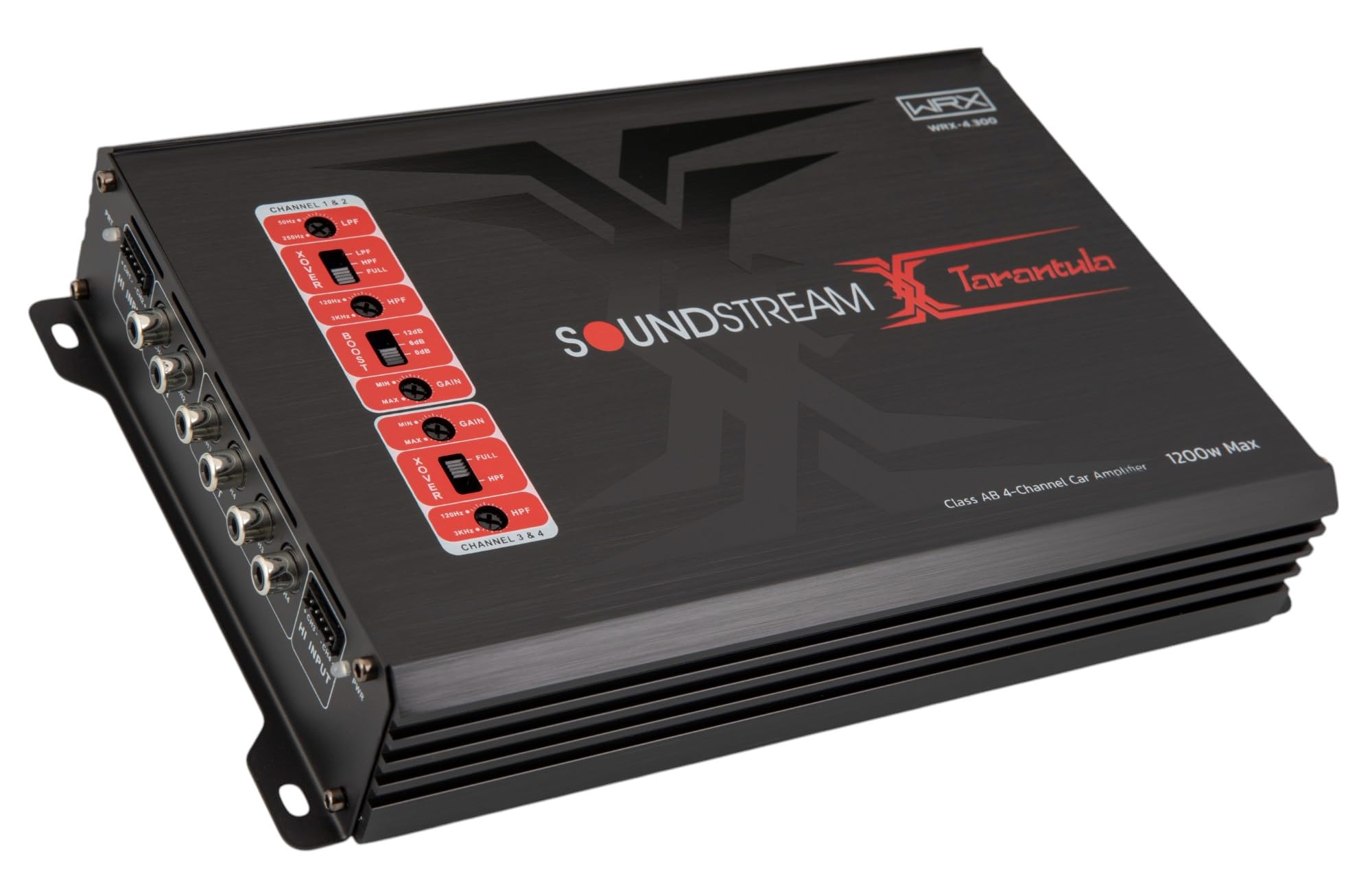
Image: Top view of the WRX-4.300 amplifier, highlighting the control panel with gain, crossover, and boost settings for channels 1&2 and 3&4.
- X-OVER (Crossover) Switches: Select between LPF (Low Pass Filter), FULL (Full Range), or HPF (High Pass Filter) for each channel pair.
- LPF/HPF Frequency Controls: Adjust the cutoff frequency for the selected crossover mode.
- BOOST (Bass Boost) Control: Adjust the bass boost level for channels 3&4.
- GAIN Controls: Adjust the input sensitivity for each channel pair to match the output of your head unit.
4.2 Input and Output Terminals

Image: Rear view of the WRX-4.300 amplifier, showing the RCA input and output jacks, and high-level input connectors for channels 1&2 and 3&4.

Image: Rear view of the WRX-4.300 amplifier, displaying the power (GND, REM, +12V), fuse, and speaker output terminals (CH1, CH2, CH3, CH4).
- HI INPUT: Connects to your head unit's speaker outputs for high-level input.
- IN (RCA Input): Connects to your head unit's RCA pre-outs for low-level input.
- OUT (RCA Output): Provides a pass-through RCA signal for connecting additional amplifiers.
- GND (Ground): Connects to the vehicle's chassis ground.
- REM (Remote): Connects to the head unit's remote turn-on lead.
- +12V (Power): Connects directly to the vehicle's positive battery terminal.
- FUSE: Contains replaceable fuses for protection.
- CH1-CH4 (Speaker Outputs): Connects to your speakers or subwoofers.
5. Setup & Installation
Proper installation is crucial for the performance and longevity of your amplifier. If you are unsure about any steps, consult a professional installer.
5.1 Mounting the Amplifier
- Choose a mounting location that is dry, well-ventilated, and away from direct heat or moisture. Ensure sufficient airflow around the amplifier's heatsink.
- Mark the mounting holes using the amplifier as a template.
- Drill pilot holes for the mounting screws.
- Secure the amplifier using the provided mounting screws.
5.2 Wiring Connections
Ensure all connections are secure and properly insulated to prevent short circuits.
5.2.1 Power Wiring
- Ground (GND): Connect a short, heavy-gauge wire (e.g., 8 AWG or larger) from the amplifier's GND terminal to a clean, unpainted metal point on the vehicle's chassis.
- Remote (REM): Connect a smaller gauge wire (e.g., 18 AWG) from the amplifier's REM terminal to the remote turn-on output of your head unit.
- +12V (Power): Connect a heavy-gauge wire (e.g., 8 AWG or larger) from the amplifier's +12V terminal directly to the positive terminal of the vehicle's battery. Install an in-line fuse holder (not included) within 18 inches (45 cm) of the battery.
5.2.2 Signal Input (RCA or High-Level)
- RCA Input: Use high-quality RCA cables to connect the head unit's pre-out jacks to the amplifier's IN (RCA Input) jacks.
- High-Level Input: If your head unit does not have RCA outputs, use the provided high-level input harnesses. Connect the harnesses to your head unit's speaker wires and then plug them into the amplifier's HI INPUT connectors.
5.2.3 Speaker Wiring
- Connect your speakers to the amplifier's CH1, CH2, CH3, and CH4 speaker output terminals.
- Ensure correct polarity (+ to + and - to -) for all speaker connections.
- For 4-channel operation, connect one speaker to each channel.
- For 2-channel (bridged) operation, connect speakers across channel pairs (e.g., CH1+ and CH2- for one speaker). Refer to the operating instructions for details on bridged mode.
6. Operating Instructions
Once installed, follow these steps to configure and operate your amplifier.
6.1 Initial Setup and Gain Adjustment
- Turn the GAIN controls on the amplifier to their minimum (fully counter-clockwise) position.
- Set your head unit's volume to about 75% of its maximum level.
- Slowly increase the GAIN control on the amplifier until you hear distortion, then back it off slightly until the sound is clear.
- Repeat for all active channel pairs.
6.2 Crossover Settings
The crossover filters allow you to direct specific frequency ranges to your speakers or subwoofers.
- FULL: For full-range speakers, allowing all frequencies to pass.
- HPF (High Pass Filter): For mid-range or tweeter speakers, allowing only frequencies above the set point to pass. Adjust the HPF frequency control to the desired cutoff.
- LPF (Low Pass Filter): For subwoofers, allowing only frequencies below the set point to pass. Adjust the LPF frequency control to the desired cutoff.
6.3 Bass Boost
The BASS BOOST control (for channels 3&4) allows you to enhance low frequencies. Use this feature sparingly to avoid distortion or speaker damage. Start with the boost at minimum and increase gradually if desired.
6.4 Bridged Mode Operation
The WRX-4.300 can be bridged to provide higher power output to fewer channels, typically for subwoofers. When bridging, connect the speaker's positive terminal to the positive output of one channel (e.g., CH1+) and the speaker's negative terminal to the negative output of the adjacent channel (e.g., CH2-). Ensure the connected speakers have an impedance compatible with bridged operation (typically 4 ohms minimum).
7. Maintenance
Minimal maintenance is required for your amplifier.
- Cleaning: Periodically wipe the amplifier's exterior with a soft, dry cloth. Do not use harsh chemicals or abrasive cleaners.
- Fuse Replacement: If the amplifier does not power on, check the fuses. Always replace blown fuses with new ones of the exact same type and rating to prevent damage.
- Ventilation: Ensure the amplifier's heatsink fins remain clear of obstructions to maintain proper cooling.
8. Troubleshooting
If you experience issues with your amplifier, refer to the following common problems and solutions:
| Problem | Possible Cause | Solution |
|---|---|---|
| Amplifier does not power on (PWR LED off) | Blown fuse, poor power/ground connection, no remote signal. | Check and replace fuses. Verify +12V, GND, and REM connections. Ensure head unit is on. |
| Amplifier powers on but no sound | Incorrect input connection, speaker wiring issues, gain too low, head unit muted. | Check RCA/high-level input cables. Verify speaker connections and polarity. Increase gain. Check head unit volume/mute. |
| Distorted sound | Gain set too high, improper crossover settings, damaged speakers. | Reduce gain. Adjust crossover frequencies. Inspect speakers for damage. |
| Amplifier goes into protection mode (PRT LED on) | Overheating, short circuit in speaker wiring, impedance too low. | Allow amplifier to cool. Check speaker wiring for shorts. Ensure speaker impedance is within amplifier's limits. |
| Engine noise/whining sound | Poor ground connection, RCA cables routed near power wires, ground loop. | Improve ground connection. Reroute RCA cables away from power wires. Consider a ground loop isolator. |
9. Specifications
Key technical specifications for the Soundstream WRX-4.300 amplifier:
- Output Power: 1200 Watts (Max)
- Number of Channels: 4
- Amplifier Class: Class D
- Voltage: 12 Volts (AC)
- Material: Aluminum
- Mounting Type: Surface Mount
- Product Dimensions (L x W x H): 7.2 x 6.69 x 1.97 inches
- Item Weight: 2.2 pounds
- Model Number: WRX-4.300
- UPC: 709483072411
10. Warranty & Support
Soundstream products are designed for reliability and performance. For warranty information, please refer to the warranty card included with your product or visit the official Soundstream website. For technical support or service inquiries, please contact Soundstream customer service through their official channels.


