
Introduction
This manual provides essential information for the safe and effective use of your Hot Wheels Remote Control Barbie Convertible Car. Please read all instructions carefully before operation to ensure proper setup and enjoyment.
What's in the Box
- Hot Wheels Remote Control Barbie Convertible Car
- Remote Control
- 2 Barbie Dolls
- 5 AA Duracell batteries (for car)
- 2 AAA Duracell batteries (for remote)
- Sticker Sheet for customization
Setup
- Unboxing: Carefully remove the car and remote control from the packaging.

Image: Hot Wheels Remote Control Barbie Convertible Car in its retail packaging.
- Battery Installation (Remote Control): Insert the 2 AAA Duracell batteries into the remote control. Ensure correct polarity.
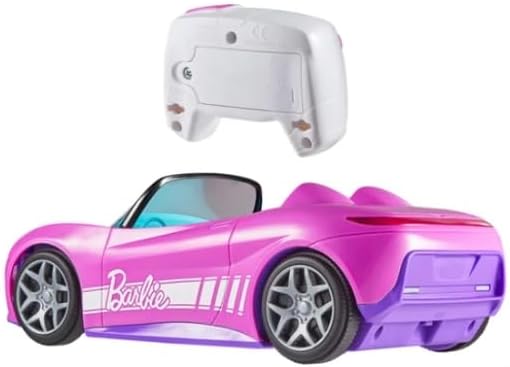
Image: Underside of the remote control, indicating battery placement.
- Battery Installation (Car): Insert the 5 AA Duracell batteries into the car's battery compartment. Ensure correct polarity. (Note: A screwdriver may be required to open the battery compartments).
- Doll Placement: Place two Barbie dolls into the car's seats.

Image: Two Barbie dolls positioned in the car seats.
- Customization: Use the included sticker sheet to personalize the car's appearance.
Operating Instructions
- Power On: Ensure both the car and the remote control are switched on.
- Select Driving Mode: Press the 'story' or 'speeder' button on the remote to select the desired driving mode.
- Story Mode: Designed for imaginative play, offering controlled speeds.
- Speeder Mode: Provides faster movement for dynamic play.
- Control Movement: Use the remote control to steer the car forward, backward, left, and right.
- Trunk Functionality: The car features an opening trunk for storing small accessories.

Image: A hand demonstrating the opening trunk feature of the car.
Features
- Designed in signature Barbie pink with included sticker sheet for personalization.
- Accommodates 2 Barbie dolls.
- Functional opening trunk for accessory storage.
- Two driving modes: Story and Speeder.
- Fully functional remote control for easy maneuverability.
Maintenance
- Cleaning: Wipe the car and remote with a damp cloth. Do not immerse in water.
- Battery Care: Remove batteries if the toy will not be used for an extended period to prevent leakage.
- Storage: Store the toy in a cool, dry place away from direct sunlight.
Troubleshooting
- Car not responding:
- Check if both the car and remote control are switched on.
- Ensure batteries are correctly installed and not depleted. Replace if necessary.
- Verify that the car and remote are within operating range.
- Car moving slowly:
- Check battery levels in both the car and remote. Low batteries can affect performance.
- Ensure the car is operating on a smooth, flat surface. Rough terrain can impede movement.
Specifications
| Product Dimensions | 15 x 8.66 x 7.36 inches |
| Item Weight | 3.37 pounds |
| Manufacturer Recommended Age | 36 months - 9 years |
| Batteries Required | 5 AA batteries (car), 2 AAA batteries (remote) - included |
| Manufacturer | Mattel |
Warranty and Support
For product support or warranty information, please contact Mattel Creations directly.
Manufacturer Contact Information: Mattel Creations: 636 Girard Ave East Aurora, NY 14052


