
1. Introduction
This manual provides detailed instructions for the safe and effective use of your JolyWell 2-in-1 Laser Tape Measure, Model JW-MT002. This device combines a 131ft (40m) laser distance meter with a 16ft (5m) traditional self-locking tape measure, offering versatility for various measurement tasks in construction, DIY projects, and woodworking.
2. Safety Information
WARNING: Read all safety warnings and instructions before using this product.
- This device emits a Class II laser. Do not stare directly into the laser beam. Avoid direct eye exposure.
- Do not attempt to disassemble or modify the device. Unauthorized modifications can result in hazardous radiation exposure.
- Keep the device out of reach of children.
- Use the device only for its intended purpose as described in this manual.
- Ensure the work area is clear of obstacles and hazards when taking measurements.
- Protect the device from extreme temperatures, moisture, and strong impacts.
3. Product Overview
The JolyWell 2-in-1 Laser Tape Measure integrates both laser and traditional tape measurement capabilities into a single compact unit.
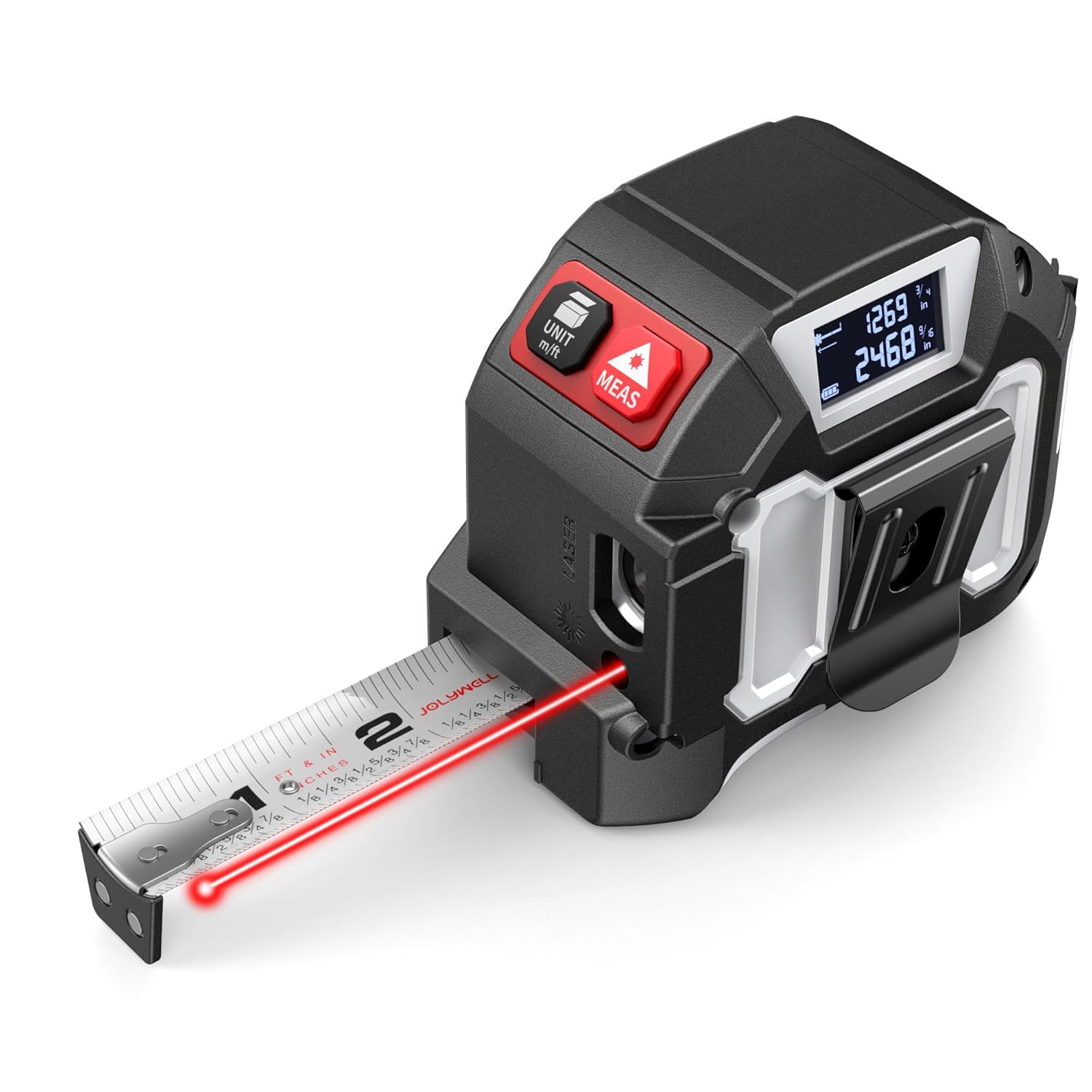
Figure 1: JolyWell 2-in-1 Laser Tape Measure. This image shows the device with its laser beam active, displaying the digital screen and the physical tape measure extending from the unit.
Key Features:
- Dual Measurement: 131ft (40m) laser distance measurement and 16ft (5m) traditional self-locking tape measure.
- Multiple Laser Modes: Single, Continuous, Area, Volume, and Pythagorean measurements.
- High Accuracy: Laser accuracy up to ±0.11 inches (0.04 inches stated in feature bullets, using the more conservative value from description).
- Magnetic Hook: Movable magnetic hook for precise internal and external measurements.
- Auto-Locking Tape: The physical tape automatically locks in place when extended.
- Rechargeable: USB Type-C charging, providing approximately 5000 measurements per full charge.
- Durable Design: Shock-resistant ABS housing and carbon steel tape for durability.
- LCD Display: Large, backlit LCD screen for clear readability in various lighting conditions.

Figure 2: Versatility of the 2-in-1 Tape Measure. This image illustrates the device being used for both short-range tape measurements (e.g., on furniture) and long-range laser measurements (e.g., in a room).
4. Setup
4.1 Charging the Device
The device is powered by a rechargeable battery. Before first use, or when the battery indicator on the LCD is low, charge the device using the provided USB Type-C cable.
- Locate the Type-C charging port on the side of the device.
- Connect the USB Type-C cable to the device and the other end to a compatible USB power adapter (not included) or a computer USB port.
- The battery indicator on the LCD will show charging status. A full charge allows for approximately 5000 measurements.

Figure 3: Type-C Charging and Belt Clip. This image highlights the USB Type-C charging port for convenient recharging and the integrated belt clip for easy portability.
4.2 Powering On/Off
- To power on, press the MEAS button.
- To power off, long press the MEAS button. The device will also automatically power off after a period of inactivity to conserve battery.
5. Operating Instructions
5.1 Using the Traditional Tape Measure
The integrated 16ft (5m) tape measure functions like a standard tape measure with added features:
- Self-Locking: Pull the tape out, and it will automatically lock in position. To retract, press the release button located on the top of the device.
- Magnetic Hook: The end hook is magnetic and movable, allowing for accurate internal and external measurements. For external measurements, the hook's thickness is included. For internal measurements, the hook's thickness is excluded.
- Double-Sided Measurements: The tape features markings on both sides for convenience.
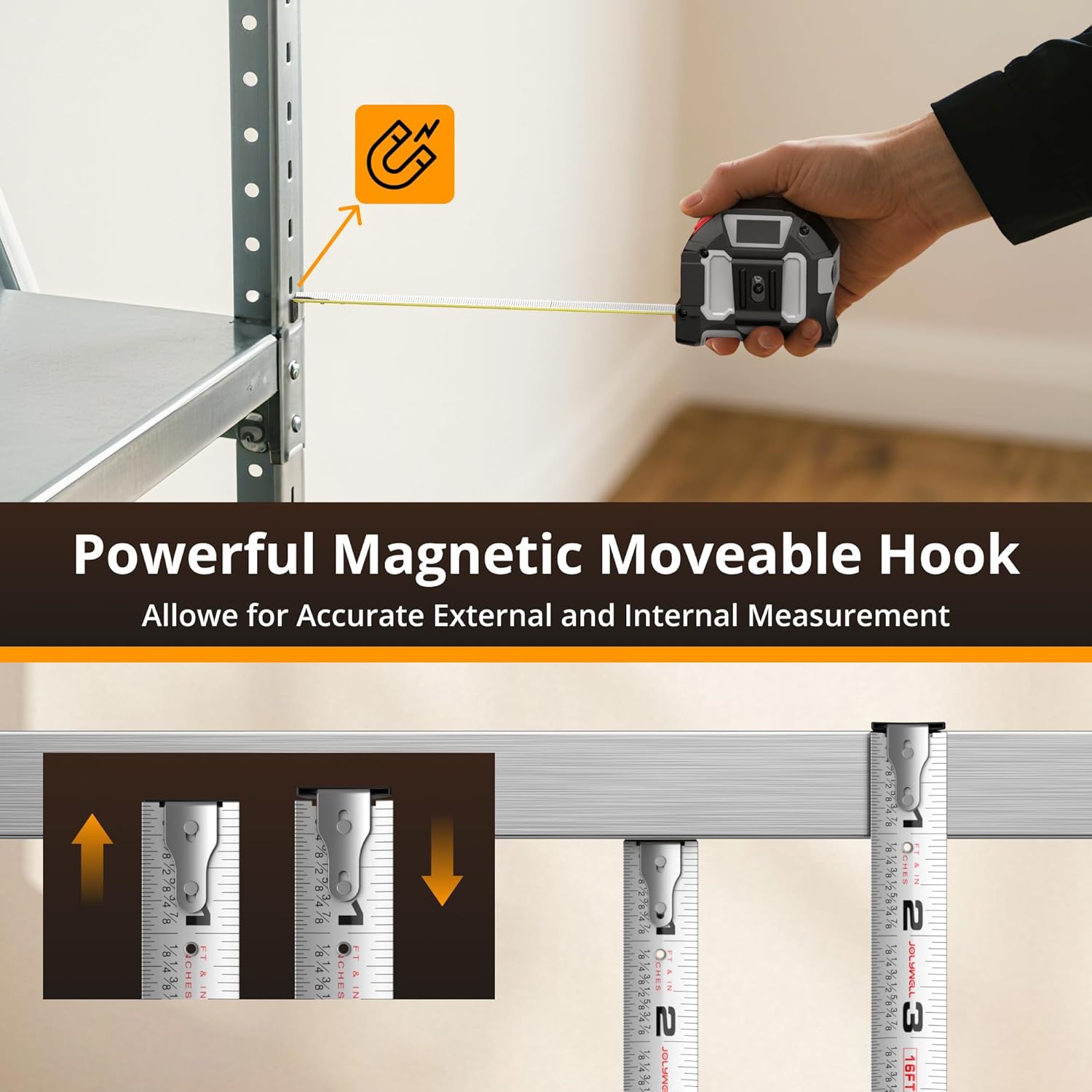
Figure 4: Magnetic Movable Hook. This image demonstrates the magnetic hook's functionality for both external and internal measurements, highlighting how the hook adjusts for accuracy.

Figure 5: Auto-Locking and Double-Sided Tape. This image illustrates the auto-locking mechanism of the tape measure and the convenience of double-sided measurement markings.
5.2 Laser Measurement Modes
The laser measurement function offers five distinct modes:

Figure 6: Multiple Laser Measurement Modes. This image visually represents the different measurement modes available: Distance, Area, Volume, and Continuous measurement.
- Single Measurement:
Press the MEAS button once to activate the laser. Press it again to take a single distance measurement. - Continuous Measurement:
At power up, press the UNIT m/ft and MEAS buttons three times in quick succession to enter Continuous Measurement Mode. The display will show real-time distance as you move the device. Press any button to exit this mode (only available in Distance Mode).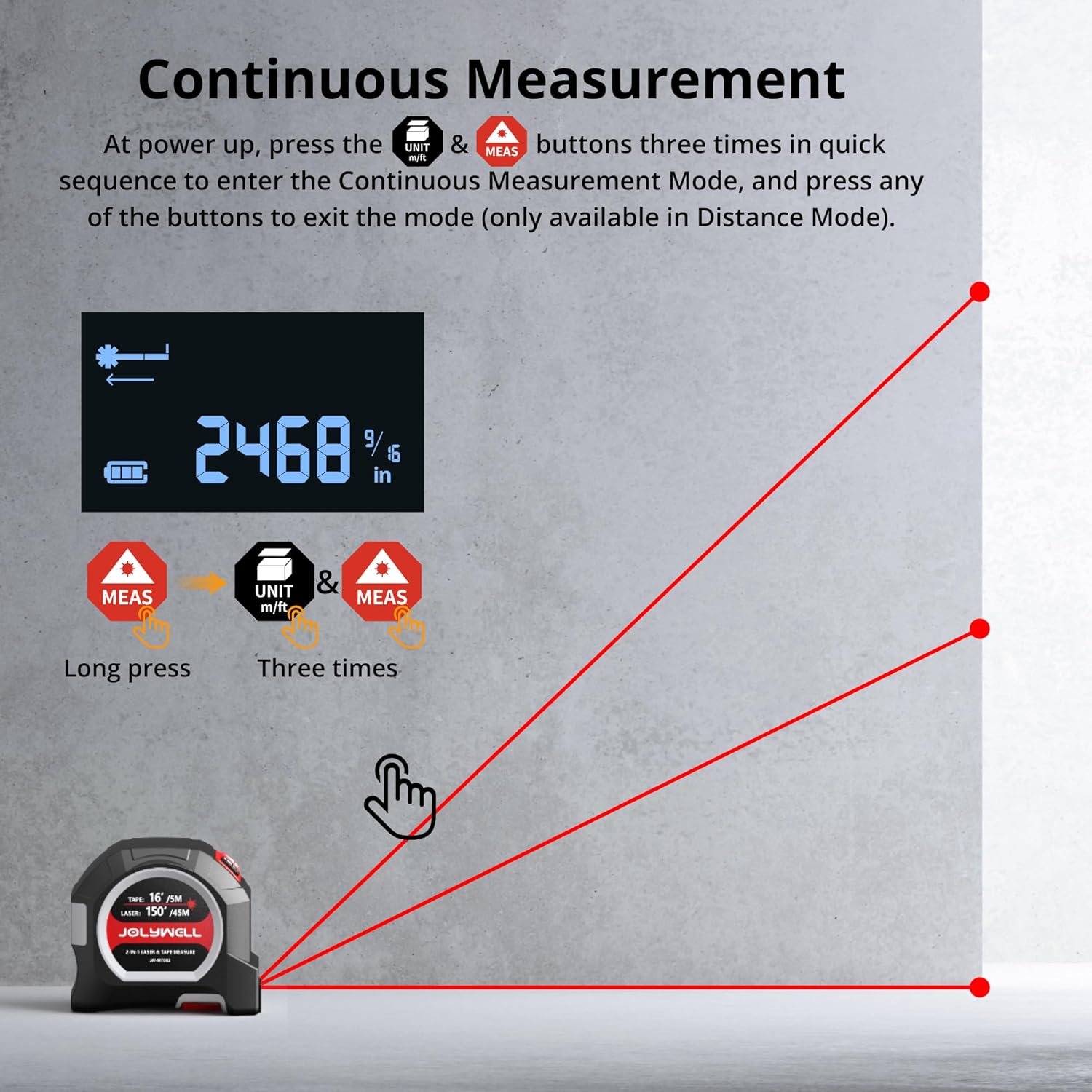
Figure 7: Continuous Measurement Mode. This image illustrates the sequence of button presses required to activate and use the continuous measurement function, showing real-time distance updates on the display.
- Area Measurement:
Short press the UNIT m/ft button (0.5 sec) until the Area icon appears on the display. Take two consecutive distance measurements (length and width). The device will automatically calculate and display the area. - Volume Measurement:
Short press the UNIT m/ft button (0.5 sec) until the Volume icon appears. Take three consecutive distance measurements (length, width, and height). The device will automatically calculate and display the volume. - Pythagorean Measurement:
Short press the UNIT m/ft button (0.5 sec) until the Pythagorean icon appears. Follow the on-screen prompts to take the required measurements for indirect height or length calculation.
5.3 Unit Switching
The device supports four units: meters (m), feet (ft), inches (in), and feet+inches (ft+in).
- To switch between units (m/ft/in/ft+in), long press the UNIT m/ft button (3 seconds).
5.4 Changing the Measurement Base Line
The measurement can be taken from the front or the back of the device.
- To change the base line (Front/Back), press the UNIT m/ft and MEAS buttons together. An icon on the LCD will indicate the current base line.
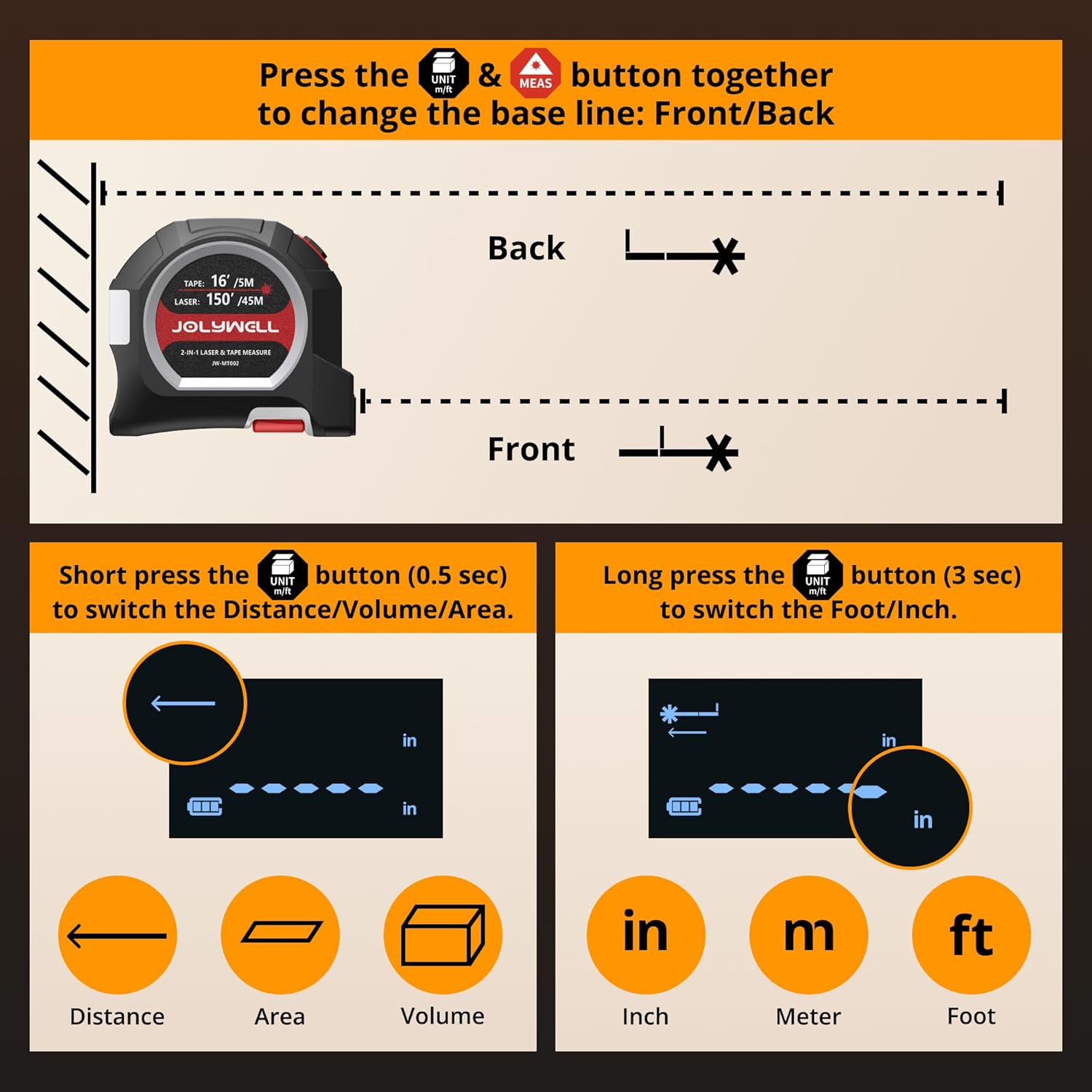
Figure 8: Unit and Base Line Selection. This image provides a visual guide for switching between measurement units (inches, meters, feet) and changing the measurement reference point (front or back of the device).
6. Maintenance
- Cleaning: Use a soft, damp cloth to clean the device. Do not use abrasive cleaners or solvents. Ensure the laser lens is kept clean for accurate measurements.
- Storage: Store the device in a cool, dry place away from direct sunlight and extreme temperatures.
- Battery Care: For optimal battery life, avoid fully discharging the battery frequently. Charge the device regularly, even if not in use for extended periods.
7. Troubleshooting
| Problem | Possible Cause | Solution |
|---|---|---|
| Device does not power on | Low battery; Device malfunction | Charge the device fully. If problem persists, contact support. |
| Inaccurate laser measurements | Dirty laser lens; Unstable surface; Obstruction in laser path; Incorrect base line setting | Clean the laser lens. Ensure a stable measurement surface. Clear any obstructions. Verify the base line setting (front/back). |
| Tape measure does not retract | Release button not pressed; Internal mechanism issue | Ensure the release button is fully pressed. Do not force the tape. If stuck, contact support. |
| LCD display is dim or unreadable | Low battery; Extreme lighting conditions | Charge the device. Move to an area with more suitable lighting. |
8. Specifications
| Feature | Specification |
|---|---|
| Model Number | JW-MT002 |
| Laser Measurement Range | Up to 131 ft (40m) |
| Tape Measure Length | 16 ft (5m) |
| Laser Class | Class II, <1mW power output |
| Measurement Accuracy | ±0.11 inches (approx. ±2.8mm) |
| Units of Measurement | m / ft / in / ft+in |
| Measurement Modes | Single, Continuous, Area, Volume, Pythagorean |
| Power Source | Rechargeable via USB Type-C |
| Battery Life (per charge) | Approx. 5000 measurements |
| Product Dimensions | 8.03 x 4.5 x 0.1 cm (device); 8L x 4.5W cm (packaging) |
| Item Weight | 0.27 Kilograms |
| Case Material | ABS Housing, Soft Rubber |
| Tape Material | Carbon Steel, Nylon Coated |
| Lock Type | Push-Button (for tape retraction) |
9. Warranty and Support
For warranty information or technical support, please refer to the product packaging or contact JolyWell customer service through your retailer or the official JolyWell website. Please have your model number (JW-MT002) and purchase details ready when contacting support.