
WZYBUTA ZQ02624
WZYBUTA Two-Armed Moving Head Lights (Model ZQ02624) Instruction Manual
Brand: WZYBUTA | Model: ZQ02624
1. Introduction
This manual provides detailed instructions for the safe and efficient operation of your WZYBUTA Two-Armed Moving Head Lights. Please read this manual thoroughly before use and retain it for future reference.

Figure 1: WZYBUTA Two-Armed Moving Head Light
2. What's in the Box
Verify that all components are present and undamaged upon unpacking:
- Moving Head Light x 1
- Power cord x 1
- Remote control x 1
- Mounting bracket + screws x 1
- Instruction manual x 1
3. Key Features
- Integrated Effects: Combines beam, red-green laser, magic ball, and colorful light strip effects.
- Flexible Projection: Two-arm RGBW beams project four horizontal beams with 180° rotation and 540° free rotation on the X-axis.
- Multiple Control Methods: Supports DMX, automatic, sound-activated, master-slave, and remote control.
- One-Click Operation: Built-in lighting effect modes for easy atmosphere creation.
- High Brightness Light Source: Class I laser level with red, green, and blue beams (less than 0.3mw each) for clear patterns and wide coverage.
- Durable Construction: Aluminum material with a metallic finish.
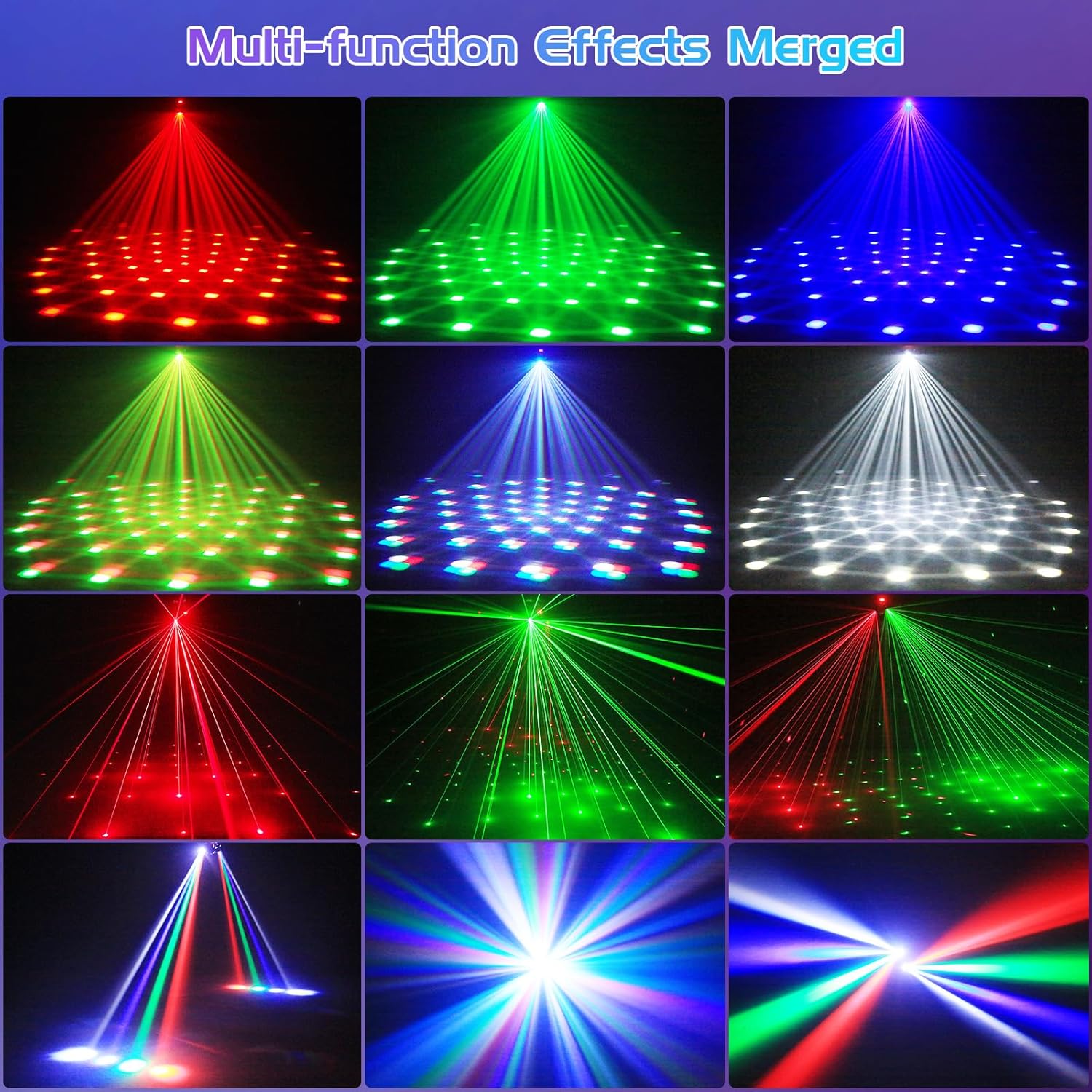
Figure 2: Multi-function effects merged

Figure 3: Diverse lighting effects

Figure 4: Component breakdown
4. Setup
- Unpacking: Carefully remove the moving head light and all accessories from the packaging. Inspect for any signs of damage.
- Placement: Position the light on a stable, flat surface or use the provided mounting bracket to secure it to a wall or ceiling. Ensure adequate ventilation around the unit.
- Power Connection: Connect the power cord to the unit's power input and then to a suitable power outlet (AC110-240V, 50/60Hz).
- Initial Power On: The unit will typically power on and enter an automatic mode.
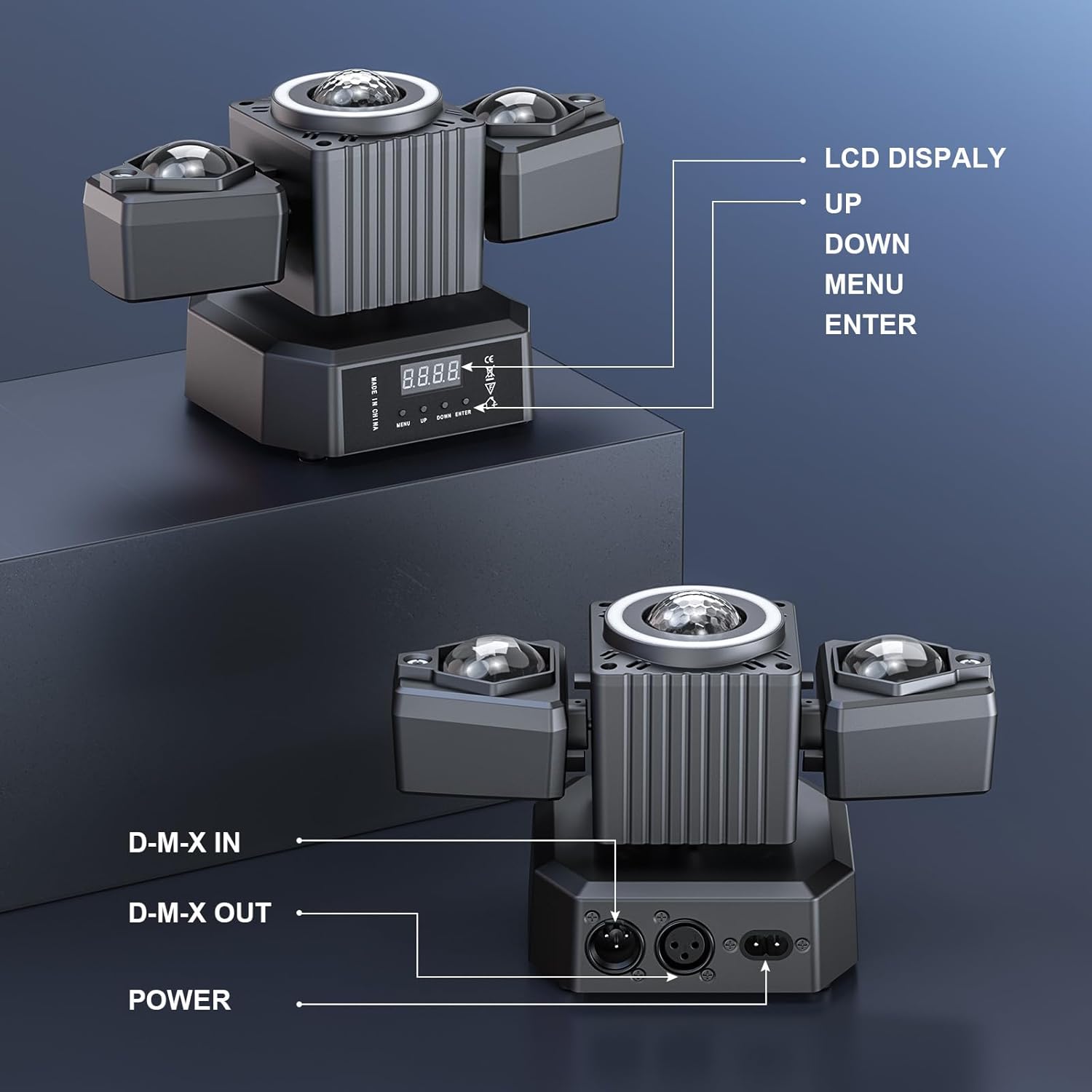
Figure 5: Rear panel connections and controls
5. Operating Modes
The WZYBUTA Moving Head Light offers several operating modes:
- Automatic Mode (AUTO): The light cycles through pre-programmed patterns and colors automatically.
- Sound-Activated Mode: The light reacts to music and sound, changing patterns and colors in sync with the audio.
- DMX512 Mode: For professional control, connect to a DMX controller using DMX IN/OUT ports. Supports 19 control channels.
- Master-Slave Mode: Link multiple units together. One unit acts as the master, controlling all other slave units.
- Remote Control: Use the included remote to switch modes, change colors, adjust speed, and control other functions.
Video 1: Demonstration of various lighting effects and modes.
6. Controls
The unit features an LCD display and four buttons for direct control, in addition to the remote control:
- MENU: Cycles through different settings and modes.
- UP/DOWN: Navigates through options or adjusts parameter values.
- ENTER: Confirms selections.
The remote control provides convenient access to all functions, including mode selection, color changes, strobe effects, and laser activation.

Figure 6: Rotation angles for dynamic effects
7. Installation
The moving head light can be installed in various ways:
- Table Mount: Place the unit on a stable, level surface.
- Wall/Ceiling Mount: Use the provided mounting bracket and screws to securely attach the unit. Ensure the mounting surface can support the weight of the fixture. Always consult a qualified professional for overhead installations.

Figure 7: Product dimensions and weight
8. Maintenance
To ensure longevity and optimal performance of your WZYBUTA Moving Head Light:
- Cleaning: Regularly clean the lenses and exterior with a soft, dry cloth. Avoid abrasive cleaners or solvents.
- Ventilation: Ensure ventilation openings are clear of dust and debris to prevent overheating.
- Storage: When not in use, store the unit in a cool, dry place away from direct sunlight and extreme temperatures.
- Inspection: Periodically check power cables and connections for wear or damage.
9. Troubleshooting
| Problem | Possible Cause | Solution |
|---|---|---|
| No power | Power cord disconnected; no power from outlet. | Check power connections; test outlet with another device. |
| No light output | Unit in standby mode; mode not selected; internal fault. | Press ON/OFF on remote; select an operating mode; contact support if issue persists. |
| Remote not working | Battery depleted; remote not aimed at sensor; obstruction. | Replace remote battery; ensure clear line of sight to unit's sensor. |
| Lights not moving/rotating | Mode does not include movement; motor obstruction. | Select a dynamic mode; ensure no physical obstructions to moving parts. |
10. Technical Specifications
| Parameter | Value |
|---|---|
| Model Number | ZQ02624 |
| Power Source | AC110-240V, 50/60Hz |
| Light Source Type | Fluorescent (RGBW LEDs, Red/Green Lasers) |
| Number of Light Sources | 3 (main RGBW, 2 laser arms) |
| Laser Level | Class I (Red beam < 0.3mw, Green beam < 0.3mw, Blue beam < 0.3mw) |
| X-Axis Rotation | 540° |
| Y-Axis Rotation | 180° |
| Dimming | 0-100% Linear Dimming |
| Strobe | 0-20 Times/Second |
| Control Channels (DMX) | 19CH |
| Material | Aluminum |
| Color | Black |
| Dimensions (L x W x H) | 9.4"L x 2"W x 6"H (approx. 24cm x 5cm x 15.3cm) |
| Weight | 0.8kg / 1.76lb |
11. Warranty & Support
The product comes with a manufacturer warranty. For specific details regarding warranty coverage and duration, please refer to the warranty card included in your package or contact WZYBUTA customer support.
For technical assistance, troubleshooting, or replacement parts, please contact the seller or manufacturer directly. Keep your purchase receipt and model number (ZQ02624) handy for faster service.
Manufacturer: Shenzhen Zhuoqiong Technology Co., Ltd.
Ask a question about this manual
Ask about setup, troubleshooting, compatibility, parts, safety, or missing instructions. Manuals+ will review the question and use this page’s manual context to help answer it.