
JINBEI HD2 Plus
JINBEI HD2 Plus 100Ws On-Camera Flash User Manual
Model: HD2 Plus
Introduction
Thank you for choosing the JINBEI HD2 Plus 100Ws On-Camera Flash. This compact and powerful flash unit is designed to provide professional lighting solutions for various photography scenarios, including sports, outdoor, and studio work. Featuring a 2.3-inch high-definition touch screen, TTL auto metering, and High-Speed Sync (HSS) capabilities, the HD2 Plus offers intuitive control and precise exposure. Please read this manual thoroughly before use to ensure proper operation and to maximize the performance of your device.
Safety Information
To prevent damage to the product or injury to yourself or others, please observe the following safety precautions:
- Do not disassemble or modify the flash unit. Unauthorized modifications can lead to electric shock or malfunction.
- Keep the device away from water and other liquids. Do not operate with wet hands.
- Avoid direct eye exposure to the flash light, especially at close range, as it can cause temporary vision impairment.
- Do not operate the flash in environments with flammable gases or liquids.
- Ensure the flash is securely mounted to your camera or stand to prevent accidental drops.
- Use only the specified battery and charging accessories.
- Store the flash in a dry, cool place, away from direct sunlight and extreme temperatures.
Package Contents
Please check that all items are present in your package:
- JINBEI HD2 Plus 100Ws On-Camera Flash Unit (Light *1)
- Rechargeable Lithium Battery
- Type-C Charging Cable
- Mini Stand
- Protective Case
- User Manual
Product Overview
Familiarize yourself with the components of your JINBEI HD2 Plus flash unit.
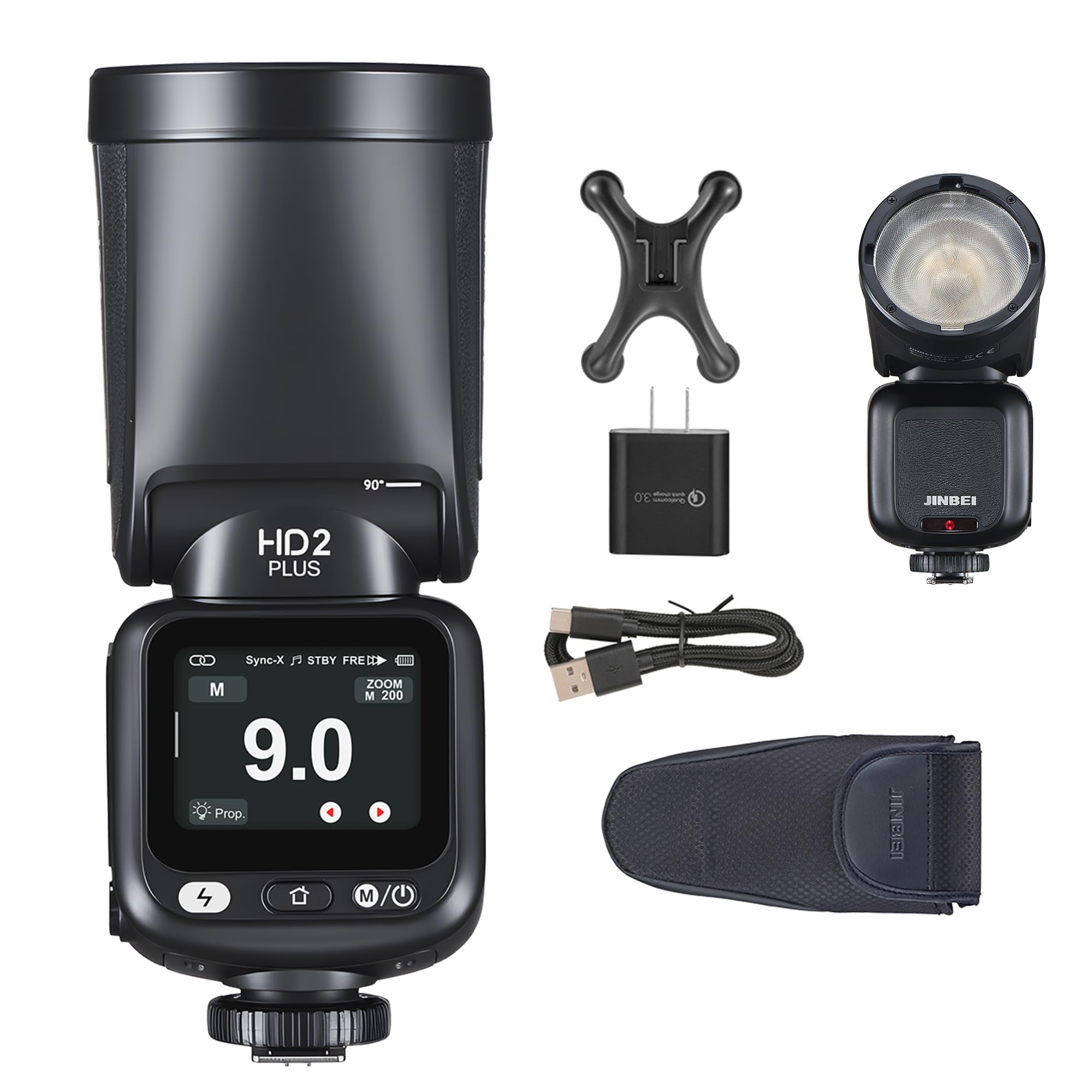
Image: The JINBEI HD2 Plus 100Ws On-Camera Flash unit, showcasing its compact design and touch screen interface.
Key Features:
- 100Ws High Output: Powerful illumination for various shooting conditions.
- Ultra-Lightweight Design: 11% slimmer than previous models for enhanced portability.
- 2.3-inch Full-Color Touch Panel: High-definition, high-sensitivity touch screen for intuitive control.
- TTL Auto Metering: Simplifies operation and ensures accurate exposure.
- High-Speed Sync (HSS): Ideal for freezing motion and shooting with wide apertures in bright ambient light.
- Over 480 Continuous Flashes: Extended battery life for prolonged shooting sessions.
- Type-C Power Delivery: Allows use during charging for uninterrupted workflow.
- 1.6s Recycle Time: Quick recycling for rapid-fire shooting.
- Multi-Language Menu: One-key switch between Chinese and English.
Setup
1. Charging the Battery:
- Insert the rechargeable lithium battery into the battery compartment on the flash unit.
- Connect the Type-C charging cable to the flash unit's Type-C port and the other end to a compatible USB power adapter (not included).
- The charging indicator on the flash unit will show the charging status. A full charge typically takes approximately [X hours - information not provided in JSON, placeholder for a real manual].
- The flash can be used while charging via Type-C power delivery.
2. Mounting the Flash:
- On-Camera Mounting: Slide the flash's hot shoe onto your camera's hot shoe mount. Secure it by tightening the locking ring or lever until it is firmly attached.
- Off-Camera Mounting: Attach the flash to a light stand using the included mini stand or a compatible light stand adapter. Ensure it is securely fastened.
Operating Instructions
1. Power On/Off:
- Press and hold the power button for [X seconds - information not provided] to turn the flash unit on or off.
- The 2.3-inch touch screen will illuminate upon power-on.
2. Navigating the Touch Screen Menu:
- Tap on icons or options on the screen to select them.
- Swipe left or right to navigate through different menu pages or settings.
- Use the dedicated "one-key" button to switch between Chinese and English menu languages.
3. Flash Modes:
The HD2 Plus supports various flash modes:
- TTL (Through-The-Lens) Mode: The flash automatically adjusts its output based on the camera's metering system for accurate exposure.
- Manual Mode (M): Allows you to manually set the flash power output from 1/1 to 1/256.
- Multi Mode (Stroboscopic): Fires a series of rapid flashes during a single exposure to capture multiple images of a moving subject.
- HSS (High-Speed Sync): Enables flash synchronization at shutter speeds faster than the camera's native sync speed, ideal for shooting with wide apertures in bright conditions.
4. Wireless Control:
The HD2 Plus can be used as a master or slave unit in a wireless flash system. Refer to the on-screen menu for pairing and group settings. It is compatible with [specific wireless systems/triggers - information not provided].
Maintenance
Cleaning:
- Use a soft, dry cloth to clean the flash unit's exterior.
- For the touch screen, use a microfiber cloth specifically designed for electronics. Avoid abrasive materials or harsh chemicals.
- Do not use water or cleaning solutions directly on the flash unit.
Storage:
- When not in use for extended periods, remove the battery from the flash unit.
- Store the flash in its protective case in a cool, dry place, away from direct sunlight, dust, and moisture.
- Avoid storing in areas with extreme temperature fluctuations.
Troubleshooting
| Problem | Possible Cause | Solution |
|---|---|---|
| Flash does not power on. | Battery is depleted or not inserted correctly. | Charge the battery or reinsert it properly. |
| Flash does not fire. | Incorrect camera settings, flash not fully recycled, or hot shoe connection issue. | Check camera flash settings. Wait for the recycle indicator. Ensure flash is securely mounted on the hot shoe. |
| Flash output is inconsistent. | Low battery, interference in wireless mode, or incorrect power settings. | Recharge battery. Check wireless channel/group. Adjust manual power settings. |
| Touch screen is unresponsive. | Temporary software glitch or screen protector interference. | Restart the flash unit. Ensure screen is clean and free of obstructions. |
Specifications
| Brand | JINBEI |
| Model Number | HD2 Plus |
| Power Output | 100Ws |
| Recycle Time | Approx. 1.6s |
| Flash Modes | TTL, Manual, Multi, HSS |
| Display | 2.3-inch Full-Color Touch Panel |
| Power Source | Rechargeable Lithium Battery, Type-C PD |
| Continuous Flashes (Full Power) | Up to 100 (full power), Over 480 (standard use) |
| Included Components | Light *1 |
| ASIN | B0FCMCSPW4 |
Warranty and Support
Warranty:
This JINBEI HD2 Plus flash unit comes with a one-year manufacturer's warranty from the date of purchase. This warranty covers defects in materials and workmanship under normal use. It does not cover damage caused by misuse, accident, unauthorized modification, or improper storage.
Customer Support:
For technical assistance, troubleshooting, or warranty claims, please contact JINBEI customer support through their official website or the retailer where you purchased the product. Please have your product model and purchase date available when contacting support.
For more information, visit the JINBEI Brand Store.
Ask a question about this manual
Ask about setup, troubleshooting, compatibility, parts, safety, or missing instructions. Manuals+ will review the question and use this page’s manual context to help answer it.