
1. Product Overview
The Mingdaln 1.85 inch Military Smart Watch is a robust and versatile wearable device designed for active lifestyles. It features a 1.85-inch screen, Bluetooth connectivity, and an activity tracker, making it compatible with both Android and iPhone devices. This manual provides essential information for setting up, operating, maintaining, and troubleshooting your new smartwatch.
Package Contents
- Mingdaln 1.85 inch Military Smart Watch
- Charging Cable
- User Manual (this document)
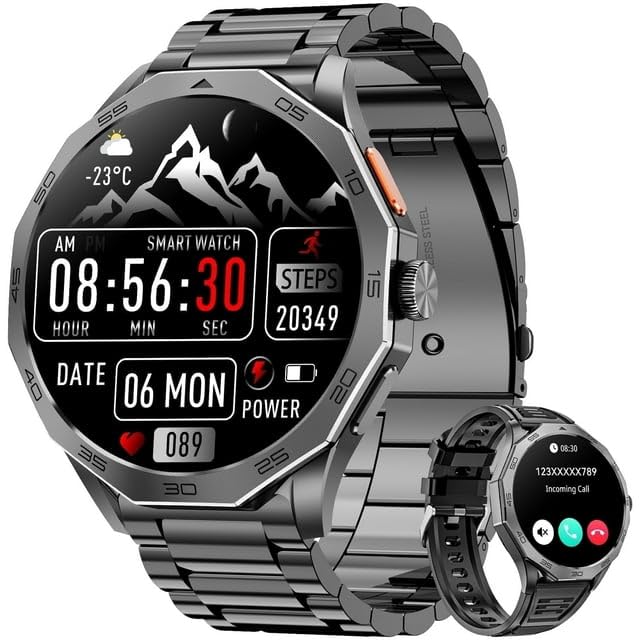
Image showing the Mingdaln 1.85 inch Military Smart Watch, featuring its display and rugged design.
2. Setup
2.1 Charging the Device
- Connect the provided charging cable to the charging port on the back of your smartwatch.
- Plug the other end of the charging cable into a standard USB power adapter (not included) or a computer's USB port.
- The watch display will indicate charging status. Ensure the watch is fully charged before first use. A full charge typically takes approximately 2 hours.
2.2 Pairing with Your Smartphone
- Ensure your smartphone's Bluetooth is enabled.
- Download and install the companion application for your Mingdaln Smart Watch from your smartphone's app store (e.g., Google Play Store for Android, Apple App Store for iPhone). Refer to the watch's packaging or quick start guide for the specific app name.
- Open the companion application on your smartphone and follow the on-screen instructions to create an account or log in.
- Within the app, navigate to the device pairing section. The app will search for available devices.
- Select your Mingdaln Smart Watch from the list of discovered devices. Confirm the pairing request on both your watch and smartphone if prompted.
- Once successfully paired, the watch will synchronize with your smartphone, and you can begin customizing settings and receiving notifications.
3. Operating Instructions
3.1 Basic Navigation
- Touch Screen: Swipe left, right, up, or down to navigate through menus and features. Tap to select an option.
- Side Button(s): Typically, a single press returns to the home screen or wakes the display. A long press may access power options or a quick menu. Refer to the watch's on-screen prompts for specific button functions.
3.2 Activity Tracking
The smartwatch includes an activity tracker to monitor your daily steps, distance, and calories burned. This feature is automatically enabled. You can view your activity data directly on the watch or in more detail through the companion smartphone application.
- Steps: The watch counts your steps using an internal accelerometer.
- Distance: Calculated based on your step count and estimated stride length.
- Calories: Estimated based on your activity level, steps, and personal data entered in the app.
3.3 Bluetooth Connectivity
Your smartwatch uses Bluetooth to connect with your smartphone, enabling features such as:
- Receiving notifications (calls, messages, app alerts)
- Synchronizing fitness data
- Controlling music playback on your phone
- Remote camera shutter control
Ensure your watch remains within Bluetooth range of your paired smartphone for continuous connectivity.
4. Maintenance
4.1 Cleaning Your Smart Watch
- Wipe the watch screen and body with a soft, lint-free cloth.
- For stubborn dirt, slightly dampen the cloth with water. Avoid using harsh chemicals, abrasive cleaners, or solvents.
- Ensure the charging contacts are clean and dry before charging to prevent corrosion.
4.2 Battery Care
- Charge the watch regularly to maintain battery health.
- Avoid fully discharging the battery frequently.
- Do not expose the watch to extreme temperatures, as this can degrade battery performance.
5. Troubleshooting
5.1 Common Issues and Solutions
- Watch not turning on: Ensure the watch is fully charged. Connect it to the charging cable and a power source for at least 30 minutes.
- Cannot pair with smartphone:
- Ensure Bluetooth is enabled on your smartphone.
- Make sure the watch is within range of your smartphone.
- Restart both the watch and your smartphone.
- Check if the companion app is updated to the latest version.
- If previously paired, try unpairing the device from your phone's Bluetooth settings and then re-pairing through the app.
- Notifications not appearing:
- Verify that the watch is successfully paired with your smartphone.
- Check notification settings within the companion app and your smartphone's system settings to ensure permissions are granted for the app to send notifications.
- Ensure the watch is not in 'Do Not Disturb' mode.
- Inaccurate activity data:
- Ensure the watch is worn snugly on your wrist.
- Update your personal information (height, weight, age) in the companion app for more accurate calculations.
- Restart the watch.
6. Specifications
| Feature | Specification |
|---|---|
| Brand | Mingdaln |
| Model | 1.85 inch Military Smart Watch |
| Screen Size | 1.8 Inches |
| Shape | Square |
| Operating System | Android Wear 1.0 |
| Connectivity Technology | Bluetooth |
| Special Feature | Activity Tracker |
| GPS | No GPS |
| Battery Cell Composition | Lithium Polymer |
| Battery Cell Type | Lithium Polymer |
| Included Components | Charging Cable |
| UPC | 607601920357 |
| ASIN | B0FCM6Y343 |
| Manufacturer | Mingdaln |
7. Warranty and Support
7.1 Warranty Information
This product comes with a 1-year limited warranty from the date of purchase, covering manufacturing defects. Please retain your proof of purchase for warranty claims. The warranty does not cover damage caused by misuse, accidents, unauthorized modifications, or normal wear and tear.
7.2 Customer Support
For technical assistance, troubleshooting, or warranty inquiries, please contact Mingdaln customer support through the contact information provided on the product packaging or the official Mingdaln website. When contacting support, please have your product model and purchase details ready.