
Assistrust KY-8000
Assistrust Sound Bar User Manual
Model: KY-8000
Introduction
This manual provides comprehensive instructions for the Assistrust KY-8000 Sound Bar. Designed for smart TVs, PCs, gaming consoles, and projectors, this 80W soundbar offers versatile connectivity and customizable audio experiences. Its unique 2-in-1 detachable design allows for flexible placement to suit any room setup, delivering impactful volume and cinematic audio.

Figure 1: The Assistrust KY-8000 Sound Bar in its standard horizontal setup.
Setup and Installation
2-in-1 Detachable Design
The KY-8000 Sound Bar features a unique 2-in-1 design, allowing it to be used as a single horizontal soundbar or split into two vertical tower speakers for enhanced stereo sound.

Figure 2: Instructions for combining the soundbar into a single long unit.

Figure 3: Instructions for splitting the soundbar into two tower speakers.
To combine into a long soundbar: Align and merge the two sections, then twist into place to lock. To split into tower soundbars: Separate the two pieces, align each to its respective stand base (A to A, B to B), and rotate until perfectly aligned.
Placement Options
The soundbar offers flexible placement to optimize sound delivery for your space:
- Horizontal Placement: Ideal for distortion-free audio, typically placed below your TV.
- Vertical Tower Placement: Splits into two towers for room-filling stereo sound, perfect for flanking a TV or monitor.
- Tabletop: Provides vibrant clarity for close-range listening.
- Wall Mount: Achieves 360° cinematic sound, transforming your room into a personal theater.

Figure 4: Examples of flexible soundbar placement options.
Connectivity
The soundbar supports multiple connection types for seamless integration with your devices:
- Bluetooth 5.3: For wireless audio streaming from compatible devices.
- ARC (Audio Return Channel): Connects to your TV via HDMI for high-quality audio and allows control with your TV remote.
- Optical: Digital audio connection for clear sound.
- AUX: Analog audio connection for a wide range of devices.

Figure 5: Available input ports on the soundbar.
Ensure your TV audio output settings are configured correctly for ARC or Optical connections. Refer to your TV's manual for specific setup paths. For ARC/OPT, set Digital Audio Output Format to PCM/Stereo Sound and disable Dolby/DTS on your TV and streaming apps if experiencing mute or noisy sound.
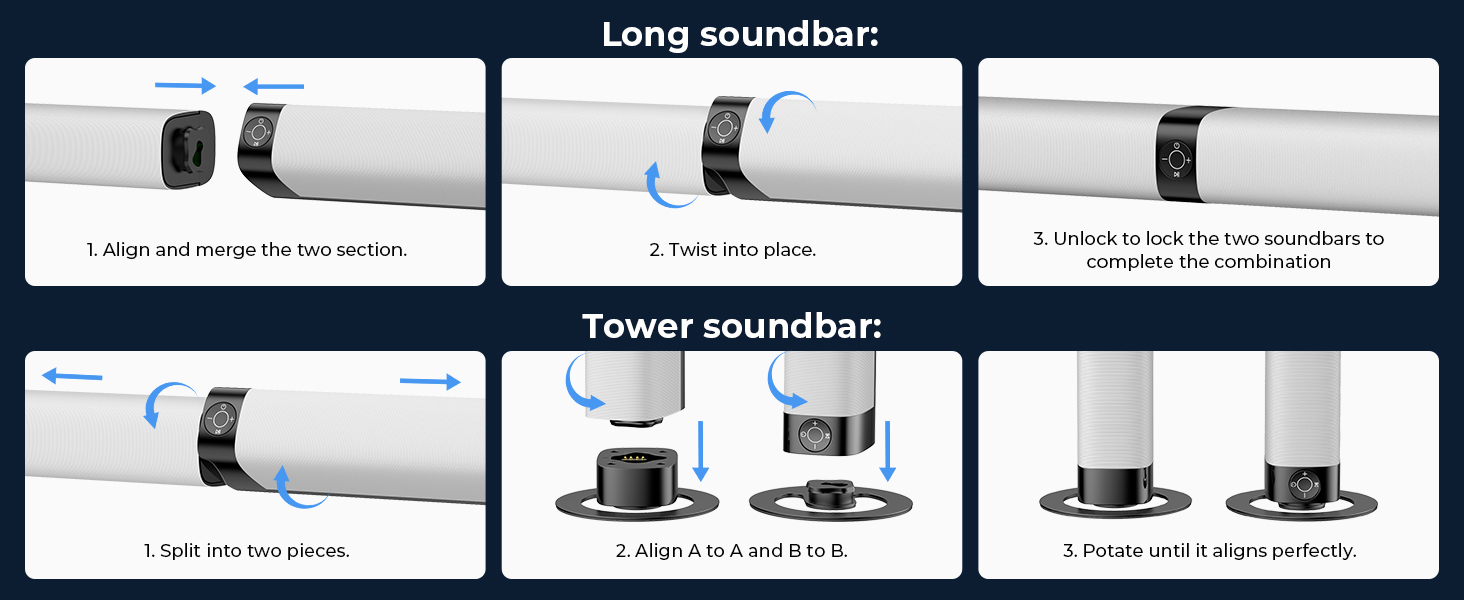
Figure 6: Guide for adjusting TV settings for ARC/Optical connection.
Operating Instructions
Power and Basic Controls
Use the included remote control to power on/off, adjust volume, and switch input modes. The soundbar also features an auto volume boost function to elevate faint sounds.

Figure 7: Included remote control for the soundbar.
Equalizer Modes
Tailor your listening experience with three dynamic equalizer modes:
- Movie Mode: Enhances cinematic audio with rich, immersive sound.
- Music Mode: Optimizes for luxurious melodies and balanced audio.
- News Mode: Provides crystal-clear dialogue for spoken content.

Figure 8: Selectable equalizer modes for optimized audio.
Audio Performance
The Assistrust KY-8000 Sound Bar is powered by 4 high-performance drivers and delivers 80W of powerful sound output. It is designed to provide richer details, from soft whispers to sonorous roars, making virtual game experiences immersive and adding weight to music. While it does not include a dedicated subwoofer, its design ensures impressively full and clear sound for everyday listening.

Figure 9: Internal components showing drivers and bass diaphragms.
Maintenance
To ensure optimal performance and longevity of your Assistrust Sound Bar, follow these maintenance guidelines:
- Cleaning: Gently wipe the surface of the soundbar with a soft, dry cloth. Avoid using liquid cleaners or abrasive materials, as they may damage the finish.
- Ventilation: Ensure adequate airflow around the soundbar. Do not block ventilation openings.
- Storage: If storing the soundbar for an extended period, disconnect it from power and store it in a cool, dry place away from direct sunlight and extreme temperatures.
- Cable Management: Keep all cables neatly organized and free from kinks or excessive tension to prevent damage.
Troubleshooting
If you encounter issues with your Assistrust Sound Bar, please refer to the following common solutions:
| Problem | Possible Cause | Solution |
|---|---|---|
| No sound from soundbar. | Power not connected; incorrect input selected; TV audio output settings incorrect. | Ensure power cable is securely connected. Select the correct input mode (e.g., ARC, Optical, AUX, Bluetooth). Check TV audio output settings (refer to Figure 6). |
| Sound is distorted or unclear. | Volume too high; incorrect equalizer mode; audio source quality. | Reduce volume. Try different equalizer modes (Movie, Music, News). Ensure the audio source is of good quality. |
| Remote control not working. | Batteries low/dead; obstruction between remote and soundbar. | Replace remote control batteries. Ensure no objects are blocking the remote's signal path to the soundbar. |
| Bluetooth pairing issues. | Soundbar not in pairing mode; device too far; interference. | Ensure soundbar is in Bluetooth pairing mode. Move your device closer to the soundbar. Avoid strong electromagnetic interference. |
If the problem persists after trying these solutions, please contact Assistrust customer support.
Specifications
| Feature | Detail |
|---|---|
| Brand | Assistrust |
| Model Name | KY-8000 |
| Speaker Type | Soundbar |
| Special Feature | 2 in 1 Detachable, 3 Customized Equalizer Modes |
| Recommended Uses | For Televisions |
| Color | Silver |
| Product Dimensions | 31"D x 3.5"W x 2.5"H |
| Wireless Communication Technology | Bluetooth 5.3 |
| Connectivity Technology | Bluetooth 5.3, Auxiliary, Optical, ARC |
| Speaker Maximum Output Power | 80 Watts |
| Frequency Response | 20 KHz |
| Audio Output Mode | Stereo |
| Item Weight | 6.6 pounds |
| Mounting Type | Tabletop Mount |
Warranty and Support
Your satisfaction is a top priority for Assistrust. The KY-8000 Sound Bar comes with an 18-month warranty for peace of mind. In addition, Assistrust offers 24/7 online tech support to assist with any questions or issues you may encounter. A 60-day hassle-free replacement policy is also in place to ensure top-tier assistance whenever needed.
For support, please visit the official Assistrust website or contact their customer service directly.
Related documentsKY-8000


Ask a question about this manual
Ask about setup, troubleshooting, compatibility, parts, safety, or missing instructions. Manuals+ will review the question and use this page’s manual context to help answer it.