
Zwide NA105H
Zwide NA105H 2-in-1 Laptop User Manual
Model: NA105H
1. Introduction
Thank you for purchasing the Zwide NA105H 2-in-1 Laptop. This manual provides essential information for setting up, operating, and maintaining your device. Please read it carefully to ensure optimal performance and longevity of your laptop.
2. Product Overview
The Zwide NA105H is a compact and powerful 2-in-1 laptop designed for versatility. Its 360-degree hinge allows it to transform seamlessly between laptop, tablet, tent, and stand modes, adapting to various usage scenarios.
2.1 Package Contents
- Zwide NA105H Main Unit
- Charger
- Instruction Manual

Image: Zwide NA105H Laptop showing package contents and port locations. The image displays the laptop unit, packaging box, charger, and manual. Numbered labels indicate: 1. Power Button, 2. USB-C (Full Function), 3. Cooling Vent, 4. 3.5mm Earphone Jack.
3. Setup
3.1 Initial Charging
Before first use, fully charge your Zwide NA105H laptop. Connect the provided charger to the USB-C (Full Function) port on the device and to a power outlet. The charging indicator light will show the charging status.

Image: Zwide NA105H laptop being charged via its USB-C port, illustrating the fast charging capability.
3.2 Powering On
Press and hold the Power Button (labeled 1 in the Product Overview image) for a few seconds until the screen lights up. Follow the on-screen instructions to complete the initial Windows 11 Pro setup.
4. Operating Your Device
4.1 360° Rotation & 4-Way Convertible Modes
The precise hinge structure allows for 360° rotation, seamlessly switching between four usage modes:
- Laptop Mode: Ideal for productivity and typing.
- Tablet Mode: Best for web browsing and e-book reading.
- Tent Mode: Convenient for media sharing and presentations.
- Stand Mode: Enhances visibility for video viewing and e-learning.
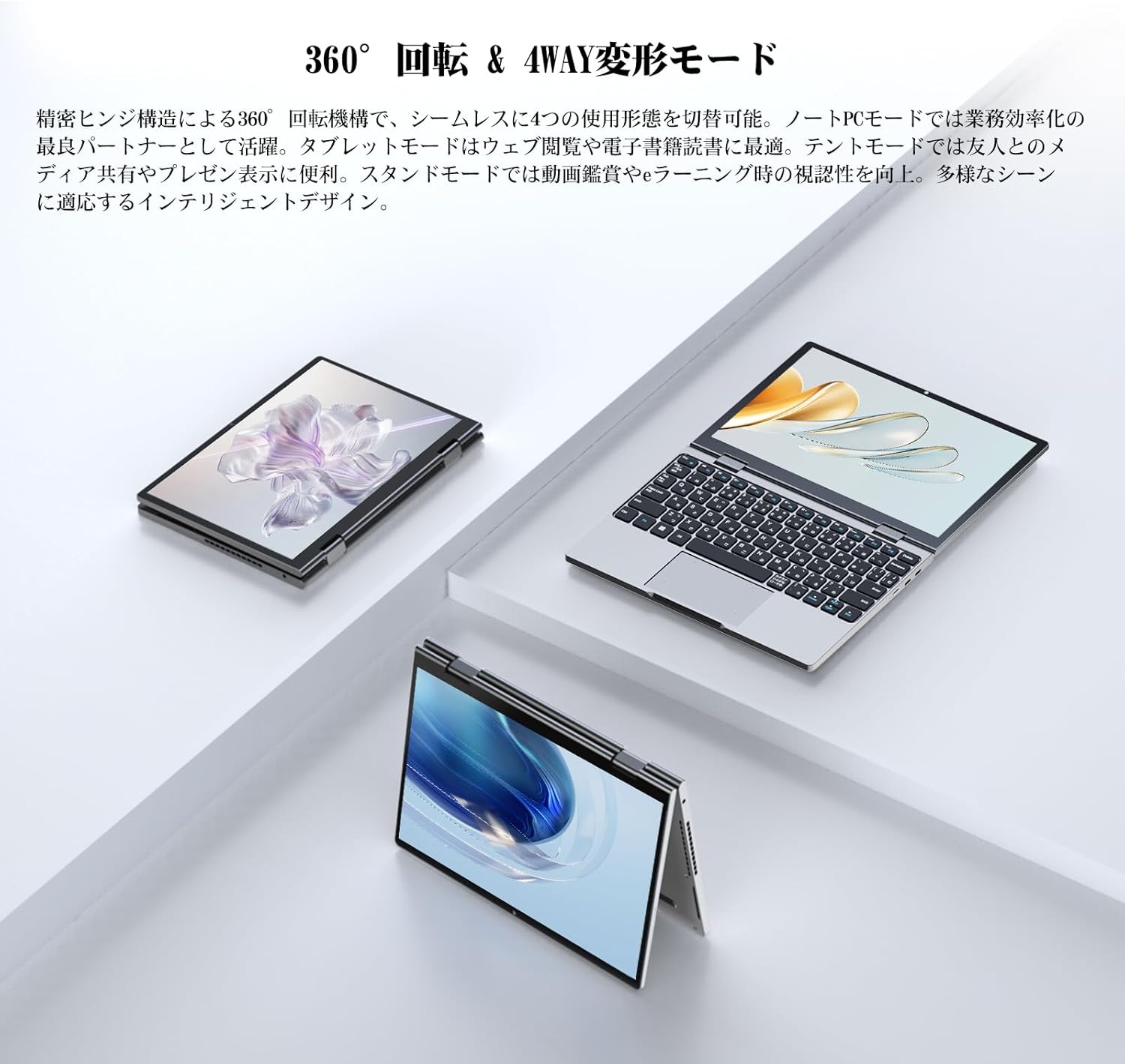
Image: The Zwide NA105H laptop demonstrating its 360-degree hinge, allowing it to rotate and transform into different modes.

Image: The Zwide NA105H laptop shown in its different convertible modes: laptop, tablet, and tent mode, highlighting its versatility.
4.2 Display and Touchscreen
The 10.51-inch Full HD screen (1920x1280 resolution) provides clear images and rich colors. The 10-point multi-touch compatible full lamination panel offers improved response speed and intuitive touch operations.

Image: The Zwide NA105H laptop's display showcasing a vibrant scenic view, emphasizing its exquisite visuals and high-resolution screen.
4.3 Keyboard and Touchpad
The full-size backlit keyboard features large keys and a comfortable typing feel. The high-sensitivity touchpad supports various gestures, such as two-finger zoom and three-finger application switching, for convenient and efficient operation.

Image: Close-up view of the Zwide NA105H laptop's full-size keyboard and precise touchpad, highlighting comfortable typing and accurate control.
4.4 Connectivity
Equipped with a next-generation Wi-Fi 6 AX101 chip, the laptop provides high-speed transmission and stable signal strength, ensuring fast web page loading, uninterrupted 4K video playback, and stable online conference connections even in crowded network environments.

Image: The Zwide NA105H laptop displaying the Windows 11 interface with a prominent 'WiFi 6' graphic, indicating its advanced wireless connectivity.
4.5 Audio
Built-in dual speakers and advanced audio technology deliver high-quality audio, providing a realistic sound experience for movie viewing, music, and web conferencing, even in noisy environments.

Image: The Zwide NA105H laptop showing its active cooling system (fan and heat pipe) and a user engaged in a video conference, highlighting both quiet operation and immersive audio.
5. Maintenance
5.1 Cleaning
Use a soft, lint-free cloth to clean the screen and exterior of the laptop. For stubborn smudges, dampen the cloth slightly with water or a screen cleaner. Avoid using harsh chemicals or abrasive materials.
5.2 Storage
When not in use for extended periods, store the laptop in a cool, dry place away from direct sunlight and extreme temperatures. Ensure the battery is charged to about 50% before storage to preserve battery health.
5.3 Active Cooling System
The laptop features an active cooling system with a fan and heat pipe to dissipate processor heat. Ensure the cooling vents (labeled 3 in the Product Overview image) are not obstructed to maintain stable performance, especially during high-load operations.
6. Troubleshooting
This section addresses common issues you might encounter with your Zwide NA105H laptop.
6.1 Power Issues
- Device does not turn on: Ensure the laptop is charged. Connect the charger and wait a few minutes before attempting to power on again.
- Battery not charging: Verify the charger is properly connected to both the laptop and the power outlet. Try a different outlet if available.
6.2 Display Issues
- Screen is blank: Press the power button briefly to wake the screen. If unresponsive, perform a hard reset by holding the power button until the device turns off, then restart.
- Touchscreen unresponsive: Restart the device. Ensure the screen is clean and free of debris.
6.3 Performance Issues
- Laptop is slow: Close unnecessary applications. Check for background processes that might be consuming resources. Ensure cooling vents are clear.
- Overheating: Ensure the laptop is on a flat, hard surface to allow proper airflow. Avoid blocking the cooling vents.
6.4 Connectivity Issues
- Wi-Fi not connecting: Check if Wi-Fi is enabled in Windows settings. Restart your router.
If you encounter issues not covered here or if troubleshooting steps do not resolve the problem, please contact Zwide customer support.
7. Specifications
| Feature | Specification |
|---|---|
| Brand | Zwide |
| Model Name | NA105H |
| Screen Size | 10.51 Inches |
| Resolution | 1920 x 1280 Pixels |
| CPU Brand | Intel |
| CPU Type | Unknown (Intel TwinLake N150) |
| CPU Speed | 3.6 GHz |
| Processor Count | 1 |
| Installed RAM Memory Size | 16 GB |
| Memory Type | LPDDR5 |
| Hard Disk Capacity | 512 GB |
| Hard Disk Type | SSD |
| Graphics Card Type | Integrated |
| VRAM Type | DDR5 SDRAM |
| Connectivity Type | Wi-Fi (802.11ac) |
| Number of USB 3.0 Ports | 1 (USB-C Full Function) |
| Operating System | Windows 11 Pro |
| Battery | 1 Lithium Polymer battery (included) |
| Lithium Battery Energy Content | 28.88 Watt Hours |
| Item Weight | 1.36 Kilograms |
| Features | Backlit Keyboard, Lightweight |
8. Warranty and Support
Your Zwide NA105H laptop comes with a standard manufacturer's warranty. Please refer to the warranty card included in your package for specific terms and conditions. For technical support, product inquiries, or warranty claims, please contact Zwide customer service through the official channels provided at the time of purchase or on the Zwide brand website.
Related documentsNA105H

Ask a question about this manual
Ask about setup, troubleshooting, compatibility, parts, safety, or missing instructions. Manuals+ will review the question and use this page’s manual context to help answer it.