
1. Introduction
This manual provides essential instructions for the safe and efficient operation of your BLUETTI AC200PL Portable Power Station and Charger 1. Please read this manual thoroughly before using the product and retain it for future reference. The BLUETTI AC200PL is a 2304Wh LFP battery backup system, expandable up to 8448Wh, featuring 4x 2400W AC outlets and a 560W DC-DC Alternator Charger (Charger 1) for versatile power needs.
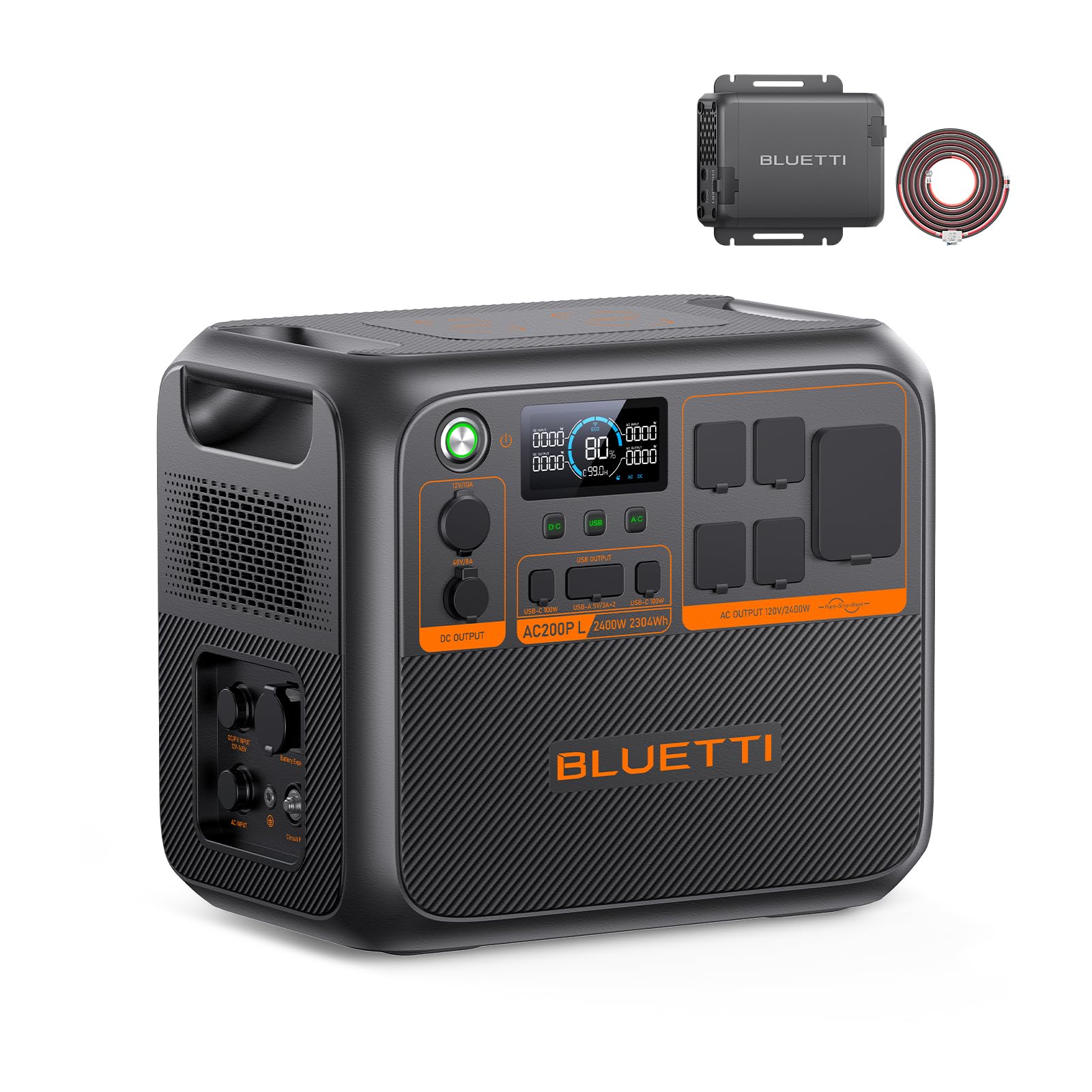
Figure 1: BLUETTI AC200PL Portable Power Station. This image shows the main unit of the BLUETTI AC200PL, highlighting its compact design and various output ports.
2. Safety Information
Always follow basic safety precautions when using this product to reduce the risk of injury or damage.
- Do not disassemble, repair, or modify the unit. Incorrect reassembly may cause fire or electric shock.
- Do not expose the unit to fire or high temperatures.
- Do not use or store the unit in direct sunlight, near heat sources, or in high-humidity environments.
- Keep the unit away from children and pets.
- Ensure proper ventilation during use to prevent overheating.
- Use only BLUETTI-approved accessories and cables.
- Avoid dropping or subjecting the unit to strong impacts.
3. Setup
Follow these steps to set up your BLUETTI AC200PL and Charger 1 for use.
3.1 Unpacking and Inspection
Upon receiving your product, carefully unpack all components and inspect for any damage. The package should include the BLUETTI AC200PL, Charger 1 (DC-DC charger), 6AWG DC input cable, AC adapter, solar/car charging cable, XT90-aviation cable, and user manual.
3.2 Charger 1 Installation
The Charger 1 allows for efficient in-vehicle charging of your AC200PL.
- Prepare your Installation: Gather all components, including the 6AWG DC input cable, tools, your power station, and solar charging cable. Ensure all accessories shown are included.
- Connect to Charger 1: Switch off the circuit breaker on the 6AWG DC input cable. Connect the 6AWG input cable and the MC4 output cable to the Charger 1. Then, connect the output cable to your power station via a solar charging cable.
- Connect to Car Battery: Route the input cable through your vehicle to the car battery. Attach the red cable to the positive (+) terminal and the black cable to the negative (-) terminal of the car battery.
- Start Charging: Switch on the circuit breaker. Set the appropriate voltage using the BLUETTI app before activating Charger 1. Securely place Charger 1 in a suitable location.

Figure 2: Components for Charger 1 installation. This image displays the Charger 1 unit, various cables, and mounting hardware required for installation.

Figure 3: Connecting cables to the Charger 1. A user is shown connecting the DC input cable and MC4 output cable to the Charger 1 unit.

Figure 4: Connecting Charger 1 to a car battery. The image illustrates the correct connection of the Charger 1 cables to a vehicle's battery terminals.

Figure 5: Starting the charging process. This image shows the BLUETTI AC200PL and Charger 1 connected in a vehicle, with a smartphone displaying the BLUETTI app for voltage adjustment.
4. Operating Instructions
The BLUETTI AC200PL offers multiple power outputs and charging options.
4.1 Output Ports
The AC200PL is equipped with a variety of output ports to power different devices:
- 4x 2400W AC Outlets
- 1x 30A TT30 Port
- 1x 48V/8A DC Port
- 1x Car Port
- 2x 100W USB-C PD Ports
- 2x 15W USB-A Ports

Figure 6: Overview of AC200PL output ports. This image highlights the various AC, DC, USB-C, and USB-A ports available on the power station.
4.2 Charging the AC200PL
The AC200PL can be charged using several methods:
- AC Charging: Use the provided AC adapter for wall outlet charging.
- Solar Charging: Connect compatible solar panels to the unit.
- Car Charging: Utilize the Charger 1 (DC-DC charger) for fast charging from your vehicle's alternator. This method is 5X faster than traditional car chargers, providing up to 500W input.
- AC + PV Charging: Combine AC and solar inputs for faster charging.
- Generator Charging: Connect to a compatible generator.

Figure 7: Various charging methods for the AC200PL. This image illustrates different ways to recharge the power station, including AC, solar, and car charging.
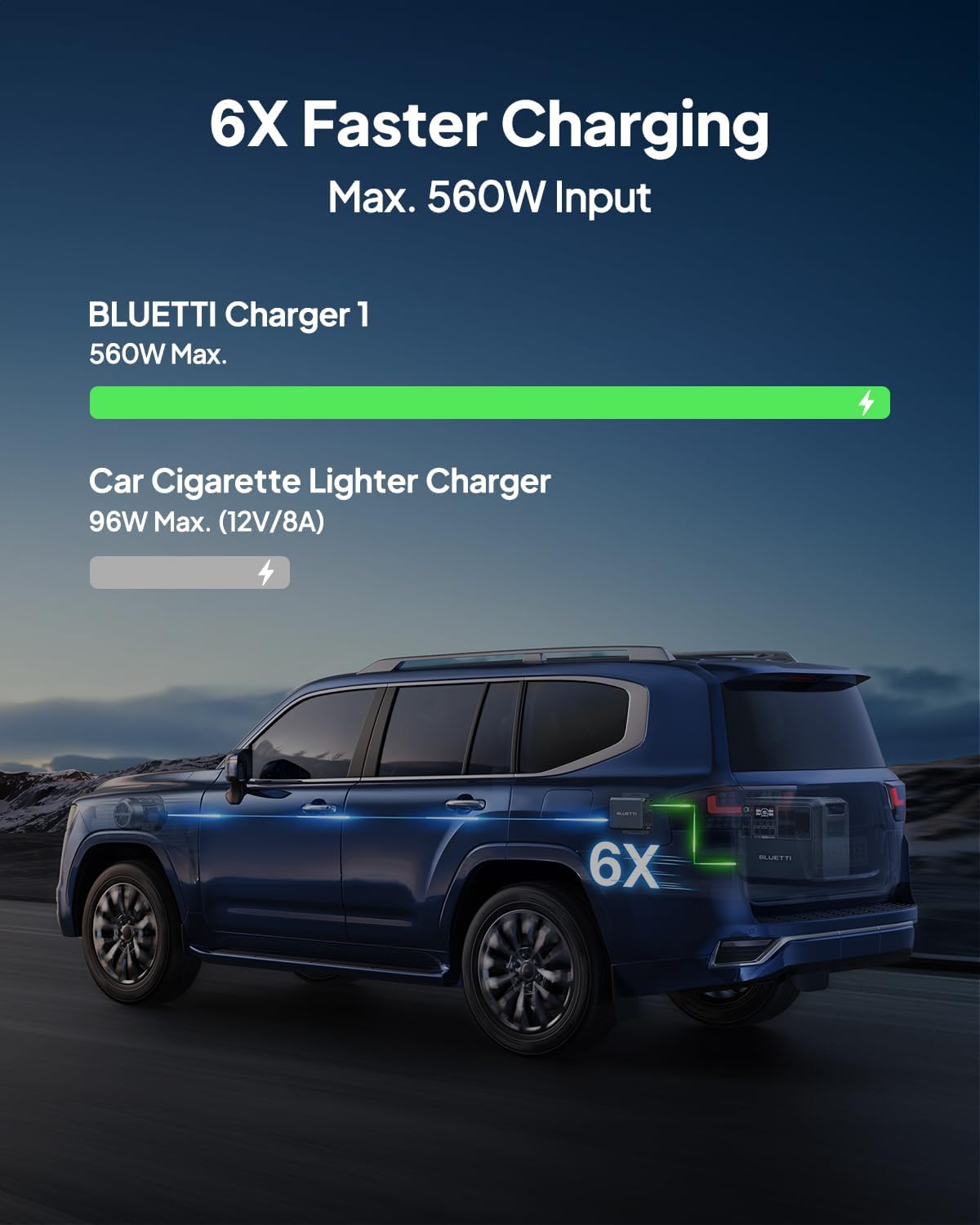
Figure 8: Comparison of Charger 1 vs. traditional car charger. This graphic demonstrates that Charger 1 provides significantly faster charging (560W Max) compared to a standard car cigarette lighter charger (96W Max).
4.3 Expansion Capability
The AC200PL's capacity can be expanded by connecting external battery packs. It is compatible with 2x B300 (3072Wh each), 2x B210P (2150Wh each), or 1x B230 (2048Wh each), reaching a maximum capacity of 8448Wh.
4.4 Smart Control and Monitoring
Manage and monitor your AC200PL using the BLUETTI mobile application. The app allows you to adjust voltage, monitor input power, and provides intelligent algorithms for battery protection.

Figure 9: Monitoring and managing the power station via the BLUETTI app. A user is shown interacting with the BLUETTI app on a smartphone, which displays charging status and allows for voltage adjustments.
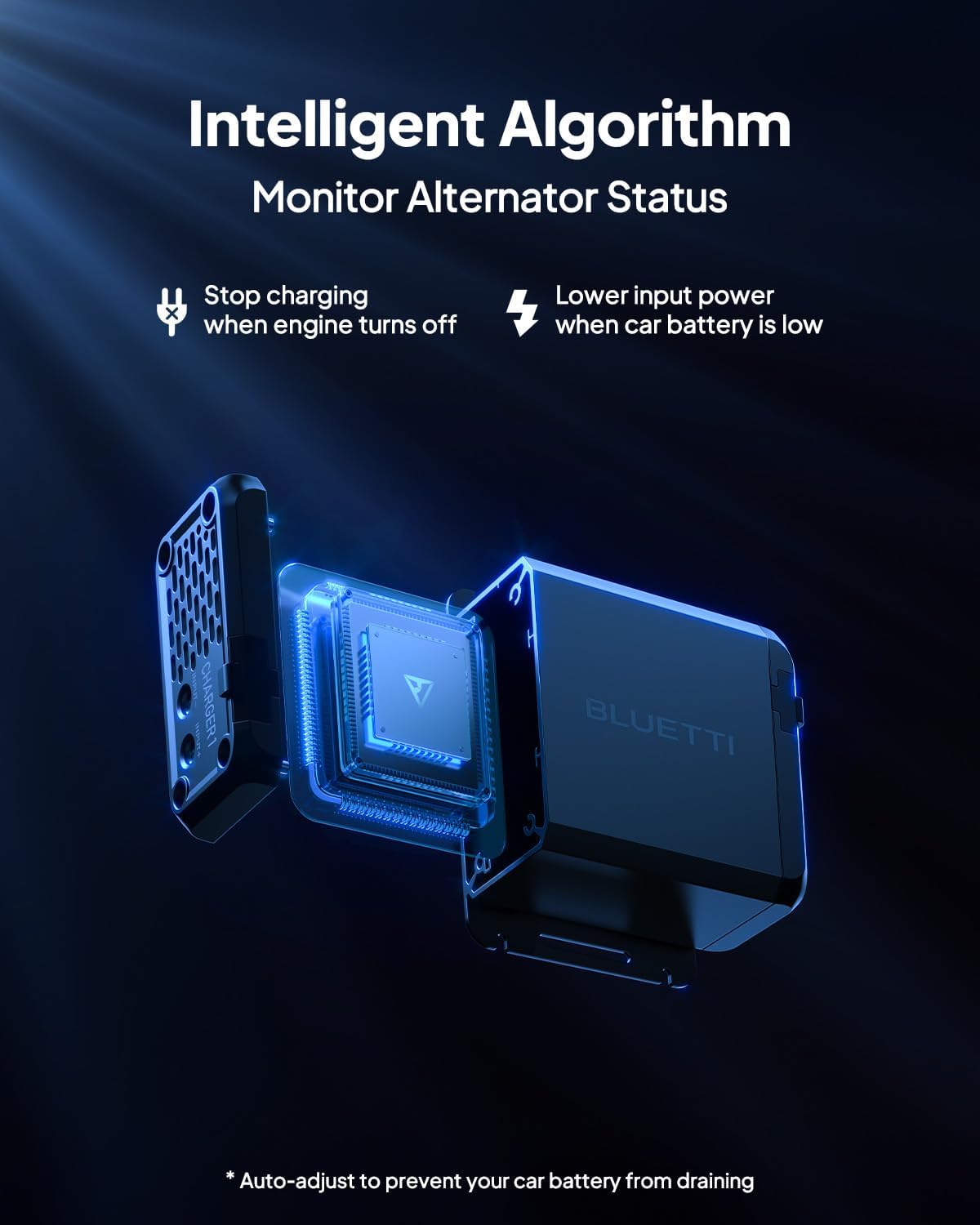
Figure 10: Illustration of the intelligent algorithm. This graphic depicts the internal components of the Charger 1 and explains how its intelligent algorithm monitors alternator status, stops charging when the engine is off, and lowers input power when the car battery is low to prevent draining.
4.5 Advanced Cooling System
The AC200PL features an advanced cooling system with active cooling and over-temperature protection to ensure stable performance even in high temperatures.

Figure 11: Advanced cooling system. This image visually represents the active cooling and over-temperature protection mechanisms within the BLUETTI unit, ensuring stable performance.
4.6 Road Trip Charging Buddy (Charger 1 Video)
Video 1: BLUETTI Charger 1 - Road Trip Charging Buddy. This video demonstrates the ease of use and efficiency of the BLUETTI Charger 1 for keeping your power station charged during road trips and outdoor activities.
5. Maintenance
Proper maintenance ensures the longevity and optimal performance of your BLUETTI AC200PL.
- Store the unit in a cool, dry place away from direct sunlight and extreme temperatures.
- Charge the unit fully at least once every 3-6 months to maintain battery health, even if not in use.
- Clean the exterior with a dry, soft cloth. Do not use harsh chemicals or abrasive materials.
- Ensure ventilation openings are clear of dust and debris.
6. Troubleshooting
If you encounter issues with your BLUETTI AC200PL, refer to the following common problems and solutions:
| Problem | Possible Cause | Solution |
|---|---|---|
| Unit not turning on | Low battery, power button not pressed correctly | Charge the unit. Press and hold the power button for 3-5 seconds. |
| AC outlets not working | AC output not enabled, overload protection triggered | Ensure AC output is enabled. Reduce load. Restart the unit. |
| Slow charging | Incorrect adapter, low solar input, high ambient temperature | Use original adapter. Optimize solar panel placement. Move to a cooler environment. |
| Charger 1 not charging | Incorrect wiring, vehicle engine off, low car battery voltage | Verify cable connections. Ensure vehicle engine is running. Check car battery health. |
If the problem persists, please contact BLUETTI customer service for assistance.
7. Specifications
Key technical specifications for the BLUETTI AC200PL Portable Power Station and Charger 1:
- Brand: BLUETTI
- Model Name: BLUETTI AC200PL+Charger 1
- Wattage: 2304 Watt-hours
- Output Wattage: 2400 Watts (Running), 3600 Watts (Starting)
- Voltage: 110 Volts
- Fuel Type: Electric
- Power Source: Solar Powered
- Item Weight: 72 Pounds
- Product Dimensions: 16.5"L x 11"W x 14.4"H
- Total Power Outlets: 11 (4 AC, 1 TT30, 1 DC, 1 Car, 2 USB-C, 2 USB-A)
- Special Feature: Super Quiet
- Included Components: BLUETTI AC200PL, Charger 1, AC adapter, solar/car charging cable, XT90-aviation cable, user manual, installation accessories
8. Warranty and Support
Your BLUETTI AC200PL Portable Power Station and Charger 1 comes with a 48-month warranty. For any questions, technical support, or warranty claims, please contact BLUETTI customer service. Our friendly local customer service team is available to assist you.
For more information, visit the official BLUETTI website or refer to the contact details provided in your product packaging.


