
Important Compatibility Note
This dashboard is specifically designed for the Kugoo KuKirin G2 PRO Electric Scooter, model TFM13-FEIMI Old.Before purchasing or attempting installation, it is crucial to verify that your scooter's existing dashboard and connectors precisely match the ones depicted in this manual.Inconsistencies may lead to incompatibility and improper function.

Image: Comparison of the product labels for the TFM13-FEIMI Old and TFM13-FEIMI-4 New dashboards. Note the distinct model numbers highlighted on each label.
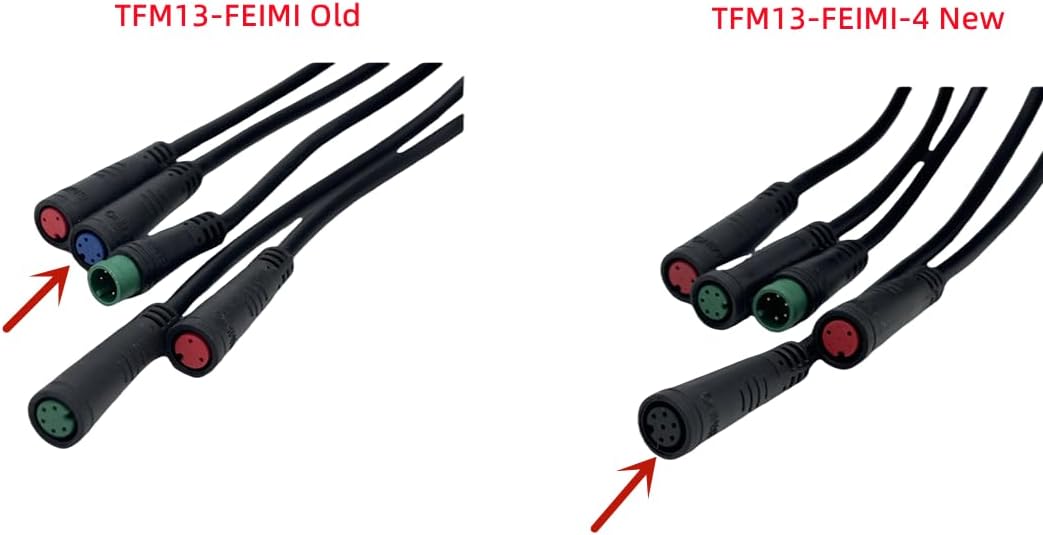
Image: Side-by-side comparison of the cable connectors for the TFM13-FEIMI Old and TFM13-FEIMI-4 New dashboards. Observe the differences in connector types and arrangements, indicated by red arrows.
Product Overview
The SPEDWHEL TFM13-FEIMI Old dashboard is an original replacement LCD display and digital meter accessory for the Kugoo KuKirin G2 PRO Electric Scooter. It provides essential ride information and serves as the primary interface for controlling scooter functions.

Image: Front view of the SPEDWHEL TFM13-FEIMI Old dashboard, showing the display screen and the "KuKirin" branding.
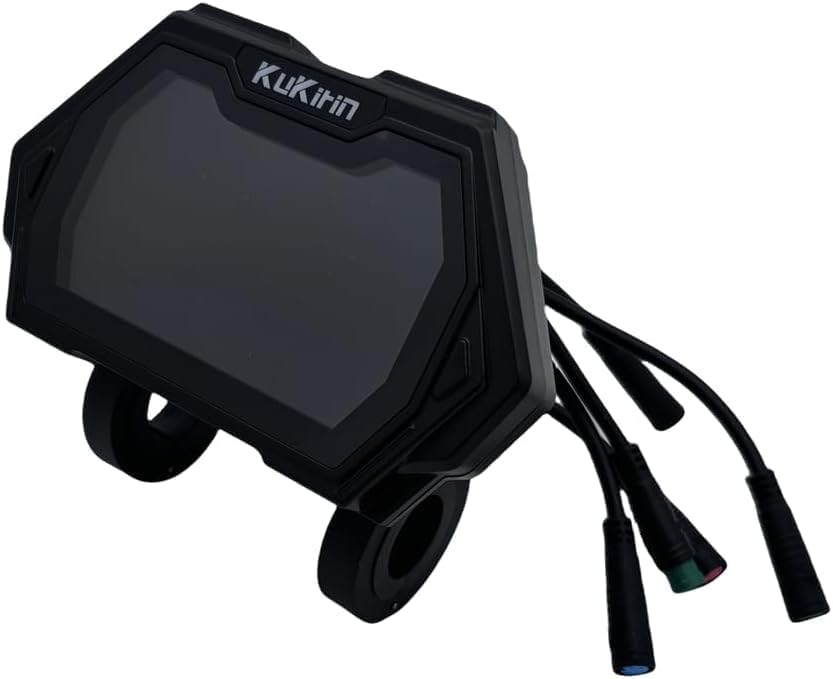
Image: Angled view of the dashboard, illustrating the various connection cables extending from the unit.
Setup and Installation
Installation of the dashboard requires careful handling and proper connection to the scooter's wiring harness. It is recommended that installation be performed by an individual with experience in electric scooter maintenance or by following the scooter's official service manual.
- Preparation: Ensure the scooter is powered off and disconnected from any charging source.
- Access: Carefully remove any covers or components necessary to access the existing dashboard and its wiring.
- Disconnection: Disconnect the old dashboard's wiring from the scooter's harness. Note the color and configuration of each connector.
- Connection: Connect the new TFM13-FEIMI Old dashboard to the scooter's wiring harness, ensuring each connector is securely and correctly matched. Refer to the image below for connector types.
- Mounting: Secure the new dashboard in its designated mounting position on the scooter's handlebars.
- Testing: Before reassembling, briefly power on the scooter to confirm the dashboard functions correctly.
- Reassembly: Reattach any covers or components removed during the installation process.

Image: Close-up view of the various multi-pin electrical connectors attached to the dashboard, showing their distinct colors and shapes for proper connection.

Image: Top-down perspective of the dashboard, with its connecting cables spread out to clearly show their individual forms and lengths.
Operating the Dashboard
Once installed and powered on, the dashboard will display key operational data for your Kugoo KuKirin G2 PRO Electric Scooter.
- Power On/Off: Typically controlled by the scooter's main power button. The dashboard will illuminate upon activation.
- Information Display: The LCD screen provides real-time data such as current speed, battery level, riding mode, and potentially trip distance.
- Mode Selection: If equipped with buttons, these are used to cycle through different riding modes (e.g., Eco, Standard, Sport) or display various metrics. Refer to your scooter's main user manual for specific button functionalities.
- Error Codes: The display may show error codes if a system malfunction is detected. Consult the scooter's main manual for interpretation of these codes.
Maintenance
Proper maintenance ensures the longevity and optimal performance of your dashboard.
- Cleaning: Use a soft, damp cloth to gently wipe the display screen. Avoid abrasive cleaners or solvents that could damage the plastic or screen coating.
- Protection: Protect the dashboard from direct impact, extreme temperatures, and prolonged exposure to direct sunlight.
- Water Exposure: While designed for outdoor use, avoid submerging the dashboard in water or exposing it to heavy rain. Ensure all connections are dry before powering on after any moisture exposure.
- Connection Check: Periodically inspect the cable connections to ensure they remain secure and free from corrosion.
Troubleshooting
If you encounter issues with your dashboard, consider the following basic troubleshooting steps:
- Dashboard Not Powering On:
- Ensure the scooter's main power is on and the battery has sufficient charge.
- Check all cable connections to the dashboard for looseness or damage.
- Verify that the dashboard is the correct model (TFM13-FEIMI Old) for your scooter.
- Incorrect Readings (Speed, Battery):
- This may indicate an issue with the scooter's sensors or main controller, not necessarily the dashboard itself. Consult your scooter's main manual or a qualified technician.
- Ensure all connections are secure.
- Display Flickering or Malfunctioning:
- Check for loose connections.
- Power off the scooter, wait a few minutes, and power it back on to reset the system.
- If the issue persists, the dashboard may be faulty and require replacement.
For complex issues or if troubleshooting steps do not resolve the problem, it is recommended to contact the scooter manufacturer's support or a certified service center.
Specifications
| Brand | SPEDWHEL |
| Product Model | TFM13-FEIMI Old |
| Compatible Scooter Model | Kugoo KuKirin G2 PRO Electric Scooter |
| Material | Plastics |
| Color | TFM13-FEIMI Old (Black) |
| Item Package Dimensions (L x W x H) | 4 x 4 x 2 inches |
| Package Weight | 1.6 ounces |
| UPC | 761850630037 |
| Manufacturer | SPEDWHEL |
Warranty and Support
Specific warranty details for this product are not provided in this manual. Please refer to the original purchase documentation or contact the seller directly for information regarding warranty coverage and claims.
For technical support or further assistance with installation and troubleshooting, please contact the manufacturer, SPEDWHEL, or the authorized retailer from whom the product was purchased.
