
1. Product Overview
This document provides instructions for installing and operating the LocoLee LED Light Kit, designed specifically for the LEGO 10367 Balrog Book Nook model. This kit enhances the visual appeal of your LEGO model with integrated lighting. Please note: The LEGO model itself is not included with this light kit and must be purchased separately.

Image 1.1: LocoLee LED Light Kit for LEGO 10367 Balrog Book Nook. This image shows the light kit installed in the LEGO model, highlighting the illuminated features. The LEGO model is for display purposes only and is not included.

Image 1.2: Important Notice: This product is a light kit only. The LEGO 10367 Balrog Book Nook model is not included and must be acquired separately.
2. Safety Information
To ensure safe operation and prevent accidental ingestion, keep all small components of the light kit out of reach of young children. This product contains small parts and is recommended for ages 16 and up.
- Do not pull wires too hard during installation to avoid damage.
- Ensure the power source is less than 5V DC.
- Always test each light component before final assembly.
3. Package Contents
Verify that all components listed below are present in your package. If any parts are missing, please contact customer support.
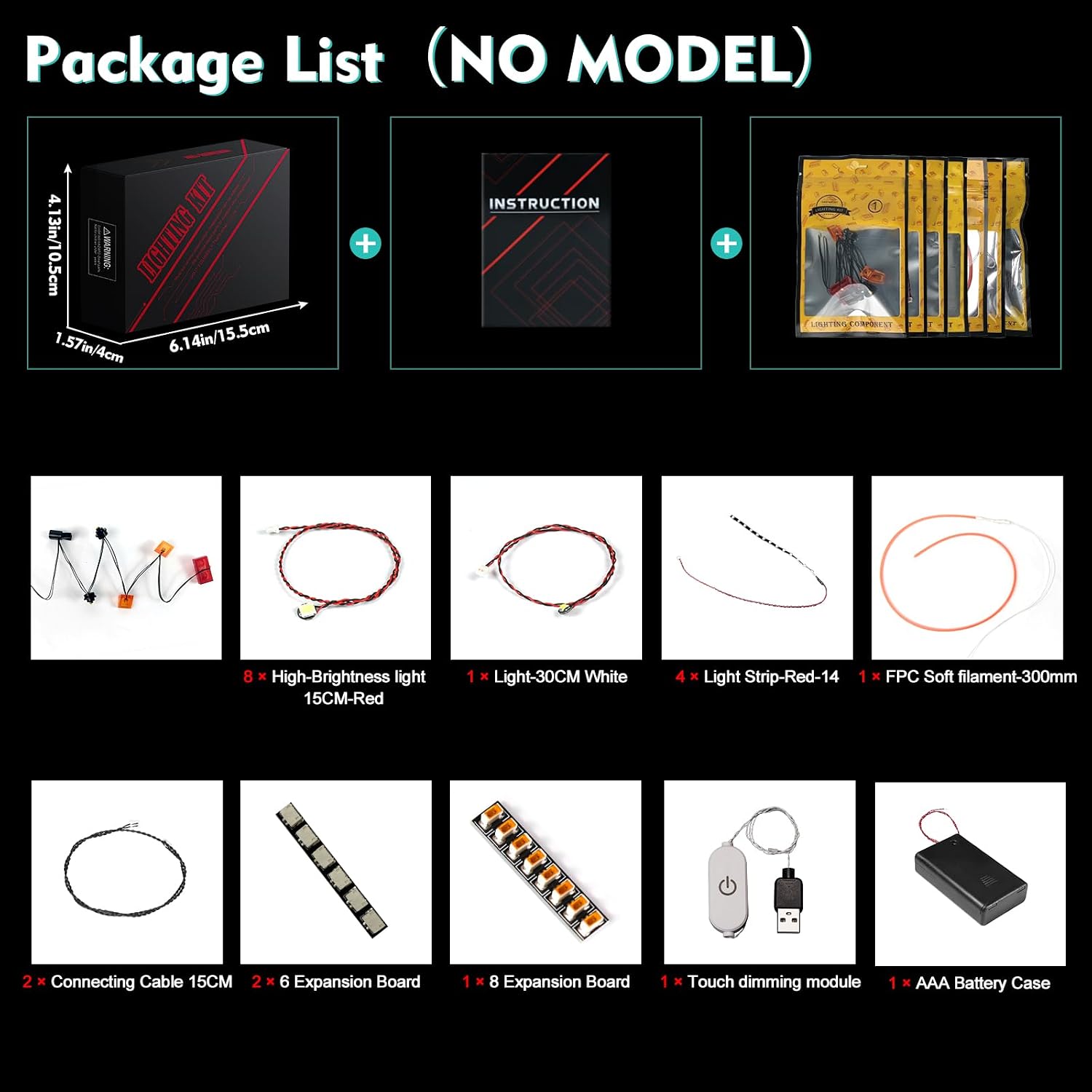
Image 3.1: Detailed view of the light kit components included in the package. This image displays various LED lights, connecting cables, expansion boards, a touch dimming module, and an AAA battery case.
- LED Light Kit components (various lights, wires, and connectors)
- Instruction Manual (online access details)
- Touch dimming module
- AAA Battery Case (batteries not included)
4. Setup and Installation
Follow these general steps for installation. Detailed video and PDF instructions are available online. Refer to the booklet included in your package for the website address and model number to access these resources.

Image 4.1: Guide to accessing online installation instructions. This image illustrates the steps to find detailed video and PDF guides using the provided website and model number.
- Access Online Instructions: Locate the website address in the included booklet. Enter the model number (10367) or the code from the packing box to find the specific instructions for your kit.
- Prepare Your Model: Carefully disassemble only the necessary bricks of your LEGO 10367 Balrog Book Nook model as indicated in the online guide.
- Install Light Fixtures: Following the step-by-step numbered light bags and instructions, integrate the LED lights and wires into your LEGO model. Ensure wires are not pulled excessively to prevent damage.
- Connect Components: Connect the various light components to the expansion boards and then to the touch dimming module.
- Power Connection: Connect the touch dimming module to the AAA battery case (ensure batteries are inserted) or a USB power source (less than 5V).
- Test Lights: Before fully reassembling your LEGO model, test all lights to ensure they are functioning correctly.

Image 4.2: Comparison of the LEGO model before and after the light kit installation, demonstrating the visual enhancement provided by the lighting.
5. Operating Instructions
Once installed, operating your LocoLee LED Light Kit is straightforward:
- Power On/Off: Use the power button on the touch dimming module to turn the lights on or off.
- Brightness Adjustment: The touch dimming module may allow for brightness adjustments. Refer to the online instructions for specific features of your module.
- Power Source: The kit can be powered by the included AAA battery case or a USB power source (less than 5V). Using a USB power source typically results in brighter illumination.
6. Maintenance
To ensure the longevity and optimal performance of your light kit:
- Cleaning: Gently wipe the LED lights and wires with a dry, soft cloth if dust accumulates. Avoid using liquids or abrasive cleaners.
- Wire Management: Ensure all wires are neatly tucked away and not pinched or strained within the LEGO model.
- Battery Replacement: If using the battery case, replace AAA batteries when lights dim or cease to function.
- Storage: If disassembling the kit for storage, carefully disconnect components and store them in a dry, cool place.
7. Troubleshooting
If you encounter issues with your light kit, consider the following troubleshooting steps:
| Problem | Possible Cause | Solution |
|---|---|---|
| Lights do not turn on. | No power, loose connection, faulty component. | Check power source (batteries or USB). Ensure all connections are secure. Test individual light parts as per installation instructions. |
| Lights are dim. | Low battery power, insufficient USB power. | Replace batteries or switch to a USB power source. Ensure USB power is stable. |
| Some lights are not working. | Damaged wire, faulty LED, loose connection. | Inspect wires for damage. Re-check connections to the expansion board. If a specific LED is faulty, contact customer support. |
If these steps do not resolve the issue, please refer to the online installation guide or contact LocoLee customer support for further assistance.
8. Specifications
| Feature | Detail |
|---|---|
| Brand | LocoLee |
| Model Number | 10367 |
| Compatible With | LEGO 10367 Balrog Book Nook |
| Material | Plastic, Copper Lines |
| Light Source Type | Light Emitting Diode (LED) |
| Power Source | DC adapter (USB, less than 5V) or AAA Battery Case |
| Special Features | Glow in the Dark, Powerful and unique lighting effects, focused lighting for cinematic diorama, vivid details |
| Item Weight | 3.52 ounces |
| Product Dimensions | 6.06 x 1.26 x 3.98 inches |
| Recommended Age | 16 years and up |
9. Warranty and Support
LocoLee is committed to providing high-quality products. The lighting set is made of high-quality copper lines and ABS plastic, undergoing quality checks to ensure compatibility and performance with LEGO blocks.
While specific warranty details are not provided in this manual, if you have any questions or concerns regarding the product, its installation, or operation, please contact LocoLee customer support. Contact information can typically be found on the product packaging or the official LocoLee website.