
1. Introduction
The SONOFF SNZB-02LD is a Zigbee-enabled waterproof temperature sensor designed for accurate and reliable temperature monitoring in various environments. Featuring a 1.5-meter stainless steel probe and an LCD display, this device allows for real-time temperature readings and app-based monitoring. It is suitable for both indoor and outdoor use, including wet conditions, when connected to a compatible Zigbee hub.
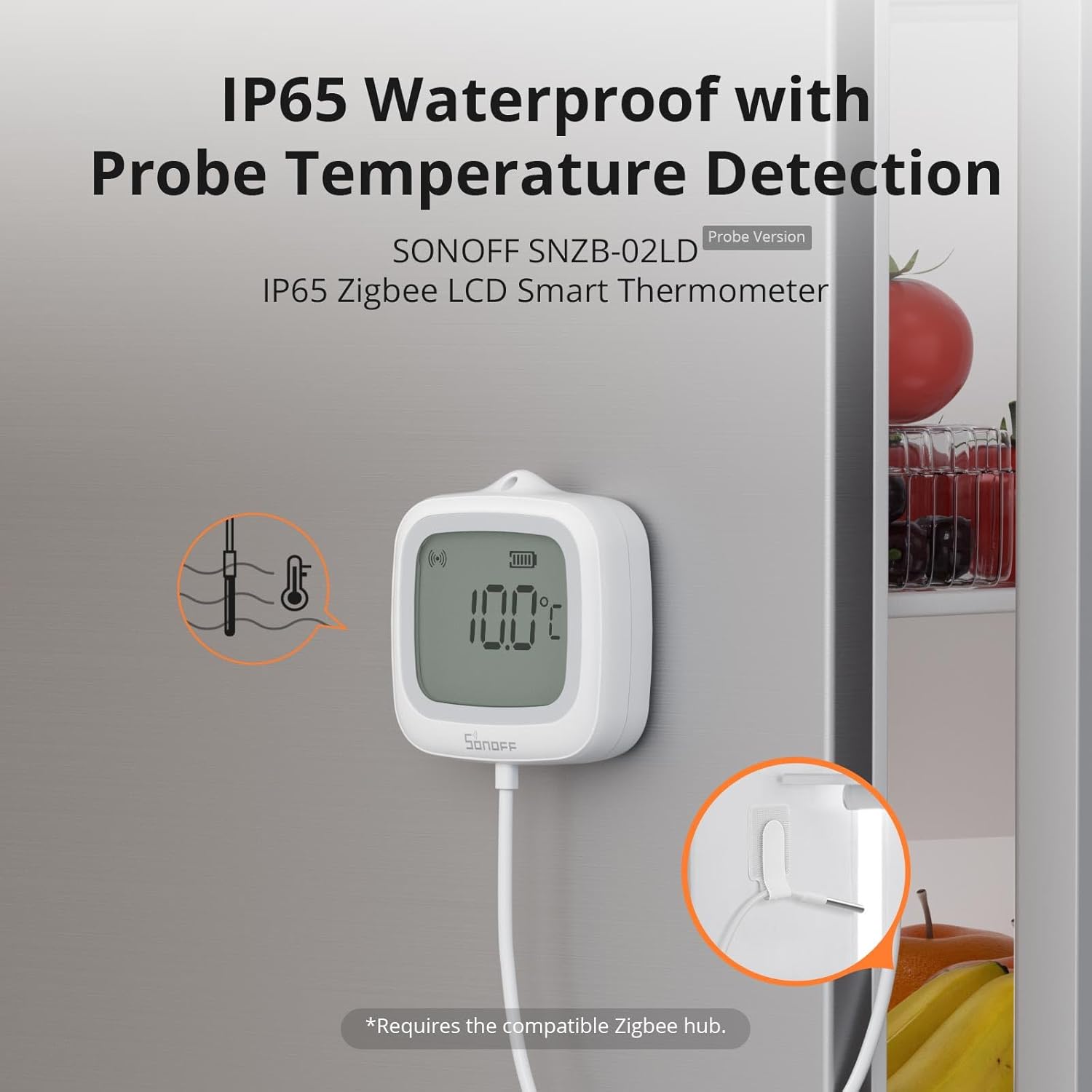
Image 1.1: SONOFF SNZB-02LD main unit with probe, showing its waterproof design and application in a refrigerator.
2. Product Features
- Waterproof Design (IP65): The main unit is IP65-rated, providing resistance against water splashes, making it suitable for humid or splash-prone environments.
- Wide Temperature Range: Equipped with a 1.5-meter 304 stainless steel probe, capable of accurate readings from -40°C to 115°C.
- Real-Time LCD Display: A clear, high-definition LCD screen provides instant temperature readings.
- App Monitoring & Data Export: View live temperature data, historical charts, and export logs via the eWeLink app.
- Flexible Installation: Features magnetic mounting or hanging options for easy placement.
- Zigbee Connectivity: Operates as a Zigbee sub-device, requiring a compatible Zigbee hub for smart features.
- Long-lasting Battery Life: Designed for low power consumption to minimize battery replacement frequency.
- UV-Resistant Housing: Durable casing withstands UV radiation for long-term outdoor use.

Image 2.1: Overview of key features including IP65 waterproof, accurate measurement, wide temperature range, long-lasting battery, LCD display, and UV-resistant housing.
3. Package Contents
The package includes the following items:
- SONOFF SNZB-02LD Temperature Sensor (1 unit)
- LR44 Battery (1 unit, pre-installed or included separately)
- User Manual (this document)
4. Specifications
| Specification | Value |
|---|---|
| Model | SNZB-02LD |
| Input | 3V |
| Battery Model | CR2477 |
| Wireless Connection | Zigbee 3.0 |
| Cable Length | 1.5 meters |
| IP Rating | IP65 |
| Host Working Temperature | -10°C ~ 60°C |
| Host Working Humidity | 0-100% RH |
| Probe Working Temperature | -40°C ~ 115°C |
| Casing Materials | PC+ABS |
| Color | White |
| Dimensions | 62.8mm x 58.5mm x 21.8mm |
| Response Time | 5 seconds |

Image 4.1: Device dimensions and various installation methods.
5. Setup and Installation
5.1 Initial Setup (Pairing with Zigbee Hub)
- Download the eWeLink App: Search for "eWeLink" in your smartphone's app store (Google Play Store or Apple App Store) and download the application.
- Scan the QR Code: Open the eWeLink app and follow the instructions to scan the QR code located on the device or in the quick start guide to initiate the pairing process.
- Add Device: Within the app, select the option to "Add Device" and confirm the device type.
- Select Zigbee Hub: Choose your compatible Zigbee hub from the list and wait for the sensor to connect. Ensure your Zigbee hub is powered on and in pairing mode.
5.2 Installation Methods
The SNZB-02LD offers flexible installation options:
- Magnetic Mount: The device features a magnetic back, allowing it to be easily attached to metallic surfaces such as refrigerators or freezers.
- Hanging Rope: A designated loop allows for hanging the device using a rope or hook in desired locations.
Image 5.1: Visual guide for the 4-step pairing process and available installation methods.
6. Operating Instructions
6.1 Reading the LCD Display
The integrated LCD display shows the current temperature. The display refreshes approximately every 5 seconds to provide up-to-date readings.
6.2 Temperature Unit Switching
The device supports switching between Celsius (°C) and Fahrenheit (°F). Refer to the device's physical button or app settings for this function.
6.3 Probe Placement for Measurement
The 1.5-meter stainless steel probe allows for versatile temperature measurement:
- Liquid Measurement: Insert the probe directly into liquids such as water in a pool, fish tank, or bathtub to monitor temperature changes.
- Enclosed Space Measurement: Place the probe inside enclosed spaces like refrigerators, freezers, or wine cellars, while keeping the main unit outside for easy viewing and connectivity.

Image 6.1: Examples of using the probe for liquid and enclosed space temperature detection.
7. App Monitoring and Smart Features
When connected to a Zigbee hub and the eWeLink app, the SNZB-02LD offers advanced monitoring and smart home integration:
- Real-time Data: View current temperature readings directly on your smartphone.
- Historical Charts: Access temperature data by day, month, or over the past half year, with storage capacity up to 180 days. This data can be exported for analysis.
- Temperature Reminders: Set up smart scenes to receive immediate notifications on your phone if the temperature exceeds or falls below a predefined threshold (e.g., for refrigerator temperature abnormalities).
- Automation Settings: Create automated actions based on temperature changes. For example, trigger a heater (connected to a compatible smart switch like ZBMINIR2) if an aquarium's temperature drops below a certain point.
- Voice Query Temperature: Integrate with third-party voice platforms (via your Zigbee Hub) to check temperatures using voice commands.

Image 7.1: The eWeLink app displaying historical temperature data for analysis.
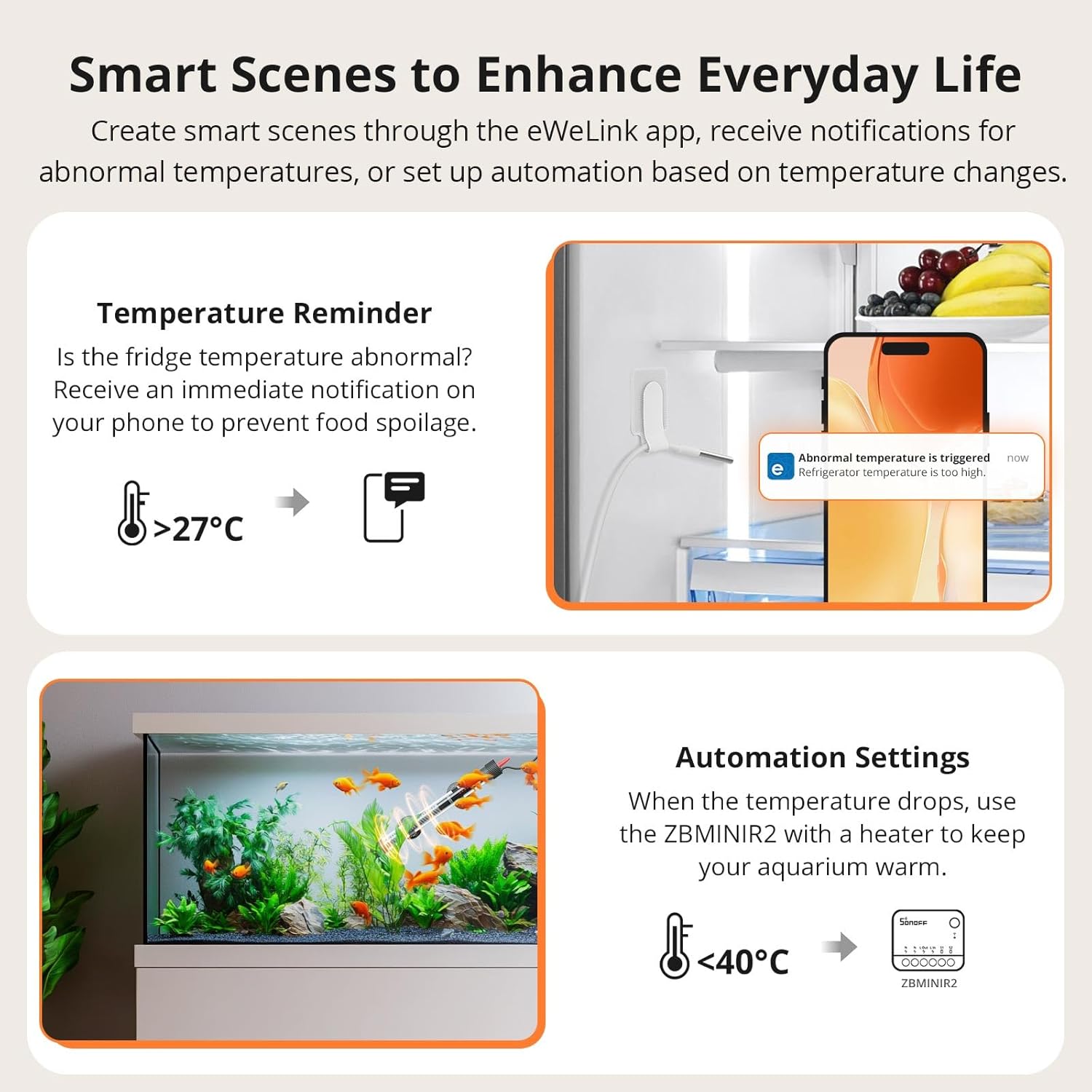
Image 7.2: Examples of smart scenes for temperature reminders and automation.
8. Compatibility
The SONOFF SNZB-02LD is a Zigbee 3.0 device and requires a compatible Zigbee hub to function as part of a smart home system. It supports integration with various platforms:
- SONOFF Hubs: Zigbee Bridge Pro, Zigbee Bridge Ultra, iHost, ZB Bridge.
- Amazon Hubs: Echo Plus 2nd Gen, Echo 4th Gen, Echo Show 2nd Gen.
- Open-Source Platforms: Home Assistant (via SONOFF ZBDongle series), Zigbee2MQTT.

Image 8.1: Compatibility chart detailing supported Zigbee hubs and features.
9. Maintenance
9.1 Battery Replacement
The device uses a CR2477 coin cell battery. When the battery level is low, a notification may appear in the eWeLink app, or the LCD display might indicate low power. To replace the battery:
- Carefully open the battery compartment, typically located on the back of the device.
- Remove the old CR2477 battery.
- Insert a new CR2477 battery, ensuring correct polarity.
- Close the battery compartment securely.
9.2 Cleaning
To clean the device, wipe it with a soft, damp cloth. Do not use abrasive cleaners or immerse the main unit in water, despite its IP65 rating, to prevent potential damage to internal components.
10. Troubleshooting
If you encounter issues with your SONOFF SNZB-02LD sensor, consider the following:
- Device Not Pairing: Ensure your Zigbee hub is powered on, within range, and in pairing mode. Check the device's battery level. Try resetting the sensor (refer to the quick start guide for reset instructions).
- Inaccurate Readings: Verify the probe is correctly positioned in the environment you wish to measure. Compare readings with another reliable thermometer if possible.
- No Data in App: Confirm the sensor is successfully paired with your Zigbee hub and the hub has internet connectivity. Check the eWeLink app for any error messages or connection status.
- Short Battery Life: Ensure you are using a fresh, high-quality CR2477 battery. Extreme temperatures can affect battery performance.
For further assistance, please contact customer support.
11. Warranty and Support
The SONOFF SNZB-02LD comes with a 2-year warranty from the date of purchase, covering manufacturing defects. Please retain your proof of purchase for warranty claims.
For technical support, warranty inquiries, or any other questions, please contact:
Email: support@itead.cc
Please provide your product model (SNZB-02LD) and a detailed description of your issue when contacting support.


