
Introduction
This manual provides essential instructions for the safe and effective operation and maintenance of your Vidattx Poseidon Wireless Tattoo Pen Kit. Please read this manual thoroughly before initial use to ensure proper setup and functionality.

Figure 1: Poseidon Wireless Tattoo Pen with key specifications (Stroke 2.4-4.2mm, Voltage 4-12V, Power 2300mAh).
Kit Contents
Your Vidattx Poseidon Wireless Tattoo Pen Kit includes the following components:
- 1 x Battery Tattoo Pen
- 1 x Extra Battery (Total 2 x 2300mAh Lithium Polymer batteries)
- 20 x Tattoo Cartridges Needles
- 1 x Self-Cohesive Tattoo Grip Cover
- 40 x Ink Caps
- 2 x Practice Skin sheets
- 2 x Transfer Paper sheets
- 10 x 5ml Tattoo Ink bottles
- 1 x 30ml Black Tattoo Ink bottle
- 1 x Pair of Tattoo Gloves
- 1 x Tattoo Sticker sheet
- 4 x Tattoo Table Mats
- 1 x Instruction Manual (this document)

Figure 2: Complete kit contents including the tattoo pen, batteries, needles, inks, and accessories.

Figure 3: Assorted tattoo cartridge needles for different tattooing techniques.
Setup
- Charge Batteries: Ensure both 2300mAh Lithium Polymer batteries are fully charged before use. Charging time is approximately 2-3 hours.
- Assemble Pen: Attach a charged battery to the tattoo pen. The pen is designed for easy assembly and disassembly for cleaning.
- Insert Needle Cartridge: Select the appropriate tattoo cartridge needle for your work. Twist the needle cartridge into the pen's grip until it is securely seated.
- Adjust Stroke Length: Rotate the grip to adjust the stroke length. The pen features 7 adjustable stroke settings from 2.4mm to 4.2mm.
- Power On: Press and hold the power button to turn on the device. The LED display will show real-time working status, including voltage and operating mode.

Figure 4: Dual 2300mAh batteries, providing 5-8 hours of working time per charge.

Figure 5: Proper insertion of a needle cartridge into the tattoo pen.
Operating Instructions
Adjusting Stroke Length
The tattoo pen offers 7 adjustable stroke settings, ranging from 2.4mm to 4.2mm. To adjust, gently twist the grip section of the pen. Refer to the markings on the pen for precise selection (2.4, 2.7, 3.0, 3.3, 3.6, 3.9, 4.2mm). This allows for versatile functionality across various tattoo styles and techniques.

Figure 6: Detailed view of the stroke length adjustment mechanism.
Voltage Control and Modes
The pen features a clear LED display screen that shows the current voltage, frequency (Hz), and active mode (M1/M2/M3). Use the '+' and '-' buttons to adjust the voltage to your desired setting. The multi-mode operation (M1/M2/M3) allows for personalized settings, enabling consistent and accurate tattoo application.

Figure 7: LED display showing real-time operating parameters.
Video Guide: How to Use the Tattoo Kit
Video 1: A visual guide demonstrating the setup and basic operation of the tattoo kit, including pen assembly and needle insertion.
Maintenance
Regular maintenance ensures the longevity and optimal performance of your tattoo pen. The pen's seamless design facilitates easy cleaning.
- Cleaning: After each use, disassemble the pen and thoroughly clean all components that come into contact with ink or skin. Use appropriate sterilization solutions and follow industry standards for hygiene.
- Lubrication: Periodically apply a small amount of machine lubricant to moving parts as recommended by professional tattoo equipment guidelines to maintain smooth operation.
- Storage: Store the tattoo pen and accessories in a clean, dry, and sterile environment when not in use.
- Battery Care: Store batteries in a cool, dry place. Avoid overcharging or fully discharging batteries to prolong their lifespan.
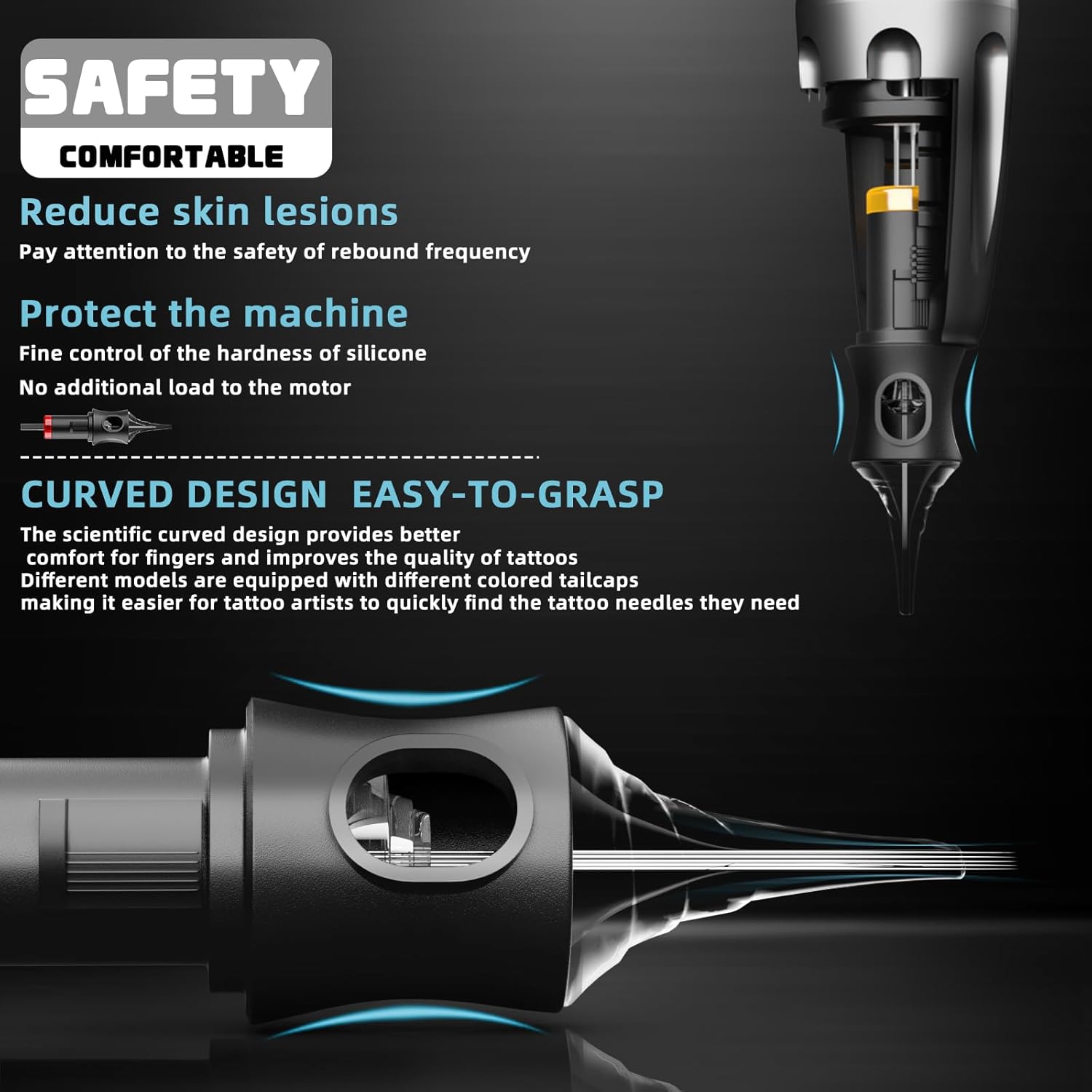
Figure 8: Design features for comfort and machine protection, highlighting the importance of proper needle handling.
Troubleshooting
If you encounter issues with your tattoo pen, refer to the following common troubleshooting steps:
- Pen Not Turning On:
- Ensure the battery is fully charged and correctly inserted.
- Check for any loose connections between the battery and the pen body.
- Inconsistent Needle Movement:
- Verify the needle cartridge is securely twisted into place.
- Check if the stroke length adjustment is set correctly.
- Ensure the battery has sufficient charge.
- Pen Overheating:
- Reduce the operating voltage.
- Allow the pen to cool down if used for extended periods.
- Ensure proper ventilation around the device.
- Display Issues:
- Recharge the battery.
- Restart the device by turning it off and on again.
If problems persist after following these steps, please contact customer support.
Specifications
| Brand: | Vidattx |
| Model: | Poseidon |
| Stroke Length: | Adjustable 2.4mm - 4.2mm (7 settings) |
| Operating Voltage: | 4V - 12V |
| Motor Speed: | 8000 RPM (at 8V) |
| Battery Type: | Lithium Polymer |
| Battery Capacity: | 2300mAh (x2 included) |
| Charging Time: | 2-3 hours |
| Working Time: | 5-8 hours (per battery) |
| Material: | Lightweight Aluminum |
| Color: | Black |
| Water Resistance Level: | Not Water Resistant |
| Package Dimensions: | 8.58 x 7.72 x 3.98 inches |
| Weight: | 2.29 Pounds |
| UPC: | 747495087597 |
| ASIN: | B0FCFQZJZ9 |

Figure 9: High-quality motor engineered for precision control and stable operation.
Safety Information
Important Safety Precautions:
- Keep all components of the tattoo kit away from children.
- This product is intended for professional use or under professional supervision.
- Always use sterile needles and follow strict hygiene protocols to prevent cross-contamination and infection.
- Do not immerse the tattoo pen in water or any liquids as it is not water-resistant.
- Ensure proper disposal of used needles and other contaminated materials according to local regulations.
- Consult a medical professional if you have any pre-existing skin conditions or concerns before tattooing.
Warranty and Support
Vidattx provides a replacement or refund for all products. For any issues, questions, or support needs, please contact Vidattx customer service. Refer to your purchase documentation for specific warranty terms and contact details.