
Important Safety Information
Read all instructions carefully before assembly and operation. Failure to follow these safety guidelines may result in serious injury.
- Adult Supervision Required: This product is intended for children aged 6-12 years. Constant adult supervision is mandatory during operation.
- Protective Gear: Always ensure the rider wears a helmet, knee pads, and elbow pads.
- Weight Limit: Do not exceed the maximum weight capacity of 110 pounds (50 kg).
- Riding Surface: Operate the go kart only on flat, dry, private surfaces free from obstacles. Avoid public roads, sidewalks, steep inclines, or wet conditions.
- Battery Safety: Handle the battery with care. Do not short-circuit, puncture, or expose to extreme temperatures. Only use the provided charger.
- Pre-Ride Check: Before each use, inspect the go kart for loose parts, damaged components, and proper tire inflation.
- No Passengers: This go kart is designed for a single rider only.
- Emergency Stop: Instruct the rider on how to use the brake pedal for immediate stopping.
Product Overview
Key Features
- Powerful Performance: Equipped with a 24V 7Ah battery and dual 200W motors, providing speeds up to 8.1 MPH.
- Drifting Capability: Features specialized rear drift wheels and a high-torque system for performing drifts and 360-degree spins.
- Adjustable Seating: The ergonomic seat offers multiple adjustment positions to accommodate children aged 6 to 12 years.
- Enhanced Stability: Constructed with a reinforced frame and a low center of gravity for stability during turns.
- Safety Features: Includes high-grip front tires and a sturdy chassis for reliable control.
- LED Lighting: Integrated bright LED lights enhance visibility and visual appeal.
Components
The Garvee Electric Go Kart includes several key components designed for performance and safety.

Image: Detailed view of the go kart's brake pedal, gas pedal, ergonomic seat, adjustable safety harness, responsive steering wheel, and wear-resistant drift wheels.
Assembly Instructions
Follow these steps to assemble your Garvee Electric Go Kart. It is recommended to watch the assembly video for visual guidance.
Assembly Video Guide
Video: A detailed guide on how to assemble the Garvee Electric Go Kart, demonstrating each step of the process.
Step-by-Step Assembly
- Unpack Components: Carefully remove all parts from the packaging and verify against the parts list in your included manual.
- Install Wheels: Attach the front and rear wheels to their respective axles, securing them with the provided washers and nuts. Ensure they spin freely.
- Connect Steering Column: Insert the steering column into the main chassis and secure it according to the instructions.
- Attach Steering Wheel: Mount the steering wheel onto the steering column, ensuring it is aligned and securely fastened.
- Install Seat: Position the seat onto the chassis and secure it. Adjust the seat to the desired position for the rider.
- Connect Battery: Connect the battery terminals as indicated in the manual. Ensure all electrical connections are secure.
- Final Checks: Before first use, perform a thorough check of all connections, fasteners, and moving parts to ensure proper assembly and safety.
Operating Your Go Kart
Familiarize yourself with the controls and operating procedures before riding.
Controls
- Power Button: Located on the dashboard, press to turn the go kart on or off.
- Gas Pedal: Press the right pedal to accelerate. Release to slow down.
- Brake Pedal: Press the left pedal to apply the brakes.
- Steering Wheel: Turn left or right to steer the go kart.
- Speed Selector: Switch between high and low-speed modes as appropriate for the rider's skill level and riding environment.
Driving Instructions
- Start: Ensure the go kart is on a flat surface. Press the power button.
- Accelerate: Gently press the gas pedal to begin moving.
- Steer: Use the steering wheel to navigate.
- Brake: Release the gas pedal and press the brake pedal to stop.
- Drifting: To initiate a drift, turn the steering wheel sharply while accelerating, then counter-steer to maintain control. Practice in an open area.
Video: A child demonstrating the operation of the electric go kart, including driving and turning.

Image: A child operating the go kart on a track, highlighting its speed and dual motor performance.

Image: The go kart demonstrating its 360-degree drift function and wear-resistant tires on a track.

Image: The go kart being driven on a dirt path, illustrating its suitability for various terrains.
Video: A short video showcasing the Garvee Electric Go Kart in action, highlighting its features and fun for children.
Maintenance and Care
Proper maintenance ensures the longevity and safe operation of your go kart.
- Battery Charging: Charge the battery fully before first use (approximately 8-12 hours). Do not overcharge. Recharge after each use and at least once a month during storage.
- Cleaning: Wipe the go kart with a damp cloth. Do not use harsh chemicals or abrasive cleaners. Avoid spraying water directly onto electrical components.
- Storage: Store the go kart in a dry, cool place away from direct sunlight and moisture. Disconnect the battery if storing for extended periods.
- Tire Inspection: Regularly check tires for wear and tear. Ensure they are free from punctures or damage.
- Fastener Check: Periodically inspect all nuts, bolts, and other fasteners to ensure they are tight and secure.
Troubleshooting Guide
Refer to this table for common issues and their solutions.
| Problem | Possible Cause | Solution |
|---|---|---|
| Go kart does not start or move. | Battery is low or not connected. Power switch is off. Loose wiring. | Charge the battery. Ensure battery connectors are secure. Turn the power switch on. Check all wiring connections. |
| Reduced speed or power. | Low battery charge. Overloaded weight. Riding on unsuitable terrain. | Recharge the battery. Ensure rider weight is within limits. Operate on flat, smooth surfaces. |
| Go kart makes unusual noises. | Loose parts. Debris in wheels/motors. | Inspect for loose components and tighten. Clear any debris from wheels and motor areas. |
| Brakes are not working effectively. | Brake mechanism issue. | Inspect the brake pedal and mechanism for obstructions or damage. Contact customer support if the issue persists. |
If you encounter issues not listed here or if solutions do not resolve the problem, please contact Garvee customer support.
Product Specifications
Detailed specifications for the Garvee 24V Electric Go Kart.
- Brand: Garvee
- Model Number: Ob-AkUXSuSb_9nmasJInSgY6f
- Battery: 24V 7Ah
- Motors: 2 x 200W (400W total)
- Maximum Speed: 8.1 MPH
- Recommended Age: 6-12 years
- Maximum Weight Capacity: 110 pounds (50 kg)
- Material: Metal chassis
- Item Weight: 66.5 pounds
- Product Dimensions (L x W x H): 49.21 x 26.57 x 10.83 inches
- Included Components: Electric Go Kart for Kids
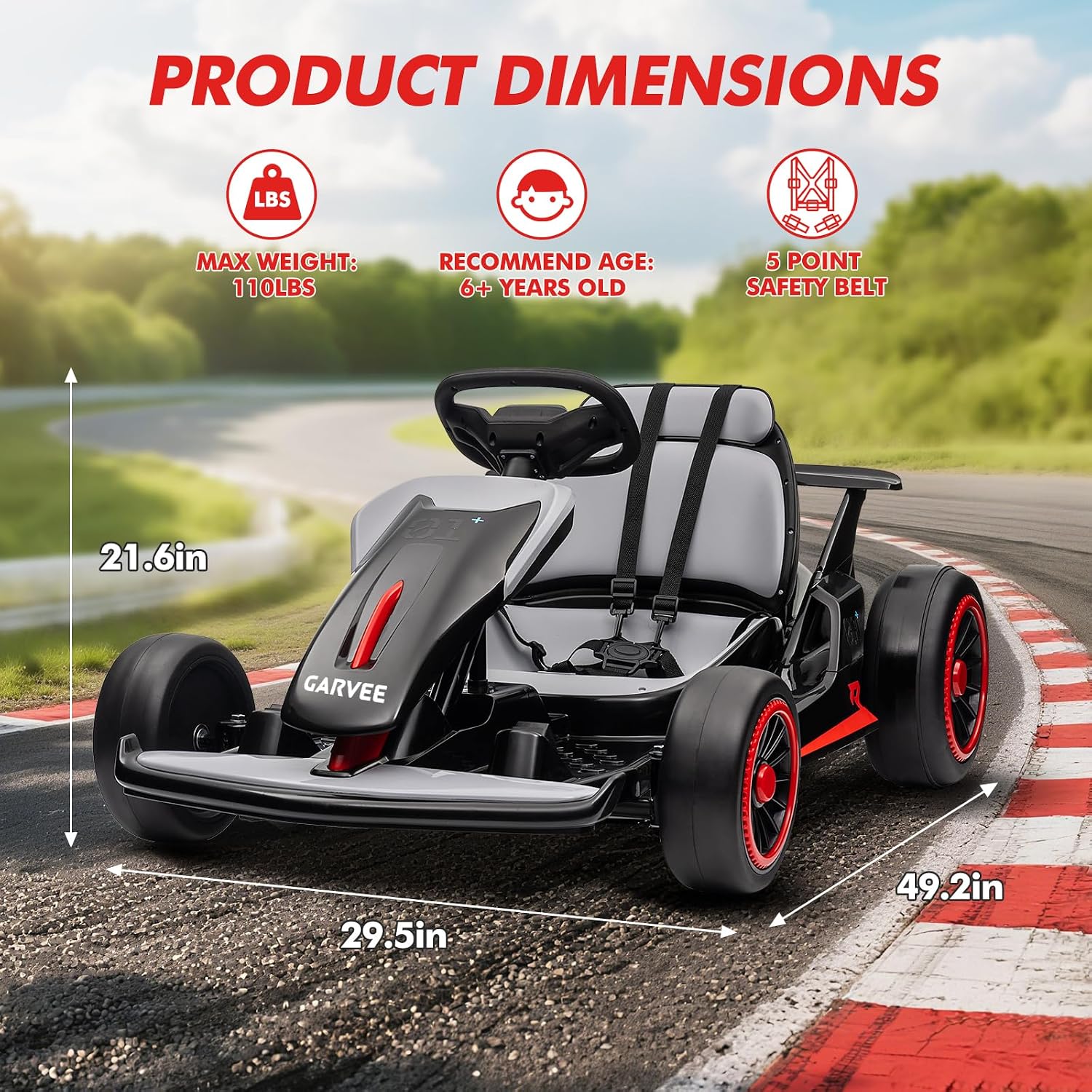
Image: Visual representation of the go kart's dimensions and key specifications.
Warranty and Customer Support
For warranty information, please refer to the documentation included with your purchase or contact Garvee customer support directly. Garvee is committed to providing quality products and support.
If you have any questions, require assistance with assembly, operation, or troubleshooting, please reach out to the seller or manufacturer through your purchase platform for prompt support.