1. Product Overview
The GHORA Portable Misting Fan Model A30 is a versatile cooling device designed for both indoor and outdoor use. It combines a powerful fan with a misting function, a large capacity water tank, and a long-lasting rechargeable battery. This manual provides essential information for the safe and efficient operation of your device.
Key Features:
- Dual Cooling System: Fan and misting technology for effective air cooling.
- Multiple Misting Modes: Four distinct spray modes (Single-Hole, Dual-Hole, Triple-Hole Turbo, Intermittent) to suit various needs.
- Remote Control & Timer: Convenient operation with a remote control and programmable 2, 4, or 8-hour timer.
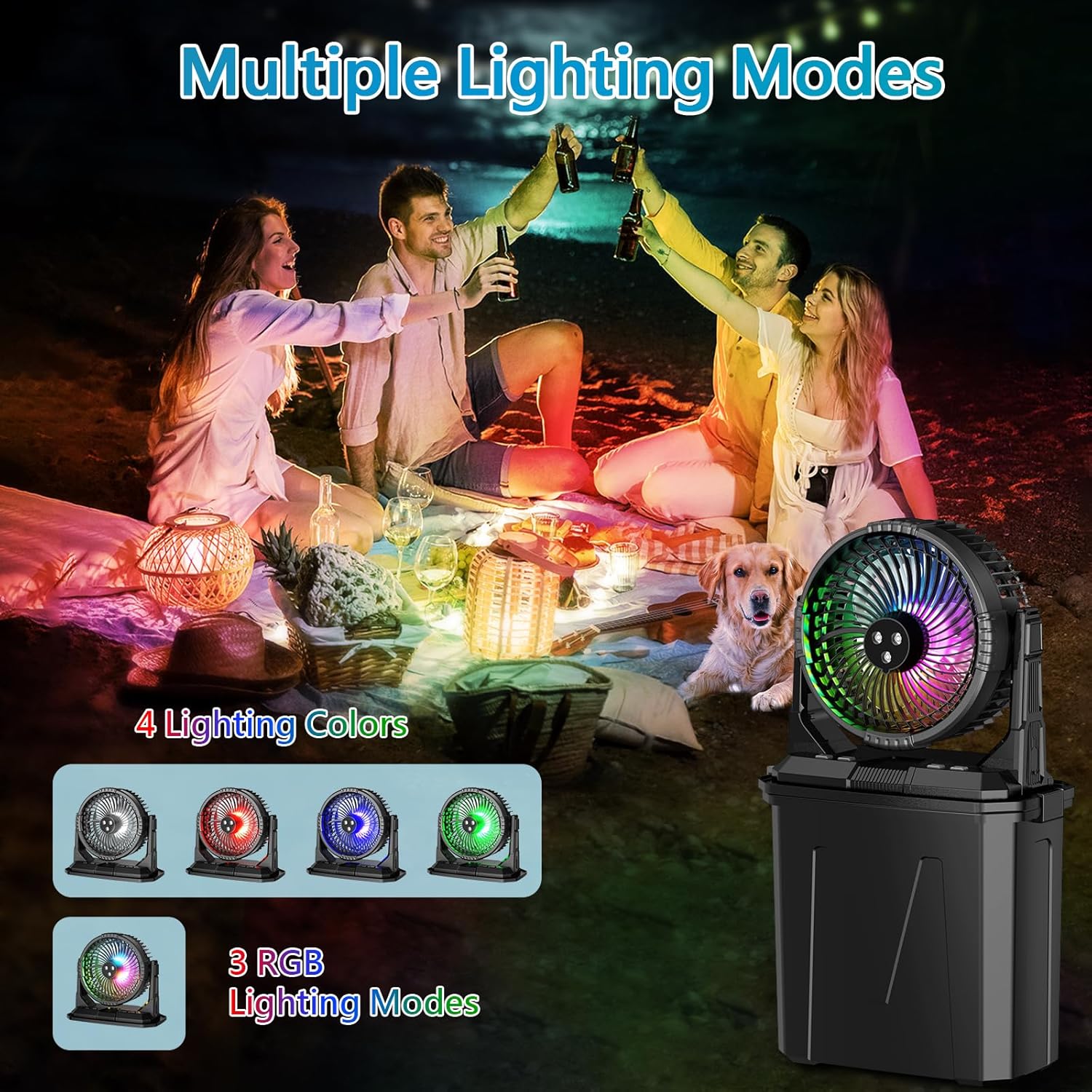
- RGB LED Lights: Seven vibrant colors for ambiance.
- Large Water Tank: Integrated 9-liter (2.4 gallon) water tank for extended misting.
- High-Capacity Battery: 20000mAh rechargeable battery offering up to 55 hours of fan-only operation or 9 hours with mist and high speed.
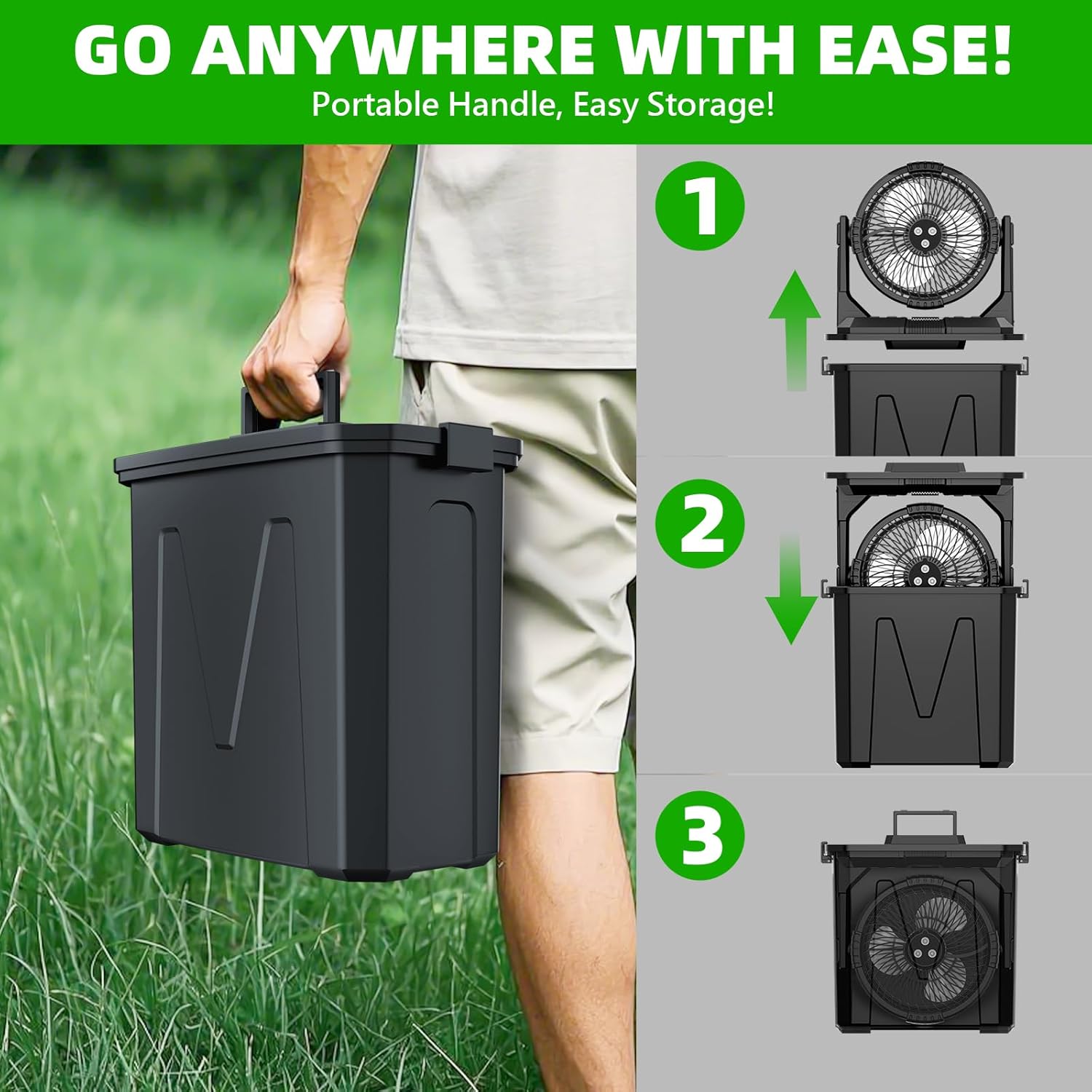
- Portable Design: The fan can be stored within the water tank for easy transport.
- Versatile Placement: Can be placed on surfaces or hung using the built-in hook.
2. Safety Instructions
Please read and understand all safety instructions before using the GHORA Portable Misting Fan. Failure to follow these instructions may result in electric shock, fire, or serious injury.
- Always use clean, pure water in the water tank to prevent clogging and ensure optimal misting performance.
- Ensure both water tubes are fully submerged in the water tank during operation.
- Avoid kinking or pressing on the water pipe, as this can obstruct water flow.
- Do not place the water pipe outside the bucket when the misting function is active.
- Keep the device away from open flames, heat sources, and direct sunlight.
- Do not immerse the fan unit in water or other liquids.
- Unplug the device before cleaning or when not in use for extended periods.
- Keep out of reach of children and pets.
- Do not attempt to disassemble or repair the device yourself. Contact customer support for assistance.
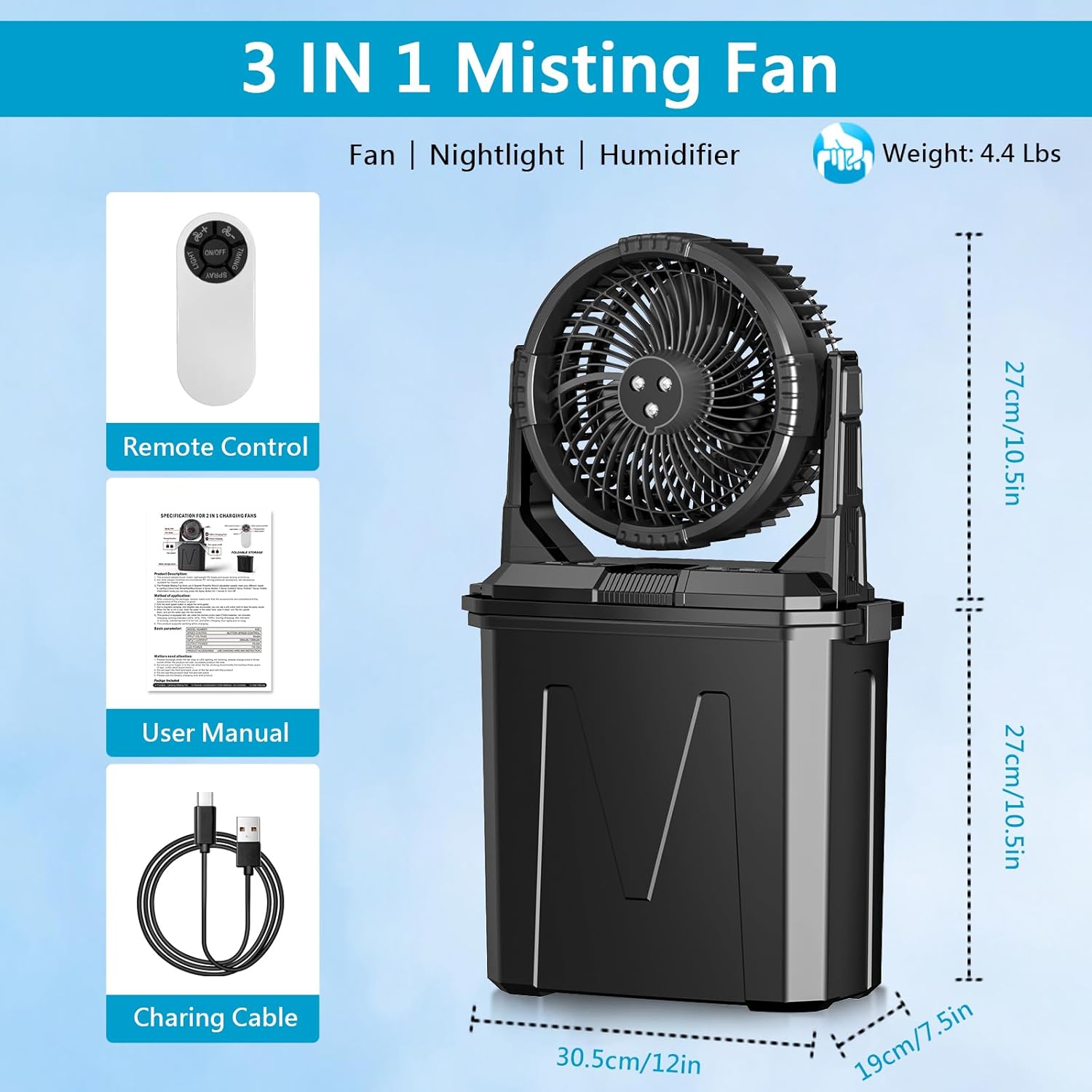
3. Package Contents
Verify that all items are present in the package:
- GHORA Portable Misting Fan Unit (Fan and 9L Water Tank)
- Remote Control
- USB Charging Cable
- User Manual
4. Setup
4.1 Unpacking and Initial Inspection
- Carefully remove all components from the packaging.
- Inspect the fan and accessories for any signs of damage. Do not use if damaged.
4.2 Charging the Battery
Before first use, fully charge the fan's internal 20000mAh battery.
- Connect the provided USB charging cable to the fan's charging port.
- Connect the other end of the USB cable to a compatible USB power adapter (not included) or a powered USB port.
- The charging indicator light will show the charging status. Allow sufficient time for a full charge (refer to specifications for charging time).

4.3 Filling the Water Tank
The fan unit sits atop a 9-liter water tank. For misting functionality, fill this tank.
- Ensure the fan unit is securely placed on the water tank.
- Open the water tank lid.
- Fill the tank with clean, pure water. For enhanced cooling, you may add ice cubes.
- Ensure the two water tubes inside the tank are fully submerged in the water.
- Close the water tank lid securely.

4.4 Placement Options
The fan offers flexible placement for various environments.
- Surface Placement: Place the fan on a stable, flat surface such as a floor or desk.
- Hanging: Utilize the built-in hook to mount the fan on trees, tents, or poles. Note: The spray function is disabled when the fan is in hanging mode.

5. Operating Instructions
5.1 Power On/Off
Press the power button on the fan unit or the remote control to turn the device on or off.
5.2 Adjusting Fan Speed
The fan features 4 adjustable speed levels.
- Press the fan speed button on the unit or remote control to cycle through the speeds (1, 2, 3, 4).
- Speed 1 is the lowest, and Speed 4 is the highest.
5.3 Selecting Misting Modes
The fan offers 4 smart spray modes for customized cooling.
- Press the misting button on the unit or remote control to select a mode.
- Single-Hole: Approximately 150ml/h, suitable for personal use.
- Dual-Hole: Approximately 300ml/h, suitable for small groups.
- Triple-Hole Turbo: Approximately 1,500ml/h, ideal for large spaces or extreme heat.
- Intermittent Spray: Activates every 2-3 seconds, effectively cools while keeping surfaces dry and is safe for pet fur.

5.4 RGB LED Lights
Enhance your environment with customizable lighting.
- Press the light button on the unit or remote control to cycle through 7 vibrant RGB colors and various lighting modes.
5.5 Timer Function
Set the fan to automatically shut off after a specified period.
- Press the timer button on the remote control to select 2, 4, or 8 hours.
- The fan will operate for the selected duration and then power off automatically.
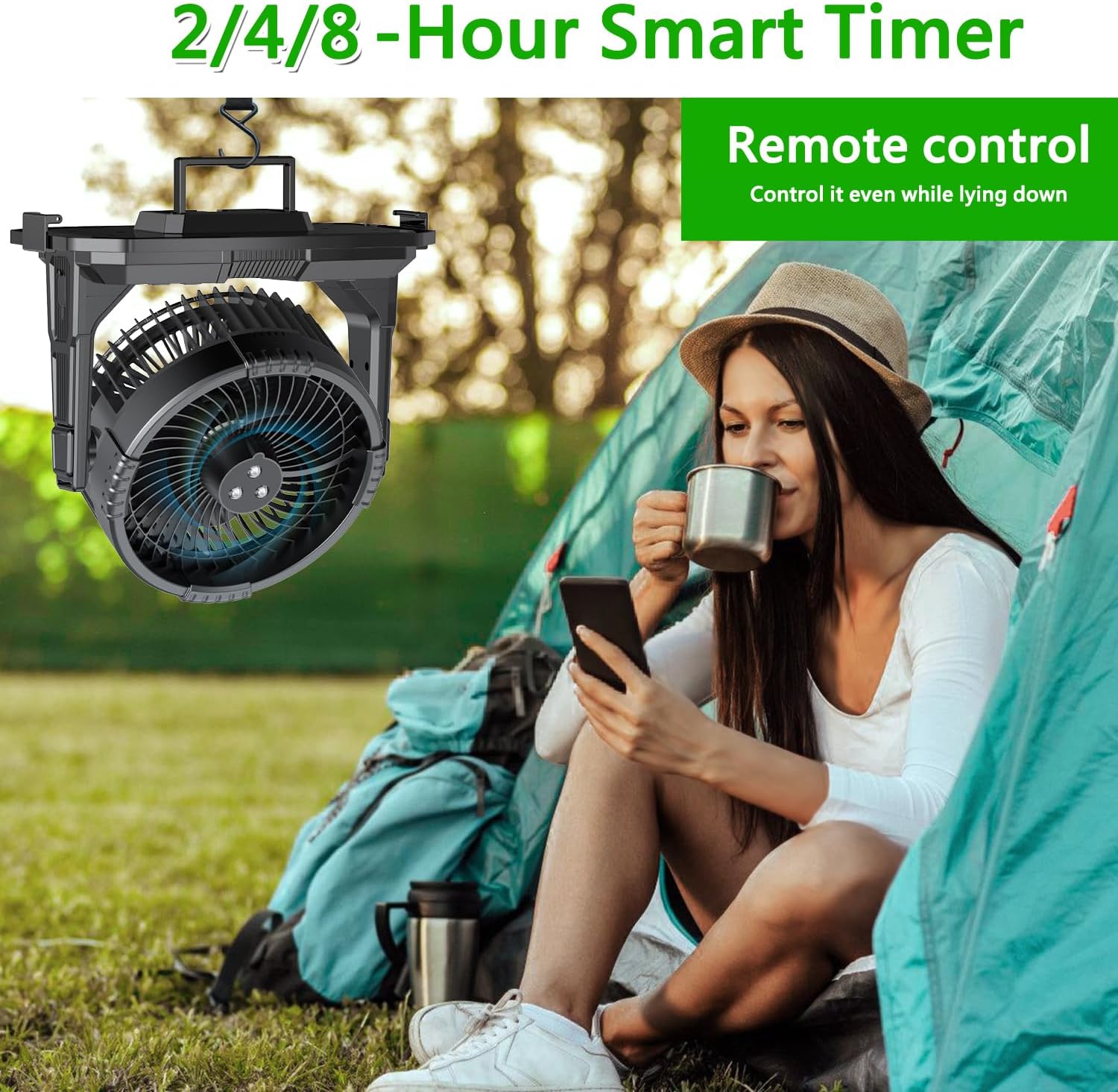
5.6 Remote Control Usage
The included remote control allows convenient operation from a distance.
- Ensure the remote control has a working battery (1 'A' battery included).
- Point the remote control towards the fan unit to send commands.
6. Maintenance
6.1 Cleaning the Misting Nozzles
To prevent clogs and maintain misting performance:
- Periodically wipe the misting nozzles with a cotton swab.
- If clogging occurs, gently clean the nozzles with a small brush or pin.
6.2 Water Tank Care
- Always use clean water to minimize mineral buildup.
- Empty and clean the water tank regularly, especially if not used for a few days.
- Before storing the fan, ensure the water tank is completely dry to prevent mold or mildew growth.

6.3 Storage
When not in use, the fan unit can be stored inside the water tank for compact storage.
7. Troubleshooting
If you encounter issues with your GHORA Portable Misting Fan, refer to the following common problems and solutions:
| Problem | Possible Cause | Solution |
|---|---|---|
| Fan does not turn on. | Battery is depleted. | Charge the battery fully. |
| No mist or weak mist. | Water tank is empty. Water tubes are not submerged or kinked. Misting nozzles are clogged. | Refill water tank. Ensure tubes are submerged and straight. Clean misting nozzles with a cotton swab. |
| Remote control not working. | Remote battery is depleted. Obstruction between remote and fan. | Replace remote control battery. Ensure clear line of sight. |
| Fan makes unusual noise. | Obstruction in fan blades. Unit not on a stable surface. | Turn off and inspect fan blades for debris. Place on a stable surface. |
If the problem persists after attempting these solutions, please contact customer support.
8. Specifications
| Feature | Specification |
|---|---|
| Brand | GHORA |
| Model Name | A30 (SX1) |
| Color | BLACK |
| Power Source | Battery Powered |
| Battery Capacity | 20000mAh |
| Water Tank Capacity | 9 Liters (approx. 2.4 gallons) |
| Fan Speed Levels | 4 |
| Misting Modes | 4 (Single-Hole, Dual-Hole, Triple-Hole Turbo, Intermittent) |
| RGB LED Lights | 7 Colors |
| Timer Settings | 2, 4, 8 Hours |
| Control Method | Remote, Touch Buttons |
| Product Dimensions | 12"D x 7.5"W x 10.5"H |
| Item Weight | 4 Pounds |
| Noise Level | 55 dB |
| Voltage | 5 Volts |
| Wattage | 37 Watt-hours |
| Certifications | CE, FCC, RoHS |
9. Warranty and Support
GHORA provides a dedicated customer support team to assist you with any questions or concerns regarding your Portable Misting Fan Model A30.
- For technical assistance, troubleshooting, or warranty inquiries, please contact our 24/7 support team.
- Contact information can typically be found on the product packaging or the official GHORA website.


