
1. Introduction
Thank you for purchasing the BESTISAN Wave Base Soundbar. This soundbar is designed to enhance your audio experience for televisions, home theater systems, gaming consoles, and projectors. It features multiple connectivity options including Bluetooth, HDMI-ARC, Optical, AUX, and USB, providing versatile audio playback. This manual provides detailed instructions for proper setup, operation, and maintenance of your soundbar.
2. Package Contents
Please check the package carefully to ensure all items are present and in good condition.
- BESTISAN Wave Base Soundbar
- Remote Control
- Power Adapter
- Optical Cable
- 3.5mm to 3.5mm Audio Cable (AUX Cable)
- User Manual (Quick Start Guide)

Figure 2.1: Soundbar and Included Accessories
3. Product Overview
3.1 Soundbar Controls
The soundbar features intuitive controls located on the side panel for easy access.
- Power Button: Press to turn the soundbar On or Off.
- Volume Down (-): Decrease the volume level.
- Volume Up (+): Increase the volume level.
- Input/Mode Button: Press to cycle through input sources (Bluetooth, AUX, Optical, HDMI-ARC, USB).
3.2 Rear Panel Connections
The rear panel provides various ports for connecting to your audio sources.
- DC IN: Connect the power adapter here.
- SUB OUT: Output for an external subwoofer (if applicable).
- AUX IN: 3.5mm audio input for connecting devices with an AUX cable.
- USB: For USB drive playback.
- OPTICAL: Optical audio input for digital audio connection.
- HDMI (ARC): HDMI Audio Return Channel input for connecting to compatible TVs.

Figure 3.1: Rear Panel Connections
3.3 Remote Control Functions
The included remote control provides full functionality for your soundbar.
- Power Button: Turns the soundbar On/Off.
- Mute Button: Mutes or unmutes the sound.
- Volume Up/Down: Adjusts the master volume.
- Play/Pause/Next/Previous: Media playback controls (for Bluetooth/USB modes).
- Input Mode Buttons (BT, AUX, OPT, HDMI ARC, USB): Directly select input sources.
- Sound Mode Buttons (MUSIC, MOVIE, DIALOG): Select preset equalizer modes.
- TREB+/TREB-: Adjust treble level.
- BASS+/BASS-: Adjust bass level.
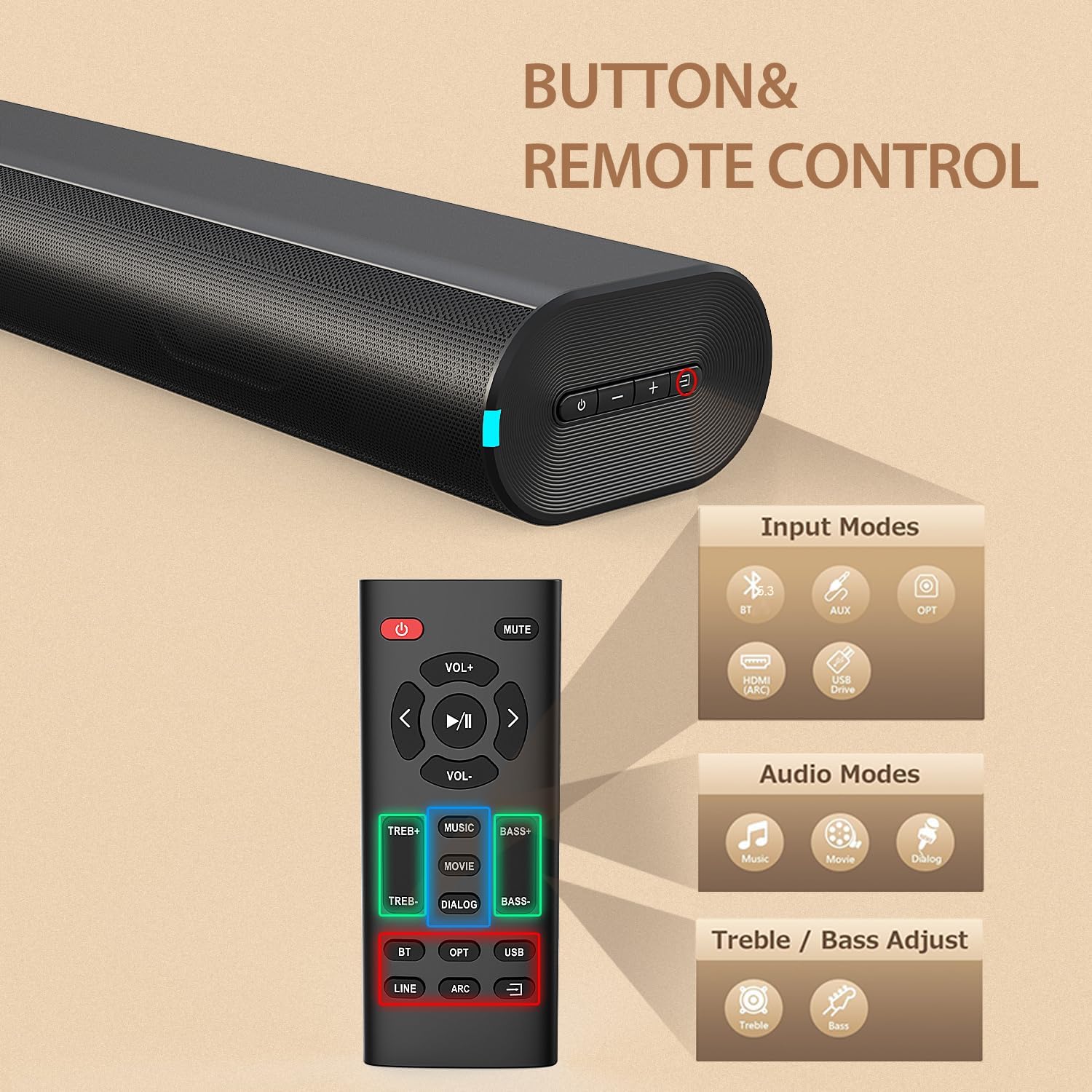
Figure 3.2: Soundbar Controls and Remote Control
4. Setup
4.1 Power Connection
- Connect the power adapter to the DC IN port on the rear of the soundbar.
- Plug the other end of the power adapter into a wall outlet (AC 110V).
- The soundbar will enter standby mode, indicated by an LED light.
4.2 Connecting to Your TV or Device
Choose one of the following connection methods based on your device's available ports:
HDMI ARC Connection
- Connect one end of an HDMI cable (not included) to the HDMI (ARC) port on the soundbar.
- Connect the other end to the HDMI ARC port on your television.
- Ensure your TV's HDMI ARC function is enabled in its settings.
- Select HDMI ARC input on the soundbar using the remote or the soundbar's input button.
Optical Connection
- Connect the included optical cable to the OPTICAL port on the soundbar.
- Connect the other end to the Optical Digital Audio Out port on your television or device.
- Select OPTICAL input on the soundbar using the remote or the soundbar's input button.
AUX Connection
- Connect the included 3.5mm audio cable to the AUX IN port on the soundbar.
- Connect the other end to the 3.5mm headphone jack or audio output on your device.
- Select AUX input on the soundbar using the remote or the soundbar's input button.
Bluetooth Pairing
- Power on the soundbar.
- Press the 'BT' button on the remote or the input button on the soundbar until the Bluetooth indicator light flashes.
- On your mobile device, enable Bluetooth and search for available devices.
- Select "BESTISAN SE12-01" from the list.
- Once paired, the Bluetooth indicator light will stop flashing and remain solid.
USB Playback
- Insert a USB drive (FAT32 format) containing audio files into the USB port on the soundbar.
- Press the 'USB' button on the remote or cycle through inputs on the soundbar until USB mode is selected.
- The soundbar will automatically begin playing audio files from the USB drive.
5. Operating Instructions
5.1 Power On/Off
Press the Power button on the soundbar or the remote control to turn the unit on or off.
5.2 Input Selection
Press the Input/Mode button on the soundbar or the corresponding input button (BT, AUX, OPT, HDMI ARC, USB) on the remote control to switch between audio sources.
5.3 Volume Adjustment
Use the Volume Up (+) or Volume Down (-) buttons on the soundbar or remote control to adjust the audio volume.
5.4 Sound Modes (EQ)
The soundbar offers three preset equalizer modes to optimize audio for different content types. Press the corresponding button on the remote control to select:
- MUSIC Mode: Ideal for listening to music, providing balanced audio.
- MOVIE Mode: Enhances cinematic sound effects and dialogue for movies.
- DIALOG Mode (News Mode): Optimizes vocal clarity, suitable for news, podcasts, or TV shows with heavy dialogue.

Figure 5.1: Sound Modes
5.5 Treble and Bass Adjustment
Use the TREB+/TREB- and BASS+/BASS- buttons on the remote control to fine-tune the treble and bass levels according to your preference.
6. Maintenance
To ensure the longevity and optimal performance of your soundbar, follow these maintenance guidelines:
- Cleaning: Use a soft, dry cloth to wipe the surface of the soundbar. Do not use liquid cleaners, abrasive cleaners, or sprays, as they may damage the finish or internal components.
- Placement: Place the soundbar on a stable, flat surface. Avoid placing it in direct sunlight, near heat sources, or in areas with high humidity or dust.
- Ventilation: Ensure adequate ventilation around the soundbar to prevent overheating. Do not block any ventilation openings.
- Power Cord: Regularly inspect the power cord for any damage. If damaged, discontinue use and contact customer support.
7. Troubleshooting
If you encounter issues with your soundbar, refer to the following table for common problems and solutions.
| Problem | Possible Cause | Solution |
|---|---|---|
| No power | Power cord not connected; Power outlet not active | Ensure power cord is securely connected to the soundbar and a working power outlet. |
| No sound | Incorrect input selected; Volume too low; Cables not connected properly | Select the correct input source. Increase volume. Check all audio cables are securely connected. Ensure TV audio output is set correctly. |
| Bluetooth pairing fails | Soundbar not in pairing mode; Device too far; Interference | Ensure soundbar is in Bluetooth pairing mode (flashing LED). Move device closer to soundbar. Turn off other Bluetooth devices. |
| Sound distortion | Volume too high; Poor audio source quality | Reduce volume. Try a different audio source or cable. |
| Remote control not working | Batteries depleted; Obstruction between remote and soundbar | Replace remote control batteries. Ensure no obstructions are blocking the remote's signal to the soundbar. |
8. Specifications
Technical specifications for the BESTISAN Wave Base Soundbar (Model SE12-01).
| Feature | Detail |
|---|---|
| Model Number | SE12-01 |
| Brand | BYL |
| Speaker Type | Soundbar |
| Connectivity Technology | Bluetooth, HDMI (ARC), Optical, AUX, USB |
| Bluetooth Version | V5.3 |
| Bluetooth Range | Up to 30 feet (10 meters) |
| Audio Output Mode | Stereo (2.0 Channel) |
| Speaker Maximum Output Power | 60 Watts |
| Frequency Response | 20 KHz (Upper limit, typical for soundbars) |
| Signal-to-Noise Ratio | 80 dB |
| Input Voltage | 110 Volts |
| Product Dimensions (D x W x H) | 3.74" x 21.85" x 2.36" |
| Item Weight | 2.64 Pounds |
| Material | Acrylonitrile Butadiene Styrene (ABS), Metal |
| Mounting Type | Tabletop Mount |
| Control Method | Push Button, Remote |
9. Warranty and Support
9.1 Product Warranty
This BESTISAN Wave Base Soundbar is covered by a Limited Manufacturer Warranty. Please refer to the warranty card included in your package or contact the manufacturer for specific terms and conditions regarding warranty coverage.
9.2 Customer Support
For technical assistance, troubleshooting beyond this manual, or warranty inquiries, please contact BESTISAN customer support. Contact information can typically be found on the manufacturer's official website or on the packaging of your product.