1. Introduction
Thank you for choosing the Kratos K14 Selfie Stick Tripod. This versatile 3-in-1 device combines a selfie stick, a tripod stand, and an integrated LED light, designed to enhance your photography and videography experience. It features a 100CM extendable length, 360° rotation, 140° tilt angle, and a detachable Bluetooth remote for convenient use. Please read this manual carefully to ensure proper operation and maintenance of your device.
2. Safety Information
- Do not expose the device to extreme temperatures, moisture, or direct sunlight.
- Keep the device away from children.
- Avoid dropping or subjecting the device to strong impacts.
- Do not attempt to disassemble or modify the device, as this will void the warranty.
- Use only the provided or recommended charging cables for the LED light.
3. Package Contents
Please check the package for the following items:
- Kratos K14 Selfie Stick Tripod
- Bluetooth Remote
- Charging Cable (for LED light)
- Warranty Card
4. Setup Instructions
4.1 Unfolding the Tripod/Selfie Stick
- Hold the handle firmly.
- Gently pull the bottom part downwards to extend the tripod legs. Ensure the legs are fully spread for maximum stability.
- To use as a selfie stick, keep the legs folded and extend the telescopic rod upwards.
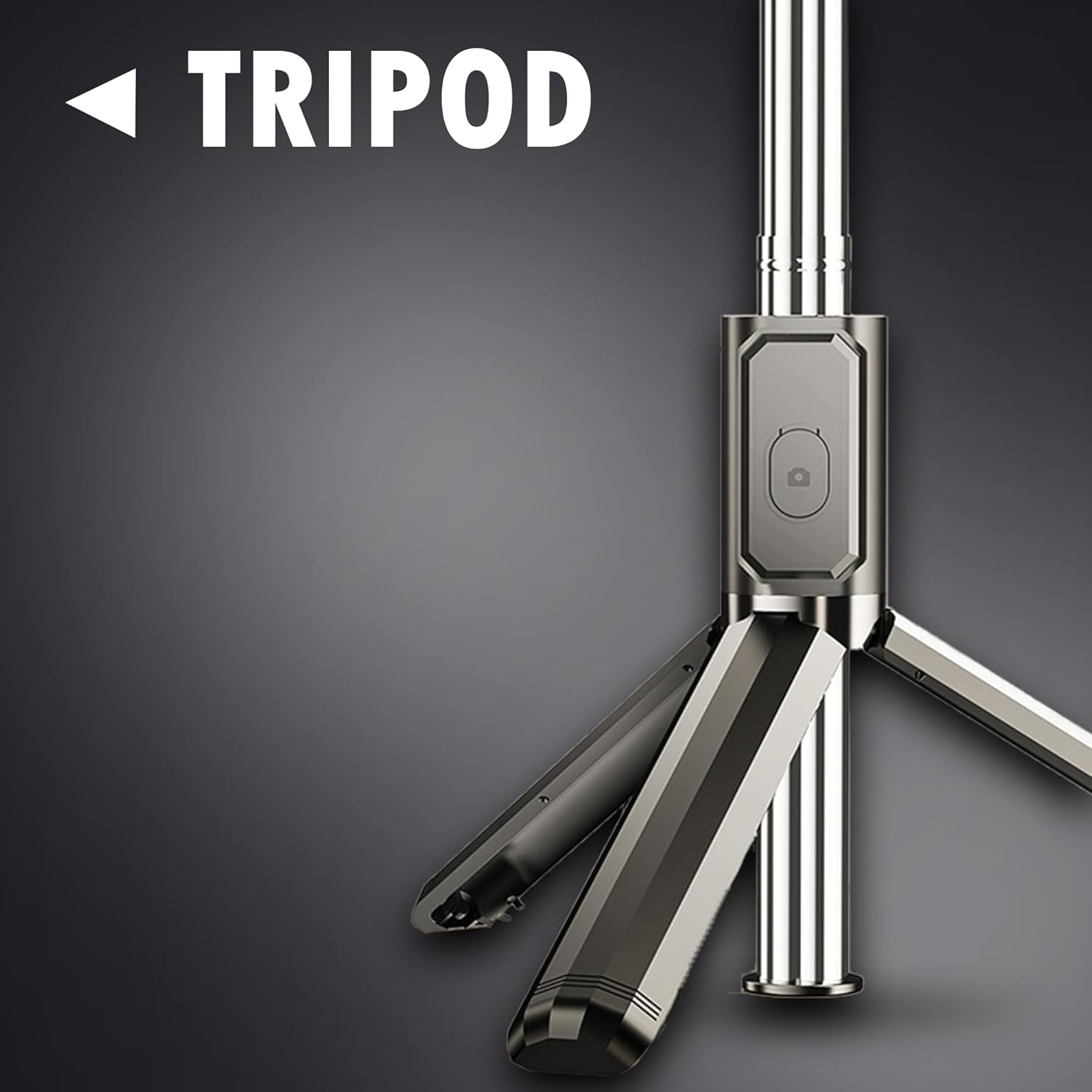
Image: The tripod base of the Kratos K14, showing its stable design when unfolded.
4.2 Mounting Your Phone
- Locate the phone holder at the top of the stick.
- Gently pull the spring-loaded clamp open.
- Insert your smartphone into the clamp, ensuring it is securely held and balanced.
4.3 Pairing the Bluetooth Remote
- Remove the Bluetooth remote from its slot on the handle.
- Press and hold the button on the remote until the indicator light starts flashing, indicating it is in pairing mode.
- On your smartphone, go to Bluetooth settings and search for available devices.
- Select "Kratos K14" or a similar name from the list to pair. The indicator light on the remote will stop flashing once successfully paired.
4.4 Using the Integrated LED Light
- The LED light is located near the phone holder.
- Press the power button on the LED light to turn it on.
- Press the button again to cycle through the two brightness levels.
- To turn off the light, press the button until it switches off.

Image: The Kratos K14 in tripod mode with the LED light illuminating a subject for photography.
5. Operating Instructions
5.1 Extending the Selfie Stick
Grasp the handle and pull the telescopic rod upwards to extend it to your desired length, up to 100CM. Ensure all sections are securely locked in place before use.

Image: The Kratos K14 selfie stick fully extended to 100CM, demonstrating its reach for wider shots.
5.2 Adjusting Angles
The phone holder supports 360° rotation and 140° tilt angle adjustments. Loosen the knob or joint near the phone holder, adjust to your preferred angle (portrait or landscape), and then tighten to secure it.

Image: Visual guide illustrating the multi-angle adjustment capabilities, including 140° tilt and easy switching between portrait and landscape orientations.
5.3 Using the Bluetooth Remote
Once paired, open your smartphone's camera application. Press the button on the Bluetooth remote to capture photos or start/stop video recording. Ensure the remote is within operational range (approximately 10 meters) of your phone.

Image: The Kratos K14 set up as a tripod, enabling hands-free recording during a meeting or presentation.
5.4 Vlogging and Live Streaming
The Kratos K14 is ideal for vlogging and live streaming. Set it up in tripod mode, adjust the height and angle, and use the LED light for optimal illumination. The Bluetooth remote allows for convenient control during recording.

Image: A user demonstrating vlogging with the Kratos K14, highlighting its utility for content creation.
6. Maintenance
- Cleaning: Wipe the device with a soft, dry cloth. Do not use abrasive cleaners or solvents.
- Storage: Store the selfie stick tripod in a cool, dry place away from direct sunlight when not in use. Ensure it is fully collapsed and the remote is securely placed in its slot.
- Charging the LED Light: If the LED light dims or does not turn on, recharge it using the provided USB cable. Connect it to a standard USB power source.
7. Troubleshooting
| Problem | Possible Cause | Solution |
|---|---|---|
| Bluetooth remote not pairing | Remote battery low; Remote not in pairing mode; Bluetooth on phone is off. | Ensure remote battery is charged. Press and hold remote button until light flashes. Turn on Bluetooth on your phone. Forget device and re-pair. |
| LED light not turning on/dim | LED light battery low. | Charge the LED light using the provided USB cable. |
| Tripod unstable | Legs not fully extended; Uneven surface; Overloaded. | Ensure tripod legs are fully spread. Place on a flat, stable surface. Do not exceed weight capacity. |
| Phone not fitting in clamp | Phone too wide/thick. | The clamp is designed for standard smartphones. Do not force larger devices. |
8. Specifications
| Feature | Detail |
|---|---|
| Model Number | K14 |
| Product Dimensions | 30 x 5.5 x 5 cm (folded) |
| Item Weight | 200 g |
| Max. Extendable Length | 100 CM |
| Wireless Communication | Bluetooth |
| Special Features | Integrated LED Light (2 brightness levels), 3-in-1 design (Selfie Stick, Tripod, Light), 360° Rotation, 140° Tilt Angle |
| Compatible Devices | Smartphone, Tablet |
| Material | Stainless Steel |
| Manufacturer | KRATOS, Ezeekart Creation LLP |
| Country of Origin | India |
9. Warranty and Support
The Kratos K14 Selfie Stick Tripod comes with a 1-Year Brand Warranty. This warranty covers replacement service for manufacturing defects. For any queries or technical support, please contact the manufacturer directly.
- Manufacturer: KRATOS, Ezeekart Creation LLP
- Phone: 81482 73270
- Email: help@gokratos.com
- Warranty Registration: Register your purchase on the brand's official website to avail of your warranty services.


