
1. Introduction
This manual provides essential information for the proper use and maintenance of your ZWP Replacement Remote Control. This remote is designed to be a direct replacement for various walking pad treadmill models, ensuring seamless operation without complex programming.
2. Product Overview
Key Features:
- Durable Construction: Made of high-quality ABS material, ensuring wear resistance and durability.
- Comfortable Design: Ergonomically designed for a comfortable hand feeling.
- No Programming Required: Ready to use after battery installation.
Compatibility:
This replacement remote control is compatible with the following walking pad treadmill models:
- Citysports: CS-WP6, CS-WP2, CS-WP3
- SubSun: SH01-A
- Anylife: 480L, 480L-A, 480L-B, 480G-A, 520A-A, 520A-B, P3-D, L1, P1, P2, P3
- AKLUER: 480L, 480L-A, 480L-B, 480G-A, 520A-A
- BestGod: 480A-A

This image illustrates the design of the ZWP replacement remote control alongside a common original remote, highlighting their functional equivalence.
3. Setup
Battery Installation:
- Locate the battery compartment cover on the back of the remote control.
- Slide the cover off to open the compartment.
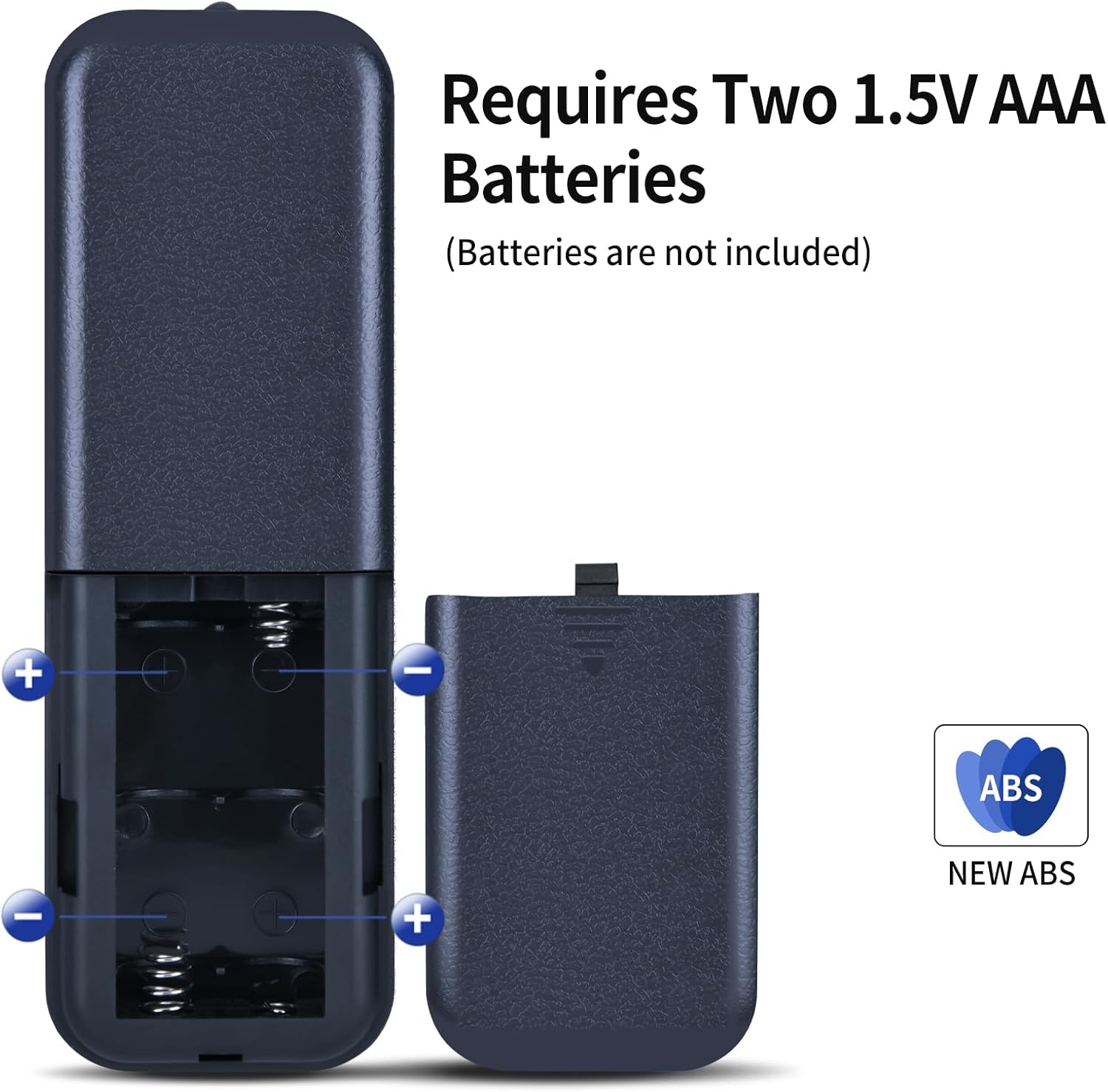
- Insert two (2) 1.5V AAA batteries, ensuring correct polarity (+ and - ends match the markings inside the compartment).
- Slide the battery compartment cover back into place until it clicks securely.
Note: Batteries are not included with the remote control.

The remote requires two 1.5V AAA batteries for operation. Ensure correct polarity when inserting.
4. Operating Instructions
Once batteries are installed, the remote control is ready for use with your compatible walking pad treadmill. No additional programming is required.
Button Functions:
- Power Button (⏻): Press to turn the treadmill ON or OFF.
- Speed Increase (+): Press to increase the treadmill's speed.
- Speed Decrease (-): Press to decrease the treadmill's speed.
- Start/Pause (⏸): Press to start or pause the treadmill's operation.
- Mode (M): Press to cycle through different workout modes or display options, if supported by your treadmill.
This diagram details the primary control buttons: speed increase (+), speed decrease (-), and start/pause (play/pause icon). Ensure your treadmill's original remote has a similar button configuration for compatibility.
Operational Range:
The remote control operates effectively up to a distance of approximately 8 meters (26 feet) from the treadmill. Ensure a clear line of sight between the remote and the treadmill's receiver for optimal performance.

The remote control maintains effective communication with the treadmill up to 8 meters, allowing for flexible use during exercise.
Official Product Videos:
This video demonstrates the functionality of the ZWP replacement remote control for walking pad treadmills, including basic operations.
A demonstration of the ZWP replacement remote control's compatibility and ease of use with a specific treadmill model (AD-4000).
5. Maintenance
- Cleaning: Wipe the remote control with a soft, dry cloth. Avoid using harsh chemicals or abrasive cleaners.
- Storage: Store the remote in a cool, dry place away from direct sunlight and extreme temperatures.
- Battery Replacement: Replace batteries promptly when the remote's performance diminishes. Remove batteries if the remote will not be used for an extended period to prevent leakage.
6. Troubleshooting
Remote Not Responding:
- Check Batteries: Ensure batteries are inserted correctly with the correct polarity and are not depleted. Replace with fresh AAA batteries if necessary.
- Line of Sight: Verify there is a clear line of sight between the remote control and the treadmill's receiver. Obstructions can interfere with the signal.
- Proximity: Ensure you are within the operational range of 8 meters from the treadmill.
- Compatibility: Double-check that your treadmill model is listed in the compatibility section of this manual. While designed for broad compatibility, some models may vary.
Intermittent Operation:
- This can often be resolved by replacing the batteries or ensuring a clear path for the signal.
7. Specifications
| Feature | Specification |
|---|---|
| Brand | ZWP |
| Package Dimensions | 7.4 x 2.5 x 1.1 inches |
| Item Weight | 2.08 ounces |
| Color | Black |
| Special Feature | Ergonomic |
| Max Number of Supported Devices | 1 |
| Compatible Devices | Treadmill (various models listed in Section 2) |
8. Warranty and Support
While specific warranty details are not provided, for any questions or issues regarding your ZWP Replacement Remote Control, please do not hesitate to contact the seller or manufacturer directly. They are committed to assisting you with any concerns to ensure your satisfaction.