
Introduction
The JOCIRUS 4G Cellular Trail Camera is designed for remote wildlife monitoring, offering advanced features such as 2K HD live streaming, night vision, and motion-activated recording. With a built-in eSIM card, it connects via 4G LTE networks, eliminating the need for Wi-Fi and ensuring reliable signal even in remote areas. Its solar-powered design and IP66 waterproof rating provide robust performance in various outdoor conditions.

Figure 1: JOCIRUS 4G Cellular Trail Camera with solar panel and live view on a smartphone.
What's in the Box
- Trail Camera
- Solar Panel with USB-C Connector
- Cellular Antenna
- Mounting Brackets (for camera and solar panel)
- USB-C Charging Cable
- User Manual
Setup
- Install Cellular Antenna: Screw the cellular antenna onto the designated port on the camera unit.
- Mount Solar Panel: Attach the solar panel to a tree or suitable surface using the provided mounting bracket and screws. Ensure the panel is angled to receive maximum sunlight for optimal charging.
- Mount Trail Camera: Secure the trail camera to a tree using the included strap. The camera features a dedicated slot on its back for easy attachment to the strap. Alternatively, use the mounting bracket for screw-based installation.
- Connect Solar Panel: Plug the USB-C connector from the solar panel into the charging port on the trail camera.
- Power On: Ensure the camera's internal battery is charged. The solar panel will continuously charge the battery when exposed to sunlight.
- App Installation: Download and install the 'AIDOVid' application on your smartphone. This app is essential for controlling the camera, viewing live footage, and managing settings.
- Activate Data Plan: The camera comes with a 7-day free data trial. After this period, a data plan subscription is required through the app for cellular connectivity. Various plan options are available.

Figure 2: The camera and solar panel offer flexible mounting options using straps or screws.
Operating Instructions
The JOCIRUS Trail Camera provides real-time monitoring and advanced features accessible via the dedicated smartphone application.
Live View and Recording
- 2K HD Live: Access crystal-clear 2K live video streams directly on your smartphone through the 'AIDOVid' app.
- Motion Detection: The camera detects movement in approximately 0.1 seconds, immediately sending real-time alerts to your phone.
- Night Vision: Equipped with invisible infrared night vision (940nm), the camera captures clear footage in low-light conditions without disturbing wildlife.
- Two-Way Audio: Utilize the two-way audio feature via the app to listen to ambient sounds and communicate remotely.
- Storage: Photos and videos can be saved on a memory card (supports up to 256GB, not included) or via cloud storage (subscription required).

Figure 3: Mobile Command Center - Control your camera and view footage via the app.
Sharing Features
The app allows you to share real-time wildlife footage with friends and family, making it a shared experience.

Figure 4: Share your wilderness adventures with loved ones through the app.
Maintenance
- Solar Power: The integrated solar panel provides continuous power, charging the built-in battery during daylight hours. This minimizes the need for manual battery replacement.
- Battery Backup: The camera includes a built-in battery backup to ensure operation during prolonged cloudy periods or at night.
- Weather Resistance: The IP66 waterproof housing protects the camera from rain, snow, and dust, allowing for year-round outdoor deployment.
- Cleaning: Periodically clean the solar panel and camera lens to ensure optimal performance. Use a soft, damp cloth.
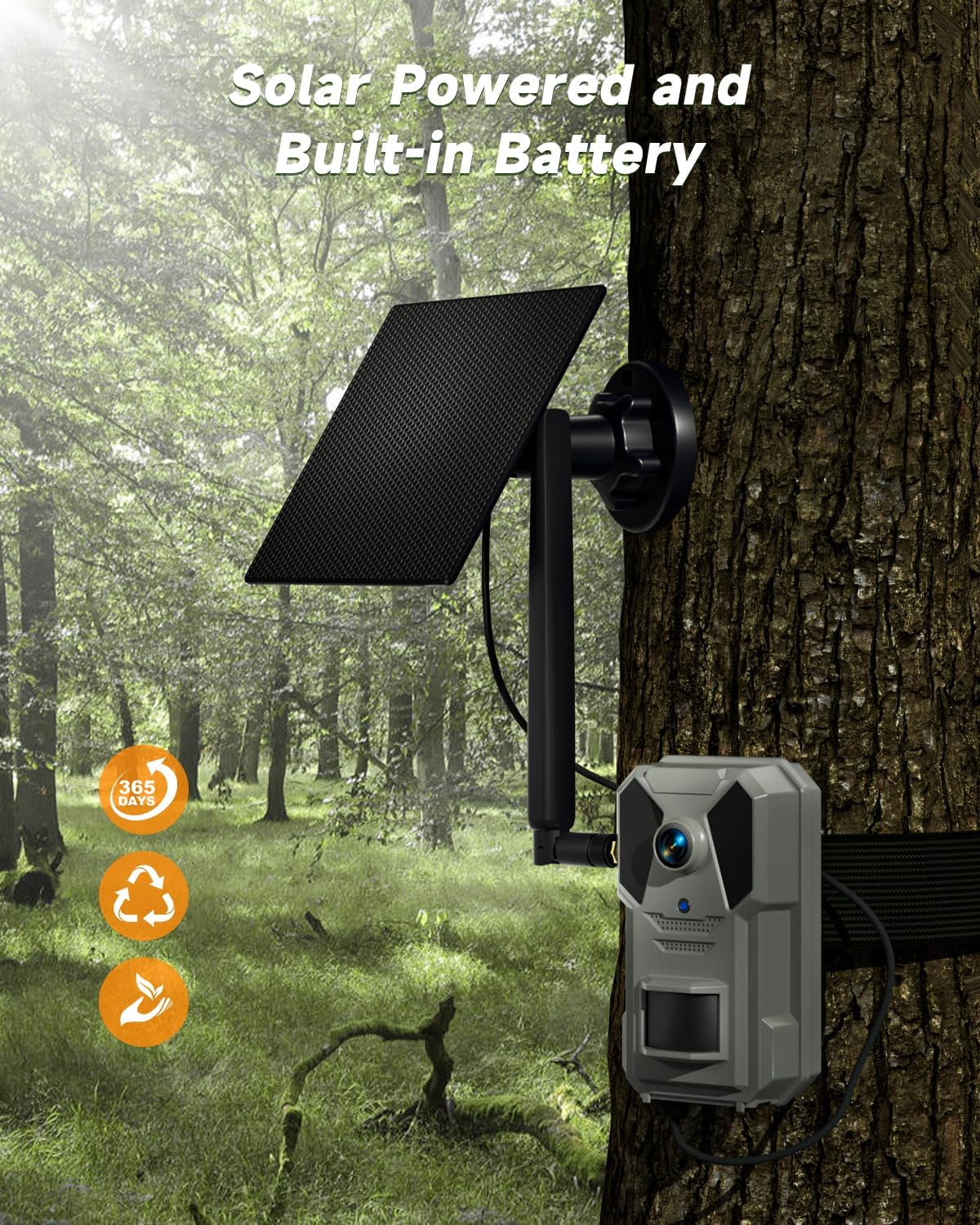
Figure 5: The camera is solar-powered with a built-in battery for continuous operation.

Figure 6: IP66 waterproof design ensures durability in various weather conditions.
Troubleshooting
- No Cellular Connection:
- Ensure you have an active data plan subscription through the 'AIDOVid' app after the trial period.
- Check the cellular signal strength in the camera's location. Relocate the camera if the signal is weak.
- Verify that the cellular antenna is securely attached. - No Footage Captured:
- Confirm the camera is powered on and the battery is charged.
- Check if the memory card (if used) is properly inserted and has sufficient storage space.
- Ensure motion detection settings are correctly configured in the app.
- Verify the camera's placement and field of view. - Poor Image/Video Quality:
- Clean the camera lens to remove any dirt or debris.
- Ensure adequate lighting during the day. For night vision, confirm there are no obstructions in front of the infrared sensors.
- Check the camera's resolution settings in the app. - App Connectivity Issues:
- Ensure your smartphone has a stable internet connection.
- Update the 'AIDOVid' app to the latest version.
- Restart both the camera and your smartphone.
Specifications
| Model Name | Trail Camera |
| Item Model Number | Tc2023-4g |
| Indoor/Outdoor Usage | Outdoor |
| Connectivity Technology | 4G LTE Cellular Network |
| Connectivity Protocol | 4g Lte |
| Power Source | Solar Powered |
| Video Capture Resolution | 2K |
| Night Vision Range | 65 Feet |
| Water Resistance Level | Waterproof (IP66) |
| Flash Memory Supported Size Maximum | 256 GB (Memory card not included) |
| Item Dimensions L x W x H | 4 x 2.6 x 1.4 inches |
| Item Weight | 2.07 pounds |
| Batteries Required? | Yes (1 9V batteries included) |
| Manufacturer | JOCIRUS |
Warranty and Support
For warranty information and technical support, please refer to the official JOCIRUS website or contact JOCIRUS customer service directly. Keep your purchase receipt for warranty claims.
Additional protection plans may be available for purchase through your retailer.