
1. Introduction
This manual provides comprehensive instructions for the installation, operation, and maintenance of your STUDIOFINIX 6.5 Inch Bluetooth Ceiling Speakers. Please read this manual thoroughly before using the product to ensure proper setup and optimal performance. Keep this manual for future reference.
What's in the Box
Verify that all components are present before beginning installation.
- 2x 6.5" Ceiling Speakers
- 2x 5 Meters Speaker Cables
- 1x Power Supply
- 1x Amplifier (Bluetooth AMP Box)

Image 1.1: Package contents including two 6.5-inch ceiling speakers, a Bluetooth amplifier, power adapter, and speaker cables.
2. Safety Information
Adhere to the following safety guidelines to prevent damage to the product or personal injury:
- Electrical Safety: Ensure the power supply is disconnected before installation or maintenance. Only use the provided power adapter.
- Installation: Installation should be performed by qualified personnel if you are unsure about electrical wiring or structural integrity. Ensure the mounting surface can support the weight of the speakers.
- Environment: These speakers are designed for indoor and semi-outdoor use (covered patios, finished basements). Avoid direct exposure to water or extreme temperatures.
- Ventilation: Ensure adequate space around the amplifier for proper ventilation to prevent overheating.
- Hearing Protection: Avoid prolonged listening at high volumes to prevent hearing damage.
3. Product Features
The STUDIOFINIX 6.5 Inch Bluetooth Ceiling Speakers offer a high-quality audio experience with convenient features:
- Bluetooth Connectivity: Seamless wireless audio streaming from compatible devices up to 30 meters.
- High Power Output: Boasting 300W peak power per pair (150W per speaker) for robust and clear sound.
- Space-Saving Flush Mount Design: Integrates discreetly into ceilings or walls with a mounting depth of 4.1 inches (10.5 cm).
- Versatile Application: Suitable for various indoor spaces like kitchens, living rooms, home theaters, and semi-outdoor areas such as covered patios.
- 6.5 Inch Woofer: Delivers rich bass and balanced audio performance.

Image 3.1: Detailed view of the 6.5-inch woofer, designed for enhanced stereo sound.

Image 3.2: Exploded view illustrating the speaker's removable grill, coaxial tweeter, and durable ABS construction.
4. Installation Guide
Follow these steps for proper installation of your ceiling speakers.
4.1 Pre-Installation Considerations
- Location: Choose a suitable location in your ceiling or wall, ensuring there are no obstructions (e.g., electrical wires, plumbing, studs) behind the mounting surface.
- Clearance: Ensure sufficient mounting depth. The required mounting depth is 4.13 inches (10.5 cm).
- Tools: You will need a drill, a drywall saw, a measuring tape, and a pencil.

Image 4.1: Key dimensions for speaker installation, including cut-out diameter and mounting depth.
4.2 Speaker Mounting
- Using the provided template, mark the cut-out area on your ceiling or wall. The cut-out diameter is 8.07 inches (20.5 cm).
- Carefully cut the marked hole using a drywall saw.
- Connect the speaker wires to the terminals on the back of each speaker. Ensure correct polarity (+ to + and - to -).
- Insert the speaker into the cut-out hole. Tighten the mounting screws (usually located on the front baffle) to secure the speaker. The mounting clamps will pivot and secure the speaker to the ceiling/wall.
- Attach the magnetic grille to the speaker frame.
4.3 Amplifier Connection
- Connect the speaker cables from the installed speakers to the corresponding terminals on the Bluetooth amplifier (AMP-BTX01). Ensure Left (SPK L) and Right (SPK R) channels are correctly connected, maintaining polarity.
- Connect the provided power supply to the 'Power Jack' input on the amplifier and then plug it into a wall outlet.
- The amplifier will power on, and the Bluetooth indicator light will activate.

Image 4.2: Connection diagram for the ceiling speakers and Bluetooth amplifier.
5. Operating Instructions
5.1 Bluetooth Pairing
- Ensure the amplifier is powered on. The Bluetooth indicator will typically blink, indicating it's in pairing mode.
- On your mobile device (smartphone, tablet, etc.), navigate to the Bluetooth settings.
- Scan for available devices. You should see 'STUDIOFINIX' or a similar name appear in the list.
- Select the device to pair. Once connected, the Bluetooth indicator on the amplifier will typically become solid, and your device will confirm the connection.
- You can now stream audio wirelessly to your ceiling speakers.
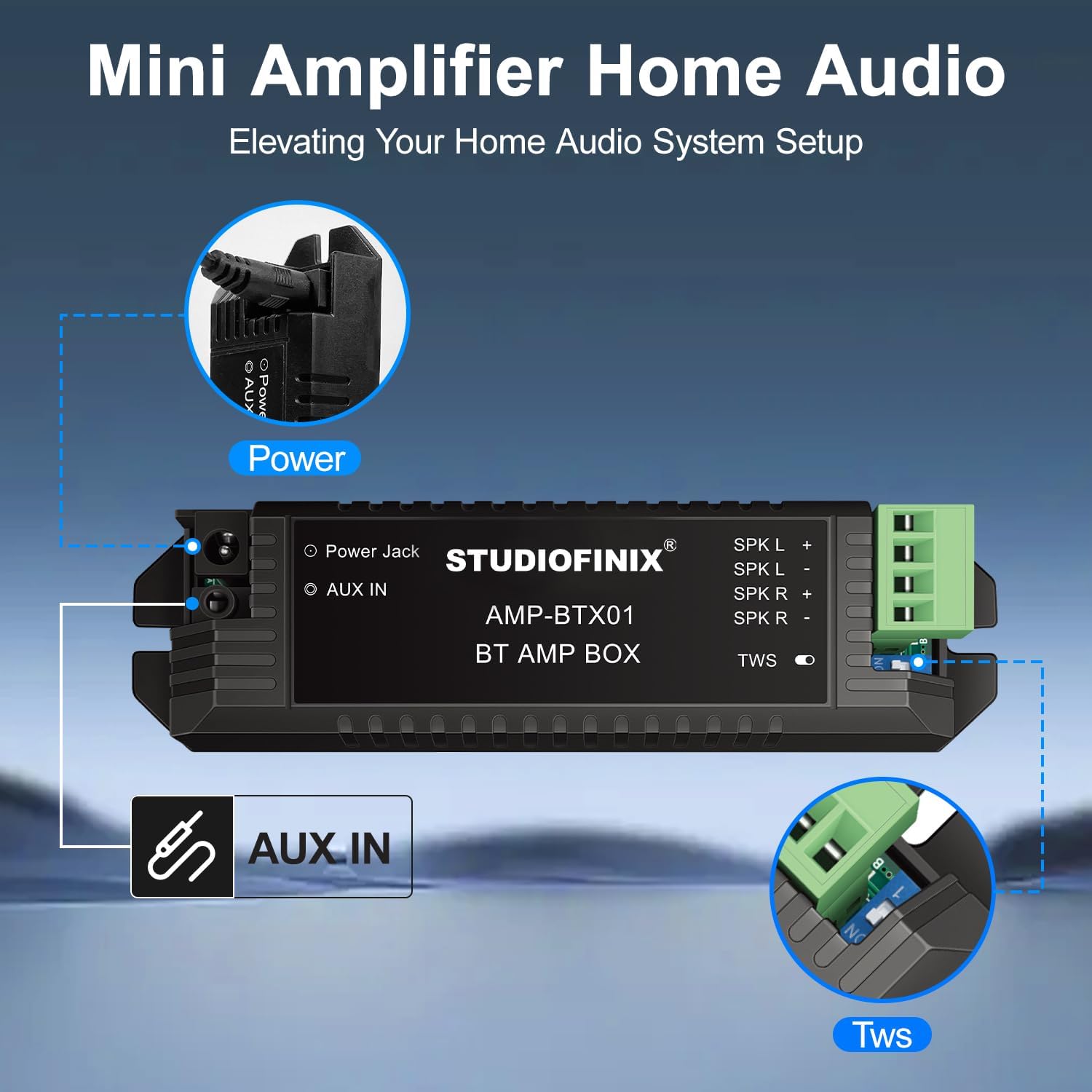
Image 5.1: Wireless audio streaming via Bluetooth from a mobile device.
5.2 Wired Connection (AUX IN)
For devices without Bluetooth or for a direct connection, use the AUX IN port:
- Connect a 3.5mm audio cable (not included) from your audio source (e.g., TV, computer, MP3 player) to the 'AUX IN' port on the amplifier.
- The amplifier will automatically switch to AUX input mode.
5.3 TWS (True Wireless Stereo) Function
The amplifier supports TWS for connecting two separate amplifier units for a wider stereo soundstage. Refer to the amplifier's specific instructions for TWS pairing if you have two amplifier units.

Image 5.2: Amplifier connections for power, AUX IN, and TWS.
6. Maintenance
To ensure the longevity and optimal performance of your speakers:
- Cleaning: Use a soft, dry cloth to wipe the speaker grilles and amplifier. Do not use abrasive cleaners or solvents.
- Grille Removal: The grilles are magnetic and can be carefully removed for cleaning or painting.
- Environmental Care: Avoid exposing the speakers to excessive dust, moisture, or direct sunlight.
7. Troubleshooting
If you encounter issues, refer to the following common problems and solutions:
- No Sound:
- Ensure the amplifier is powered on and the power adapter is securely connected.
- Check speaker wire connections for correct polarity and secure fit.
- Verify your audio source is playing and its volume is turned up.
- If using Bluetooth, ensure the device is paired and connected to the correct amplifier.
- If using AUX, ensure the cable is fully inserted and functional.
- Bluetooth Connection Issues:
- Ensure the amplifier is within the 30-meter range of your device.
- Turn off and on Bluetooth on your device, then try pairing again.
- Unpair and re-pair the device from your Bluetooth settings.
- Ensure no other devices are actively connected to the amplifier.
- Distorted Sound:
- Reduce the volume on your audio source or the amplifier.
- Check speaker wire connections for any loose strands or short circuits.
- Ensure the audio source is providing a clean signal.
8. Specifications
| Feature | Specification |
|---|---|
| Speaker Type | In-Ceiling |
| Speaker Size | 6.5 Inches |
| Speaker Maximum Output Power | 300 Watts (per pair) |
| Connectivity Technology | Bluetooth |
| Mounting Type | Flush Mount |
| Product Dimensions (each speaker) | 9"D x 9"W x 4"H (23.5cm D x 23.5cm W x 10.5cm H) |
| Cut-Out Diameter | 8.07 inches (20.5 cm) |
| Mounting Depth | 4.13 inches (10.5 cm) |
| Item Weight | 9.75 pounds (4.43 Kilograms) |
| Recommended Uses | Indoor/Outdoor (Covered) |
| Special Feature | Waterproof (for semi-outdoor use) |
| Model Name | ST-HCS818BT-US |
9. Warranty and Support
STUDIOFINIX products are manufactured to high-quality standards. For information regarding product warranty, please refer to the warranty card included with your purchase or visit the official STUDIOFINIX website.
For technical support, troubleshooting assistance, or to inquire about replacement parts, please contact STUDIOFINIX customer service through the retailer where the product was purchased or visit the STUDIOFINIX Brand Store.