
1. Introduction
Thank you for choosing the Docreate Handheld Steam Cleaner. This manual provides essential information for the safe and efficient operation, maintenance, and troubleshooting of your new steam cleaner. Please read this manual thoroughly before first use and retain it for future reference.
Important Safety Information
- Always ensure the appliance is unplugged before filling with water or performing maintenance.
- Steam is extremely hot. Never direct steam at people, pets, or electrical appliances. Keep hands and face away from the steam nozzle during operation.
- Do not open the water tank cap while the unit is pressurized or hot.
- Use only clean tap water. Do not add detergents, perfumes, or other chemicals to the water tank.
- Keep the appliance out of reach of children.
- Exercise caution when handling hot attachments, especially the metal rod, as it can become very hot during use.
2. Product Overview
The Docreate Handheld Steam Cleaner is designed for versatile cleaning tasks around your home and vehicle, utilizing high-temperature steam for effective sanitization and stain removal.
Included Components:
- 1 x Steam Cleaner Unit
- 1 x 2M Steam Outlet Hose
- 1 x 1.5M Power Cord
- 1 x Extended Spray Rod
- 1 x Steel Brush
- 1 x Nylon Brush
- 1 x Large Nylon Brush
- 2 x Silicone Seal Rings
- 1 x User Manual (this document)
- Additional accessories may include a cleaning cloth cover, high temperature nozzle, floor cleaning brush, extension nozzle, and round brush.

Figure 2.1: Docreate Handheld Steam Cleaner with its components and approximate dimensions. The image displays the main unit, steam hose, various brushes (nylon, steel), power cord, and other attachments, along with measurements for the main unit.
3. Setup
- Unpack: Carefully remove all components from the packaging. Inspect for any damage.
- Fill Water Tank: Ensure the unit is unplugged. Open the water tank cap and fill the translucent water tank with up to 1100 ml of clean tap water. Do not overfill. Securely close the cap.
- Attach Hose and Nozzle: Connect the 2M steam outlet hose to the main unit. Then, attach the desired cleaning nozzle or brush to the end of the hose. Ensure all connections are secure to prevent steam leakage.
- Connect Power: Plug the 1.5M power cord into a suitable electrical outlet.

Figure 3.1: The Docreate Handheld Steam Cleaner with its main unit, steam hose, power cord, and various cleaning attachments laid out. This image provides a general view of the product and its components.
4. Operating Instructions
- Power On: Press the power button on the touch screen panel. The unit will begin heating.
- Heating Time: The steam cleaner heats up quickly, typically within 10 seconds, to generate high-temperature steam up to 105°C (221°F).
- Adjust Steam Intensity: Use the '+' and '-' buttons on the 6-level smart touch screen to adjust the steam intensity according to your cleaning needs. The current setting will be displayed in real-time.
- Begin Cleaning: Direct the steam nozzle towards the surface to be cleaned. Move the nozzle slowly over the area. For stubborn stains, hold the nozzle closer for a longer duration.
- Accessory Use: Select the appropriate brush or attachment for the surface. The nylon brush is suitable for general cleaning, the steel brush for tough grime on durable surfaces, and the large nylon brush for broader areas.
- Safety During Operation: Always wear appropriate protective gear, such as gloves, to protect against hot steam and surfaces. Be aware that the extended spray rod can become hot during use.
- Power Off: When finished, press the power button to turn off the unit and unplug it from the electrical outlet.

Figure 4.1: Close-up view of the Docreate Handheld Steam Cleaner's touch screen panel, showing the power button and '+' / '-' controls for adjusting steam intensity across 6 levels.
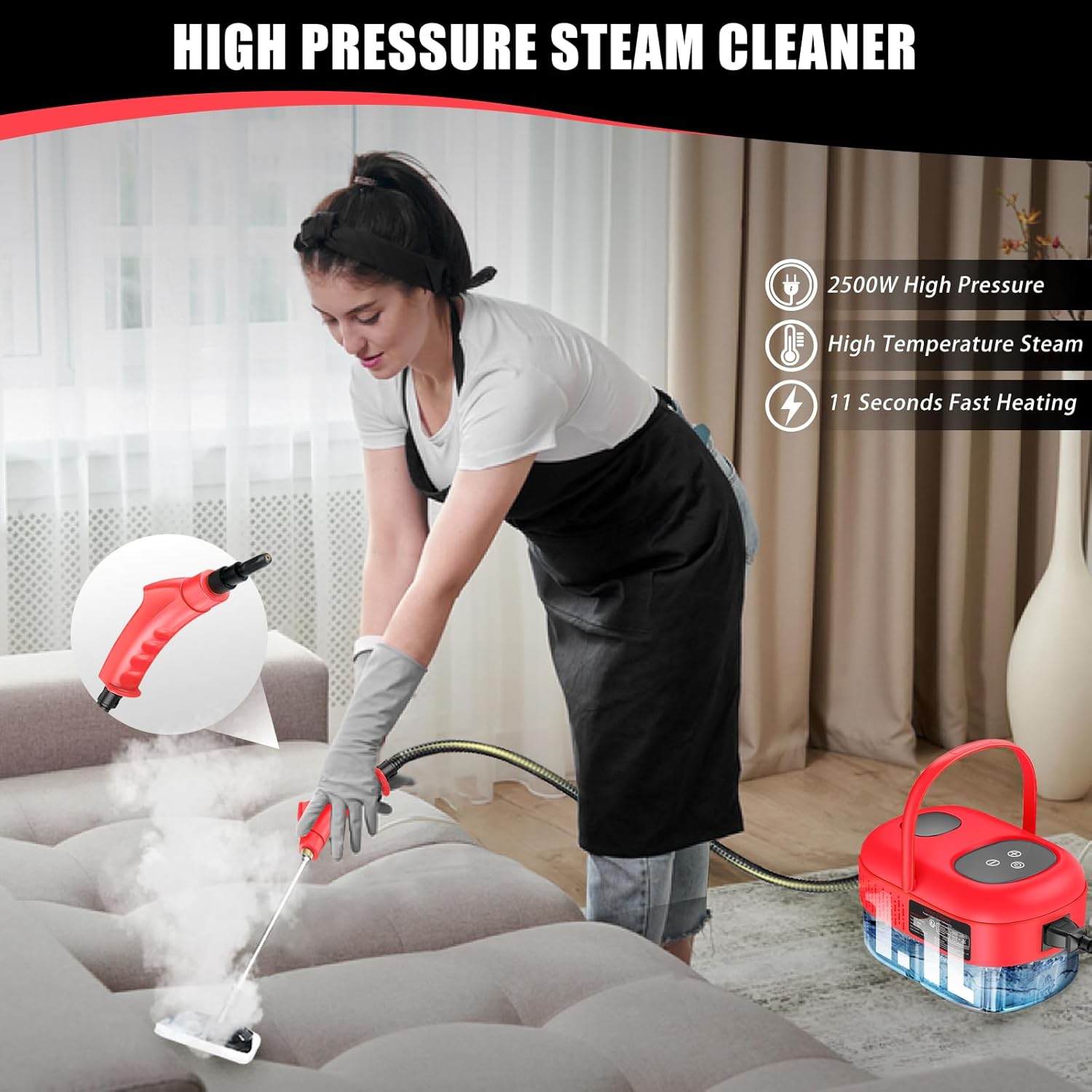
Figure 4.2: The Docreate Handheld Steam Cleaner being used to clean a couch, demonstrating its high-pressure steam capability for upholstery cleaning.
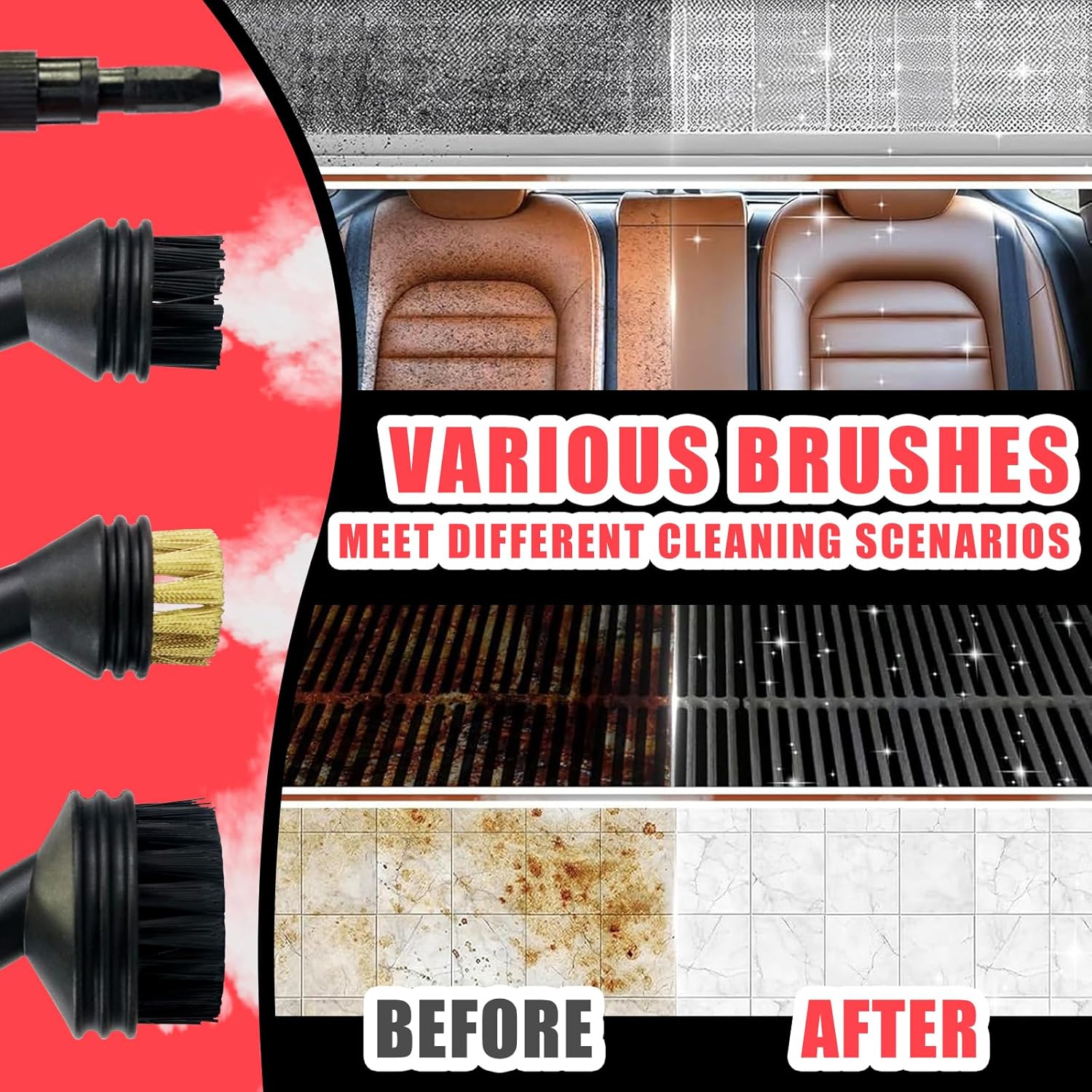
Figure 4.3: An illustration of the different brushes included with the Docreate Handheld Steam Cleaner (nylon, brass, and another nylon brush) and their effectiveness on various surfaces like car interiors, grates, and tiles, showing before and after cleaning results.

Figure 4.4: A visual representation of the wide range of applications for the Docreate Handheld Steam Cleaner, including kitchen surfaces, car interiors, floors, windows, and bathrooms.
5. Maintenance
Regular maintenance ensures the longevity and optimal performance of your steam cleaner.
- Draining Water: After each use, ensure the unit is cool and depressurized. Carefully open the water tank cap and drain any remaining water.
- Cleaning Accessories: Wash brushes and nozzles with warm water and mild soap. Allow them to dry completely before storing.
- Exterior Cleaning: Wipe the exterior of the steam cleaner with a damp cloth. Do not use abrasive cleaners or solvents.
- Descaling: Depending on water hardness, mineral deposits may accumulate. Periodically descale the unit by following manufacturer guidelines for steam cleaners, typically involving a vinegar solution. Consult a professional if unsure.
- Storage: Store the steam cleaner and its accessories in a cool, dry place, away from direct sunlight and extreme temperatures.
6. Troubleshooting
If you encounter issues with your Docreate Handheld Steam Cleaner, refer to the following common problems and solutions:
| Problem | Possible Cause | Solution |
|---|---|---|
| No steam or low steam output | Water tank empty or low Unit not fully heated Nozzle clogged | Refill water tank Allow 10-15 seconds for heating Clean nozzle with a small brush or pin (ensure unit is off and cool) |
| Unit not turning on | Not plugged in Power outlet malfunction | Check power cord connection Test outlet with another appliance |
| Water leakage | Water tank cap not secured Hose/nozzle not properly attached Damaged seal ring | Ensure cap is tightly closed Re-attach hose and nozzle firmly Replace silicone seal ring if damaged |
| Steam is not hot enough | Unit not fully heated Steam intensity set too low | Allow more time for heating Increase steam intensity using the touch screen controls |
7. Specifications
- Brand: Docreate
- Model Name: Handheld Steam Cleaner
- Color: Red
- Form Factor: Handheld
- Power: 2500W
- Heat Time: 10 Seconds
- Max Steam Temperature: 105°C (221°F)
- Tank Volume: 1100 Milliliters
- Item Weight: 1.92 Kilograms
- Package Dimensions: 28.91 x 17.91 x 16.31 cm
- Special Features: Carry Handle, High Pressure, Lightweight, Portable, 6-level Smart Touch Screen
- Surface Recommendation: Floor, Sink, Door, Counter Top, Upholstery, Wall, Carpet, Window, Grout
- ASIN: B0FCBS8NS4
8. Warranty and Support
This Docreate Handheld Steam Cleaner comes with a standard manufacturer's warranty. Please refer to the warranty card included in your packaging for specific terms and conditions, including the warranty period and coverage details.
For technical support, troubleshooting assistance beyond this manual, or warranty claims, please contact Docreate customer service through the retailer where the product was purchased or visit the official Docreate support website.